
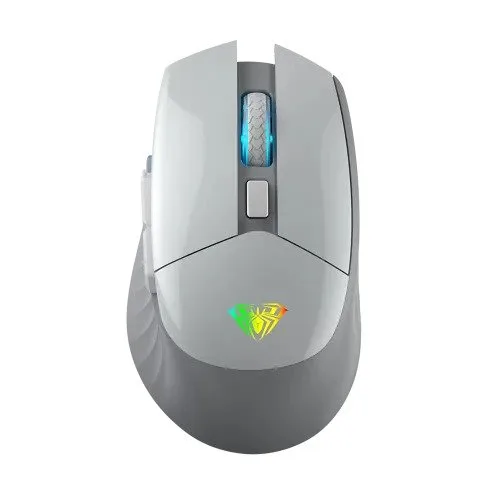
AULA SC520 2.4G Dual-mode Wireless Mouse in Jashore
- Brand: Aula
- Product Code: SC520
- Availability: In Stock
Specification
| BASIC INFORMATION | |
| Number of Keys | 7 Button |
| Others | Connection Distance: About 10M RGB backlight Two sets of replaceable accessories |
| Main Features | |
| Resolution | 400-800-1600-3200DPI,up to 10000DPI by software |
| Connection Type | Wireless |
| Cable Length | Type-c 1.5m |
| Physical Specification | |
| Color | Gray Black |
| WARRANTY | |
| Manufacturing Warranty | 01-Year Warranty |
Description
The AULA SC520 2.4G Dual-mode Wireless Mouse is a versatile gaming and everyday-use mouse designed for users who want the freedom of wireless connectivity without giving up the reliability of a wired connection. It supports 2.4G wireless and Type-C wired operation, allowing you to switch between cable-free use and direct USB connectivity depending on the situation.
With 7 programmable buttons, adjustable DPI up to 10,000 through software, a rechargeable 600mAh battery, RGB backlighting, up to 1000Hz polling rate and an ergonomic design, the AULA SC520 is suitable for gaming, office work, browsing, productivity and general computer use. Its approximately 10-metre wireless range also provides useful freedom for users who prefer a cleaner desk setup.
AULA SC520 2.4G Dual-mode Wireless Mouse in Bangladesh
The AULA SC520 is designed for users who want more flexibility than a conventional wired mouse. Its 2.4G wireless connection eliminates cable drag during normal use, while the Type-C wired mode provides a direct connection when charging or when you prefer to use the mouse with a cable.
This dual-mode approach is particularly practical for gaming users. You can use the mouse wirelessly for everyday gaming and desk use, then connect the Type-C cable when the battery needs charging or when you want to continue using it in wired mode.
The SC520 also supports software-based customisation, allowing compatible settings such as button functions, macros, DPI and lighting to be configured according to your preferences.
2.4G Wireless and Type-C Wired Connectivity
The biggest advantage of the AULA SC520 is its dual connectivity. The mouse communicates wirelessly through a 2.4G USB receiver and can also operate through its Type-C cable.
In wireless mode, the absence of a mouse cable provides greater freedom of movement and reduces cable friction on the desk. The advertised wireless connection distance is approximately 10 metres under suitable conditions, although the actual range can vary depending on interference, obstacles and the surrounding environment.
When the Type-C cable is connected, the mouse can operate in wired mode. This is useful when charging the internal battery or when you want a direct connection to the computer.
Rechargeable 600mAh Battery
The AULA SC520 incorporates a rechargeable 600mAh lithium battery. Instead of replacing disposable batteries, you can recharge the mouse through its Type-C connection and continue using it.
A rechargeable design is particularly convenient for a wireless gaming mouse because it reduces the need to keep spare batteries available. Battery runtime will depend on usage, polling rate, RGB lighting and other settings, so actual operating time can vary between users.
For best results, use an appropriate USB power source and the supplied or compatible charging cable. Users should follow the manufacturer's charging recommendations rather than using unsuitable high-voltage or non-standard power equipment.
Adjustable DPI up to 10,000
The SC520 provides multiple DPI settings for different types of use. Common selectable levels include 400, 800, 1600 and 3200 DPI, while the accompanying software can extend the maximum setting up to 10,000 DPI.
DPI determines how much the pointer moves in response to physical mouse movement. A lower DPI setting can provide more controlled cursor movement, which can be useful for precision work or certain gaming situations. Higher DPI settings can allow the pointer to travel further with less physical movement.
There is no universally ideal DPI setting. The best setting depends on screen resolution, game sensitivity, mousepad size and personal preference. The ability to adjust the DPI gives users more freedom to find a comfortable configuration.
Up to 1000Hz Polling Rate
The AULA SC520 supports polling rates from 125Hz through 250Hz, 500Hz and up to 1000Hz. Polling rate determines how frequently the mouse reports its position and button information to the computer.
A 1000Hz polling rate can provide frequent input reporting and is useful for users who value responsive mouse behaviour, particularly during gaming. Lower polling rates can also be selected when preferred or when prioritising different operating characteristics.
As with DPI, polling rate should be considered as one part of the overall mouse experience rather than a guarantee of better gaming performance. Sensor behaviour, surface quality, system performance and the user's settings all contribute to responsiveness.
Seven Programmable Buttons
The AULA SC520 features 7 buttons that can be configured through compatible software. Programmable buttons can be useful for assigning frequently used commands, shortcuts or macros.
For gaming, additional buttons can provide quick access to actions that would otherwise require keyboard input. In productivity applications, they can be assigned to functions such as navigation, shortcuts or other frequently used commands.
Macro programming should be used according to the rules of the games and applications in which you use the mouse. Some competitive games may restrict certain types of automated input.
RGB Backlighting
RGB backlighting gives the AULA SC520 a gaming-oriented appearance and allows it to complement other illuminated components in a gaming setup.
The lighting is primarily an aesthetic feature and does not directly improve tracking accuracy. Depending on the available software configuration, users can customise supported lighting behaviour to match their preferred desk setup.
Optical Tracking
The AULA SC520 uses optical tracking technology to detect movement across a compatible surface. Optical mice are widely used for both gaming and everyday computing because they provide consistent cursor tracking when used on a suitable mousepad or desk surface.
For the most predictable tracking performance, a proper mousepad with an even surface is recommended. Very reflective, transparent or highly irregular surfaces may affect the behaviour of optical sensors.
Ergonomic Design for Extended Use
The SC520 is designed with an ergonomic shape intended to provide a comfortable hand position during extended use. This is important for users who spend several hours gaming, working, studying or browsing.
Comfort is highly dependent on hand size, grip style and personal preference. Users with a palm grip, claw grip or fingertip grip may experience the same mouse differently, so physical fit should be considered alongside technical specifications.
Useful for Gaming
The combination of 2.4G wireless connectivity, wired operation, programmable buttons, adjustable DPI and up to 1000Hz polling makes the SC520 suitable for a broad range of gaming styles.
Wireless operation removes the physical cable from the mouse movement area, which can be particularly convenient for games that require frequent or wide mouse movements. If the battery needs charging, the Type-C connection provides a straightforward way to continue using the mouse.
The programmable buttons can also be useful for assigning commonly used commands in compatible games. However, competitive players should always check the rules of individual games or tournaments before using macros or automated functions.
Useful for Office and Productivity
The AULA SC520 is not limited to gaming. Its programmable buttons and adjustable sensitivity can also be useful for everyday productivity.
Users can configure supported buttons for commonly used shortcuts and navigation functions. This can be particularly convenient for people who work with documents, browsers, creative applications or other software where frequently repeated commands can benefit from quick-access buttons.
The wireless connection also helps maintain a cleaner desk by eliminating the need for a permanently connected mouse cable.
Wireless Freedom Without Losing Wired Mode
Many users prefer wireless mice because of the freedom they provide, but some still want the option of using a direct wired connection. The SC520 addresses both requirements through its dual-mode design.
Wireless mode is convenient when you want a clean workspace and unrestricted movement. Wired mode is useful when charging the mouse or when you prefer a direct connection. This makes the SC520 adaptable to different working and gaming situations.
Type-C Charging Connection
The Type-C connection provides a modern physical interface for wired operation and charging. A 1.5-metre Type-C cable is commonly specified for the SC520, giving reasonable freedom of movement when the mouse is being used in wired mode.
The cable also makes it possible to recharge the internal battery without removing it from the mouse. This is more convenient than wireless mice that require battery replacement or proprietary charging docks.
AULA SC520 Technical Specifications
| Specification | Details |
|---|---|
| Brand | AULA |
| Model | SC520 |
| Product Type | Dual-mode Wireless Gaming Mouse |
| Connectivity | 2.4G Wireless and Type-C Wired |
| Wireless Receiver | 2.4G USB Receiver |
| Number of Buttons | 7 |
| Tracking Technology | Optical |
| DPI | 400 / 800 / 1600 / 3200 DPI, up to 10,000 DPI through software |
| Polling Rate | 125 / 250 / 500 / 1000Hz |
| Wireless Range | Approximately 10 metres |
| Battery | 600mAh rechargeable lithium battery |
| Lighting | RGB backlight |
| Cable | Type-C, approximately 1.5 metres |
| Colour | Black |
| Software | Supported configuration software |
| Compatibility | Windows and Mac systems; feature availability may vary |
Software Customisation and Macro Support
The AULA SC520 can be configured through compatible software, giving users greater control over the mouse than a basic plug-and-play model.
Supported configuration options include DPI adjustment, button customisation, macro functions and RGB lighting settings. Configuring these functions can make the mouse more closely suited to individual games or workflows.
One useful aspect of the SC520 is that settings configured through the software can be associated with the mouse configuration, allowing users to maintain their preferred setup when switching between wireless and wired operation.
Two Sets of Replaceable Accessories
The SC520 is also specified with two sets of replaceable accessories. This gives the mouse additional flexibility for users who want to customise aspects of its physical setup according to their preference.
The exact accessory configuration can depend on the specific retail package, so customers should check the contents of the supplied box when purchasing a particular regional version.
Suitable for Different Grip Styles
Mouse comfort is strongly influenced by grip style. A palm grip generally places most of the hand over the mouse, while claw and fingertip grips involve different contact points and movement patterns.
The SC520's ergonomic design is intended to provide comfortable handling during extended use, but users should consider their own hand size and preferred grip before making a final decision.
Advantages of the AULA SC520
- Supports both 2.4G wireless and Type-C wired operation.
- Provides up to approximately 10 metres of wireless connection distance.
- Seven programmable buttons provide additional customisation.
- Adjustable DPI from common lower settings up to 10,000 DPI through software.
- Supports polling rates up to 1000Hz.
- Uses a rechargeable 600mAh lithium battery.
- Includes RGB backlighting for a gaming-focused appearance.
- Uses Type-C connectivity for charging and wired operation.
- Provides software support for supported customisation and macro functions.
- Suitable for gaming, office work, study and general computer use.
- Wireless operation helps reduce cable clutter on the desk.
- Wired mode allows continued use while connected by cable.
Things to Consider Before Buying
The AULA SC520 is a 2.4G wireless and wired mouse rather than a Bluetooth mouse. Wireless operation therefore requires the included compatible 2.4G receiver. Users who specifically need Bluetooth connectivity should consider a mouse that supports Bluetooth.
The maximum 10,000 DPI setting is available through software, while the commonly listed hardware DPI steps include 400, 800, 1600 and 3200 DPI. Most users do not need extremely high DPI settings, so choosing the mouse should be based on the complete feature set rather than the maximum DPI number alone.
Battery life also depends on usage. RGB lighting, polling rate, wireless conditions and frequency of use can affect how often the mouse needs to be recharged.
Finally, users who regularly play competitive games should check the individual game's rules regarding macros and programmable inputs before using automated functions.
Who Should Buy the AULA SC520?
- Gamers who want wireless mouse freedom without giving up wired connectivity.
- Users looking for a rechargeable 2.4G gaming mouse.
- Players who want programmable buttons and software customisation.
- Users who prefer adjustable DPI settings.
- Office professionals who want additional mouse shortcuts.
- Students looking for a versatile wireless mouse for study and entertainment.
- Users building an RGB gaming setup.
- People who want to reduce cable clutter around their computer desk.
Who May Prefer a Different Mouse?
Users who require Bluetooth connectivity should consider a tri-mode mouse that specifically includes Bluetooth. Similarly, users who prioritise an extremely lightweight competitive gaming mouse may prefer a specialised ultralight model.
The SC520 is better suited to buyers who value versatility, programmable controls, rechargeable wireless operation and the option of wired connectivity rather than focusing on one specialist characteristic.
Wireless Gaming Mouse Buying Guide
When choosing a wireless gaming mouse, consider connectivity first. A 2.4G wireless connection generally requires a USB receiver, while Bluetooth can be more convenient for devices with limited USB ports. A dual-mode mouse that also supports wired operation provides another useful option.
Next, consider the sensor and DPI range. Very high DPI does not automatically mean better tracking. More important factors include consistent tracking, appropriate sensitivity adjustment and a comfortable physical design.
Polling rate is another specification to consider, especially for gaming. The SC520 supports up to 1000Hz, which is a common high-performance setting for gaming mice.
Battery capacity is also important for wireless convenience. The SC520 uses a 600mAh rechargeable battery, while its Type-C connection makes charging straightforward.
Why Buy the AULA SC520 from Unix Network?
Unix Network is a computer and technology retailer serving customers in Jessore and across Bangladesh. The store offers computer accessories for gaming, office, study and general computing setups.
When choosing a wireless gaming mouse, technical specifications are only part of the decision. Hand comfort, grip style, connectivity requirements, software support and intended use should all be considered. Customers can compare these factors when selecting the AULA SC520 or another suitable gaming mouse.
For customers searching for a Computer Shop in Jessore, Gaming PC Shop in Jessore or Tech Store Bangladesh, Unix Network provides access to computer peripherals and technical product guidance with local customer support.
Warranty and After-Sales Support
Warranty coverage depends on the local seller and applicable distribution terms. The AULA SC520 is commonly listed in Bangladesh with a 1-year warranty, but customers should confirm the warranty period and conditions applicable to the specific unit at the time of purchase.
Keep the original purchase invoice, packaging and accessories where required for warranty claims. If the mouse develops a problem, checking the wireless receiver, USB connection, charging cable and software configuration can help identify basic connection issues before requesting service.
Frequently Asked Questions
Is the AULA SC520 wireless?
Yes. The SC520 supports 2.4G wireless operation through a USB receiver and can also be used as a wired mouse through its Type-C connection.
Does the AULA SC520 support Bluetooth?
The SC520 is designed around 2.4G wireless and Type-C wired connectivity. It should not be purchased specifically for Bluetooth functionality.
What is the maximum DPI of the AULA SC520?
The commonly listed DPI settings are 400, 800, 1600 and 3200 DPI, while compatible software can extend the setting up to 10,000 DPI.
How many buttons does the AULA SC520 have?
The SC520 is commonly specified with 7 buttons, with programmable functions available through compatible software.
Does the AULA SC520 have RGB lighting?
Yes. The mouse includes RGB backlighting designed to complement gaming setups.
What is the polling rate of the AULA SC520?
The mouse supports selectable polling rates of 125Hz, 250Hz, 500Hz and up to 1000Hz.
What battery does the AULA SC520 use?
It uses a built-in rechargeable lithium battery with a listed capacity of 600mAh.
Can I use the AULA SC520 while charging?
Yes. Connecting the Type-C cable allows the mouse to operate in wired mode while connected to the computer.
How far does the AULA SC520 wireless connection work?
The advertised wireless connection distance is approximately 10 metres under suitable conditions. Actual range can vary because of obstacles and wireless interference.
Can the AULA SC520 be programmed?
Yes. Compatible software provides configuration options for supported buttons, DPI, macros and RGB lighting.
Is the AULA SC520 suitable for office work?
Yes. Although it has a gaming-oriented design, its programmable buttons, adjustable DPI and wireless connectivity also make it suitable for office work, browsing, study and general productivity.
Conclusion
The AULA SC520 2.4G Dual-mode Wireless Mouse is a flexible gaming and productivity mouse for users who want both wireless freedom and wired reliability. Its 2.4G wireless connection, Type-C wired mode, rechargeable 600mAh battery and approximately 10-metre wireless range make it practical for everyday desk use.
With 7 programmable buttons, adjustable DPI up to 10,000 through software, up to 1000Hz polling and RGB backlighting, it offers a useful combination of customisation and gaming-focused features without being limited to gaming alone.
For customers looking for an AULA wireless gaming mouse in Jessore or elsewhere in Bangladesh, the SC520 is a strong option when dual-mode connectivity, programmable controls and rechargeable operation are more important than Bluetooth connectivity or an ultralight competitive design.
Reviews (0)
Tags: AULA SC520, wireless mouse, dual-mode, ergonomic design, 2.4G connectivity, computer accessories, tech gadgets, Unix Network, Jashore, online shopping, gaming mouse, productivity tools, wireless technology