
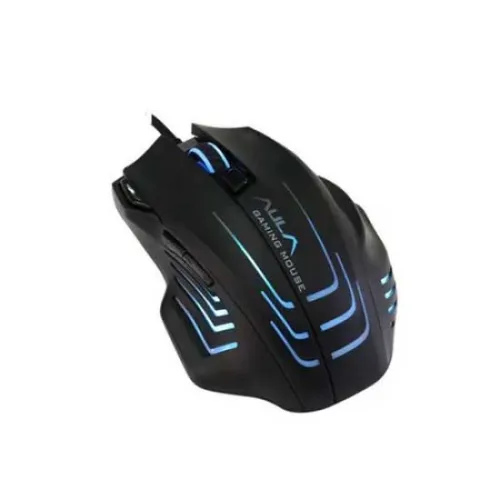
AULA S18 Backlit 7 Buttons Gaming Mouse
- Brand: Aula
- Product Code: S18
- Availability: In Stock
- Updated:
Earn ৳100 cashback in your wallet on orders of ৳3,000 or more. Credited 7 days after the order is completed, if it is not cancelled or returned. Logged-in customers only; coupon, wallet and shipping are not counted.
Specification
| BASIC INFORMATION | |
| Specification | Dimension 4.983.601.63 Inches/126.591.541.5mm Weight 0.37lb/170g Interface: USB Default DPI 1200/2400/3200/6400 Backlight YES Others Frame Rate: 6000fps Moving Speed: 66ips Weight System: 4.5g * 4pcsare. OS Windows 7/8/10/Vista/XP |
|---|---|
Description
The AULA S18 Backlit 7 Buttons Gaming Mouse is a wired optical gaming mouse designed for PC users who want adjustable sensitivity, multiple programmable controls, RGB-style backlighting and a comfortable shape at an affordable price. With seven buttons, up to 6400 DPI, adjustable polling rates up to 1000Hz, a 66 IPS tracking speed and a 1.8m USB cable, it offers a feature set suitable for gaming as well as everyday computer use.
AULA S18 Backlit 7 Buttons Gaming Mouse in Bangladesh
For customers looking for an affordable gaming mouse in Bangladesh, the AULA S18 is designed to provide more control than a basic office mouse while remaining straightforward to connect and use. Its seven-button layout provides additional inputs for games and applications, while the adjustable DPI settings allow users to change cursor sensitivity according to their preferences.
The S18 uses a wired USB connection, so it does not require batteries, wireless pairing or charging. This makes it particularly practical for desktop gaming setups, students, home users and budget-conscious PC builders.
Seven-Button Gaming Mouse
The AULA S18 features seven buttons, giving users additional controls beyond the standard left button, right button and scroll wheel arrangement. Extra buttons can be useful for assigning frequently used actions in compatible games or applications.
For gaming, additional controls can reduce the need to move the hand away from the mouse when performing certain commands. The usefulness of the extra buttons depends on the game and whether the particular configuration supports custom button assignments through its software.
Up to 6400 DPI Sensitivity
The AULA S18 provides four documented DPI levels: 1200, 2400, 3200 and 6400 DPI. DPI determines how far the cursor moves in response to physical mouse movement.
Lower DPI settings can provide more controlled movement, which can be useful for precision aiming or detailed work. Higher DPI settings allow the cursor to travel farther with less physical movement, which can be convenient when navigating large displays.
There is no universally correct DPI setting. FPS players may prefer lower sensitivity for controlled aiming, while users working across large monitors may prefer a higher setting. The S18's multiple DPI levels allow users to choose a setting that suits their preferred workflow.
Adjustable Polling Rate up to 1000Hz
One of the more notable features of the AULA S18 is its documented adjustable polling-rate range of 125Hz, 250Hz, 500Hz and 1000Hz. Polling rate refers to how frequently the mouse reports its position to the computer.
A 1000Hz polling rate corresponds to up to 1000 reports per second under the appropriate setting. This can provide more frequent position updates than a 125Hz setting and can be useful for gaming users who prefer a more responsive mouse configuration.
The actual benefit depends on the computer, game, display and individual sensitivity to input responsiveness. Higher polling rates can also require more frequent USB communication, so users should select the setting that works reliably with their system.
Sunplus 6698A Optical Controller
Bangladesh product listings identify the AULA S18 with a Sunplus 6698A chip, while AULA's regional product information identifies the optical sensor/controller as SPCP6698A. This controller is associated with the mouse's optical tracking and adjustable performance settings.
Optical tracking is well suited to normal gaming and desktop use when the mouse is operated on a suitable surface. A good-quality mousepad can provide consistent tracking and predictable movement.
66 IPS Tracking Speed
The S18 is documented with a maximum moving speed of 66 inches per second. This specification indicates the maximum tracking speed under the manufacturer's specified conditions.
For ordinary gaming, office work and general navigation, users are unlikely to approach this limit during normal mouse movement. It becomes more relevant when evaluating the mouse's tracking capability alongside its DPI, acceleration and frame-rate specifications.
6000 FPS Frame Rate
The mouse is also documented with a frame rate of up to 6000 FPS. In an optical mouse, the sensor captures surface information to determine movement, and the frame-rate specification describes how frequently the sensor can process surface images under its specified operating conditions.
As with DPI and IPS, this number should not be considered an independent measurement of overall mouse quality. Tracking performance depends on the complete sensor implementation, firmware, surface and other factors.
22.5g Acceleration
The AULA S18 is documented with up to 22.5g acceleration. This is a sensor performance specification describing the acceleration level the tracking system is designed to handle under the manufacturer's conditions.
For everyday users and most gaming applications, the mouse's practical performance will depend more on the overall tracking consistency, DPI setting, polling rate and physical handling than on acceleration figures alone.
RGB Backlit Gaming Design
The AULA S18 features RGB backlighting that gives the mouse a colourful gaming appearance. The illumination can complement RGB keyboards, gaming cases and other illuminated peripherals.
The backlight is primarily a visual feature and does not directly improve tracking accuracy, DPI performance or response time. Users who enjoy coordinated gaming setups may nevertheless find it a useful part of the mouse's overall design.
Comfortable Ambidextrous Shape
The AULA S18 is designed around an ambidextrous-style shape, making it suitable for users who prefer a symmetrical mouse body. This can provide greater flexibility for different hand positions and usage preferences.
Actual comfort depends on hand size and grip style. Palm, claw and fingertip users can experience the same mouse differently, so users who spend many hours gaming should consider the physical shape as carefully as the technical specifications.
170g Weight with Adjustable Weight System
The documented weight of the AULA S18 is approximately 170g. Product information also lists a weight system using four removable 4.5g weights. This allows the mouse's overall weight to be adjusted according to user preference when the corresponding weight system is included in the particular version.
Weight adjustment can be useful for gamers who prefer a more controlled, heavier feel. Users who prefer fast, low-resistance mouse movement may choose to reduce the additional weight where the removable system permits it.
1.8 Metre USB Cable
The AULA S18 uses an approximately 1.8m USB cable. This provides useful reach for desktop gaming setups and allows the mouse to remain connected even when the computer is positioned under or beside the desk.
The documented cable construction is PVC on several product listings. Users should avoid sharply bending the cable or placing it where a chair, desk edge or other object can repeatedly pull against it.
Wired USB Connectivity
The S18 uses a USB wired connection, providing a simple plug-in setup without wireless pairing or battery management. This is particularly convenient for users who want a gaming mouse that is always ready to use whenever the computer is powered on.
A wired connection also means there is no need to recharge the mouse during a gaming session. The trade-off is that the cable needs to be managed around the desk.
AULA S18 Technical Specifications
| Specification | Details |
|---|---|
| Brand | AULA |
| Model | S18 |
| Product Type | Wired Gaming Mouse |
| Connection Type | USB Wired |
| Sensor Type | Optical |
| Sensor / Controller | Sunplus 6698A / SPCP6698A |
| Number of Buttons | 7 |
| DPI Levels | 1200 / 2400 / 3200 / 6400 DPI |
| Maximum DPI | 6400 DPI |
| Polling Rate | 125 / 250 / 500 / 1000Hz |
| Maximum Moving Speed | 66 IPS |
| Acceleration | Up to 22.5g |
| Frame Rate | 6000 FPS |
| Backlighting | RGB Backlight |
| Cable Length | Approximately 1.8m |
| Cable Type | PVC |
| Weight | Approximately 170g |
| Weight Adjustment | 4 x approximately 4.5g removable weights, where included |
| Dimensions | Approximately 127–128 x 91 x 41mm, depending on measurement source |
| Supported Operating Systems | Windows XP, Vista, 7, 8, 10 and Mac; compatibility may vary by version |
AULA S18 for FPS Gaming
The adjustable DPI and polling-rate settings make the S18 suitable for players who want control over mouse sensitivity and responsiveness. FPS players can experiment with lower DPI settings for more controlled aiming or higher settings for quicker camera movement.
The seven-button layout can also provide additional commands without requiring the player to reach for the keyboard as frequently. However, competitive FPS players should consider their personal requirements carefully, particularly if they prefer an ultra-light mouse or a modern esports mouse with a substantially lighter construction.
AULA S18 for Action and Adventure Games
For action, adventure and general multiplayer games, the S18's additional buttons can be useful for assigning frequently used controls. Its adjustable sensitivity also allows users to change cursor or camera movement according to the game.
The RGB backlight adds a gaming-oriented appearance, while the wired connection ensures that the mouse does not require battery charging during longer gaming sessions.
AULA S18 for Strategy Games
Strategy and simulation games often involve extensive cursor movement and frequent selection commands. The adjustable DPI range allows users to choose a balance between precise control and faster movement across the screen.
The additional buttons can also be useful for assigning application-specific shortcuts where the software or game supports mouse-button configuration.
AULA S18 for Everyday Computer Use
The S18 can also be used as a general-purpose mouse for browsing, office applications, programming, document editing and multimedia. Users do not need to use the highest DPI or polling rate simply because those settings are available.
For normal desktop work, a moderate DPI setting can provide comfortable cursor control, while the additional buttons may be useful for browser navigation or other frequently used actions when supported.
Programmable Controls and Software
Some product listings describe the AULA S18 as supporting software and macro functionality. This can provide additional configuration options for supported button assignments and gaming commands.
Software availability and supported functions can depend on the particular hardware revision and driver package. Customers should use the software intended for the exact S18 version rather than installing an unrelated AULA mouse driver.
Advantages of the AULA S18 Gaming Mouse
- Seven-button gaming layout
- Up to 6400 DPI sensitivity
- Four documented DPI levels
- Adjustable 125Hz, 250Hz, 500Hz and 1000Hz polling rates
- Optical tracking with Sunplus 6698A controller
- 66 IPS maximum moving speed
- 22.5g acceleration specification
- 6000 FPS sensor frame rate
- RGB backlighting
- Approximately 1.8m USB cable
- Ambidextrous-style shape
- Approximately 170g body weight
- Optional removable weight system on the documented configuration
Things to Consider Before Buying
The AULA S18 offers a relatively broad feature set for its category, but it is important to match those features with your actual requirements.
- The approximately 170g weight is considerably heavier than modern ultra-light esports mice.
- The maximum 6400 DPI is more than sufficient for many users, but high DPI does not automatically mean better gaming performance.
- The mouse uses a wired USB connection rather than wireless connectivity.
- RGB lighting is decorative and does not improve tracking accuracy.
- Software and macro functionality can vary between hardware revisions.
- The physical shape should be considered according to hand size and preferred grip.
- The removable weight system should be confirmed for the exact retail configuration if weight adjustment is important to you.
Is a 6400 DPI Gaming Mouse Necessary?
Most users do not need to operate a mouse at its maximum DPI. DPI is primarily a sensitivity setting, not a direct measurement of gaming quality.
A 6400 DPI maximum gives the user flexibility, but many players may find 1200, 2400 or 3200 DPI more comfortable depending on their game, display resolution and sensitivity settings. The best setting is the one that provides accurate and predictable control.
Why Choose a 1000Hz Polling Rate?
A 1000Hz polling rate allows the mouse to report its position up to 1000 times per second under the corresponding setting. Compared with 125Hz, this provides more frequent position updates.
This can be useful for gaming users who want a more responsive configuration, particularly when using a high-refresh display. Nevertheless, polling rate is only one part of mouse performance, and it should not be considered separately from sensor quality, tracking consistency and system configuration.
Heavy vs Lightweight Gaming Mouse
At approximately 170g, the AULA S18 has a heavier feel than many newer lightweight gaming mice. Some users prefer this because the added mass can make the mouse feel stable and controlled during slower movements.
Other gamers, particularly those who play low-sensitivity FPS games, may prefer a much lighter mouse that can be moved quickly across a large mousepad. The S18's weight system can provide some flexibility, but it remains a comparatively substantial mouse even when additional weights are removed.
Who Should Buy the AULA S18?
- Budget-conscious PC gamers
- Users looking for a seven-button gaming mouse
- Gamers who want adjustable DPI settings
- Users who prefer a wired USB mouse
- Players who want adjustable polling rates up to 1000Hz
- Users who enjoy RGB gaming peripherals
- Gamers who prefer a heavier mouse body
- Students and general computer users who also play games
- Users building an affordable gaming PC setup
Who May Prefer a Different Gaming Mouse?
Users who prioritise an ultra-lightweight design may prefer a modern honeycomb or lightweight gaming mouse. Likewise, users who specifically require wireless connectivity, Bluetooth, extremely high polling rates or advanced onboard memory should consider a more specialised gaming mouse.
The S18 is better suited to users who value multiple buttons, adjustable sensitivity, RGB styling and a substantial wired mouse design.
AULA S18 for Gaming PC Builds in Bangladesh
The S18 can be a practical peripheral for an affordable gaming PC build. It provides several gaming-oriented features without requiring wireless charging equipment, making it straightforward to include alongside a gaming keyboard, headset and mousepad.
When selecting a mouse for a new PC, it is worth balancing the budget across the complete setup. A comfortable mouse that matches the user's grip and sensitivity preference can be more valuable than choosing a peripheral solely because it has a higher advertised DPI.
Buying an AULA Gaming Mouse in Jessore
Customers searching for a gaming mouse in Jessore can consider the AULA S18 when they want a wired seven-button model with adjustable DPI, RGB backlighting and configurable polling rates. It is suitable for customers who want a gaming-focused peripheral for both entertainment and everyday computer use.
Unix Network is a Computer Shop in Jessore offering gaming peripherals, computer components, laptops, gaming PCs, networking products and other technology accessories. Customers can compare the S18 with other AULA and gaming mouse models according to sensor specifications, button count, weight, connectivity and intended use.
Why Buy Gaming Accessories from Unix Network?
Unix Network provides computer and gaming accessories for customers in Jessore and across Bangladesh. When choosing a mouse, practical factors such as hand comfort, grip style, DPI requirements, cable length and gaming habits are considered alongside the headline specifications.
For customers outside Jessore, applicable delivery services can also provide access to computer accessories from Unix Network in other parts of Bangladesh.
Warranty and After-Sales Support
Warranty coverage for AULA products can vary by seller, distributor, product batch and local market. Customers should confirm the warranty period and claim conditions for the exact S18 unit before purchase and retain the purchase invoice.
If the mouse does not respond correctly, basic troubleshooting such as testing another USB port, checking the operating-system mouse settings and testing the mouse on another compatible computer can help identify whether the issue is related to the mouse or the host system.
Frequently Asked Questions
What is the AULA S18 Gaming Mouse?
The AULA S18 is a wired optical gaming mouse with seven buttons, up to 6400 DPI, adjustable polling rates up to 1000Hz and RGB backlighting.
How many buttons does the AULA S18 have?
The AULA S18 has seven buttons, providing additional controls compared with a standard basic mouse.
What is the maximum DPI of the AULA S18?
The maximum documented DPI is 6400, with selectable levels of 1200, 2400, 3200 and 6400 DPI.
What is the polling rate of the AULA S18?
The S18 supports adjustable polling rates of 125Hz, 250Hz, 500Hz and 1000Hz according to the documented product specifications.
Is the AULA S18 wireless?
No. It is a wired USB gaming mouse and does not require a battery or wireless receiver.
Does the AULA S18 have RGB lighting?
Yes. The mouse features RGB backlighting for a gaming-oriented appearance.
How long is the AULA S18 cable?
The documented cable length is approximately 1.8 metres.
How much does the AULA S18 weigh?
The documented weight is approximately 170 grams. Product information also describes a removable weight system using four approximately 4.5g weights on the applicable configuration.
Is the AULA S18 suitable for FPS gaming?
Yes. Its adjustable DPI, optical tracking, seven buttons and configurable polling rate make it suitable for FPS gaming. However, its approximately 170g weight may feel heavier than the ultra-light mice preferred by some competitive FPS players.
Can the AULA S18 be used for office work?
Yes. It can be used for browsing, documents, programming, study and other everyday computer tasks. The additional buttons and adjustable sensitivity can also be useful outside gaming.
Does the AULA S18 support Mac?
Product listings document compatibility with Mac as well as Windows XP, Vista, 7, 8 and 10. Compatibility with a specific modern operating-system version can depend on the available driver and software support.
Does the AULA S18 support software?
Several product listings describe the S18 as supporting software and macro functions. The exact configuration options can vary according to hardware revision and driver version.
Is the AULA S18 ambidextrous?
The S18 is described with an ambidextrous-style shape. Actual suitability for left- or right-handed use can depend on the placement and accessibility of the additional buttons.
Final Verdict
The AULA S18 Backlit 7 Buttons Gaming Mouse is a feature-rich budget wired mouse for users who want more control than a conventional office mouse. Its seven-button layout, 1200–6400 DPI range, adjustable 125–1000Hz polling rate, optical tracking, 66 IPS moving speed, RGB backlighting and 1.8m USB cable provide a useful combination for everyday gaming and general computer use.
Its approximately 170g weight gives it a more substantial feel than many modern ultra-light gaming mice, which can be an advantage for users who prefer stability but may be less appealing to players who favour extremely fast mouse movement. The optional weight system adds further flexibility where included with the particular version.
For budget-conscious gamers, students, home users and PC builders looking for a seven-button RGB gaming mouse with adjustable sensitivity and wired USB connectivity, the AULA S18 is a practical option. Competitive esports players seeking the lightest possible design or the latest advanced sensor and wireless technologies should consider a higher-end gaming mouse instead.