
Specification
| BASIC INFORMATION | |
| Number of Keys | 8 function buttons |
| Others | Trendy RGB backlight 10 million click life |
| Gaming Features | |
| Switch Lifecycle | 10 million click life |
| Main Features | |
| Connection Type | Wired and wireless dual mode |
| Physical Specification | |
| Color | Black |
Description
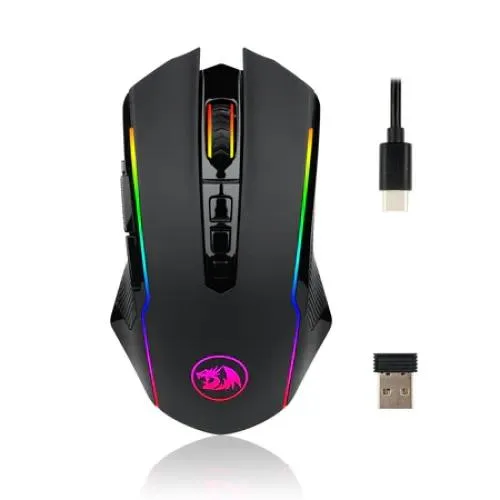
The Redragon Ranger M910-KS RGB Dual-mode Gaming Mouse is a versatile gaming mouse designed for players who want the freedom of wireless operation without giving up the reliability of a wired connection. With 2.4GHz wireless and USB wired connectivity, a PMW 3104 optical sensor, programmable buttons, RGB lighting, adjustable DPI and a rapid-fire function, the M910-KS is well suited to gaming, everyday computing and productivity tasks.
Redragon Ranger M910-KS RGB Dual-mode Gaming Mouse in Bangladesh
For gamers looking for a flexible gaming mouse in Bangladesh, the Redragon Ranger M910-KS offers a practical combination of performance and convenience. You can use it wirelessly when you want a cleaner desk and unrestricted movement, then switch to a wired USB connection when you prefer a direct connection or need to charge the mouse. This makes the M910-KS particularly useful for gaming setups that are also used for office work, study, browsing and general PC use.
The mouse uses the PMW 3104 optical sensor and provides five preset DPI levels in its standard switching mode: 500, 1000, 2000, 3000 and 4000 DPI. Redragon's current product information also states that software can provide a wider adjustable range from 250 to 8000 DPI, depending on the configured mode.
Dual-mode Wired and Wireless Connectivity
One of the most useful features of the Ranger M910-KS is its dual-mode connection. The mouse supports 2.4GHz wireless operation as well as a USB-C wired connection. Wireless mode is useful when you want fewer cables around your gaming desk, while wired mode provides a straightforward connection for extended gaming sessions or charging.
The included 2.4GHz receiver handles wireless communication with the computer. When connected by cable, the mouse can continue to be used while charging, allowing you to keep working or gaming instead of waiting for the battery to recharge. Redragon specifies USB-C wired connectivity and 2.4GHz wireless connectivity for the M910-KS.
PMW 3104 Optical Gaming Sensor
The M910-KS uses a PMW 3104 optical sensor designed for responsive cursor tracking. The standard DPI settings of 500, 1000, 2000, 3000 and 4000 provide practical sensitivity choices for different games and desktop applications, while software-based adjustment can extend the configurable range up to 8000 DPI.
For FPS gaming, lower sensitivity can make controlled aiming easier, particularly when using larger mouse movements. Higher DPI settings can be useful for fast cursor movement, multiple-monitor setups or users who prefer smaller physical mouse movements. DPI is therefore best treated as a personal control setting rather than a simple measure of gaming quality.
Adjustable DPI for Different Gaming Styles
The M910-KS provides five convenient DPI levels through its standard switching system. The documented preset levels are 500, 1000, 2000, 3000 and 4000 DPI, with software offering additional adjustment from 250 to 8000 DPI.
This flexibility makes the mouse suitable for different genres. A player may prefer a lower DPI setting for precise FPS aiming, a medium setting for general gaming, or a higher setting for fast-paced games and desktop navigation. Having multiple levels available also makes it easier to move between different applications without constantly changing Windows pointer settings.
Programmable Buttons and Rapid-fire Function
The Ranger M910-KS is built for users who want more control than a basic two-button mouse can provide. Product documentation describes the mouse with programmable function buttons and a rapid-fire button, while retailer specifications commonly list eight function buttons and Redragon's current product page describes nine programmable buttons plus a rapid-fire button.
Because button-count descriptions vary between regional listings, buyers should check the exact hardware revision supplied with the product. The important advantage is that the M910-KS provides considerably more assignable controls than a conventional office mouse.
Programmable controls can be useful for assigning frequently used commands, shortcuts or in-game actions. For productivity, additional buttons can also be mapped to functions such as copy, paste, browser navigation or application-specific shortcuts when supported by the software.
Rapid-fire Button for Fast Commands
The rapid-fire function is designed to execute repeated mouse actions quickly with a dedicated control. This can be useful in supported games where repeated inputs are part of the gameplay. As with any programmable gaming function, its usefulness depends on the individual game and its rules, so players should always use such functions in accordance with the game's terms and competitive policies.
RGB Backlighting
The Redragon Ranger M910-KS features RGB backlighting that adds a gaming-focused appearance to the mouse. Redragon's current M910-KS information lists up to nine RGB effects, allowing users to change the lighting style through the supported software.
RGB lighting does not improve sensor accuracy or gaming performance, but it can complement a desktop gaming setup, particularly when combined with an RGB keyboard, headset, mouse pad or PC case. Users who prefer a simpler appearance can reduce or disable lighting where supported.
Software Customisation and Profiles
The M910-KS is designed to work with configuration software that can be used to customise buttons, DPI settings and RGB lighting. Redragon also specifies multiple memory modes for the current version, making the mouse suitable for users who switch between different configurations.
This is particularly useful for gamers who play several genres. A configuration for an FPS title can prioritise aiming and movement controls, while another profile can be configured for MMO-style commands or everyday productivity. Software support and available functions can vary by operating system and product revision, so the supplied driver should be used for the exact M910-KS version.
Polling Rate and Response
The current M910-KS specification lists selectable polling rates of 125Hz, 250Hz, 500Hz and 1000Hz.
A higher polling rate allows the mouse to report its position to the computer more frequently. A 1000Hz setting corresponds to a reporting interval of approximately 1 millisecond, although the real-world experience also depends on the computer, game engine, USB connection, wireless environment and other system factors.
Rechargeable Wireless Design
The current M910-KS specification identifies a 700mAh rechargeable battery and states up to 70 hours of battery life. Actual battery runtime depends on factors such as RGB lighting, polling rate, wireless conditions and usage.
The rechargeable design makes the mouse more convenient than models that require disposable batteries. When the battery needs charging, the mouse can be connected through USB-C and used in wired mode according to the product design.
Ergonomic Gaming Shape
The M910-KS uses an ergonomic shape intended to remain comfortable during longer sessions. Its dimensions are approximately 124.5 x 72.4 x 39.8mm, while Redragon lists a product weight of approximately 135g for the current version.
The shape and weight make it more appropriate for users who prefer a substantial gaming mouse rather than an ultra-light competitive mouse. Hand size and grip style remain important, so buyers who strongly prefer very lightweight mice should consider this point before choosing the M910-KS.
Anti-skid Scroll Wheel and Teflon Feet
The M910-KS includes an anti-skid scroll wheel designed to provide better finger control during scrolling and gaming. Redragon also specifies Teflon feet pads to help the mouse glide across a suitable mouse surface.
A good mouse pad can make a noticeable difference to the overall feel. A clean, consistent surface allows the optical sensor and mouse feet to work more predictably and can provide smoother movement than an uneven or dusty desk surface.
Redragon Ranger M910-KS Specifications
| Specification | Details |
|---|---|
| Model | Redragon M910-KS Ranger Lite |
| Connection | 2.4GHz wireless and USB-C wired |
| Sensor | PMW 3104 optical sensor |
| Standard DPI Levels | 500 / 1000 / 2000 / 3000 / 4000 DPI |
| Software DPI Range | 250–8000 DPI adjustable |
| Polling Rate | 125 / 250 / 500 / 1000Hz |
| Buttons | Programmable function buttons with rapid-fire function |
| Backlight | RGB |
| RGB Effects | Up to 9 effects on the current documented version |
| Acceleration | 15G |
| Battery | 700mAh rechargeable battery |
| Battery Life | Up to 70 hours, depending on usage and lighting |
| Wired Cable | 1.8m USB-C cable |
| Weight | Approximately 135g |
| Dimensions | Approximately 124.5 x 72.4 x 39.8mm |
| Colour | Black |
| Operating System | Windows XP, Vista, 7, 8, 10 and 11 according to current Redragon documentation |
Redragon M910-KS for FPS Gaming
For FPS games, the M910-KS provides the core features many players look for in a gaming mouse: adjustable DPI, an optical sensor, selectable polling rates, programmable controls and both wired and wireless operation.
The ability to use a lower DPI setting can help players who prefer controlled aiming, while the higher settings provide faster cursor movement. The extra programmable buttons can also be assigned to suitable game commands, although the ideal layout depends heavily on the game and the player's preferred grip.
For MOBA and Strategy Games
Additional buttons can be particularly useful in games where several commands need to remain accessible without moving the hand away from the main mouse controls. MOBA, strategy and simulation players can benefit from assigning frequently used actions to the available programmable controls where supported by the software.
For these genres, the M910-KS's customisation capability may be more valuable than simply choosing a mouse based on maximum DPI.
For Everyday Work and Study
The M910-KS is not limited to gaming. Its wireless mode can help keep a workstation tidy, while programmable buttons can be useful for browser navigation, document editing and frequently repeated shortcuts.
The dual-mode connection is also convenient for users who move between gaming and office work. Wireless operation keeps the desk uncluttered, while wired operation provides a direct USB connection whenever preferred.
For Gaming Laptops
A gaming laptop user can also benefit from the M910-KS. Wireless operation avoids adding another long cable across a desk, while USB-C wired connectivity provides an alternative when charging or when a wired connection is preferred.
For laptop users who frequently travel, remember to keep the 2.4GHz receiver safely stored when it is not connected to the computer. A mouse pad is also recommended when using the mouse away from a consistent desk surface.
Who Should Buy the Redragon Ranger M910-KS?
- Gamers who want both wireless and wired connectivity.
- Users who need several programmable mouse controls.
- Players who want adjustable DPI and polling-rate options.
- Gamers who enjoy RGB lighting and software customisation.
- Users who want a rechargeable wireless gaming mouse.
- People who use the same mouse for gaming and everyday computer work.
- Users building a gaming PC setup with a Redragon keyboard, headset and other peripherals.
Who May Want a Different Mouse?
The M910-KS may not be the best choice for someone specifically looking for an ultra-light competitive mouse. At approximately 135g in the current documented version, it is designed more around feature flexibility and functionality than extreme weight reduction.
It may also be unnecessary for someone who only needs a basic mouse for office applications. In that case, a simpler wired or wireless model with fewer programmable controls may offer better value.
Things to Check Before Buying
- Confirm that the exact M910-KS hardware revision matches the specifications you require.
- Check the number of buttons included with the specific regional version, as retailer listings describe the button count differently.
- Make sure your computer supports the required USB connection for wired use.
- Keep the wireless receiver accessible and protected from loss.
- Battery life will vary according to RGB lighting, polling rate and usage.
- For the best tracking consistency, use the mouse on a clean, suitable mouse pad.
- Check the warranty terms supplied by the local seller before purchase.
Why Buy the Redragon Ranger M910-KS from Unix Network?
Unix Network is a computer and technology retailer serving customers in Jessore (Jashore), Khulna, Bangladesh. For customers looking for a gaming mouse in Jessore, the M910-KS is an option worth considering when wireless convenience, programmable controls and gaming-oriented features are more important than having the lightest possible mouse.
Unix Network can also help customers choose suitable accessories around the mouse, including gaming keyboards, mouse pads, headsets, gaming PCs and other computer peripherals. For buyers outside Jessore, nationwide delivery makes it possible to order computer accessories from different parts of Bangladesh.
Warranty and After-sales Support
Local listings commonly specify a one-year warranty for the Redragon Ranger M910-KS. Warranty coverage can depend on the seller, importer and exact product batch, so the warranty terms supplied with your purchase should be treated as the final reference.
For a wireless gaming mouse, retain the purchase documentation and original accessories. If a problem develops, providing the mouse, receiver and relevant cable can make troubleshooting easier.
Frequently Asked Questions
Is the Redragon Ranger M910-KS wireless?
Yes. The M910-KS supports 2.4GHz wireless connectivity as well as USB-C wired operation.
Can the Redragon M910-KS be used while charging?
The mouse supports wired operation through USB-C, allowing you to continue using it through the wired connection when charging is required.
What sensor does the M910-KS use?
The documented M910-KS uses a PMW 3104 optical sensor.
What is the DPI of the Redragon Ranger M910-KS?
The standard DPI switching levels are 500, 1000, 2000, 3000 and 4000 DPI. The current Redragon documentation also lists software adjustment from 250 to 8000 DPI.
Does the M910-KS have RGB lighting?
Yes. It has RGB backlighting with multiple lighting effects supported by the product software.
Is the Redragon M910-KS rechargeable?
Yes. The current version uses a 700mAh rechargeable battery. Redragon specifies up to 70 hours of battery life, although actual runtime depends on usage and lighting settings.
Does the M910-KS have programmable buttons?
Yes. It is designed with programmable controls and a rapid-fire function. Exact button-count descriptions vary across regional listings, so the physical layout of the supplied revision should be checked.
What polling rates are supported?
The current documented version supports 125Hz, 250Hz, 500Hz and 1000Hz polling rates.
Is the M910-KS suitable for FPS games?
Yes. Its adjustable DPI, optical sensor, selectable polling rate and programmable controls make it suitable for FPS gaming. The best settings depend on the player's sensitivity preference and game.
Can I use the M910-KS for office work?
Yes. Its programmable buttons and wireless connection can be useful for browsing, office applications and everyday computer use in addition to gaming.
Is the M910-KS suitable for gaming laptops?
Yes. The 2.4GHz wireless connection is convenient for laptop gaming, while USB-C wired connectivity provides an alternative connection method.
Does the mouse require a mouse pad?
It can operate on suitable surfaces, but a clean and consistent mouse pad is recommended for smoother movement and more predictable optical tracking.
What is the warranty for the Redragon Ranger M910-KS in Bangladesh?
Several Bangladesh retailers list a one-year warranty. Exact warranty coverage should be confirmed with the seller at the time of purchase.
Final Verdict
The Redragon Ranger M910-KS RGB Dual-mode Gaming Mouse is a feature-rich option for users who do not want to choose between wired stability and wireless convenience. Its PMW 3104 optical sensor, adjustable DPI, selectable polling rates, RGB lighting, programmable controls, rechargeable battery and USB-C connection give it enough flexibility for gaming as well as everyday computing.
For customers shopping for a gaming mouse in Jessore or elsewhere in Bangladesh, the M910-KS makes the most sense when you specifically value dual-mode connectivity and extensive customisation. If your priority is a very lightweight competitive mouse or a simple office mouse, another design may be more appropriate.