
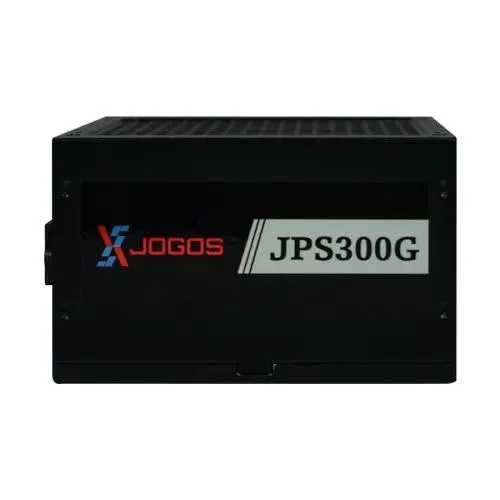
Xtreme XJOGOS JPS300G 300W ATX Power Supply
- Brand:Xtreme
- Product Code: Xtreme XJOGOS JPS300G 300W ATX Power Supply
- Availability:In Stock
Specification
| BASIC INFORMATION | |
| Fan Size | 120mm |
| Connectivity | |
| PCI-E | 4pin |
| SATA | 5pin |
| Headphone | |
| Lighting Effect | N/A |
| Key Features | |
| Continuous Power | 300W |
| Power | |
| Modular Type | Non-Modular |
| Total Power | 300-Watt |
| Voltage | 220V |
| WARRANTY | |
| Manufacturing Warranty | 2 Years |
Description
The Xtreme XJOGOS JPS300G 300W ATX Power Supply is a budget-oriented desktop PSU designed for basic and entry-level computer systems where a 300-watt power capacity is appropriate. Its standard ATX form factor, non-modular cable design and 120mm cooling fan make it a practical option for everyday desktop builds, office computers, home systems and selected low-power configurations.
For customers looking for an Xtreme XJOGOS JPS300G 300W ATX Power Supply in Bangladesh, the most important consideration is system power demand. A 300W PSU should be selected according to the combined requirements of the processor, motherboard, storage devices, cooling fans and graphics hardware. It is not intended to be treated as a universal solution for every gaming PC, particularly systems using power-hungry dedicated graphics cards.
The JPS300G uses a conventional wired design, which keeps installation straightforward. Its ATX format is suitable for compatible desktop cases, while the 120mm fan provides active cooling for the power supply during operation. Available product information also identifies a 220V input, non-modular construction, SATA and PCI-E connectivity, and a stated two-year manufacturing warranty. :contentReference[oaicite:0]{index=0}
Xtreme XJOGOS JPS300G 300W ATX Power Supply Price in Bangladesh
The Xtreme XJOGOS JPS300G sits within the affordable PSU segment in Bangladesh. When comparing prices, buyers should look beyond the headline figure and check current stock, warranty coverage, connector requirements and the power needs of their computer.
A lower-capacity PSU can be a sensible choice for an office desktop or basic home computer when the installed hardware does not require substantial electrical power. Choosing an unnecessarily large unit can increase the purchase cost without providing a meaningful benefit to a low-power system. Conversely, using an undersized PSU for a demanding configuration is not a sensible way to reduce the build budget.
For buyers in Jessore and Jashore, Unix Network provides computer hardware and accessories for local customers while also serving online buyers throughout Bangladesh. Customers can confirm the latest price, stock status, warranty terms and suitability for their particular PC before ordering.
300W Power Capacity for Entry-Level Desktop PCs
The JPS300G provides a stated continuous power capacity of 300W. That capacity should be viewed as the upper power-delivery category of the unit rather than as a recommendation that every connected computer should consume 300W continuously.
Actual system consumption depends on the processor, motherboard, memory, storage, graphics hardware, cooling fans and attached peripherals. A basic computer using integrated graphics can have considerably lower requirements than a gaming system with a dedicated GPU.
Before purchasing, calculate or estimate the total power requirement of the intended configuration. Allowing reasonable headroom is preferable to selecting a PSU that operates close to its maximum capacity under normal workloads.
ATX Form Factor for Compatible Desktop Cases
The Xtreme JPS300G follows the ATX PSU format. This is useful for standard desktop builds where the computer case is designed to accommodate an ATX power supply.
Although ATX is a common format, buyers should still check their case before installation. Small-form-factor computers, proprietary office systems and certain compact desktops can use different PSU dimensions or connector arrangements. A standard ATX PSU should not be assumed to fit every desktop chassis simply because the motherboard itself is an ATX or Micro-ATX model.
Checking the existing PSU dimensions, mounting position and connector arrangement before replacement can prevent installation problems.
Non-Modular Cable Design
The JPS300G uses a non-modular cable design. With this arrangement, the required power cables are permanently attached to the power supply rather than being individually removable.
Non-modular PSUs are often attractive in budget PC builds because their construction is straightforward and there is no need to purchase or manage separate detachable cables. The trade-off is cable management. Unused cables need to be routed or tucked away inside the case.
For a conventional desktop case with reasonable cable-management space, this is usually manageable. Users building compact systems or prioritising an exceptionally clean internal appearance may prefer a modular or semi-modular PSU.
120mm Cooling Fan
The JPS300G incorporates a 120mm cooling fan. Active airflow helps move heat away from the PSU's internal components during operation.
Fan size alone should not be interpreted as a guarantee of a particular noise level. Actual acoustic behaviour can depend on workload, fan control, ambient temperature, case ventilation and the condition of the unit. Keeping the computer case reasonably clean and ensuring adequate airflow can help the PSU operate in a more suitable thermal environment.
Users should also avoid blocking the PSU's ventilation openings. A computer placed against a wall, inside a tightly enclosed cabinet or in an area with restricted airflow can experience poorer cooling than the same hardware installed in a properly ventilated case.
220V Input for Bangladesh Desktop Systems
Available specifications list a 220V input for the JPS300G. This is relevant for customers purchasing a desktop PSU in Bangladesh because mains voltage compatibility should always be checked before installation. :contentReference[oaicite:1]{index=1}
Electrical supply conditions can vary, so users who experience unstable mains power may also consider appropriate electrical protection for the entire computer system. A suitable surge protector or UPS can provide an additional layer of protection depending on the environment and equipment requirements.
Power Connectors and Hardware Compatibility
Published product specifications identify PCI-E and SATA power connectivity for the JPS300G. Retailer listings also describe the unit with a 20+4-pin main motherboard connection and P4+P8 CPU power connectivity. :contentReference[oaicite:2]{index=2}
Connector availability matters because a PSU can have sufficient wattage yet still be unsuitable for a particular computer if the required power connectors are missing or incompatible. Before installation, compare the connectors from the PSU with the motherboard, processor power socket, storage drives and graphics card.
Buyers should pay particular attention to dedicated graphics cards. A graphics card may require a specific PCI-E power connector and considerably more power than an integrated-graphics system. Never assume that the presence of a PCI-E connector means the PSU is suitable for every graphics card.
SATA Power for Storage Devices
SATA power connectivity makes the PSU useful for desktop configurations containing compatible SATA storage devices. Depending on the system, these can include SATA hard drives and SATA solid-state drives.
Storage devices typically consume far less power than high-performance graphics hardware, but the total load of a complete system still needs to be considered. When upgrading an older computer with additional drives, check both available connectors and overall PSU capacity.
20+4 Pin Motherboard Connection
The commonly listed 20+4-pin main connector is designed around the standard motherboard power connection used by many desktop platforms. This split arrangement provides flexibility for compatible motherboard designs.
Correct installation is important. The connector should be aligned with the motherboard socket rather than forced into position. Users replacing an existing PSU should compare the new cable arrangement with the old unit before disconnecting or reconnecting components.
CPU Power Connection
Available listings describe P4+P8 CPU power connectivity for the JPS300G. This connection supplies power to the processor area of a compatible motherboard. :contentReference[oaicite:3]{index=3}
CPU power requirements vary between platforms. Before buying the PSU, verify that the motherboard's processor power socket matches the available connector configuration. This is particularly important when upgrading an older office computer with a newer motherboard or processor.
Practical Performance for Everyday Computers
The JPS300G is most appropriately considered for basic desktop workloads where the overall hardware demand remains within the PSU's 300W capacity. Suitable applications can include web browsing, document work, study, office software, media playback and other general computing tasks, provided the complete system has compatible power requirements.
For these types of computers, there is little benefit in selecting an unnecessarily high-wattage PSU solely because the number looks larger. The correct choice is determined by the system's actual requirements, connector needs, physical compatibility and desired headroom.
For Entry-Level Gaming PCs
The JPS300G can potentially suit selected low-power gaming configurations, but buyers should evaluate the complete hardware list carefully. Entry-level gaming computers using integrated graphics or very low-power graphics hardware can have significantly different requirements from modern performance-oriented gaming systems.
Users planning to install a dedicated graphics card should check the manufacturer's recommended PSU capacity and connector requirements for that specific model. If the graphics card recommendation exceeds the capabilities of the JPS300G, choosing a higher-capacity PSU is the safer purchasing decision.
A PSU should not be selected based purely on the total wattage printed on the box. Quality, protection features, connector configuration, efficiency, platform compatibility and adequate operating headroom all contribute to a sensible power solution.
Build Quality and Everyday Use
The JPS300G uses a conventional black PSU chassis and non-modular construction. Its design is focused on practical desktop installation rather than premium enthusiast features.
For an affordable office or home computer, this approach can be appropriate. The PSU does not need to provide elaborate cable customisation when the primary objective is to power a straightforward configuration within its intended capacity.
As with any PSU, proper installation and ventilation are important. Avoid operating a computer with damaged cables, loose connectors, excessive dust accumulation or blocked ventilation openings.
Key Features of Xtreme XJOGOS JPS300G 300W ATX Power Supply
- 300W stated continuous power capacity.
- Standard ATX form factor for compatible desktop cases.
- Non-modular cable construction.
- 120mm cooling fan.
- 220V input specification listed by retailers.
- PCI-E power connectivity listed for the unit.
- SATA power connectivity for compatible storage devices.
- 20+4-pin main motherboard connection reported in product listings.
- P4+P8 CPU power connection reported in product listings.
- Two-year manufacturing warranty listed by multiple Bangladesh retailers.
Technical Specifications
| Specification | Details |
|---|---|
| Brand | Xtreme |
| Model | XJOGOS JPS300G |
| Power Output | 300W |
| PSU Type | Non-Modular |
| Form Factor | ATX |
| Fan Size | 120mm |
| Input Voltage | 220V |
| PCI-E Connector | 4-pin |
| SATA Connector | 5-pin |
| Lighting | Not specified / N/A |
| Warranty | 2 years manufacturing warranty |
Advantages of the Xtreme JPS300G
- Suitable wattage category for many basic desktop computers.
- Standard ATX format simplifies compatibility with supported cases.
- Non-modular construction keeps the design straightforward.
- 120mm fan provides active PSU cooling.
- SATA connectivity supports compatible storage devices.
- PCI-E connectivity can support selected low-power graphics configurations where the complete power requirement is appropriate.
- Full-size ATX design is familiar to PC builders and technicians.
- Two-year manufacturing warranty is listed by multiple Bangladesh retailers.
Things to Consider Before Buying
The most important consideration is power demand. A 300W unit should not be selected for a computer that requires substantially more capacity. If you are building a gaming PC with a dedicated graphics card, calculate the system's expected consumption and compare it with the GPU manufacturer's recommendation.
Check the physical case compatibility before purchase. While ATX is widely used, some compact computers use proprietary or smaller power supplies.
Examine the required connectors as well. Motherboard CPU power, main motherboard power, graphics-card power and storage connections should all be compatible with the PSU.
Buyers who prefer cleaner cable management may want a modular or semi-modular alternative. The JPS300G's non-modular approach is better suited to customers who are comfortable routing fixed cables inside the case.
Who Should Buy the Xtreme JPS300G
This PSU is worth considering for customers assembling or upgrading a basic desktop computer where the calculated power requirement comfortably fits within a 300W capacity. Office PCs, home computers, study systems and other modest configurations can be appropriate candidates.
It can also make sense as a replacement for an ageing low-capacity ATX PSU when the replacement system has similar or lower power requirements and the connector arrangement matches.
Customers should choose a higher-capacity PSU when the computer contains a power-hungry CPU, dedicated gaming GPU or several high-consumption components. The correct PSU is determined by the complete configuration rather than by the computer case alone.
Who Should Choose a Higher-Wattage PSU
Users building a performance gaming PC, workstation or content-creation computer should carefully evaluate whether 300W is sufficient. Modern graphics cards can have substantial power requirements, particularly during demanding workloads.
Likewise, systems with multiple high-performance components should have adequate headroom. If your estimated system load approaches the PSU's maximum capacity, moving to an appropriately rated higher-wattage model is generally more sensible than operating with minimal reserve.
Power Supply Selection for a New PC Build
When assembling a new computer, begin with the processor and graphics card because these components can account for a significant portion of the system's power requirement. Add the expected consumption of motherboard components, storage, cooling fans and peripherals.
After estimating the total requirement, select a PSU that provides suitable capacity with reasonable headroom. Then verify physical dimensions and every necessary connector. This method is more reliable than selecting a PSU based solely on the computer's intended use.
For an office PC, the resulting capacity may be relatively modest. A gaming system can require substantially more depending on its graphics hardware. This is why the same 300W PSU can be appropriate for one computer while being unsuitable for another.
Power Supply Selection for Upgrading an Existing PC
If your existing computer is being upgraded, inspect the current PSU before purchasing a replacement. Record the model, wattage, connector types and physical dimensions. Then identify the power requirements of the new components.
Replacing a processor or adding a graphics card can change the power requirements enough to make the original PSU unsuitable. Storage upgrades generally have a smaller effect, but every additional component contributes to the total system load.
If you are uncertain about compatibility, providing the exact motherboard, processor, graphics card and case models to a technical support team can make the assessment more accurate.
Why Buy from Unix Network
Unix Network is a computer store in Jessore serving customers interested in desktop components, gaming hardware, laptops, printers, networking products and IT accessories. For a PSU purchase, customers can receive practical guidance based on the intended computer configuration rather than choosing a power rating without considering the rest of the system.
A local retailer can also be useful when a customer needs to compare replacement options, verify connector compatibility or understand warranty procedures. Customers visiting the showroom in Jessore can discuss their existing computer before selecting a suitable component.
Unix Network also supports customers outside Jashore through online ordering and nationwide delivery arrangements. Buyers from nearby districts including Jhenaidah, Magura, Narail, Satkhira, Khulna, Kushtia and Chuadanga can enquire about availability and delivery options.
Buying Guide for the Xtreme JPS300G
Start by listing your computer's major components. Identify the CPU, graphics card, motherboard, storage drives and cooling hardware. Then estimate the total power requirement.
Next, check whether 300W provides enough capacity with sensible headroom. If your GPU manufacturer recommends a significantly larger PSU, do not choose the JPS300G simply because it is cheaper.
After confirming wattage, verify the ATX form factor and physical case compatibility. Then compare the PSU's available connectors against your motherboard, CPU and storage requirements.
Finally, check the current warranty terms and stock status before purchasing. PSU warranty conditions can vary between sellers and supply channels, so retaining the purchase invoice is advisable.
Warranty Information
Multiple Bangladesh retailer listings specify a two-year manufacturing warranty for the Xtreme XJOGOS JPS300G. :contentReference[oaicite:4]{index=4}
Warranty conditions can depend on the seller, distributor and nature of the fault. Customers should confirm the applicable terms at the time of purchase and retain the invoice or relevant purchase documentation.
Do not open, modify or repair the PSU yourself if you intend to make a warranty claim. Power supplies contain components that can remain electrically hazardous even after the computer has been switched off and disconnected.
Delivery Across Bangladesh
Unix Network serves customers in Jessore and accepts online enquiries from buyers throughout Bangladesh. Customers outside Jashore can contact the store to confirm current stock, pricing and delivery arrangements before placing an order.
Delivery time may vary according to destination, courier availability, order processing and stock position. If the PSU is required for an urgent computer repair or new build, confirm availability before ordering.
Customers located near Jessore can also consider local showroom support when discussing component compatibility or replacement requirements.
After-Sales Support
Power supply troubleshooting can involve several components, so professional assistance can be useful when a computer fails to start, restarts unexpectedly or experiences power-related symptoms. A PSU should not automatically be blamed before the motherboard, power cable, switch, RAM and other components have been considered.
If the JPS300G is installed and the computer does not operate correctly, disconnect the system from mains power and avoid repeatedly switching it on if there is a burning smell, unusual noise, visible damage or other serious warning sign. Contact technical support for an appropriate assessment.
Unix Network provides product guidance and after-sales support according to applicable service and warranty policies. Customers should provide their invoice and product information when requesting assistance.
Safety and Installation Guidance
Installing a PSU should be done with the computer completely disconnected from the mains supply. Ensure that all connectors are properly seated and that cables are routed away from fans.
Never force a connector into an incompatible socket. Different power connections serve different purposes, and attempting to modify cables can create a serious electrical risk.
Keep the PSU ventilation area unobstructed. The computer should operate in a reasonably clean environment with adequate airflow. Excessive dust can reduce cooling performance over time.
Frequently Asked Questions
Is the Xtreme XJOGOS JPS300G a 300W power supply?
Yes. The listed continuous power capacity is 300W. The actual suitability depends on the complete computer configuration and its expected power consumption.
Is the Xtreme JPS300G suitable for a gaming PC?
It can suit selected low-power or entry-level gaming configurations, but it should not be assumed to support every gaming PC. Dedicated graphics cards can have considerably higher power requirements, so the GPU's recommended PSU capacity should be checked before purchase.
Is the XJOGOS JPS300G modular?
No. It uses a non-modular cable design. The cables are permanently attached to the PSU, so unused connections need to be managed inside the computer case.
What size fan does the JPS300G use?
The listed fan size is 120mm. The fan provides active cooling for the PSU during operation.
Does the JPS300G have SATA power connections?
Yes. Product specifications list SATA power connectivity. The exact number and connector configuration should be confirmed against the current supplied unit if your build has several storage devices.
Does the Xtreme JPS300G have PCI-E power connectivity?
Yes. Retailer specifications list a 4-pin PCI-E connection. Buyers should still verify the exact graphics-card connector requirement before purchasing because different GPUs use different power connections and have different PSU recommendations.
Can this PSU be used with an ATX motherboard?
The PSU uses the ATX form factor and is intended for compatible desktop cases and motherboard configurations. Buyers should verify the motherboard power connector and case dimensions before installation.
Is the Xtreme JPS300G suitable for an office computer?
It can be a practical option for an office PC with modest power requirements. The final choice should be based on the processor, graphics hardware, storage and other components rather than the fact that the computer is used for office work.
How long is the warranty?
Multiple Bangladesh product listings specify a two-year manufacturing warranty for this model. Customers should confirm the current warranty conditions with Unix Network before purchase because warranty procedures and coverage terms can depend on the applicable seller or distributor policy.
Where can I buy the Xtreme XJOGOS JPS300G in Bangladesh?
Customers can contact Unix Network for current availability, pricing, warranty information and delivery options. The store serves customers in Jessore and Jashore while also supporting online buyers throughout Bangladesh.
Final Recommendation
The Xtreme XJOGOS JPS300G 300W ATX Power Supply is a straightforward budget PSU for compatible desktop systems that do not require high power capacity. Its 300W output, ATX format, non-modular construction, 120mm fan and listed SATA and PCI-E connectivity make it relevant to basic desktop builds and selected low-power configurations.
The key point is choosing it for the right system. For an office computer, study PC or modest home desktop, 300W can be a sensible capacity when the complete hardware requirement remains comfortably below the available output. For a modern gaming machine with a demanding graphics card, a higher-rated PSU may be the better choice.
Customers in Jessore and Jashore can contact Unix Network for expert advice, competitive pricing, product availability and after-sales assistance. Nationwide buyers can also enquire about delivery throughout Bangladesh. Before ordering, confirm the current stock position, connector requirements, case compatibility and warranty terms so the PSU matches the intended computer.