
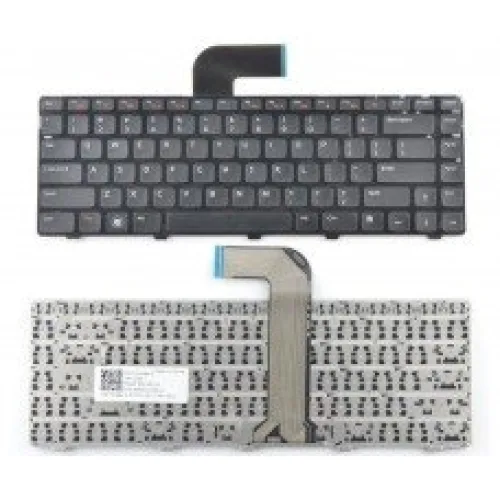
Description
Dell Inspiron Laptop Keyboard is a practical replacement component for restoring comfortable, accurate typing when the original keyboard becomes damaged, worn, unresponsive, or affected by liquid spills. Since Dell Inspiron laptops are available in many generations and configurations, the correct replacement must be matched with the exact laptop model and keyboard part number.
Dell Inspiron Laptop Keyboard Price in Bangladesh
Dell Inspiron replacement keyboards are available in different layouts, colours, key counts, mounting designs and backlighting configurations. Dell itself lists replacement keyboards according to specific Inspiron models, while individual Inspiron systems can use either standard or backlit keyboards. Therefore, compatibility should be confirmed before ordering.
Key Specifications
| Specification | Details |
|---|---|
| Product Type | Replacement Laptop Keyboard |
| Brand Compatibility | Dell Inspiron |
| Keyboard Layout | QWERTY, depending on variant |
| Keyboard Type | Standard or backlit, depending on model |
| Connection | Internal ribbon connection, model dependent |
| Key Count | Varies according to laptop model and regional layout |
| Colour | Model dependent, commonly black |
| Compatibility | Specific Dell Inspiron models only |
Reliable Replacement for Dell Inspiron Laptops
A faulty keyboard can make an otherwise fully functional laptop difficult to use. Replacing the keyboard can restore normal typing without requiring replacement of the entire notebook. This makes it a suitable repair component for students, office workers, business users, programmers, accountants and home users.
Responsive Key Operation
A suitable replacement keyboard restores dependable keystroke registration across the complete keyboard area. It is useful when individual keys stop responding, become difficult to press, or develop inconsistent behaviour because of prolonged use.
Standard and Backlit Options
Some Dell Inspiron models are equipped with standard keyboards, while others support backlit versions. Backlighting availability depends on the specific laptop configuration and internal hardware, so a backlit replacement should only be selected when the laptop supports the required connection and functionality.
Comfortable QWERTY Layout
Many Dell Inspiron keyboards use a QWERTY arrangement, although the number of keys and regional layout can vary. US, UK and Japanese configurations, for example, may have different key counts and arrangements.
Compatible Dell Inspiron Series
Dell has produced numerous Inspiron generations, including Inspiron 3000, 5000 and 7000 series laptops. Examples include models such as Inspiron 14 3000, Inspiron 14 5000, Inspiron 15 3000, Inspiron 15 5000 and other model-specific configurations. A keyboard designed for one Inspiron model should not automatically be assumed to fit another.
Common Reasons for Keyboard Replacement
- Several keys have stopped responding.
- Keyboard keys are damaged, missing or physically worn.
- Liquid has entered the keyboard assembly.
- Keys are producing inconsistent input.
- The keyboard has suffered physical damage.
- The original keyboard has become difficult to press.
- Backlight functionality has failed on a compatible backlit assembly.
- The laptop needs restoration after long-term use.
How to Check Dell Inspiron Keyboard Compatibility
Checking the exact laptop model is essential before purchasing a replacement. The model information can usually be found on the laptop's bottom panel or through the computer's system information. Dell's own replacement-parts system also uses the specific Inspiron model to identify compatible keyboards.
- Check the complete Dell Inspiron model number.
- Compare the existing keyboard's part number where available.
- Check whether the original keyboard is backlit or non-backlit.
- Confirm the regional layout, such as US or UK.
- Compare the physical frame and mounting arrangement.
- Check the ribbon connector configuration.
- Verify whether the replacement includes the required keyboard assembly or only the key mechanism.
Why Exact Model Matching Matters
Two Dell Inspiron keyboards can look very similar while using different connectors, mounting points, key layouts or backlight connections. Even laptops from the same Inspiron family can have different keyboard assemblies. Matching the model and part number helps prevent purchasing a component that cannot be installed correctly.
Dell Inspiron Keyboard for Laptop Repair
This replacement component can be useful for laptop technicians and repair shops handling damaged Inspiron notebooks. A correctly matched keyboard can help restore a laptop to normal working condition without replacing the complete computer. Professional installation is recommended when the keyboard assembly requires removal of the palm rest, internal connectors or other chassis components.
Suitable for Work, Study and Everyday Computing
A functional keyboard is essential for document preparation, accounting software, programming, web browsing, email, online education and business applications. Replacing a damaged keyboard can extend the useful life of an otherwise capable Dell Inspiron laptop.
Things to Consider Before Buying
Do not purchase a Dell Inspiron keyboard based only on the brand or laptop screen size. Inspiron models have different keyboard assemblies across generations. The exact model, part number, layout, backlight configuration and connector should be compared before placing an order.
Why Buy Dell Inspiron Laptop Keyboard from Unix Network?
Unix Network supplies laptop components, computer accessories and replacement parts for customers in Jessore, Jashore and throughout Bangladesh. Customers can provide their Dell Inspiron model number or existing keyboard information so the appropriate replacement variant can be identified before purchase.
Unix Network also supports customers looking for laptop accessories and computer parts in Jessore and nearby areas, with delivery options available for buyers across Bangladesh.
Frequently Asked Questions
Will this keyboard fit every Dell Inspiron laptop?
No. Dell Inspiron covers many different generations and models, each of which may use a different keyboard design. Exact model compatibility should be confirmed before purchase.
Can I replace a non-backlit keyboard with a backlit version?
It depends on the laptop. Some Inspiron models support both configurations, while others require specific internal hardware and connectors for backlighting.
How can I find my Dell Inspiron model?
The model is commonly printed on the laptop's bottom panel. It can also be identified through Windows system information or Dell support tools.
Does the keyboard come with a ribbon cable?
Keyboard assemblies normally connect to the laptop through an internal ribbon connection, but the exact construction and included components depend on the replacement variant.
Can I replace only one damaged key?
Some individual replacement keys may be available for certain Dell models. If multiple keys are damaged or the underlying keyboard mechanism has failed, replacing the complete keyboard assembly is generally more practical.
What keyboard layout should I choose?
Select the layout that matches your original keyboard. US and UK layouts can have differences in key arrangement and count, so checking the existing keyboard before ordering is important.
Final Buying Guide
A Dell Inspiron Laptop Keyboard is an effective replacement for restoring typing functionality after keyboard damage or long-term wear. Because Inspiron keyboards vary considerably between models, always verify the exact laptop model, keyboard part number, layout, backlight support and connector before purchase. For customers in Jessore and across Bangladesh, Unix Network can help identify a suitable replacement according to the laptop's specific configuration.