
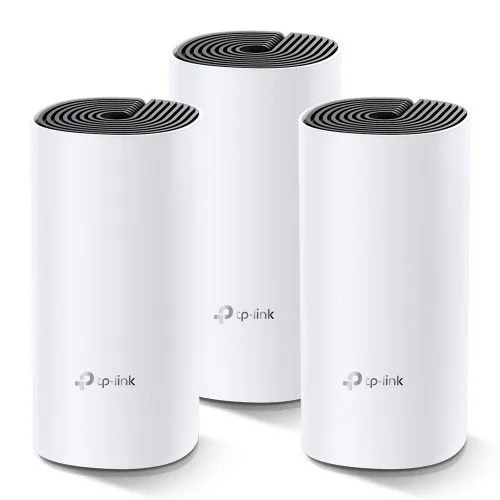
TP-Link Deco E4 (3 Pack) Whole Home Mesh Wi-Fi System AC1200 Dual-band Router
- Brand:Tp-Link
- Product Code: M04074030
- Availability:In Stock
Description
TP-Link Deco E4 (3 Pack) Whole Home Mesh Wi-Fi System is an AC1200 dual-band mesh networking solution designed to provide consistent Wi-Fi coverage across larger homes, multi-storey buildings and small offices. Instead of relying on a single router to cover every room, the three Deco units work together as one unified mesh network, helping reduce weak-signal areas and allowing compatible devices to move between nodes without manually changing Wi-Fi networks.
With combined wireless speeds of up to 1,167 Mbps, including up to 867 Mbps on the 5 GHz band and 300 Mbps on 2.4 GHz, Deco E4 is suitable for everyday internet use, HD streaming, online classes, video calls, smart home devices, browsing and general home networking. The system also supports optional Ethernet backhaul, allowing the Deco units to communicate through wired connections when higher consistency is required.
TP-Link Deco E4 3 Pack AC1200 Mesh Wi-Fi System
The Deco E4 3-pack is built around TP-Link Mesh Technology. All three units operate as part of a single network rather than behaving like separate range extenders. Your smartphone, laptop or other compatible device can automatically connect to the most suitable Deco as you move around the property.
This approach is particularly useful for homes where a conventional router struggles to deliver reliable coverage in bedrooms, upper floors, corridors, living areas or rooms separated by thick walls. TP-Link specifies the 3-pack for 3–4 bedroom homes, although actual coverage depends on building construction, wall materials, interference, placement and the connected devices.
Key Features of TP-Link Deco E4
- AC1200 dual-band whole-home mesh Wi-Fi system
- 3 Deco units included in the package
- Up to 867 Mbps on the 5 GHz band
- Up to 300 Mbps on the 2.4 GHz band
- Combined AC1200 wireless class
- TP-Link Mesh Technology for seamless roaming
- Single Wi-Fi network name across the mesh system
- Optional Ethernet backhaul
- Two 10/100 Mbps WAN/LAN ports per Deco unit
- Router Mode and Access Point Mode
- MU-MIMO technology
- Beamforming support
- Guest networks for 2.4 GHz and 5 GHz
- Parental Controls with URL filtering and time controls
- QoS for prioritising connected devices
- IPv4 and IPv6 support
- SPI firewall and access control
- Management through the Deco app
- Supports up to 100 connected devices according to TP-Link's stated capacity
TP-Link Deco E4 Technical Specifications
| Specification | Details |
|---|---|
| Product | TP-Link Deco E4 |
| Package | 3 Pack |
| Wi-Fi Standard | Wi-Fi 5, IEEE 802.11ac/n/a 5 GHz and 802.11n/b/g 2.4 GHz |
| Wireless Class | AC1200 |
| 5 GHz Speed | Up to 867 Mbps |
| 2.4 GHz Speed | Up to 300 Mbps |
| Antennas | 2 internal dual-band antennas per Deco unit |
| Ethernet Ports | 2 × 10/100 Mbps WAN/LAN ports per unit |
| Mesh Technology | TP-Link Mesh |
| Backhaul | Wireless or optional Ethernet backhaul |
| Operating Modes | Router Mode, Access Point Mode |
| MU-MIMO | Supported |
| Beamforming | Supported |
| Guest Network | 2.4 GHz and 5 GHz |
| Security | SPI Firewall, Access Control, WPA-Personal, WPA2-Personal |
| Parental Controls | URL Filtering and Time Controls |
| QoS | QoS by Device |
| Internet Types | Dynamic IP, Static IP, PPPoE, PPTP, L2TP |
| Protocols | IPv4 and IPv6 |
| Management | Deco App |
| Dimensions | 90.7 × 90.7 × 190 mm per unit |
| Operating Temperature | 0°C to 40°C |
AC1200 Dual-Band Wi-Fi for Everyday Connectivity
Deco E4 uses two wireless bands to distribute network traffic between compatible devices. The 5 GHz band can provide up to 867 Mbps and is well suited to devices that require higher throughput, while the 2.4 GHz band can provide up to 300 Mbps and generally offers better propagation through obstacles.
The AC1200 rating represents the theoretical combined wireless link rate across both bands. It should not be interpreted as the actual internet download speed available to an individual device. Real-world throughput varies according to your internet package, wireless interference, device capabilities, distance, wall construction and network configuration.
Whole Home Mesh Coverage
The main advantage of a three-unit Deco system is coverage rather than simply increasing the maximum speed of one router. You can position the three nodes in different areas of a home so that wireless connectivity reaches locations where a conventional single-router setup may struggle.
TP-Link lists the 3-pack as suitable for 3–4 bedroom homes. Placement is important. The secondary Deco units should normally be positioned where they can still receive a strong connection from another node rather than being placed directly inside a dead zone.
For larger buildings, unusual layouts or properties with reinforced concrete walls, actual coverage can differ considerably from the manufacturer's stated guidance.
Seamless Roaming with One Wi-Fi Name
Deco E4 creates a unified Wi-Fi network rather than requiring users to manually select different network names as they move around the building. Compatible devices can automatically switch between Deco units as the user moves from one coverage area to another.
This is convenient in homes with multiple floors or separate rooms because smartphones, tablets and laptops can remain connected while moving around the property. It is especially useful for people who regularly move between a home office, bedroom, living room and other areas.
Optional Ethernet Backhaul
Deco E4 supports Ethernet backhaul, allowing Deco units to communicate with each other through wired Ethernet instead of relying exclusively on wireless communication between nodes.
A wired backhaul can be useful when Ethernet cabling is already available throughout a house or office. It can reduce the wireless workload between nodes and provide a more consistent mesh connection in suitable installations.
However, buyers should pay close attention to the hardware limitation of this model. Each Deco E4 unit has two 10/100 Mbps WAN/LAN ports. Therefore, it is not a Gigabit Ethernet mesh system. If your priority is high-speed wired networking above 100 Mbps between Ethernet-connected devices, a newer Gigabit-port mesh solution may be more appropriate.
MU-MIMO for Multiple Connected Devices
Modern homes commonly have smartphones, laptops, smart TVs, cameras, printers, tablets and other network-connected equipment operating simultaneously. Deco E4 includes MU-MIMO technology to improve communication efficiency with compatible devices.
This makes the system more suitable for households where multiple users are browsing, streaming, attending video meetings and using smart devices at the same time.
Beamforming Technology
Beamforming helps concentrate wireless transmission towards compatible connected devices instead of distributing the signal equally in every direction. This can contribute to improved wireless coverage and connection quality under suitable conditions.
Actual results still depend on device compatibility, physical surroundings, interference and the position of each Deco unit.
Router Mode and Access Point Mode
Deco E4 can operate as a traditional router or as an access point. Router Mode is useful when Deco is responsible for routing and managing the local network, while Access Point Mode can be useful when another router or gateway is already handling routing duties.
This flexibility makes the system suitable for different home-networking arrangements, including setups where an ISP-provided modem or router needs to remain in place.
Parental Controls and Guest Network
Deco E4 includes parental control features that allow users to create profiles, apply time controls and filter websites. This can help parents manage internet access for children without needing to configure every device separately.
The system also supports separate guest networks on both the 2.4 GHz and 5 GHz bands. A guest network can provide visitors with internet access while keeping the main household network separate.
Deco App Management
TP-Link provides the Deco app for setup and management. The guided setup process is designed to help users configure the main Deco unit, add additional nodes and manage the network from a compatible smartphone or tablet.
Depending on the software version and hardware revision, available application features and interface elements may vary. Checking the current app requirements before installation is recommended.
Practical Performance for Home and Small Office Use
TP-Link Deco E4 is primarily designed to solve coverage problems rather than compete with premium Wi-Fi 6 or Wi-Fi 7 systems for maximum throughput. Its strength is creating a broader, unified Wi-Fi environment across multiple rooms.
It can be a practical choice for internet browsing, social media, HD video streaming, online learning, video conferencing, cloud applications, smart home devices and general household connectivity.
For users with a relatively modest broadband connection, the wireless capability of the Deco E4 can be more than sufficient for everyday requirements. For users with very high-speed fibre connections, however, the 10/100 Mbps Ethernet ports are an important consideration.
Who Should Buy TP-Link Deco E4 3 Pack?
- Families experiencing Wi-Fi dead zones around the house
- Users living in 3–4 bedroom homes
- Multi-storey homes requiring broader wireless coverage
- Users wanting one unified Wi-Fi network throughout the property
- People replacing conventional Wi-Fi extenders with a mesh solution
- Small offices needing wider wireless coverage
- Users who want simple smartphone-based network management
- Homes with multiple smartphones, laptops, TVs and smart devices
- Users who need parental controls and guest Wi-Fi
Things to Consider Before Buying
Deco E4 is a Wi-Fi 5 mesh system, not a Wi-Fi 6 or Wi-Fi 7 platform. If you are building a new high-performance network and want the latest wireless technology, a newer Deco generation may provide better long-term performance.
The Ethernet ports are limited to 10/100 Mbps. This is one of the most important specifications to consider before purchasing. Users with internet packages above 100 Mbps should understand that wired connections through the Deco E4 ports have a significant hardware limitation, while actual wireless performance is affected by many additional factors.
Coverage should also be considered as an installation requirement rather than a fixed guarantee. Thick concrete walls, metal structures, neighbouring wireless networks and poor node placement can reduce practical coverage.
Why Buy TP-Link Deco E4 from Unix Network?
Unix Network is a trusted local computer and networking retailer in Jessore, Bangladesh, supplying routers, mesh Wi-Fi systems, networking equipment, computer hardware and IT accessories for home and business users.
When choosing a networking system, the correct product depends on broadband speed, property size, wall construction, number of connected devices and existing network equipment. Our technical team can help customers select a suitable configuration based on their actual networking requirements rather than focusing only on the advertised wireless speed.
Customers visiting our local showroom in Jessore can explore networking solutions for homes, offices, shops, educational environments and other installations. Unix Network also serves customers across Bangladesh through nationwide delivery.
Buying Guide for TP-Link Deco E4
Before purchasing the Deco E4 3-pack, check the size and layout of your property. A three-node system is most useful when the units can be distributed strategically across different areas instead of being placed together.
Next, check your internet package. If you have a broadband connection significantly faster than 100 Mbps, remember that the Deco E4's Ethernet interfaces are 10/100 Mbps. For users prioritising Gigabit wired connectivity, another mesh model with Gigabit ports may be a better match.
Finally, consider whether you need advanced features such as Wi-Fi 6, higher wireless capacity, multi-gigabit Ethernet or newer security capabilities. If your requirements are focused on reliable whole-home Wi-Fi for normal daily use, Deco E4 remains a straightforward mesh networking option.
Package Contents
- 3 × TP-Link Deco E4 mesh units
- 3 × Power adapters
- 1 × RJ45 Ethernet cable
- Quick Installation Guide
Warranty Information
Warranty coverage can depend on the specific stock, distributor and applicable local warranty policy. Customers should confirm the current warranty terms, service procedure and coverage period with Unix Network before purchase.
Delivery Across Bangladesh
Unix Network provides delivery services for customers throughout Bangladesh. Customers outside Jessore can order networking equipment and other computer products for delivery to their preferred address, subject to the applicable delivery service and location.
For customers in Jessore and nearby areas, the local showroom provides an opportunity to discuss networking requirements directly with the technical team before choosing a suitable mesh Wi-Fi solution.
After-Sales Support
Proper positioning and configuration can have a significant effect on mesh Wi-Fi performance. Unix Network can provide practical guidance regarding basic network setup, Deco placement, router or access point configuration and compatibility with existing networking equipment.
Frequently Asked Questions
Is TP-Link Deco E4 a Wi-Fi 5 mesh system?
Yes. Deco E4 uses Wi-Fi 5 technology with IEEE 802.11ac on the 5 GHz band and 802.11n/b/g on the 2.4 GHz band.
What is the maximum wireless speed of Deco E4?
The system is rated AC1200, with up to 867 Mbps on 5 GHz and up to 300 Mbps on 2.4 GHz under suitable wireless conditions.
How many Deco units are included in this package?
This version is a 3-pack and includes three Deco E4 mesh units, three power adapters and one RJ45 Ethernet cable.
Does Deco E4 support seamless roaming?
Yes. TP-Link Mesh Technology allows compatible devices to move between Deco units while remaining on a unified Wi-Fi network.
Can Deco E4 work with Ethernet backhaul?
Yes. Optional Ethernet backhaul is supported, allowing Deco units to communicate through wired connections when suitable cabling is available.
Does Deco E4 have Gigabit Ethernet ports?
No. Each Deco E4 unit has two 10/100 Mbps WAN/LAN ports. Customers requiring Gigabit Ethernet should consider a different Deco model with Gigabit ports.
Can Deco E4 work as an access point?
Yes. Deco E4 supports both Router Mode and Access Point Mode, allowing it to be integrated into different network configurations.
Does Deco E4 support parental controls?
Yes. The system provides parental control features including URL filtering and time controls through its management software.
Is TP-Link Deco E4 suitable for a large house?
The three-pack is intended for broad coverage and TP-Link lists it for 3–4 bedroom homes. Actual coverage depends on the building structure, interference, node placement and other environmental factors.
Is Deco E4 suitable for gaming?
Deco E4 can provide a suitable wireless connection for everyday online gaming when the network is properly configured. However, serious competitive gamers may prefer a newer system with stronger wireless capabilities, Gigabit Ethernet and lower-latency networking features.
Conclusion
TP-Link Deco E4 (3 Pack) is a practical AC1200 whole-home mesh Wi-Fi system for users who want broader wireless coverage without managing multiple separate Wi-Fi networks. Its three-node design, seamless roaming, dual-band connectivity, MU-MIMO, beamforming, parental controls, guest networking and optional Ethernet backhaul make it suitable for many homes and small offices.
The most important limitation is its 10/100 Mbps Ethernet connectivity, so buyers should consider their broadband speed and wired networking requirements before purchasing. For customers who prioritise affordable whole-home Wi-Fi coverage and straightforward management, the TP-Link Deco E4 3-pack can be a useful networking upgrade.