
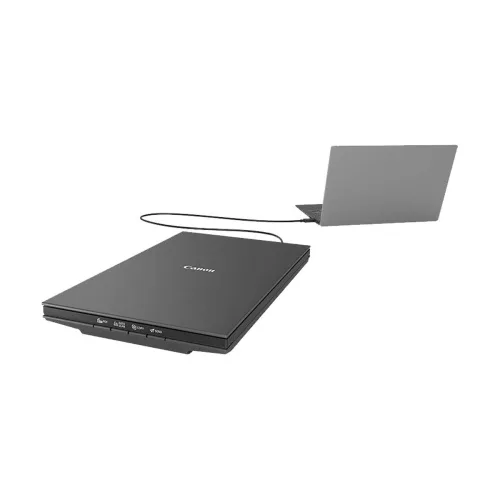
Canon CanoScan Lide 300 Flatbed Scanner
- Brand:Canon
- Product Code: CanoScan Lide 300
- Availability:In Stock
- Updated:
Description
Canon CanoScan LiDE 300 Flatbed Scanner Price in Bangladesh
The Canon CanoScan LiDE 300 Flatbed Scanner is a compact, lightweight and easy-to-use document and photo scanner designed for homes, offices, educational institutions and professional workplaces. Featuring Canon's Contact Image Sensor (CIS) technology, it offers an optical scanning resolution of up to 2400 x 4800 dpi for digitising photographs, documents, certificates and other printed materials. Its slim design, USB-powered operation and four convenient EZ buttons make everyday scanning straightforward without requiring a separate power adapter. Whether you need to preserve family photographs, create digital copies of official documents or organise office paperwork, the Canon CanoScan LiDE 300 provides a practical scanning solution at an accessible price in Bangladesh.
2400 x 4800 dpi Optical Resolution for Detailed Scanning
The Canon CanoScan LiDE 300 offers an optical scanning resolution of up to 2400 x 4800 dpi, allowing users to capture fine details from printed documents and photographs. This resolution is useful for preserving photographs, scanning certificates and creating digital copies of important paperwork. Users can select lower resolutions for routine document scanning to reduce file sizes and processing time, while higher settings are available when additional image detail is required. Actual scan quality depends on the condition of the original material and the selected scanning settings.
Canon CIS Technology for Accurate Document and Photo Scanning
The Canon CanoScan LiDE 300 uses a Contact Image Sensor (CIS) to capture images from documents and photographs placed on the scanner glass. CIS technology supports a compact scanner design while providing detailed colour and monochrome scanning for everyday applications. It is suitable for scanning printed pages, forms, certificates, illustrations and photographs. For the best results, documents should be placed flat against the scanning surface, as uneven or raised originals may affect sharpness.
Fast A4 Colour Scanning in Approximately 10 Seconds
The Canon CanoScan LiDE 300 is designed for efficient everyday scanning, with an advertised A4 colour scanning time of approximately 10 seconds at 300 dpi under specified test conditions. This makes it convenient for digitising letters, invoices, forms and other routine paperwork. Actual scanning time can vary depending on resolution, computer performance, software settings and file processing requirements. Higher-resolution scans and image enhancement features may take longer to complete.
USB-Powered Operation Without a Separate Power Adapter
One of the most convenient features of the Canon CanoScan LiDE 300 is its USB bus-powered design. The scanner receives both power and data through a compatible USB connection, eliminating the need for a separate AC power adapter. This reduces cable clutter and makes it easier to use the scanner on a home desk, office workstation or reception counter. The device uses a USB 2.0 interface with a Mini-B connection on the scanner side. Users should connect it to a suitable USB port capable of supplying the required power.
Four EZ Buttons for Convenient One-Touch Scanning
The Canon CanoScan LiDE 300 features four EZ buttons designed to simplify common scanning tasks. These include PDF, Auto Scan, Copy and Send functions, allowing users to start frequently used workflows directly from the scanner. With the appropriate Canon software installed and configured, these buttons can help create PDF documents, initiate automatic scanning, prepare copies for printing and send scanned files to supported applications. The exact behaviour depends on the software configuration and connected computer.
Auto Scan Mode for Easier Document Digitisation
Auto Scan Mode helps simplify scanning by automatically identifying supported types of originals and applying appropriate settings through Canon's scanning software. This is useful for people who regularly switch between photographs, printed documents and other materials. Instead of adjusting every scanning parameter manually, users can rely on automatic detection for many routine tasks. Manual settings remain useful when specific resolution, colour or output requirements are needed.
PDF Scanning for Office Documents and Records
The Canon CanoScan LiDE 300 supports PDF scanning workflows through compatible Canon software, making it useful for digitising business documents, invoices, certificates and administrative records. Users can create digital files that are easier to organise, archive and share than physical paperwork. Multi-page PDF creation is particularly useful when several pages need to be stored together. The scanner itself uses a single-page flatbed, so documents must be placed on the glass individually rather than fed automatically through an ADF.
Searchable PDF and OCR Functionality
With compatible Canon scanning software and supported OCR functions, the CanoScan LiDE 300 can assist in converting scanned text into searchable digital content. Optical Character Recognition helps identify printed characters within scanned documents, making it easier to search or work with the resulting files. OCR accuracy depends on the language, print quality, document layout and software capabilities. Users should verify the supported OCR and searchable PDF options for their installed software version, especially when working with Bangla text or complex document layouts.
Advanced Z-Lid Design for Books and Thick Documents
The Canon CanoScan LiDE 300 features a Z-Lid design that allows the scanner cover to accommodate certain thicker originals, including books, magazines and notebooks. This makes it more versatile than a scanner designed only for loose sheets of paper. The adjustable lid helps users position thicker materials on the scanning glass without placing excessive pressure on the cover. However, scanning quality near a book's binding may vary if the pages cannot lie flat. Users should follow Canon's recommended limits when scanning thick items.
Scan Photographs and Preserve Family Memories
The Canon CanoScan LiDE 300 is suitable for converting printed photographs into digital image files. Its high optical resolution allows users to capture details from family portraits, travel photographs and other printed memories. Digital copies can be organised, backed up and shared more conveniently than physical originals. Canon's compatible photo enhancement software may also help improve selected image characteristics. Results depend on the original photograph's condition, scan resolution and editing settings.
Automatic Document and Photo Enhancement
Canon's compatible scanning software provides image processing options that can help improve scanned documents and photographs. Depending on the software and selected mode, available adjustments may include document text enhancement, colour correction and image restoration functions. These tools can be useful for improving the readability of certain printed materials or refining older photographs. However, automatic enhancement cannot fully restore missing image information or guarantee perfect results from damaged originals.
Colour and Monochrome Scanning for Different Tasks
The Canon CanoScan LiDE 300 can be used for colour photographs, greyscale documents and monochrome text scanning. Colour scanning is useful for photographs, certificates and documents containing graphics, while greyscale or black-and-white settings can be suitable for ordinary letters and printed forms. Choosing the appropriate scanning mode helps balance image quality, file size and processing time. This flexibility makes the scanner practical for both personal and professional document management.
Compact and Lightweight Design for Small Workspaces
The Canon CanoScan LiDE 300 has a slim, space-saving design that fits comfortably into many home offices, reception areas and desktop workstations. Its lightweight construction makes it easier to move or store when not in use. Since the scanner is powered through USB, there is no separate power adapter to manage. This makes it a convenient choice for students, home users and professionals who need occasional scanning without dedicating a large amount of desk space to equipment.
Suitable for A4 Documents, Certificates and ID Cards
The Canon CanoScan LiDE 300 is designed for scanning common document sizes, including A4 sheets and smaller originals. It can be used to digitise certificates, letters, receipts, identification documents and other flat materials that fit within its scanning area. This is useful for offices, educational institutions and professionals who maintain digital records. When scanning identification documents or confidential paperwork, users should handle the resulting files securely and follow applicable privacy requirements.
Canon CanoScan LiDE 300 for Home and Student Use
Students and home users can benefit from the Canon CanoScan LiDE 300 when creating digital copies of assignments, certificates, printed notes and photographs. Its one-touch scanning controls and USB-powered operation make it convenient for occasional scanning tasks. The flatbed design is also useful for originals that should not be passed through an automatic document feeder. Users who frequently scan large stacks of paper may prefer a dedicated document scanner with an ADF, but the LiDE 300 remains a practical choice for individual pages and photographs.
Ideal for Lawyers, Accountants and Office Professionals
The Canon CanoScan LiDE 300 is a useful option for lawyers, accountants, administrative staff and small businesses that need to digitise printed documents. It can help create electronic copies of contracts, invoices, receipts, forms and supporting records. PDF workflows make it easier to store related documents together, while the compact design fits into smaller office environments. As a flatbed scanner, it is best suited to individual pages and materials that require careful placement rather than continuous high-volume batch scanning.
Windows and macOS Compatibility
The Canon CanoScan LiDE 300 supports compatible Windows and macOS systems through Canon's scanning software and drivers. Users should check Canon's current support information to confirm compatibility with their exact operating system version before purchasing. Driver availability can change as older operating systems reach the end of support or newer versions are released. Installing the appropriate Canon software helps enable the scanner's supported buttons, image processing functions and document workflows.
Canon CanoScan LiDE 300 vs Multifunction Printer Scanners
Many multifunction printers include a basic scanning function, but a dedicated flatbed scanner such as the Canon CanoScan LiDE 300 can be a useful alternative for users who want a compact device focused on document and photo digitisation. Its 2400 x 4800 dpi optical resolution and Z-Lid design make it suitable for photographs, certificates and certain thicker originals. However, the LiDE 300 does not print documents or provide an automatic document feeder. Customers should choose according to their scanning volume, required features and available workspace.
Why Choose the Canon CanoScan LiDE 300 Flatbed Scanner?
The Canon CanoScan LiDE 300 combines detailed optical scanning, a slim design and straightforward USB-powered operation in an affordable desktop device. Its 2400 x 4800 dpi optical resolution supports high-detail scanning, while the four EZ buttons simplify routine document workflows. Auto Scan Mode, PDF creation, compatible image enhancement features and the adjustable Z-Lid add versatility for home and office use. For customers who need a reliable flatbed scanner for photographs, certificates and everyday paperwork, the LiDE 300 is a practical option to consider.
Canon CanoScan LiDE 300 Flatbed Scanner Price in Bangladesh
Looking for the Canon CanoScan LiDE 300 Flatbed Scanner price in Bangladesh? Contact Unix Network to check the latest price, stock availability and technical specifications. Before ordering, confirm the supported operating systems, USB connection requirements, included accessories and applicable warranty terms. Prices and availability may change depending on market conditions. Comparing the CanoScan LiDE 300 with other Canon flatbed scanners can help you choose a suitable model for your document scanning requirements and budget.
Buy Canon CanoScan LiDE 300 Flatbed Scanner from Unix Network in Jashore
Explore the Canon CanoScan LiDE 300 Flatbed Scanner at Unix Network in Jashore, Bangladesh. Whether you need a scanner for personal photographs, student documents, office paperwork or professional records, Unix Network can help you enquire about Canon scanners and compatible accessories. Customers in Jashore, Khulna, Jhenaidah, Magura, Narail, Satkhira and other parts of Bangladesh can contact Unix Network for ordering and delivery information. Visit our shop or browse unixnetworkbd.com to check current prices, confirm stock availability and review applicable warranty details before purchasing.