
Hyper
Showing 1 to 1 of 1 (1 Pages)
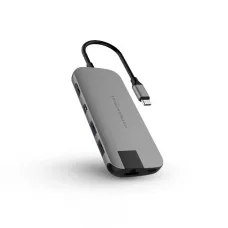
Hyper is a technology-focused manufacturer name associated with a range of computer and connectivity accessories designed to make modern digital setups more convenient, organised and capable. For customers looking for Hyper products in Bangladesh, the right choice depends on the exact model, device compatibility, available ports, intended workload and the type of connection or accessory required. Because Hyper products can vary significantly between models, checking the individual product specifications before purchase is important.
At Unix Network, a trusted technology retailer in Jessore (Jashore), Bangladesh, customers can explore Hyper products alongside computers, laptops, networking equipment, gaming hardware, printers and other IT accessories. Whether you are upgrading a laptop workstation, expanding connectivity, improving your desk setup or looking for a practical accessory for everyday computing, selecting the appropriate Hyper model can help create a more flexible and efficient workspace.
Hyper Products in Bangladesh
Hyper products can be relevant to modern laptop users, desktop owners, professionals, students, creators, business users and technology enthusiasts who need dependable accessories for their devices. Modern computers increasingly rely on compact designs with fewer built-in ports, making suitable connectivity accessories particularly useful. A properly selected accessory can provide additional connection options without requiring a complete replacement of the primary computer.
When searching for Hyper products in Bangladesh, customers should consider the exact model rather than choosing solely by brand name. Port selection, supported standards, operating-system compatibility, power requirements, physical construction, intended application and warranty coverage can all influence whether a particular product is appropriate.
For buyers searching locally, Unix Network provides access to technology products through its Jessore showroom while serving customers across Bangladesh. Customers from Jashore and surrounding areas can discuss their requirements before selecting a suitable Hyper product, while nationwide buyers can purchase according to model availability and applicable delivery arrangements.
Hyper Manufacturer Overview
Hyper is positioned within the modern computer-accessory market, where users increasingly need practical solutions for connectivity, portability and device expansion. Laptops, ultrabooks and compact computers often prioritise slim dimensions, which can reduce the number of physical ports available. Accessories from manufacturers operating in this segment help users adapt those systems to different working environments.
A Hyper accessory may be useful when a laptop needs additional interfaces for peripherals, displays, storage devices, networking equipment or other compatible hardware. The actual capabilities depend on the individual model, so customers should always review the relevant product information before making a purchase.
The value of a computer accessory is not determined only by the number of ports or functions it provides. A good purchasing decision considers whether the device supports the required standard, whether it works with the user's computer, whether the physical layout is convenient and whether its capabilities match the workload.
Why Hyper Products Can Be Useful for Modern Computers
- They can help expand connectivity on compatible computers.
- They can make laptop workstations more flexible.
- They may reduce the need to repeatedly disconnect and reconnect peripherals.
- Selected models can support multiple types of compatible connections.
- Portable accessories can be convenient for users who work between different locations.
- They can help organise a desk around a laptop or compact computer.
- Suitable models may support professional, educational and home-computing environments.
The usefulness of an accessory ultimately depends on the user's equipment. A product with numerous interfaces is not automatically the best option if the computer cannot utilise those functions. Compatibility should therefore remain one of the first considerations during selection.
Key Features to Consider When Choosing Hyper
Hyper products can differ considerably depending on their purpose. Customers should identify the primary requirement first, then compare models based on the features that matter for that particular use case.
- Connection type
- Supported interfaces
- Data-transfer capability
- Display connectivity where applicable
- Power delivery support where applicable
- Operating-system compatibility
- Computer compatibility
- Port arrangement
- Physical size and portability
- Cable length and connector design
- Build quality
- Everyday usability
- Warranty availability
Not every Hyper model includes all of these characteristics. The product's exact specification should always be checked before ordering.
Connectivity and Port Selection
Connectivity is one of the most important considerations when buying a modern computer accessory. Different laptops and desktops can use different connector standards, and two ports that appear similar may offer different capabilities.
Before purchasing a Hyper accessory, identify the ports already available on your computer. Then determine which additional connections are required. For example, someone working with external storage may prioritise high-speed data connectivity, while another user may need display output or additional peripheral connections.
Port selection should be based on actual requirements rather than simply choosing the model with the largest number of interfaces. A smaller accessory with the correct connections can be more practical than a larger unit containing functions that will rarely be used.
Compatibility with Laptops and Desktop Computers
Compatibility is critical because computer accessories do not necessarily provide identical functionality across every device. Hardware design, operating-system support, available power and connector standards can affect performance.
Windows users should check whether the selected Hyper model supports their particular system configuration. Mac users should similarly verify compatibility with their specific Mac model and operating-system version. Some functions may depend on the computer's hardware or software environment.
Desktop users should also consider physical placement, cable routing and available connections. Laptop users may place greater importance on portability, compact dimensions and easy installation.
Hyper for Laptop Users
Laptop users often benefit from accessories that make a portable computer function more like a complete desktop workstation. A suitable accessory can help connect peripherals that may not be directly available on a slim laptop.
For office work, this can mean connecting additional workplace equipment. Students may need convenient access to external devices during study sessions. Professionals working from home can use compatible accessories to create a more organised desk arrangement without replacing their existing laptop.
Travelling users should pay particular attention to size and portability. A compact solution that fits easily inside a laptop bag may be more useful than a larger accessory designed primarily for a permanent desktop workspace.
Hyper for Office and Business Use
Business environments often require computers to connect with multiple peripherals. Employees may use external displays, keyboards, mice, storage devices, networking equipment and other workplace hardware. A suitable connectivity accessory can simplify the connection process for compatible laptops and computers.
For businesses purchasing several units, standardising compatible accessories can also make workstation deployment easier. However, organisations should verify the computer models being used before selecting a single accessory for multiple employees.
For professional environments, reliability, compatibility, ease of use and warranty support may be more important than simply selecting the lowest-priced option.
Hyper for Students and Home Users
Students often use laptops for online classes, assignments, research, presentations and entertainment. A suitable accessory can provide additional connectivity when the built-in ports of a laptop are limited.
Home users may also require flexible connectivity for printers, external drives, displays, keyboards, mice and other compatible devices. The best choice depends on the existing computer and the peripherals that need to be connected.
For occasional use, a simple model may be sufficient. Users with a more permanent workstation may benefit from a solution designed around their complete desk setup.
Hyper for Professional Workstations
Professionals working with photography, video, graphic design, office applications, programming or other demanding workflows may connect several peripherals to one computer. In these situations, selecting an accessory based on the actual workflow is particularly important.
For example, a creator working with external storage may prioritise data connectivity, whereas a presentation-focused professional may place greater importance on display compatibility. Someone building a fixed workstation may prefer a broader range of interfaces.
The correct model should therefore be selected around the workflow rather than around a generic assumption that more connections always mean better performance.
Performance Considerations
Performance depends on several factors, including the Hyper model, the connected computer, the peripheral, the interface standard and the workload. An accessory cannot normally exceed the practical limitations of the hardware and connection standard used by the computer.
Users transferring large files should pay attention to supported data standards. Those connecting displays should verify the relevant display-output capabilities. Customers using several peripherals simultaneously should also consider how the accessory handles the required connections.
Performance should be evaluated as part of the complete computer setup rather than judging the accessory in isolation.
Build Quality and Everyday Durability
Build quality matters for accessories that are frequently connected, disconnected, transported or moved around a workspace. Regular handling can place stress on connectors, cables and housing materials.
For portable users, a compact and well-designed accessory can be easier to carry between home, office, classroom and other locations. For fixed workstations, physical construction and cable management can contribute to a cleaner installation.
Customers should avoid assuming that every model from the same manufacturer has identical construction. Individual products can have different designs and materials, making model-specific inspection important.
Hyper Compatibility Guide
| Requirement | What to Check |
|---|---|
| Laptop connectivity | Available computer port and required additional interfaces |
| External display | Supported display connector and computer compatibility |
| Storage devices | Compatible data interface and required transfer capability |
| Peripheral devices | Required connector type and number of connections |
| Operating system | Compatibility with the installed system and relevant functions |
| Portable use | Size, weight, cable arrangement and ease of transport |
| Permanent workstation | Port selection, physical arrangement and connectivity requirements |
Advantages of Choosing the Right Hyper Model
- Better alignment with the computer's available connections.
- More convenient access to required peripherals.
- Greater flexibility for laptop-based workstations.
- Potentially cleaner desk organisation.
- Useful portability for mobile professionals and students.
- More efficient connection management for compatible devices.
- Greater confidence when the product is selected according to actual requirements.
Things to Consider Before Buying Hyper
Do not purchase a Hyper accessory simply because it has a large number of ports or appears suitable from a product photograph. Start by identifying the computer model and the peripherals you intend to use.
- Check the exact Hyper model number.
- Confirm connector compatibility.
- Review the supported interfaces.
- Check operating-system compatibility.
- Confirm display requirements when using an external monitor.
- Consider whether simultaneous connections are required.
- Check physical dimensions for portable use.
- Review warranty availability.
- Ask about current stock before ordering.
- Choose features based on actual usage rather than unnecessary extras.
Who Should Buy Hyper Products?
Hyper can be a practical choice for customers who need additional connectivity or a more adaptable computer setup. The manufacturer may be relevant to laptop users, professionals, students, office workers, home users and technology enthusiasts depending on the individual product.
It can be especially useful for people who use modern laptops with limited physical connections and need to attach additional compatible equipment. Customers should still verify the exact model before purchasing because the available features differ between products.
Hyper for Gaming and Entertainment Setups
Gaming computers and entertainment systems can use multiple peripherals, displays, storage devices and other accessories. A compatible connectivity product can help organise these connections when the computer's built-in interfaces are insufficient for the intended setup.
Gamers should pay attention to the required connection standards and ensure that the accessory does not introduce an unnecessary limitation for the devices being connected. For high-performance gaming environments, the entire connection chain should be considered, including the computer, accessory, cable and peripheral.
Hyper for Creative Professionals
Designers, photographers, video editors and content creators often work with external storage, displays and other specialist hardware. Connectivity requirements can therefore be more demanding than those of a basic office computer.
Creative professionals should identify their most frequently used devices before selecting a Hyper product. File-transfer requirements, display connections and the number of simultaneous peripherals can influence the ideal choice.
How to Choose Hyper Products in Bangladesh
Start with your computer. Identify the laptop or desktop model, then list every peripheral that needs to be connected. Next, determine which ports are currently available and which ones are missing.
After establishing the requirement, compare compatible Hyper models. Focus on the functions you will actually use. If portability is important, prioritise compactness. If the product will remain on a desk, connection flexibility and physical layout may deserve more attention.
Finally, confirm current availability, warranty terms and after-sales support before completing the purchase.
Hyper Price in Bangladesh
The price of a Hyper product in Bangladesh can vary according to the exact model, features, interface selection, market availability and applicable warranty arrangement. Because different products can serve completely different purposes, comparing prices without comparing functionality may lead to an unsuitable purchase.
Customers looking for Hyper price in Bangladesh can contact Unix Network for current model availability and pricing. For buyers in Jessore, the local showroom provides an opportunity to discuss requirements before choosing a suitable product. Customers outside Jashore can also enquire about nationwide delivery options.
Why Buy Hyper from Unix Network?
Unix Network serves customers looking for computers, laptops, gaming PCs, printers, networking products and accessories in Jessore and throughout Bangladesh. The focus is on helping customers select products according to practical requirements instead of simply recommending the most expensive option.
When purchasing a Hyper product, customers can discuss their computer model, required connections and intended application before finalising a choice. This can be particularly helpful when compatibility depends on the exact hardware configuration.
- Local computer showroom in Jessore.
- Wide range of computer and technology products.
- Product selection based on customer requirements.
- Support for customers across Bangladesh.
- Assistance with compatibility questions.
- Warranty guidance where applicable.
- After-sales customer support.
Hyper Showroom in Jessore
Customers searching for a Hyper product in Jessore can visit Unix Network to discuss their requirements and check available options. The showroom environment can be useful for buyers who prefer local assistance when selecting computer accessories.
For customers using the alternative spelling Jashore, Unix Network also serves the same local technology market. Whether the search term is “Hyper in Jessore”, “Hyper in Jashore” or “Hyper products in Bangladesh”, the important consideration remains choosing a model compatible with the customer's equipment.
Delivery Across Bangladesh
Customers outside Jessore can enquire about delivery throughout Bangladesh. Before ordering, buyers should confirm product availability, delivery arrangements, payment conditions and warranty details for the selected model.
Proper packaging and careful handling are important for computer accessories because connectors and electronic components can be affected by physical damage. Customers receiving a product should inspect the package and product condition according to the applicable delivery and warranty procedures.
Warranty and After-Sales Support
Warranty terms can differ according to the individual Hyper product, distributor arrangement and current sales channel. Customers should confirm the applicable warranty before purchasing rather than assuming that every model carries identical coverage.
If a product develops a problem, customers should follow the applicable warranty procedure and provide the required purchase information. Unix Network can assist customers with relevant after-sales guidance according to the warranty terms associated with the purchased product.
Frequently Asked Questions About Hyper
What is Hyper?
Hyper is a technology accessory manufacturer associated with products designed to improve connectivity and flexibility for modern computing environments. The available features depend on the individual product model.
Are Hyper products suitable for laptops?
Many computer accessories can be useful with laptops, particularly where additional connectivity is required. Compatibility should be confirmed against the exact laptop model and the Hyper product before purchase.
Can I use Hyper products with a desktop computer?
Depending on the model, a Hyper accessory may be suitable for desktop environments. Customers should check the supported connector, operating system and hardware requirements.
How do I choose the correct Hyper product?
Begin by identifying your computer model and required peripherals. Then compare compatible models according to connector type, supported interfaces, performance requirements, physical design and intended use.
Where can I buy Hyper products in Jessore?
Customers in Jessore can contact or visit Unix Network for current Hyper product availability, pricing and compatibility guidance.
Does Unix Network sell Hyper products across Bangladesh?
Unix Network serves customers across Bangladesh and can provide information about available delivery options for Hyper products and other technology equipment.
Is every Hyper product compatible with every laptop?
No. Compatibility depends on the exact accessory, laptop ports, hardware capabilities, operating system and supported standards. Always verify the product requirements before purchase.
What should I check before buying a Hyper accessory?
Check the exact model, connector type, supported interfaces, computer compatibility, required functionality, physical dimensions, warranty terms and current availability.
Final Buying Advice
Hyper can be a useful option for customers seeking practical computer accessories, particularly when additional connectivity or greater workstation flexibility is required. The best product is not necessarily the one with the largest feature list. It is the model that matches the computer, peripherals and working environment most effectively.
Before purchasing, identify the exact requirement, verify compatibility and compare the relevant features. Customers in Jessore can visit Unix Network for local assistance, while buyers throughout Bangladesh can enquire about available products, pricing, delivery and after-sales support.
For current Hyper product availability in Bangladesh, Unix Network can help customers identify a suitable model according to their laptop, desktop, workstation or accessory requirements.