
i-Life
Showing 1 to 9 of 9 (1 Pages)

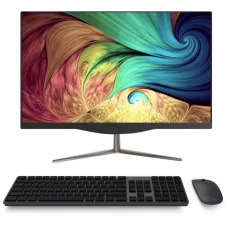
i-Life Zed PC all in one PC
৳31,500

৳271 Cashback
৳232 Cashback
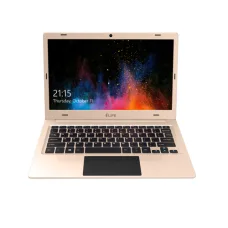
i-Life Zed Air H2 14 Inch Laptop
৳23,200
৳310 Cashback
৳305 Cashback
৳271 Cashback
i-Life is a consumer technology brand associated with affordable computing devices designed for everyday digital needs. The brand is particularly relevant to customers looking for practical laptops, tablets, notebooks and other personal technology products where portability, straightforward operation and value for money are important considerations. Depending on the market and model, i-Life products can appeal to students, home users, office workers and customers seeking an economical computing solution.
For customers in Bangladesh, choosing an i-Life product should be based on the exact model, processor platform, memory, storage, display, battery condition, operating system, connectivity and intended workload. Different models can be designed for very different purposes, so checking the individual product details is essential before purchase.
Unix Network, a computer and technology retailer in Jessore (Jashore), Bangladesh, serves customers looking for laptops, desktop computers, gaming PCs, printers, networking equipment and computer accessories. i-Life products can be considered by customers who want a practical device for study, browsing, office work, entertainment and other everyday computing activities.
i-Life Products in Bangladesh
i-Life products are positioned towards users who want accessible technology for common computing requirements. In Bangladesh, affordability can be an important consideration when selecting a laptop or tablet, particularly for students, families, small businesses and users purchasing a secondary computer.
A suitable i-Life device can provide a convenient way to access online education, web applications, office documents, email, video content and other routine tasks. However, customers should match the product to their workload rather than choosing solely according to its price.
For buyers searching for i-Life products in Bangladesh, the exact model should be checked carefully because specifications, screen sizes, storage configurations, operating systems and hardware capabilities may differ between product generations.
i-Life Laptop and Notebook Solutions
Laptops and notebooks are useful for customers who need computing capability that can be moved between home, classroom, office and other locations. An i-Life notebook can be considered for basic productivity where the workload does not require high-end processing or graphics performance.
Students may use a suitable notebook for assignments, research, online learning and document preparation. Home users can use compatible systems for browsing, communication and entertainment, while office users may require them for word processing, spreadsheets, email and web-based business applications.
Before purchasing an i-Life laptop, customers should consider how demanding their applications are. Basic computing requirements are different from professional photo editing, advanced video production, engineering applications or modern gaming.
i-Life Tablets and Portable Computing
Portable computing devices can be useful when mobility is more important than a traditional desktop-style workstation. Tablets and compact devices are convenient for browsing, reading, online learning, media consumption and lightweight applications when supported by the selected model.
Portability should be evaluated alongside battery capability, display usability, storage, operating-system support and available connectivity. A lightweight device may be convenient for travel, while a larger display may provide greater comfort for extended reading or productivity tasks.
Why Consider i-Life?
The main appeal of i-Life products is their focus on accessible computing for everyday users. Customers who do not require high-end hardware may prefer a device that covers their essential requirements without paying for capabilities they will rarely use.
- Suitable options for everyday computing requirements
- Portable devices for study and home use
- Practical solutions for basic office tasks
- Options designed around value-conscious purchasing
- Useful devices for web browsing and online services
- Suitable choices for selected educational applications
- Compact computing options depending on model
These benefits should always be considered against the capabilities of the exact product. A lower-cost computer is appropriate when its hardware matches the workload, but it may not be suitable for demanding applications.
i-Life for Students
Students often need a computer for online classes, assignments, presentations, research, document creation and communication. For these requirements, a suitable i-Life notebook can provide a practical entry point into personal computing.
Students should prioritise portability, keyboard usability, display quality, battery expectations and compatibility with their required educational applications. Storage requirements should also be considered if the device will hold large numbers of documents, photographs, videos or downloaded learning materials.
Students studying specialised subjects should pay additional attention to software requirements. Accounting, programming, design, engineering and multimedia courses can require more capable hardware than general office or educational workloads.
i-Life for Office Work
Small businesses and office users may require a computer primarily for documents, spreadsheets, email, web applications, communication and business software. An i-Life device can be considered when the selected hardware is capable of handling these tasks comfortably.
Before purchasing for business use, check application compatibility, storage requirements and expected workload. If several employees will use similar devices, standardising the model can simplify maintenance and support.
For organisations that depend heavily on demanding software, customers should compare i-Life models with more powerful business-oriented laptops before making a final decision.
i-Life for Home Users
Home users often need a computer for browsing websites, watching videos, communicating with family members, managing documents, attending online meetings and using everyday applications.
A device selected for these purposes does not necessarily need high-end specifications. Instead, usability, screen comfort, storage capacity, connectivity and reliability may have greater practical importance.
Families purchasing a shared computer should consider how many people will use it and what types of applications they expect to run. A system intended for basic browsing may not be appropriate if another family member later needs it for advanced creative work.
i-Life Performance
Performance depends on the exact processor, memory configuration, storage technology, operating system and application workload. Customers should therefore avoid judging performance from the brand name alone.
Basic office applications and web browsing generally require less processing capability than modern gaming, professional video editing, 3D modelling or advanced software development environments. Selecting hardware according to the workload helps prevent paying for unnecessary performance while also avoiding an underpowered system.
Customers who expect their computing requirements to increase over time should consider future needs before purchasing. A device that is sufficient today may become restrictive if software requirements become more demanding.
Memory and Storage Considerations
Memory affects how comfortably a computer can handle multiple applications and browser tabs, while storage determines how much software, documents and personal data can be kept locally.
Users who primarily browse the web and work with documents may have different requirements from customers storing large media libraries. Students should consider their course materials, while business users should evaluate the size of their working files.
Customers should check whether the selected i-Life model allows hardware upgrades. Some compact devices may provide limited upgrade flexibility, making the original configuration particularly important.
Display Quality and Screen Size
The display is one of the most frequently used parts of a laptop or portable computer. Screen size can influence portability, while resolution and panel characteristics affect visual comfort and workspace availability.
Students who carry a laptop every day may prefer a more portable design. Users who spend many hours working with documents may appreciate a larger viewing area.
When choosing a display, consider your typical viewing distance, workspace, application requirements and portability expectations rather than selecting solely according to screen size.
Battery and Portability
Battery performance can vary according to hardware configuration, software workload, brightness, wireless activity and battery condition. Customers should therefore treat advertised battery figures as usage-dependent rather than assuming a fixed operating time.
For mobile users, portability includes more than battery life. Weight, charger size, physical dimensions and construction can all affect how convenient the device is to carry.
Connectivity and Compatibility
Connectivity is important for customers who need to connect external devices such as printers, storage drives, displays, keyboards, mice and networking equipment.
Before purchasing an i-Life product, check the available ports and wireless connectivity against your existing peripherals. A computer may be perfectly suitable for basic use but inconvenient if it lacks a connection required for a particular device.
| Requirement | What to Check |
|---|---|
| Office applications | Processor capability, memory and operating-system compatibility |
| Online learning | Webcam, microphone, connectivity and application support |
| External storage | Available compatible data ports |
| External display | Supported video-output connection |
| Wireless networking | Supported wireless standards and router compatibility |
| Printer connection | Available interface and operating-system support |
Build Quality and Durability
Durability is an important consideration when purchasing any portable computer. Students and mobile professionals may carry their devices frequently, exposing them to repeated movement and handling.
Customers should inspect the keyboard, hinges, chassis, ports and display assembly when possible. Careful handling can also extend the usable life of a laptop or tablet.
For a portable device, using a suitable carrying case and avoiding excessive pressure on the display can help protect the hardware during transportation.
i-Life for Everyday Productivity
Everyday productivity includes activities such as writing documents, managing spreadsheets, browsing websites, checking email, attending online meetings and accessing cloud services. A suitable i-Life computer can handle these tasks when its hardware and software configuration are appropriate.
Users should identify their most frequently used applications before buying. A browser-heavy workflow may benefit from sufficient memory, while users working with large spreadsheets may need greater processing capability.
i-Life for Online Learning
Online learning can require a combination of reliable internet connectivity, a usable display, audio input and output, a webcam where necessary and compatible educational software.
Students should check whether the device supports the applications used by their school, college or university. Browser-based learning platforms may have different requirements from specialised desktop applications.
i-Life for Entertainment
Portable computers can also be used for streaming video, browsing social platforms, listening to music and accessing online entertainment. The experience depends on the display, speakers, network connection and hardware capabilities of the particular model.
Customers should remember that entry-level hardware may not be designed for demanding modern games or advanced multimedia workloads. If gaming is a major requirement, a dedicated gaming laptop or gaming PC may be a better fit.
i-Life and Gaming
Customers interested in gaming should evaluate i-Life models carefully. Basic or casual games may run on hardware that is not intended for demanding titles, but modern high-performance games often require stronger processors, dedicated graphics and faster memory configurations.
If gaming is the primary purpose, Unix Network can help customers compare suitable gaming laptops or gaming PCs according to their budget and performance requirements instead of selecting a general-purpose device that may not meet the workload.
i-Life for Small Businesses
Small businesses often need practical computing devices for accounting, inventory management, communication, invoicing, browsing and office productivity. An appropriately configured i-Life system can be considered for lightweight business workflows.
Businesses should evaluate software compatibility, data storage, backup requirements and expected service life before purchasing. If the computer will run specialised accounting, design or enterprise software, confirm the application's hardware requirements first.
Things to Consider Before Buying i-Life
- Identify the exact product model.
- Check the processor generation and capability.
- Review the installed memory.
- Confirm storage type and capacity.
- Check display size and resolution.
- Review available connectivity options.
- Confirm operating-system compatibility.
- Consider battery expectations for portable use.
- Check whether upgrades are possible.
- Match the hardware to your applications.
- Confirm current price and availability.
- Review warranty and after-sales terms.
Who Should Buy i-Life?
i-Life products can be considered by students, home users, light office users, families and customers looking for an affordable computing device for everyday activities. The brand can be particularly relevant when the primary requirement is browsing, document work, online education, communication and general multimedia use.
Customers with demanding professional requirements should compare the available hardware carefully. Workloads involving advanced graphics, professional video editing, engineering software, 3D applications or high-end gaming may require a more powerful computer.
Who Should Consider Another Type of Computer?
If performance is the highest priority, customers should not choose a device simply because it has an attractive price. Professional creators, engineers, developers running demanding environments and serious gamers may need hardware designed specifically for intensive workloads.
Likewise, customers who need extensive upgrade capability should examine the internal architecture before purchasing a compact notebook or tablet.
i-Life Price in Bangladesh
The price of an i-Life product in Bangladesh depends on the exact model, hardware configuration, product condition, availability and warranty arrangement. Different models can target completely different users, so comparing prices without comparing specifications can produce misleading conclusions.
Customers searching for i-Life price in Bangladesh should identify the exact model number and compare its processor, memory, storage, display, connectivity and other relevant features.
Unix Network can provide current pricing and availability information for available i-Life products. Customers in Jessore can also discuss their requirements locally before choosing a suitable device.
i-Life in Jessore and Jashore
Customers searching for i-Life products in Jessore can contact Unix Network for information about available models, pricing and suitable alternatives. The showroom serves the local technology market while also supporting customers looking for computers and accessories throughout Bangladesh.
Jashore is the official spelling of the district, although Jessore remains widely used in online searches. Both terms refer to the same local market when customers are searching for computer stores and technology products in the area.
Why Buy i-Life from Unix Network?
Unix Network is a computer store in Jessore serving customers who need laptops, desktop computers, gaming PCs, printers, networking equipment and related accessories. Customers can discuss their intended workload before selecting an i-Life device or comparing it with alternative products.
- Local showroom in Jessore
- Computer and laptop product selection
- Guidance based on practical requirements
- Compatibility assistance
- Current product pricing and availability information
- Warranty guidance where applicable
- After-sales customer support
- Delivery options for customers across Bangladesh
The goal is to help customers purchase a computer that fits their actual requirements rather than selecting hardware based only on brand recognition or advertised features.
Buying i-Life Products Online in Bangladesh
When purchasing an i-Life device online, customers should carefully check the exact model and product description. Portable computers can have different configurations under similar product names, making model identification particularly important.
Before placing an order, confirm the processor, memory, storage, display, operating system, connectivity, warranty and product condition where applicable. Customers should also verify current stock because technology inventory can change quickly.
Warranty Information
Warranty coverage can vary depending on the exact i-Life product, distributor, importer and purchase arrangement. Customers should confirm the applicable warranty period and conditions before completing a purchase.
Keeping purchase documentation is recommended for future warranty or support requirements. Warranty coverage may distinguish between manufacturing-related faults and damage caused by misuse, accidents or unauthorised modifications.
After-Sales Support
After-sales assistance can be valuable when customers need help with configuration, compatibility or warranty procedures. Unix Network supports customers according to the applicable terms associated with products purchased through the store.
When reporting a technical issue, customers should provide the exact product model and describe the problem clearly. This information can help determine whether the issue is related to configuration, software, compatibility or hardware.
Delivery Across Bangladesh
Customers outside Jessore can enquire about delivery arrangements for available i-Life products. Buyers should confirm stock status, price, delivery conditions, payment requirements and warranty details before ordering.
Portable computers should be handled carefully during transportation. Customers should inspect the package and device upon receiving the order and follow the applicable support procedure if any issue is identified.
Frequently Asked Questions About i-Life
What is i-Life?
i-Life is a consumer technology brand associated with affordable computing products such as laptops, notebooks, tablets and other personal electronic devices. The exact range varies by market and product generation.
Are i-Life laptops good for students?
A suitable i-Life laptop can be useful for students whose workloads mainly involve browsing, online learning, documents, presentations and other lightweight applications. Students using demanding specialist software should choose hardware accordingly.
Can i-Life laptops be used for office work?
Yes, an appropriately configured model can be used for common office activities such as documents, spreadsheets, email, web applications and communication. The exact hardware should be matched to the business software being used.
Is i-Life suitable for gaming?
Suitability depends on the exact model and game. General-purpose i-Life devices may be appropriate for lightweight or casual gaming, while demanding modern games generally require substantially stronger gaming hardware.
Where can I buy i-Life products in Jessore?
Customers in Jessore can contact Unix Network to enquire about available i-Life products, current prices and suitable alternatives.
Does Unix Network deliver i-Life products across Bangladesh?
Unix Network serves customers throughout Bangladesh and can provide information about delivery arrangements for available products.
How do I choose the right i-Life laptop?
Start by identifying your applications and workload. Then compare processor capability, memory, storage, display, battery expectations, connectivity, operating-system support and upgrade possibilities.
What should I check before buying an i-Life laptop?
Check the exact model number, processor, memory, storage, display, ports, operating system, battery condition where applicable, warranty and current availability.
Can i-Life devices be used for online classes?
Compatible models can be used for online learning when they support the required browser, application, internet connection, microphone, speakers and webcam functions.
Does every i-Life model have the same specifications?
No. Specifications can differ substantially between models and generations. Customers should always verify the exact product configuration before purchasing.
Final Thoughts on i-Life
i-Life can be a practical option for customers seeking accessible computing products for everyday use. Its suitability depends heavily on the individual model and the customer's workload. Students, home users and light office users may find a properly selected device useful for browsing, education, documents, communication and entertainment.
The most important part of buying an i-Life product is matching the hardware to the intended purpose. Check the processor, memory, storage, display, connectivity, operating system, battery expectations and warranty before making a decision.
For customers in Jessore and across Bangladesh, Unix Network can assist with i-Life product selection, current pricing, availability, delivery and applicable after-sales support. A careful comparison based on real-world requirements can help ensure that the chosen device provides useful performance and practical value for everyday computing.