
Specification
| Display Features | |
| Resolution | 1200-1800-2400-3600DPI |
| BASIC INFORMATION | |
| Number of Keys | 4 |
| Others | RGB Lighting Effects |
| Main Features | |
| Connection Type | Wired USB 2.0 |
| Cable Length | 1.5M |
| Physical Specification | |
| Color | Black |
Description
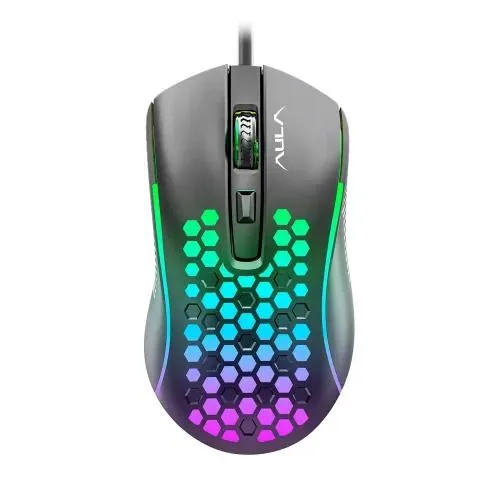
The AULA S11 RGB Wired Gaming Mouse is a lightweight, straightforward gaming mouse designed for users who want responsive wired control, adjustable DPI settings and colourful RGB-style lighting without paying for unnecessary advanced features. With four buttons, a USB 2.0 wired connection, 1200–3600 DPI adjustment and an approximately 1.5-metre cable, the S11 is suited to everyday gaming, esports, office work and general PC use.
AULA S11 RGB Wired Gaming Mouse in Bangladesh
The AULA S11 is positioned as a budget-friendly wired gaming mouse for PC and laptop users who want a gaming-oriented design with adjustable sensitivity. Its four-button layout keeps the control scheme simple, while the available DPI levels allow the pointer or cursor speed to be changed according to the game, application or user's preference.
The S11 uses a wired USB connection, so there is no internal battery to charge and no wireless receiver to keep track of. Simply connect the mouse to a compatible computer and it is ready for normal use. This makes it suitable for gamers, students, home users and office users who prefer the consistency of a wired peripheral.
Its rainbow-style backlighting adds a gaming appearance to the mouse, while the compact body and relatively low weight make it suitable for everyday desktop use. The exact lighting behaviour is model-dependent, so buyers should not assume that the lighting can be customised through software; the documented S11 specification lists the mouse as a model without software.
1200–3600 DPI Adjustable Sensitivity
The AULA S11 provides selectable DPI levels of 1200, 1600, 2400 and 3600 DPI. DPI, or dots per inch, describes how much cursor movement is produced for a given physical movement of the mouse.
A lower DPI setting generally allows more deliberate, slower cursor movement, which can be useful when precision is important. A higher setting allows the cursor to travel farther across the screen with less physical mouse movement, which some users prefer for faster navigation or certain gaming situations.
The four available settings give users a practical range without making the mouse unnecessarily complicated. Players can choose a sensitivity that feels comfortable for their preferred game, while office users can select a setting that makes normal desktop navigation convenient.
Optical Tracking for Everyday Gaming
The AULA S11 uses an optical tracking system designed to detect mouse movement and translate it into cursor movement on the screen. Optical mice are widely used because they provide straightforward tracking without the mechanical tracking components found in older mouse designs.
For normal gaming, browsing, document work and general computer use, accurate optical tracking is more important than simply having an extremely high advertised DPI number. The quality of the mouse surface, sensor implementation, firmware and user's sensitivity settings can all influence the practical experience.
The S11 is therefore best viewed as a practical entry-level gaming mouse rather than a specialised competitive mouse built around a premium esports sensor.
Four-Button Gaming Layout
The AULA S11 is documented with four keys. This provides a simple control layout that is easy to learn and suitable for users who do not require a large number of programmable buttons.
Four-button gaming mice can work particularly well for general gaming genres where most actions are performed through the keyboard and only a small number of additional mouse controls are required. They can also be useful for users transitioning from a standard office mouse to a gaming-oriented model.
It is important to distinguish the S11 from the AULA S11 Pro. The S11 Pro is a separate model with six keys, whereas the AULA S11 covered here is the four-key version.
Rainbow RGB-Style Backlighting
One of the most noticeable features of the AULA S11 is its colourful backlighting. The S11 is commonly documented with rainbow backlight or RGB lighting effects, giving it a more gaming-focused appearance than a conventional office mouse.
The lighting is primarily an aesthetic feature. It does not directly increase tracking accuracy or gaming performance, but it can complement an RGB gaming keyboard, gaming headset, illuminated PC case and gaming desk setup.
The documented S11 is listed as a model without software, so buyers should not expect the same software-based RGB customisation found on more advanced programmable AULA mice. The available lighting effect is best treated as part of the mouse's built-in design.
Lightweight 81g Design
The AULA S11 has a documented weight of approximately 81 grams. A relatively lightweight mouse can be easier to move repeatedly across a mouse pad, which can be useful in games that require frequent cursor or camera movement.
Weight preference is personal. Some gamers prefer heavier mice because they feel more planted, while others prefer lighter models for quick movement. At around 81 grams, the S11 sits comfortably within the lightweight category for a basic wired gaming mouse.
The mouse measures approximately 123 x 63 x 42mm according to commonly documented specifications. This compact form factor can suit users who prefer a relatively small or manageable gaming mouse.
1.5 Metre Wired USB Connection
The S11 uses a wired USB 2.0 connection with an approximately 1.5-metre cable. A wired connection provides continuous power directly from the computer, eliminating the need for batteries or wireless charging.
The 1.5-metre cable provides enough reach for many desktop PC and laptop setups. Users should still consider the position of their computer and monitor before purchasing, particularly if the PC is located far away from the desk.
Keeping the cable free from sharp bends and unnecessary tension can also help maintain a reliable connection over extended use.
AULA S11 RGB Gaming Mouse Specifications
| Specification | Details |
|---|---|
| Brand | AULA |
| Model | S11 |
| Product Type | Wired Gaming Mouse |
| Number of Keys | 4 |
| Connection | Wired USB |
| USB Interface | USB 2.0 |
| DPI Levels | 1200 / 1600 / 2400 / 3600 DPI |
| Maximum DPI | 3600 DPI |
| Lighting | Rainbow / RGB-style backlighting |
| Cable Length | Approximately 1.5 metres |
| Tracking | Optical |
| Weight | Approximately 81g |
| Dimensions | Approximately 123 x 63 x 42mm |
| Colour | Black |
| Software | Not supported on the documented S11 configuration |
| Operating Systems | Windows and Mac on documented configurations |
| Warranty | Commonly listed as 1 year in Bangladesh; confirm seller-specific terms |
Gaming Performance
The AULA S11 is aimed at gamers who need dependable basic mouse control rather than an extensive set of programmable features. Its adjustable DPI range allows users to choose between slower precision-oriented movement and faster cursor movement.
For casual gaming, strategy games, adventure games, racing titles and many general-purpose PC games, the S11 provides the essential functions required from a gaming mouse. Its wired connection also means that the mouse does not depend on battery charge during a gaming session.
For highly competitive esports players, however, it is worth comparing the S11 with a higher-end gaming mouse offering a more advanced sensor, higher polling rate, more configurable controls and dedicated software. The S11 is better positioned as an affordable gaming mouse for everyday players.
Useful for FPS Gaming
First-person shooter games often require precise mouse movement, particularly when aiming. The S11's selectable DPI settings allow users to experiment with sensitivity until they find a comfortable balance between speed and control.
A lower sensitivity can provide more physical mouse movement for precise aiming, while higher sensitivity can make rapid camera movement easier. The best setting depends on the game, mouse pad size and player's personal preference.
The S11 should not be marketed as a dedicated professional esports mouse, but its adjustable DPI and lightweight wired design provide a reasonable starting point for gamers moving beyond a basic office mouse.
Suitable for MOBA and Strategy Games
MOBA and strategy games often combine mouse movement with keyboard shortcuts. The four-button layout of the S11 provides simple additional controls while leaving the majority of commands to the keyboard.
For users who do not need numerous side buttons or extensive macro functionality, the simpler design can actually be an advantage. There are fewer controls to learn and less complexity when setting up the mouse.
Suitable for Office and Everyday Work
The AULA S11 is not limited to gaming. Its USB connection makes it suitable for ordinary desktop tasks such as web browsing, document editing, spreadsheet work, graphic applications and file management.
The adjustable DPI settings can also be useful outside gaming. Users can select a comfortable cursor speed depending on their monitor resolution, desktop size and personal preference.
The RGB-style backlighting gives the mouse a gaming appearance, so users seeking an extremely understated office design may prefer a conventional business mouse. For a mixed gaming-and-work computer, however, the S11 can serve both purposes.
Suitable for PC and Laptop Users
The AULA S11 is designed around a standard USB wired connection, making it suitable for desktop computers and compatible laptops. This is particularly convenient for users who do not want to install wireless drivers or manage a separate receiver.
On desktop PCs, the cable can be routed alongside the keyboard and monitor cables. On laptops, the mouse can provide a larger and more comfortable pointing device than the built-in touchpad for extended work or gaming.
Ergonomic Shape for Everyday Use
The S11 has a compact ergonomic-oriented shape intended to fit naturally in the hand. Mouse comfort is highly individual, however, and the best grip depends on hand size and whether the user prefers palm, claw or fingertip control.
At approximately 81 grams, the mouse is light enough to move easily without feeling excessively bulky. Users with larger hands may prefer a larger mouse, while users with smaller or medium-sized hands may find the compact dimensions more comfortable.
Plug-and-Play Simplicity
One of the biggest advantages of a basic wired gaming mouse is its simple setup. Connect the USB cable to a compatible computer and the operating system can normally recognise the mouse without requiring a separate wireless receiver or battery setup.
The documented AULA S11 does not rely on dedicated configuration software, which keeps the product straightforward. This can be an advantage for users who simply want to connect the mouse and start using it.
At the same time, users looking for programmable macros, extensive button remapping or advanced RGB control should consider a different AULA model designed with dedicated software functionality.
AULA S11 Versus AULA S11 Pro
The AULA S11 and AULA S11 Pro have similar names but should not be treated as the same product. The S11 is the simpler four-key version, while the S11 Pro is documented with six keys.
| Feature | AULA S11 | AULA S11 Pro |
|---|---|---|
| Keys | 4 | 6 |
| DPI | 1200 / 1600 / 2400 / 3600 DPI | 1200 / 1800 / 2400 / 3600 DPI |
| Connection | Wired USB | Wired USB |
| Cable | Approximately 1.5m | Approximately 1.5m |
| Lighting | Rainbow backlight | Rainbow backlight |
| Software | Documented without software | Documented without software |
If you need additional physical buttons, the S11 Pro may be the more appropriate model. If you prefer a simpler four-button design, the standard S11 is the better match.
Advantages of AULA S11 RGB Wired Gaming Mouse
- Adjustable DPI up to 3600 DPI
- Four practical mouse keys
- Wired USB connection for consistent operation
- USB 2.0 interface
- Rainbow/RGB-style backlighting
- Lightweight approximately 81g body
- Compact dimensions suitable for everyday desktop use
- Approximately 1.5-metre cable
- Optical tracking
- Simple plug-and-play operation
- No battery charging required
- Suitable for gaming, office work and general PC use
Things to Consider Before Buying
The AULA S11 is designed as a straightforward budget gaming mouse, so it does not offer every feature found on advanced gaming peripherals. The documented model has four keys and does not include dedicated configuration software.
If you need multiple programmable side buttons, hardware profile storage, macro recording, advanced RGB customisation or a premium esports sensor, you should compare the S11 with higher-tier gaming mice.
It is also important to remember that a maximum DPI of 3600 does not by itself determine gaming performance. Sensor accuracy, tracking consistency, polling behaviour, surface quality, ergonomics and user settings all contribute to the experience.
Mouse Pad Compatibility
The S11 can be paired with a suitable cloth, speed or control mouse pad. A clean and reasonably consistent surface helps the optical sensor track movement predictably.
For gaming, a larger mouse pad can be particularly useful if you prefer lower DPI and larger physical movements. For ordinary office work, a compact mouse pad may be sufficient.
Who Should Buy the AULA S11?
- Budget-conscious PC gamers
- Students looking for an affordable gaming mouse
- Users upgrading from a basic office mouse
- Gamers who prefer a lightweight wired mouse
- Users who want adjustable DPI without complicated software
- People building an affordable RGB gaming setup
- PC and laptop users who prefer wired USB peripherals
- Casual gamers who do not need numerous programmable buttons
- Office users who also use the same computer for gaming
Who May Want a Different Gaming Mouse?
Professional or highly competitive esports players may prefer a mouse with a more advanced sensor, higher polling rates, extensive software controls and a shape specifically optimised for their grip and game.
MMO players and productivity users who rely heavily on additional mouse shortcuts may also benefit from a model with more programmable buttons.
Likewise, users who want a completely cable-free setup should consider a wireless gaming mouse instead of the S11.
Why Buy AULA S11 from Unix Network?
Unix Network is a computer and technology retailer in Jessore, offering gaming peripherals, computers, laptops, networking equipment, printers and other IT accessories. The AULA S11 is a suitable option for customers looking for an affordable gaming mouse that can also handle normal computer work.
When choosing a gaming mouse, customers should consider hand size, preferred grip, game type, required buttons, sensitivity and whether they want wired or wireless connectivity. A simple comparison based on these factors can be more useful than selecting a mouse only because it has RGB lighting or a high DPI number.
Customers in Jessore and surrounding areas can consider Unix Network when looking for AULA gaming accessories, while buyers elsewhere in Bangladesh can use the store's online ordering and delivery arrangements subject to the applicable service and warranty conditions.
AULA S11 Gaming Mouse for a Budget Gaming PC
Building an affordable gaming PC often requires careful allocation of the budget between the main components and peripherals. The AULA S11 can provide basic gaming mouse functionality without requiring a large portion of the overall setup budget.
It can be combined with an entry-level mechanical keyboard, gaming headset, mouse pad and suitable gaming monitor to create a complete desktop gaming setup. The RGB-style illumination also helps give an inexpensive gaming desk a more coordinated appearance.
For users upgrading an existing office computer into a gaming setup, the S11 can also be a simple first peripheral upgrade before moving to more advanced gaming equipment later.
Frequently Asked Questions
What is the DPI of the AULA S11?
The AULA S11 has selectable DPI settings of 1200, 1600, 2400 and 3600 DPI, with 3600 DPI being the maximum documented setting.
How many buttons does the AULA S11 have?
The standard AULA S11 is documented with four keys. It should not be confused with the AULA S11 Pro, which is a separate six-key model.
Is the AULA S11 wireless?
No. The AULA S11 is a wired gaming mouse that connects to a computer through USB.
Does the AULA S11 have RGB lighting?
Yes. The S11 is documented with colourful rainbow/RGB-style backlighting that gives the mouse a gaming-focused appearance.
What is the cable length of the AULA S11?
The documented cable length is approximately 1.5 metres.
What type of connection does the AULA S11 use?
It uses a wired USB 2.0 connection.
How much does the AULA S11 weigh?
The AULA S11 is documented at approximately 81 grams, making it a relatively lightweight gaming mouse.
What are the dimensions of the AULA S11?
The commonly documented dimensions are approximately 123 x 63 x 42mm.
Does the AULA S11 require software?
The documented AULA S11 specification lists the model as being supplied without dedicated software. Its main functionality is therefore designed to work without a separate configuration application.
Can I use the AULA S11 for office work?
Yes. The mouse can be used for browsing, documents, spreadsheets, general navigation and other everyday computer tasks. Its gaming styling and backlighting simply give it a more gaming-oriented appearance.
Is the AULA S11 good for gaming?
The S11 is suitable for casual and everyday gaming, offering adjustable DPI, optical tracking, four keys, a lightweight body and a wired connection. Competitive esports users with specialised requirements may prefer a higher-end gaming mouse.
Can I use the AULA S11 with a laptop?
Yes. It can be used with a laptop that provides a compatible USB port. The wired connection makes it straightforward to use without Bluetooth pairing or a wireless receiver.
Does the AULA S11 need batteries?
No. It is a wired mouse and receives power through its USB connection, so there is no internal battery that needs regular charging.
Is the AULA S11 suitable for FPS games?
Yes. Its adjustable DPI settings allow players to choose a sensitivity that suits FPS gameplay. However, players seeking professional competitive performance may want a higher-end mouse with more advanced sensor and configuration features.
What is the difference between AULA S11 and S11 Pro?
The standard S11 has four keys, while the S11 Pro has six. Their DPI specifications also differ slightly, so buyers should check the exact model before ordering.
Does the AULA S11 support programmable macros?
The documented standard S11 is listed without dedicated software, so it should not be treated as a software-programmable macro mouse. Buyers requiring macro functionality should choose a model specifically designed with programmable controls.
Final Verdict
The AULA S11 RGB Wired Gaming Mouse is a practical entry-level gaming peripheral for users who want a lightweight wired mouse with adjustable sensitivity and colourful gaming-style lighting. Its 1200–3600 DPI range, four-button layout, optical tracking, USB 2.0 connection and approximately 1.5-metre cable cover the essential requirements for everyday gaming and general computer use.
Its simplicity is one of its main advantages. There is no battery to recharge, no wireless receiver to manage and no complicated software requirement on the documented configuration. For casual gamers, students and users building an affordable gaming PC, the S11 provides a straightforward way to add gaming functionality to a desktop or laptop.
Customers looking for an AULA S11 RGB Wired Gaming Mouse in Jessore can consider Unix Network for computer accessories and gaming peripherals. Before purchasing, compare your hand size, preferred grip, required number of buttons and gaming requirements to make sure the four-key S11 is the right fit for your setup.