৳100 Cashback
Showing 1 to 4 of 4 (1 Pages)
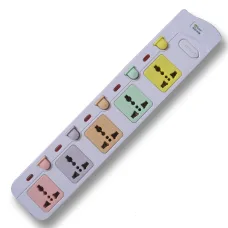
Many MTS is a practical power-accessory brand available in the Bangladesh computer and electronics market, particularly known for multi-plug power strips, extension sockets and desktop power accessories. The range is designed for users who need to connect several electrical devices from a convenient shared power source, making it useful for computer desks, home entertainment setups, offices, shops, classrooms and general workspaces.
Many MTS products are particularly relevant to computer users because a modern workstation may require power for a desktop computer, monitor, speakers, printer, router, charger and other peripherals at the same time. Models such as the Many MTS-144, MTS-154, MTS-157 and MTS-158 are found in the Bangladesh market, while other MTS-series power strips use different outlet arrangements, cable lengths and plug configurations. Product specifications can vary between models, so buyers should always check the exact version before purchase.
A power strip is a simple accessory, but selecting the correct model is important because electrical equipment can have different power requirements. Many MTS power strips provide multiple sockets from a single connection point, helping users organise equipment around a desk or workstation without requiring a separate wall outlet for every device.
Many MTS products are available in different configurations, including multi-port extension sockets and models with varying cable lengths. Some products are designed around three-pin connections, while others use two-pin arrangements. The correct choice depends on the devices being connected, available wall sockets, grounding requirements and the electrical installation where the product will be used.
For customers searching for Many MTS power strip price in Bangladesh, comparing the number of outlets alone is not enough. Cable length, plug configuration, grounding, switch arrangement, maximum electrical load and construction quality should also be considered.
Many MTS is positioned in the Bangladesh market as an everyday electrical and computer-accessory solution rather than a specialised computing hardware manufacturer. Its products are particularly useful where several devices need to be powered from one convenient location.
The brand is commonly encountered in the multi-plug and power-strip category. Available models can differ significantly in outlet count, cable length and physical configuration, making model-level selection important.
For a computer user, the purpose of a Many MTS power strip is not to increase the electrical capacity of a wall outlet. Instead, it provides additional connection points and convenient cable routing. The connected devices must remain within the electrical limits of the power strip and the building's electrical circuit.
The Many MTS-144 is a four-port power-strip option listed in the Bangladesh market. Its multi-socket arrangement can be useful for users who need to power several devices from one convenient location.
A four-port configuration can work well for smaller computer desks, basic office workstations, networking corners and entertainment areas. Before connecting equipment, users should check the electrical requirements of every device and make sure the combined load is appropriate for the power strip and circuit.
The MTS-144 can be considered when the number of required outlets is moderate and a straightforward extension solution is preferred over a larger power-distribution unit.
The Many MTS-154 is another multi-port power solution available through Bangladesh computer and electronics retailers. It can be useful for home offices, workstations, small business environments and areas where several electrical devices need to be positioned together.
When selecting an MTS-154 or similar model, buyers should check the exact socket arrangement, cable configuration and electrical rating of the current product because specifications may vary between product versions and market listings.
The Many MTS-157 provides five power outlets and is designed for users who need additional connection points. A five-port arrangement can be convenient for computer setups containing a desktop PC, monitor, speakers, printer and networking equipment.
Some Bangladesh market listings describe MTS-157 variants with different cable lengths and plug configurations. Buyers should therefore confirm the exact version before ordering rather than assuming that every MTS-157 listing has identical specifications.
For a home workstation, the additional outlet can help reduce the need for multiple extension devices. A cleaner arrangement can also make cable management easier around the desk.
The Many MTS-158 is a five-port power-strip model available in Bangladesh. It is suitable for users who require multiple electrical connections from a single extension point.
It can be useful around computer desks, office workstations, entertainment areas and general-purpose home setups. Some market listings identify versions with longer cables, making the model useful where the wall outlet is located farther from the equipment.
Customers should confirm the cable length and plug configuration of the exact MTS-158 variant before purchase, particularly when the product will be installed behind a large desk or in a fixed workspace.
Computer workstations frequently require several power connections. A typical desktop arrangement may include a computer, monitor, speaker system, router, printer, scanner, USB charger and other peripherals. Using a suitable power strip can make the physical arrangement more convenient.
However, a power strip should not be confused with a UPS or voltage stabiliser. A basic extension socket primarily provides additional connection points. It does not automatically provide battery backup, voltage regulation or the same level of electrical protection found in dedicated power-protection equipment.
Customers who need protection from power interruptions or unstable voltage should consider whether a UPS, surge-protection device or voltage-regulation solution is more appropriate for their particular equipment.
Home offices increasingly contain several electrical devices in a relatively small space. A Many MTS power strip can help organise connections for computers, monitors, networking equipment, chargers, speakers and other low-to-moderate power devices.
A suitable cable length can make a noticeable difference. A short cable may be appropriate when the power strip sits directly beside a desk, while a longer extension can be useful when the wall socket is positioned farther away.
Users should avoid running extension cables where they can become a tripping hazard. The power strip should ideally be placed in a stable, accessible position where switches and plugs can be reached without stretching cables.
Gaming setups can contain a desktop gaming PC, monitor, speakers, router, lighting, charging accessories and additional displays. A multi-port power strip can provide a convenient central connection point for these peripherals.
Gaming PCs can consume substantially more power than ordinary office equipment, particularly when equipped with powerful graphics cards and processors. Therefore, gamers should calculate the approximate combined electrical load before connecting multiple devices to one power strip.
A Many MTS power strip should be selected according to its actual electrical rating rather than simply the number of available sockets. The number of ports indicates how many devices can be connected physically; it does not indicate how much total power the strip can safely supply.
Office environments often have several low-power devices positioned around each employee's workspace. Computers, monitors, speakers, chargers, printers and networking accessories may all require electrical connections.
A suitable multi-plug can simplify desk organisation and reduce unnecessary cable stretching. For larger offices, power distribution should be planned carefully so that electrical circuits are not overloaded.
Businesses should also consider the placement of power strips. They should remain accessible for inspection and should not be covered by papers, carpets or other materials that could interfere with ventilation or inspection.
Small offices and home users may need to power routers, switches, printers, monitors and computers in the same area. A multi-port extension socket can make these installations easier to organise.
Networking equipment usually consumes relatively modest amounts of electricity, but multiple devices can still create a crowded power arrangement. A suitable power strip can help centralise the connections and make equipment maintenance easier.
Users should pay attention to equipment power adapters. Large adapters can occupy adjacent sockets, so the physical spacing of the power strip can be as important as the number of outlets.
Home entertainment areas can contain televisions, soundbars, media players, game consoles, streaming devices, subwoofers and charging equipment. A multi-socket power strip can provide a convenient way to connect these devices in one area.
For entertainment systems, cable length is especially useful when the wall outlet is positioned behind furniture. A correctly sized extension reduces the temptation to connect several extension strips together.
Users should avoid daisy-chaining multiple power strips because this can increase electrical and safety risks. One appropriately rated power-distribution solution is generally preferable to connecting several extension units together.
Cable length should be selected according to the distance between the wall outlet and the equipment. A cable that is too short can make installation inconvenient, while an unnecessarily long cable can create excess cable around the workspace.
Many MTS products are available with different cable lengths depending on the model. Some Bangladesh market listings show configurations ranging from shorter desktop extensions to longer cables intended for wider placement.
Before buying, measure the required distance and allow enough length for safe routing without stretching the cable.
Many MTS products are available with different plug and socket configurations. Two-pin and three-pin designs serve different electrical arrangements, so customers should choose according to the devices and wall outlets being used.
A three-pin connection can provide an earth connection when the complete electrical installation and product support it. Customers should never assume that every three-pin-looking product provides the same grounding arrangement. The actual product specification should be verified.
When replacing an existing extension socket, checking the old unit's plug arrangement and the electrical requirements of the connected equipment is a sensible starting point.
Power strips are electrical accessories and should be used responsibly. The total connected load must remain within the rated capacity of the power strip and the electrical circuit.
For high-power appliances such as heaters, kettles, ovens or other heavy electrical loads, users should verify whether the particular power strip is designed for that application. A computer-oriented multi-plug should not automatically be treated as suitable for every household appliance.
A good power strip should be convenient to operate while remaining physically stable during normal use. Socket spacing, switch placement, cable flexibility and housing construction all influence the user experience.
For computer desks, compact construction can help keep the accessory organised beneath or beside the workstation. For larger equipment arrangements, a longer cable can provide greater installation flexibility.
Because power strips are frequently plugged and unplugged, users should avoid pulling the product by its cable. Holding the plug body when disconnecting equipment can reduce unnecessary strain on the cable connection.
Students using laptops, desktop computers, monitors, chargers, desk lamps and networking equipment can benefit from a convenient multi-socket arrangement. A compact power strip can help organise several low-power devices around a study desk.
Students living in shared accommodation may also need to consider how many devices will be connected simultaneously. A power strip with suitable outlet spacing can make everyday charging and study equipment easier to manage.
Small businesses often need affordable electrical accessories for computers, printers, routers, scanners and other office equipment. Many MTS power strips can provide a straightforward way to expand the number of available connection points.
For business environments, reliability and correct electrical loading should take priority over simply choosing the cheapest option. Offices should also inspect power accessories regularly and replace products that show signs of damage or overheating.
Retail counters can contain computers, barcode scanners, receipt printers, networking equipment, displays and charging devices. A suitable power strip can help keep these connections organised behind the counter.
Retail businesses should select a model based on the complete electrical arrangement and should avoid placing the extension socket where customers can accidentally pull or damage the cable.
Choosing the right Many MTS model is straightforward when the intended application is clear. Start by counting the number of devices that need simultaneous connection, then check their approximate power requirements.
If the setup contains sensitive equipment such as a desktop PC, NAS, workstation or professional networking system, consider whether a UPS or dedicated surge-protection solution is more appropriate than a basic extension strip.
The price of Many MTS power strips in Bangladesh varies according to the model, outlet count, cable length, plug arrangement and market availability. Current retail listings show that different MTS models occupy different price ranges, so buyers should compare the exact model number rather than searching only for the Many brand name.
Prices can also change because of stock levels and supplier availability. Customers looking for the latest Many MTS price in Bangladesh should confirm the current price and specifications before ordering.
Unix Network can help customers compare available Many MTS models according to the number of outlets, cable requirements and intended application.
Customers searching for Many MTS power strips in Jessore can contact Unix Network for current availability and product guidance. As a local technology retailer, Unix Network serves computer users, offices, students, businesses and home customers looking for practical computer and electrical accessories.
For customers visiting the local showroom, discussing the intended equipment setup can make product selection easier. Customers can explain how many devices they need to connect and where the power strip will be positioned, allowing the appropriate model to be considered.
Unix Network serves customers in Jessore and throughout Bangladesh with computer hardware, networking equipment, accessories, printing solutions and other technology products. Many MTS power strips are useful additions to these environments because they support the everyday electrical needs of computer workstations and electronics setups.
Customers outside Jessore can order available Many MTS products for delivery across Bangladesh, subject to current stock and delivery conditions. Power strips are compact accessories and are generally convenient to ship, although packaging should protect the sockets, switches and cable during transportation.
For larger business orders, customers should confirm stock quantity before placing the order. This is particularly useful when several workstations require identical power-strip models.
Warranty availability depends on the exact Many MTS model, distributor and applicable sales terms. Some basic electrical accessories may have different warranty conditions from computer hardware, so customers should confirm the warranty status of the selected product before purchase.
Keeping the purchase invoice is recommended for any future support or replacement requirement. Unix Network can assist customers according to the applicable warranty and supplier policy.
A power strip is not a substitute for a UPS. Customers who need battery backup during power failures should consider a UPS designed for their equipment. This is particularly relevant for desktop computers, networking equipment, servers, CCTV systems and other devices where sudden power loss can interrupt work or create data-loss risks.
Similarly, users experiencing significant voltage instability should consider whether voltage regulation or a suitable power-conditioning solution is required. The correct device depends on the electrical problem being addressed.
What is Many MTS?
Many MTS is a product range commonly found in Bangladesh's electrical and computer-accessory market, particularly associated with multi-plug power strips and extension sockets.
What is a Many MTS power strip used for?
It provides multiple electrical connection points from a shared power source, making it useful for computer desks, offices, home entertainment systems and other electronic setups.
How many devices can I connect to a Many MTS power strip?
The physical number depends on the number of available sockets, but the safe electrical load depends on the specific model's rating and the combined power requirements of the connected devices.
Can I use Many MTS for a desktop computer?
Yes, a suitable model can be used for a desktop computer and peripherals when the combined electrical load remains within the product's rated capacity.
Can I connect a gaming PC to Many MTS?
A suitable Many MTS power strip may be used with a gaming PC, but users should check the total load of the computer, monitor and connected peripherals before installation. High-power systems may benefit from a properly rated UPS or dedicated power-protection solution.
Does a Many MTS power strip provide UPS backup?
No. A standard power strip does not provide battery backup. A UPS is required when continued operation during a power failure is needed.
Are Many MTS products available with different cable lengths?
Yes. Different MTS models and variants can have different cable lengths. Customers should confirm the exact model specification before purchase.
Should I buy a two-pin or three-pin Many MTS model?
The choice depends on the electrical system, connected devices and grounding requirements. Customers should select the configuration that matches their intended installation rather than choosing solely by outlet count.
Can I connect one Many MTS power strip to another?
Daisy-chaining power strips is not recommended because it can create additional electrical and safety risks. A single appropriately rated power-distribution solution is preferable.
Is Many MTS available in Jessore?
Availability depends on current stock. Customers can contact Unix Network in Jessore to check available Many MTS models and current pricing.
Does Unix Network deliver Many MTS products across Bangladesh?
Yes. Unix Network serves customers nationwide, subject to current product availability and delivery arrangements.
How do I choose the correct Many MTS model?
Consider the number of required outlets, plug type, cable length, connected-device load, grounding requirements and installation location. Checking the exact model specification before purchase is recommended.
Many MTS provides practical power-distribution accessories for everyday computer, office, home and electronics setups. Its MTS-series power strips are useful when several devices need convenient access to a shared electrical connection, with different models offering varying outlet arrangements and cable configurations.
The best Many MTS power strip is not necessarily the model with the most sockets. Buyers should consider electrical capacity, plug configuration, cable length, grounding, physical installation and the power requirements of connected equipment. For demanding computer systems, users should also distinguish between a basic power strip and a UPS or dedicated power-protection device.
For customers looking for Many MTS products in Jessore, Unix Network provides local purchasing support along with nationwide delivery across Bangladesh. Customers can compare available models, check current pricing and receive practical guidance for home, office, gaming, networking and business applications.