

Top OLED Monitor: Reviews, Prices, and Comparison - Best Picks of [Current Year]
Showing 1 to 15 of 15 (1 Pages)

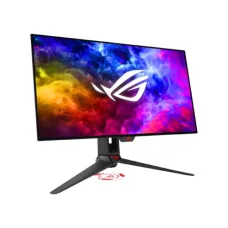

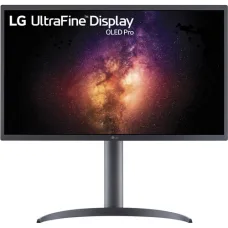
LG 27EP950-B 27 Inch UltraFine OLED Pro 4K Professional Monitor
৳302,000 ৳305,000

LG 27GR95QE-B 27-Inch UltraGear OLED QHD 240Hz 0.03ms Gaming Monitor
৳162,000 ৳164,000

LG 32EP950-B 32 Inch UltraFine OLED Pro 4K Professional Monitor
৳430,000 ৳442,000


LG BX 55 4K UHD Smart OLED Television
Call for Price


LG C1 55 Inch 4K Smart OLED Television With Alexa
Call for Price

OLED Monitor
OLED Monitor Price in Bangladesh
OLED monitors are premium display solutions known for deep blacks, high contrast, fast response times, and vibrant image quality. OLED technology is available in monitors designed for gaming, professional creative work, entertainment, and everyday computing.
The OLED monitor price in Bangladesh varies depending on screen size, resolution, refresh rate, panel technology, HDR capability, connectivity, response time, and brand. Higher-end OLED gaming monitors generally cost more because they combine high resolution, high refresh rates, and advanced display features.
OLED Monitor Price in Jessore
If you are searching for OLED monitor price in Jessore, compare models based on your primary use. A monitor for competitive gaming may require a high refresh rate and extremely fast response time, while a monitor for photo or video editing may place greater importance on color accuracy, resolution, and HDR performance.
Buy OLED Monitor in Bangladesh
Before buying an OLED monitor in Bangladesh, consider screen size, resolution, refresh rate, response time, HDR support, color performance, connectivity, ergonomic adjustment, warranty, and the type of OLED panel used.
It is also important to consider your computer's graphics capability. A high-resolution, high-refresh-rate OLED monitor may require a powerful graphics card to take full advantage of its capabilities.
OLED Gaming Monitor
OLED gaming monitors are popular among gamers because OLED pixels can switch between bright and dark states extremely quickly. This can provide excellent motion clarity and very low response times.
High-refresh-rate OLED gaming monitors are particularly suitable for competitive games where smooth motion and fast visual response are important.
OLED Monitor for Gaming
An OLED monitor can provide an immersive gaming experience with strong contrast, deep blacks, vibrant colors, and fast response. These characteristics are useful in both dark cinematic games and fast-paced competitive titles.
For gaming, pay particular attention to refresh rate, resolution, adaptive synchronization, response time, HDR performance, and the graphics card required to drive the display.
OLED Monitor for PC
OLED monitors can be used with desktop PCs for gaming, office work, programming, browsing, multimedia, content creation, and professional applications.
Because OLED monitors are available in different sizes and resolutions, users can select a display according to their desk space, viewing distance, and workload.
OLED Monitor for Laptop
An OLED monitor can also be connected to a laptop as an external display when the laptop provides a compatible video output. This can be useful for users who want a larger screen for productivity, creative work, gaming, or entertainment.
Check the laptop's HDMI, DisplayPort, USB-C, or Thunderbolt capabilities before purchasing a high-resolution or high-refresh-rate monitor.
OLED Monitor for Office Work
OLED monitors can provide excellent image quality for office work, browsing, documents, spreadsheets, presentations, and multitasking. However, users who display static interfaces for many hours should pay attention to OLED burn-in prevention features and follow the manufacturer's recommendations.
For long office sessions, brightness, text clarity, screen size, resolution, ergonomic adjustment, and viewing comfort should also be considered.
OLED Monitor for Programming
Programmers can benefit from the strong contrast of OLED displays, particularly when using dark-themed code editors. A high-resolution OLED monitor can also provide additional workspace for code, documentation, terminals, browsers, and development tools.
For extended programming sessions, choose a monitor with comfortable brightness, sharp text rendering, suitable pixel density, and appropriate burn-in protection features.
OLED Monitor for Graphic Design
OLED monitors can be attractive for graphic designers because they can provide rich colors, deep blacks, and high contrast. Depending on the model, they may support wide color gamuts and advanced HDR features.
Professional designers should check the monitor's color gamut, factory calibration, color accuracy, bit depth, HDR capabilities, and calibration options rather than choosing solely because it is an OLED display.
OLED Monitor for Video Editing
OLED monitors can be useful for video editing because their high contrast and deep blacks can help editors evaluate dark scenes and HDR content. Larger high-resolution displays can also provide more workspace for editing timelines and preview windows.
For professional video production, check color accuracy, HDR standards, peak brightness, color gamut, resolution, and calibration support.
OLED Monitor for Photo Editing
Photographers can benefit from OLED's strong contrast and vibrant image reproduction. However, professional photo workflows require accurate color reproduction, so the monitor's color accuracy and calibration capability are important.
Always check the manufacturer's measured or certified color specifications before choosing an OLED monitor for professional color-critical work.
OLED Monitor for Movies
OLED monitors can provide an excellent movie-watching experience because individual pixels can produce very deep blacks. This results in strong contrast, especially in dark scenes.
HDR support can further improve the viewing experience when both the monitor and source content support compatible HDR standards.
OLED Monitor Resolution
OLED monitors are available in different resolutions, including Full HD, QHD, and 4K depending on the model and market. Higher resolution provides more detail and can create a sharper image, but it also requires greater graphics performance for gaming.
Choose resolution according to screen size, viewing distance, workload, and graphics hardware.
OLED Monitor Refresh Rate
Refresh rate determines how many times the monitor can update the image per second. OLED gaming monitors are available with high refresh rates designed for smooth gameplay.
A higher refresh rate can be particularly useful for competitive gaming, provided your computer can generate enough frames to take advantage of it.
OLED Monitor Response Time
OLED technology is known for very fast pixel response. Fast response can reduce visible motion blur and ghosting during rapid movement.
This makes OLED monitors particularly attractive to competitive gamers and users who value smooth motion.
OLED Monitor HDR
HDR can improve the difference between bright highlights and dark areas of an image. OLED's ability to produce deep blacks can complement HDR content effectively.
However, HDR quality depends on more than the panel technology. Peak brightness, HDR certification, local brightness behavior, color gamut, and content also affect the final result.
OLED Monitor Contrast
One of the major advantages of OLED technology is its ability to turn individual pixels off when displaying black. This allows OLED displays to achieve extremely deep blacks and very high contrast.
This characteristic is particularly noticeable when watching movies, playing games, or working with dark content.
OLED Monitor Color Quality
OLED monitors can deliver vibrant colors and excellent contrast. Some models support wide color gamuts designed for gaming, content creation, and professional workflows.
If accurate color reproduction is important, review the specific monitor's color coverage and calibration information rather than assuming every OLED monitor has identical color performance.
OLED Monitor Burn-In
OLED displays can be susceptible to image retention or permanent burn-in when static elements are displayed repeatedly for long periods. Modern OLED monitors often include protective technologies such as pixel shifting, panel refresh, screen savers, and automatic brightness management.
Users can reduce the risk by avoiding unnecessary static images for extended periods, enabling the monitor's built-in protection features, and following the manufacturer's recommended usage practices.
OLED Monitor Eye Comfort
Eye comfort depends on many factors, including brightness, viewing distance, ambient lighting, flicker behavior, text rendering, and individual sensitivity. OLED technology itself does not automatically make a monitor more comfortable or less comfortable for every user.
For long working sessions, adjust brightness appropriately and position the monitor at a comfortable viewing distance and height.
OLED Ultrawide Monitor
Ultrawide OLED monitors provide a wider horizontal workspace than conventional monitors. They can be useful for gaming, video editing, multitasking, productivity, and immersive entertainment.
An ultrawide OLED monitor can allow users to place multiple applications side by side without requiring two separate displays.
Curved OLED Monitor
Many large OLED gaming monitors use curved panels. Curvature can create a more immersive viewing experience, especially on wide or ultrawide screens.
The ideal curvature depends on screen size, viewing distance, desk setup, and personal preference.
OLED Monitor Connectivity
Check the available connectivity before purchasing an OLED monitor. Depending on the model, connections may include HDMI, DisplayPort, USB Type-C, USB hubs, and audio outputs.
If you want to connect a laptop through USB Type-C, verify whether the monitor's USB-C port supports video output and the required power delivery specification.
OLED Monitor for Console Gaming
OLED monitors can be used with compatible gaming consoles. When selecting a monitor for console gaming, check HDMI specifications, supported resolution, refresh rate, HDR support, variable refresh rate, and compatibility with the console.
OLED Monitor vs IPS Monitor
OLED monitors generally provide deeper blacks, higher contrast, and faster pixel response than traditional IPS LCD monitors. IPS displays can still be excellent choices for productivity and professional work, particularly when long periods of static content are involved.
The best choice depends on your budget, workload, gaming requirements, color needs, and tolerance for OLED-specific considerations such as potential burn-in.
OLED Monitor vs LED Monitor
LED monitors are generally LCD displays that use LED backlighting, while OLED displays generate light at the individual pixel level. This fundamental difference allows OLED monitors to produce very deep blacks without requiring a conventional backlight.
OLED monitors typically provide superior contrast and response performance, while conventional LED-backlit LCD monitors remain available in a wider range of prices and configurations.
Who Should Buy an OLED Monitor?
Gamers
Ideal for users who prioritize fast response, high refresh rates, deep blacks, strong contrast, and immersive gaming.
Content Creators
Useful for video editors, photographers, designers, and creators who benefit from strong contrast and high-quality image reproduction.
Movie Lovers
Suitable for users who want deep blacks and high contrast for movies and HDR entertainment.
Programmers
Useful for users who want high contrast and a sharp, large display for code, terminals, browsers, and development tools.
Professionals
Suitable for professional workflows when the specific OLED monitor provides the required color accuracy, resolution, HDR capability, and calibration features.
Premium PC Users
A good option for users who prioritize premium display quality and are willing to pay more than they would for a conventional LCD monitor.
Things to Consider Before Buying an OLED Monitor
Screen Size
Choose a screen size that fits your desk, viewing distance, and workload. Larger displays can provide greater immersion and workspace but require more desk space.
Resolution
Higher resolution provides greater image detail but can require more graphics processing power, particularly for gaming.
Refresh Rate
Choose a refresh rate according to your gaming or productivity requirements and the frame rates your computer can produce.
HDR Performance
Check actual HDR specifications, brightness, certification, and color gamut instead of assuming all OLED monitors provide identical HDR performance.
Burn-In Protection
Check which OLED protection features are included and follow the manufacturer's recommendations for reducing long-term image retention risk.
Connectivity
Make sure the monitor has the ports required for your PC, laptop, console, or other devices.
Graphics Card Compatibility
A high-resolution, high-refresh-rate OLED monitor may require a powerful GPU to reach its maximum gaming performance.
Warranty
Check warranty coverage carefully, particularly the manufacturer's policy regarding OLED panel defects and burn-in.
OLED Monitor Price in Bangladesh Buying Guide
The OLED monitor price in Bangladesh depends on the screen size, resolution, refresh rate, panel generation, HDR performance, connectivity, and additional features. Premium gaming OLED monitors generally cost more than conventional IPS or VA monitors.
When comparing prices, consider the complete package rather than focusing only on panel type. A slightly more expensive model may offer a better refresh rate, higher resolution, stronger HDR performance, better connectivity, or more comprehensive warranty coverage.
OLED Monitor Price in Jessore
If you are searching for OLED monitor price in Jessore, compare the latest price, model, panel specifications, warranty, availability, and intended use before purchasing.
For gaming, pay particular attention to refresh rate and response time. For professional creative work, prioritize color accuracy, resolution, HDR performance, and calibration capabilities.
Frequently Asked Questions About OLED Monitor
What is an OLED monitor?
An OLED monitor uses organic light-emitting pixels that can produce their own light. Unlike conventional LCD monitors, OLED panels do not require a traditional backlight.
Is an OLED monitor good for gaming?
Yes. OLED monitors are particularly attractive for gaming because they can provide deep blacks, high contrast, very fast pixel response, and high refresh rates on many models.
Is OLED better than IPS?
OLED has advantages in contrast, black levels, and pixel response, while IPS monitors can offer excellent color performance and may be preferable for users concerned about long-term static content or budget.
Can OLED monitors get burn-in?
Yes. OLED panels can experience permanent image retention under certain long-term usage conditions. Modern OLED monitors include various protection features designed to reduce this risk.
Is an OLED monitor good for office work?
Yes, but users who spend many hours displaying static interfaces should use the monitor's burn-in protection features and follow recommended maintenance practices.
Is an OLED monitor good for photo editing?
It can be excellent for photo editing, particularly because of its contrast and color capabilities. Professional users should verify the specific monitor's color accuracy and calibration specifications.
Is an OLED monitor good for video editing?
Yes. OLED's contrast and black levels can be useful for video editing and HDR content. Professional workflows should also consider color accuracy, brightness, color gamut, and HDR performance.
Are OLED monitors expensive in Bangladesh?
OLED monitors are generally positioned above many conventional LCD monitors in price. The exact OLED monitor price in Bangladesh depends on the model and its features.
Final Buying Guide for OLED Monitor
An OLED monitor is an excellent premium display option for gamers, content creators, professionals, programmers, and entertainment users who want deep blacks, high contrast, vibrant colors, and very fast pixel response.
If you are searching for OLED monitor price in Bangladesh, OLED monitor price in Jessore, best OLED monitor, OLED gaming monitor, OLED monitor for PC, OLED monitor for laptop, OLED monitor for gaming, OLED monitor for video editing, OLED monitor for graphic design, OLED monitor for photo editing, OLED ultrawide monitor, or curved OLED monitor, compare screen size, resolution, refresh rate, HDR performance, connectivity, burn-in protection, warranty, and current price before making your purchase.