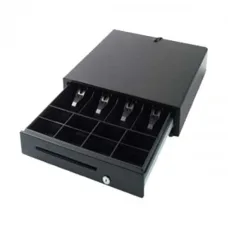
Rongta RT410B2 Cash Drawer
৳6,500
Showing 1 to 4 of 4 (1 Pages)
৳6,500
These are the latest in-stock Rongta Cash Drawer at Unix Network, with the current price in Bangladesh. Open a model for specifications.
| Rongta Cash Drawer List | Price in BD |
|---|---|
| Rongta RT420F POS Cash Drawer | ৳7,900 |
| Rongta RT410B2 Cash Drawer | ৳6,500 |
| Rongta RT-425A Roller Cash Drawer | ৳8,900 |
| Rongta RT-335 Mini Cash Drawer | ৳4,100 |
Looking for the latest Rongta Cash Drawer price in Bangladesh? Unix Network offers Rongta cash drawer solutions for retail shops, supermarkets, restaurants, pharmacies, grocery stores, electronics shops, computer shops, and other businesses using POS systems.
A Rongta Cash Drawer is designed to securely organize cash during daily sales transactions. When integrated with a compatible POS printer and POS software, the cash drawer can automatically open after a completed transaction, making the checkout process faster and more organized.
When choosing a cash drawer, customers should consider drawer size, number of bill and coin compartments, construction quality, locking mechanism, interface, POS printer compatibility, installation space, and warranty.
| Rongta Cash Drawer Type | Best For | Typical Application |
|---|---|---|
| Rongta POS Cash Drawer | Retail Shops | Cash Management |
| Rongta Manual Cash Drawer | Small Businesses | Manual Cash Handling |
| Rongta Automatic Cash Drawer | POS Counters | Automatic Opening |
| Rongta Cash Drawer with POS Printer | Retail & Restaurant | Integrated POS System |
| Rongta Heavy-Duty Cash Drawer | Busy Businesses | High-Volume Transactions |
Price note: Rongta Cash Drawer prices in Bangladesh can vary depending on the exact model, size, construction, compartments, interface, warranty, stock availability, and market conditions. Always confirm the current model and price before purchasing.
A Rongta Cash Drawer is a POS accessory designed to store and organize cash securely at a checkout counter.
It normally contains separate compartments for different denominations of banknotes and coins. Compatible models can be connected to a POS printer so that the drawer opens automatically when a transaction is completed.
A cash drawer is commonly used as part of a complete POS system alongside a POS computer, monitor, barcode scanner, receipt printer, and POS software.
A Rongta POS Cash Drawer is designed to work as part of a point-of-sale environment.
During a transaction, the POS software sends the receipt-printing command to the compatible POS printer. If the printer and cash drawer are configured correctly, the printer can trigger the cash drawer to open.
This allows the cashier to complete the transaction, provide the receipt, and access the cash drawer through a more organized workflow.
An automatic cash drawer is designed to open electronically when triggered by compatible POS equipment.
This is particularly useful for businesses processing frequent transactions because the cashier does not need to manually open the drawer for every sale.
Automatic opening depends on compatibility between the cash drawer, POS printer, connection interface, and POS software.
A manual cash drawer can be opened directly by the cashier without requiring an electronic trigger from a POS printer.
Manual operation can be suitable for small businesses or POS environments where automatic drawer control is not required.
Retail shops can use a Rongta cash drawer to organize banknotes and coins during daily transactions.
A suitable retail cash drawer should provide enough compartments for the denominations handled by the business and fit comfortably beneath or beside the checkout counter.
Supermarkets can benefit from a properly organized POS cash drawer, particularly at busy checkout counters.
When selecting a cash drawer for supermarket use, consider transaction volume, construction quality, locking mechanism, compartment layout, POS printer compatibility, and available counter space.
Restaurants can use a cash drawer together with their POS system to manage cash payments.
A compatible automatic drawer can make the cashier workflow more convenient by opening when a transaction is completed.
Pharmacies can use cash drawers to organize cash received from customer transactions.
If the pharmacy uses a computerized POS system, check compatibility between the cash drawer and the existing POS printer before purchasing.
A cash drawer can help grocery stores keep different denominations organized and make daily cash handling easier.
For smaller counters, choose a drawer that fits the available space while providing sufficient note and coin compartments.
Electronics shops and computer stores can integrate a cash drawer into their POS setup for customer payments.
A lockable drawer can also provide an additional level of physical organization for cash at the sales counter.
Computer shops using POS software can combine a Rongta cash drawer with a receipt printer, barcode scanner, POS computer, and monitor.
This creates a more organized checkout environment for processing customer sales.
A Rongta Cash Drawer with POS Printer can be part of an integrated checkout system.
In a compatible setup, the cash drawer connects to the POS receipt printer. The POS software communicates with the printer, and the printer sends the drawer-opening signal.
Before purchasing, confirm that the printer provides the required cash-drawer interface and that the drawer uses the compatible connector.
Cash drawers commonly use an RJ-style connector designed for connection to a compatible POS printer or cash-drawer interface.
However, the physical appearance of connectors does not by itself guarantee compatibility. Always check the printer and cash drawer specifications before connecting them.
The cash drawer itself normally does not independently determine when it should open. In an automatic POS setup, the opening signal is typically controlled through the POS printer and software configuration.
For this reason, compatibility should be checked across the entire system:
A lockable cash drawer can help prevent unauthorized access to the cash stored inside.
When selecting a drawer, check the available lock positions and key-management requirements.
For businesses with multiple cashiers, establish a clear procedure for controlling access to the drawer keys.
Cash drawers normally contain dedicated sections for banknotes and coins.
The ideal compartment layout depends on the currencies and denominations handled by your business.
Before purchasing, consider how many note and coin compartments your cashier needs for efficient cash management.
For businesses in Bangladesh, choose a cash drawer that can accommodate the Bangladeshi taka denominations used at your checkout counter.
The drawer should provide a practical arrangement for separating different notes and coins so that cashiers can quickly identify and return the correct change.
Cash drawers are opened frequently, so construction quality is an important consideration.
For busy businesses, look for a sturdy drawer, reliable opening mechanism, durable compartments, and a secure locking system.
Before purchasing a cash drawer, measure the available space under or beside your POS counter.
A drawer that is too large may not fit properly, while a very small drawer may not provide enough space for the required cash compartments.
Small businesses may not require a large or complex cash drawer.
A compact model with sufficient note and coin compartments can provide a practical solution while saving valuable counter space.
Businesses processing a large number of transactions should prioritize durability and reliable operation.
Consider the drawer's construction, opening mechanism, compartment design, locking system, and compatibility with the existing POS printer.
Connection procedures can vary by model. Follow the instructions supplied with the specific cash drawer and POS printer.
If your Rongta cash drawer is not opening automatically, check the following:
If the printer can print receipts but the drawer does not open, check whether the POS software is configured to send the appropriate cash-drawer command.
The cable is an important part of an automatic POS cash-drawer setup.
Do not assume that every telephone-style or RJ-style cable will work correctly. Cash-drawer cables can use different wiring configurations, so use the appropriate cable for the specific POS printer and cash drawer.
First determine which POS printer you are using. The cash drawer must be compatible with the printer's cash-drawer interface.
Confirm the connector type and wiring configuration required by your POS printer.
Measure your available counter space before purchasing.
Choose enough banknote compartments for the denominations handled by your business.
Make sure the drawer has enough coin sections for your daily transactions.
Choose a suitable locking mechanism if controlled access to cash is important for your business.
Busy businesses should prioritize a sturdy construction and reliable opening mechanism.
Confirm the warranty and after-sales support before purchasing.
Compare the total value of the drawer rather than choosing solely based on the lowest initial price.
| Business Type | Recommended Consideration |
|---|---|
| Small Retail Shop | Compact POS Cash Drawer |
| Grocery Shop | Multi-Compartment Cash Drawer |
| Restaurant | Automatic POS Cash Drawer |
| Pharmacy | Lockable POS Cash Drawer |
| Supermarket | Durable High-Use Cash Drawer |
| Electronics Shop | Secure Lockable Cash Drawer |
| Computer Shop | POS Printer-Compatible Cash Drawer |
If you are searching for Rongta Cash Drawer price in Jessore, Unix Network can help you select a suitable cash drawer according to your POS printer, business type, counter space, cash-handling requirements, and budget.
Before visiting the showroom, confirm the exact model, current price, warranty, and stock availability.
When purchasing a Rongta cash drawer online, do not compare products only by price.
Check:
Unix Network can help customers select suitable POS equipment according to their business requirements and existing hardware.
The price depends on the exact model, size, construction, compartments, locking system, interface, warranty, and current stock.
It is used to store and organize cash at POS checkout counters in retail shops, restaurants, supermarkets, pharmacies, and other businesses.
Compatible cash drawers can open automatically when triggered by a compatible POS printer and properly configured POS system.
Yes, compatible cash drawers can be connected to POS printers that provide the required cash-drawer interface.
Not necessarily. Check the connector, wiring configuration, interface, and POS printer compatibility before connecting the drawer.
Typically, an automatic cash drawer connects through a compatible POS printer or dedicated cash-drawer interface rather than directly to a standard computer.
Cable availability depends on the specific model and package. Confirm the included accessories before purchasing.
The number of banknote and coin compartments depends on the model.
Yes, a suitable cash drawer can be used in Bangladesh for retail, restaurant, pharmacy, grocery, supermarket, and other POS applications. Select the compartment layout according to the denominations used by your business.
Check the cable, printer interface, POS software settings, printer configuration, lock position, and compatibility between the cash drawer and POS printer.
A manual cash drawer can be used independently, but automatic opening generally requires compatible POS equipment and software.
You can compare Rongta cash drawer models from POS equipment retailers in Bangladesh. Confirm the exact model, compatibility, warranty, price, and stock before purchasing.
Customers searching for Rongta Cash Drawers in Jessore can check Unix Network's current availability and confirm the exact model and price before visiting the showroom.
A Rongta Cash Drawer can be an important part of a complete POS system. It helps businesses organize cash, separate notes and coins, and maintain a cleaner checkout workflow.
For automatic operation, compatibility is especially important. The cash drawer, POS printer, cable, POS software, and computer should all work together correctly.
Before purchasing, always check the exact model, drawer dimensions, note and coin compartments, locking system, connector, cable compatibility, POS printer compatibility, warranty, current price, and stock availability.
If you are searching for Rongta Cash Drawer price in Bangladesh, Rongta Cash Drawer price in Jessore, Rongta Cash Drawer BD, Rongta Cash Drawer Bangladesh, Rongta POS Cash Drawer, Rongta Automatic Cash Drawer, Rongta Manual Cash Drawer, Rongta Cash Drawer with POS Printer, Rongta Cash Drawer Connector, Rongta Cash Drawer Cable, Rongta Cash Drawer for POS, Rongta Cash Drawer Price in Bangladesh, Rongta Cash Drawer Price in Jessore, Rongta POS Cash Drawer Price, Rongta Cash Drawer Online, Rongta Cash Drawer Shop in Jessore, or Rongta Cash Drawer Supplier in Bangladesh, Unix Network can help you choose a suitable cash drawer according to your POS system and business requirements.