
৳100 Cashback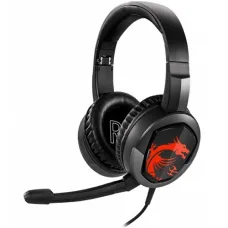
Showing 1 to 2 of 2 (1 Pages)

These are the latest in-stock MSI Head phone at Unix Network, with the current price in Bangladesh. Open a model for specifications.
| MSI Head phone List | Price in BD |
|---|---|
| MSI Immerse GH30 Gaming Headset (Single & Double Port) | ৳3,400 |
MSI headphones are designed for gaming, music, movies, communication, online meetings, and everyday computer use. MSI gaming headsets can provide features such as stereo or surround audio, gaming-oriented sound profiles, integrated microphones, noise isolation, comfortable ear cushions, RGB lighting, and wired or wireless connectivity depending on the model.
Unix Network offers MSI headphones and gaming headsets in Bangladesh for gamers, streamers, content creators, students, professionals, and general computer users. The right MSI headphone depends on audio quality, microphone performance, connection type, comfort, compatibility, battery life, and budget.
MSI headphones, particularly gaming headsets, are designed to deliver immersive audio and clear voice communication while gaming or using a computer. A suitable headset can help users hear game sounds, dialogue, music, voice chat, and other audio clearly.
MSI headset models can differ significantly in their drivers, microphone technology, connection options, sound features, weight, earcup design, and software support.
MSI gaming headsets are designed for gaming and voice communication. Depending on the model, they may feature large audio drivers, virtual surround sound, noise-isolating earcups, adjustable microphones, RGB lighting, and dedicated controls.
Wireless MSI headsets provide freedom from an audio cable and can create a cleaner gaming setup. Depending on the model, wireless connectivity may use a dedicated 2.4GHz receiver or Bluetooth.
When choosing a wireless MSI headset, consider battery life, wireless range, latency, charging method, microphone performance, connection stability, and device compatibility.
Wired MSI headsets connect directly to a compatible device and do not require battery charging. Depending on the model, connection may be through USB or a 3.5mm audio connector.
USB MSI headsets connect digitally to a computer. USB models can support additional software-based audio controls and customization features depending on the product.
MSI headsets with a 3.5mm connector can be compatible with many PCs, laptops, gaming devices, and other audio equipment that provides the appropriate audio jack. Users should check whether the device requires a combined headset jack or separate microphone and headphone connections.
Bluetooth MSI headsets can be useful for laptops, mobile devices, and other compatible products. Bluetooth is convenient for general audio use, although dedicated low-latency wireless technology may be preferable for competitive gaming when supported.
Selected MSI gaming headsets feature RGB lighting on the earcups or other parts of the headset. RGB lighting can enhance the appearance of a gaming setup but does not directly improve audio quality.
Gaming headsets commonly include an integrated microphone for voice chat, online gaming, meetings, streaming, and communication. Microphone quality varies by model, so users who frequently communicate should consider microphone pickup quality, noise reduction, positioning, and mute controls.
Drivers are the components that convert electrical signals into sound. MSI headsets can use different driver sizes and technologies depending on the model. Driver size alone does not determine overall sound quality.
Sound quality depends on the driver design, tuning, frequency response, digital processing, source device, software settings, and other components of the audio system. Gaming users may prefer enhanced positional cues, while music listeners may prefer a more balanced sound profile.
FPS gamers can benefit from a headset that provides clear directional audio and good separation between sounds. Footsteps, reloads, environmental sounds, and other audio cues can be important during competitive gameplay.
MMO games often contain music, dialogue, environmental effects, and extended gameplay sessions. A comfortable MSI headset with clear audio and a good microphone can be suitable for long gaming sessions.
Competitive gamers may prioritize low latency, accurate positional audio, clear voice communication, comfortable earcups, and reliable connectivity. Wired or dedicated low-latency wireless models can be considered according to individual requirements.
Selected MSI gaming headsets may support virtual surround sound or other spatial-audio technologies. These features attempt to create a wider sense of direction and can be useful in supported games and applications.
Surround or spatial audio is not automatically better for every user. Some gamers prefer stereo audio because of its simpler and more natural presentation.
Stereo headsets use separate left and right audio channels. Stereo can provide clear and natural audio reproduction and remains popular for gaming, music, movies, and everyday computer use.
A clear microphone is important for multiplayer gaming, online meetings, streaming, and voice chat. MSI headset microphones can vary in pickup pattern, sensitivity, noise reduction, and physical design.
Over-ear gaming headsets can provide passive noise isolation by covering the ears with padded earcups. The level of isolation depends on the earcup material, fit, seal, and overall headset design.
Noise cancellation can refer to different technologies. Active noise cancellation uses electronic processing to reduce certain environmental sounds, while microphone noise reduction attempts to make the user's voice clearer during communication. Customers should check which technology is included in the specific MSI model.
Comfort is particularly important for gaming headsets because users may wear them for several hours. Factors include headset weight, headband design, earcup padding, clamping force, ventilation, and adjustability.
Soft ear cushions can improve comfort and help create a seal around the ears. Materials and cushion designs vary between MSI headset models.
Over-ear headphones surround the ears rather than resting directly on them. This design can provide comfort and passive noise isolation when the earcups fit properly.
Gaming headsets may include controls for volume adjustment, microphone mute, audio profiles, or other functions. Convenient controls can be particularly useful during gaming because users can make adjustments without leaving the game.
Compatible MSI gaming headsets may support software for adjusting audio settings, microphone parameters, equalizer profiles, virtual surround effects, lighting, and other features. Available software functionality varies by model.
An equalizer allows users to adjust different frequency ranges. Gamers may create profiles for different game genres, while music listeners may prefer a balanced profile or their own preferred tuning.
Frequency response describes the range of frequencies a headset is designed to reproduce. A wider stated range does not necessarily mean better sound quality because tuning, distortion, driver performance, and other factors also matter.
Impedance affects how a headset interacts with an audio source. Most gaming headsets are designed to work with common PCs and laptops, but users should check the specifications when connecting a headset to specialized audio equipment.
Wired MSI headsets may use different cable lengths and connection designs. Users should consider cable length and connector type according to their computer or gaming setup.
Battery life is an important consideration for wireless gaming headsets. Actual battery runtime can vary depending on volume, lighting, wireless technology, microphone use, and other features.
Rechargeable MSI wireless headsets require periodic charging. Users should check the charging connector, charging time, battery capacity, and whether the headset can be used while charging.
Compatibility depends on the headset's connection type and supported devices. USB models generally target compatible computers, while 3.5mm models can work with devices that provide the appropriate audio connection. Wireless models require compatible receivers or Bluetooth support.
MSI gaming headsets are widely suitable for PC gaming. USB and 3.5mm models can provide different levels of audio functionality, while compatible wireless models can offer greater freedom of movement.
MSI headphones can be used with laptops that support the required connection type. Wireless models can be convenient for laptop users who move between locations.
An MSI gaming headset can complement a gaming PC by providing immersive audio and voice communication. Users should consider audio performance, microphone quality, comfort, connection type, and software compatibility.
Streamers need clear game audio and reliable voice communication. An MSI gaming headset with a capable microphone can provide an all-in-one audio solution for gaming and streaming.
MSI headsets can also be used for video conferences, online classes, remote work, and voice calls. For professional communication, microphone clarity and comfort may be more important than gaming-specific features.
MSI gaming headphones can be used for music, although sound tuning varies between models. Users who primarily listen to music should consider a headset with a sound signature that matches their preferred genres and listening style.
Over-ear MSI headsets can provide an immersive experience for movies and video content. Models with spacious sound presentation or supported spatial-audio features can be considered for users who want a wider cinematic experience.
For office and work environments, comfort, microphone quality, reliable connectivity, and noise isolation can be important. Wireless models can help reduce cable clutter on a workstation.
| Specification | What to Check |
|---|---|
| Driver | Driver size and technology |
| Connection | USB, 3.5mm, Bluetooth, or dedicated wireless receiver |
| Microphone | Type, pickup, and noise-reduction features |
| Audio | Stereo, virtual surround, or spatial-audio support |
| Frequency Response | Manufacturer-specified frequency range |
| Impedance | Headset impedance and source compatibility |
| Battery | Battery capacity and estimated runtime for wireless models |
| Weight | Total headset weight |
| Lighting | RGB features where available |
| Software | Supported customization options |
| Feature | MSI Wired Headset | MSI Wireless Headset |
|---|---|---|
| Connection | USB or 3.5mm depending on model | Wireless receiver or Bluetooth depending on model |
| Battery | Not required | Required |
| Cable | Yes | No during wireless operation |
| Mobility | Limited by cable | Greater freedom of movement |
| Charging | Not required | Required for rechargeable models |
| Gaming | Reliable wired connection | Convenient and potentially low-latency depending on technology |
For FPS gaming, directional audio and accurate sound positioning can be useful for identifying footsteps, gunfire, vehicles, and environmental effects. A comfortable headset with clear audio and a reliable microphone can improve the overall gaming experience.
Competitive gamers may prioritize low audio latency, accurate positional information, clear microphone communication, and comfortable long-session use. A wired headset or dedicated low-latency wireless model can be selected according to personal preference.
Casual gamers can choose an MSI headset based on comfort, sound quality, microphone performance, and price without necessarily requiring advanced competitive gaming specifications.
MSI headphone and gaming headset prices in Bangladesh vary according to driver technology, wired or wireless connectivity, microphone design, surround or spatial-audio features, RGB lighting, battery capacity, construction, and software support.
When comparing MSI headset prices, customers should consider the complete feature set and intended use rather than choosing only by appearance or advertised audio specifications.
Customers looking to buy an MSI headphone or gaming headset in Bangladesh can choose from wired, wireless, USB, 3.5mm, RGB, stereo, and gaming-oriented models. The best option depends on the user's gaming requirements, device compatibility, comfort preferences, and budget.
Unix Network provides headphones, gaming headsets, and other computer accessories for customers building gaming PCs, upgrading desktops, setting up workstations, streaming, or enjoying multimedia content.
Unix Network provides MSI headphones and computer accessories for customers in Jashore and across Bangladesh. MSI headsets can be used with gaming PCs, desktops, laptops, workstations, and other compatible devices.
An MSI headphone or headset is an audio device designed for gaming, communication, entertainment, and computer use. Many MSI gaming headsets include an integrated microphone and gaming-focused audio features.
MSI offers gaming headsets designed for immersive audio, voice communication, and gaming use. The suitability of a specific model depends on sound quality, microphone performance, latency, comfort, and connectivity.
MSI offers both wired and wireless headset models. Wireless connectivity varies by model and can include dedicated wireless receivers or Bluetooth.
Many MSI gaming headsets include integrated microphones. Microphone design and features vary between models.
Selected MSI gaming headsets include RGB lighting. RGB functionality varies by model and is primarily intended for visual customization.
Many MSI headphones and gaming headsets are designed for PC use. Compatibility depends on the connection method, such as USB, 3.5mm, Bluetooth, or a dedicated wireless receiver.
Yes, compatible MSI headphones can be used with laptops. Users should check whether the laptop supports the required USB, 3.5mm, Bluetooth, or wireless connection.
MSI wireless gaming headsets can provide the convenience of cable-free operation. For gaming, users should check the wireless technology and latency specifications of the particular model.
The best MSI headset depends on the user's gaming genre, preferred sound profile, microphone requirements, connection type, comfort preferences, and budget. Competitive gamers may prioritize low latency and positional audio, while casual gamers may prioritize comfort and overall sound quality.
Unix Network provides headphones and gaming accessories for gaming, office work, online communication, entertainment, streaming, and general computer use. Customers can compare MSI headset models according to audio performance, microphone quality, connection type, comfort, battery life, RGB features, software support, warranty, price, and intended use.
Before purchasing an MSI headphone, verify the exact model, driver specifications, connection method, microphone features, compatibility, wireless battery life where applicable, software support, warranty, price, and stock availability. Product specifications and market availability may change without prior notice.