

Top Havit Keyboard Picks
Showing 1 to 15 of 55 (4 Pages)
/Havit-GameNote-KB500L-Multi-Function-LED-Backlit-USB-Gaming-Keyboard-Black-228x228.webp "Havit GameNote KB500L Multi-Function LED Backlit USB Gaming Keyboard (Black)")

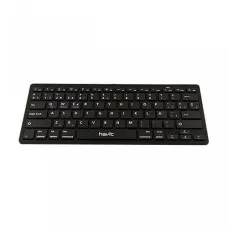
Havit HV-KB220BT Bluetooth Mini Keyboard
৳1,100 ৳1,200


Havit HV-KB501CM 4 in 1 Gaming Combo
৳2,000 ৳2,200


HAVIT HV-KB653GCM WIRELESS KEYBOARD AND MOUSE
৳750 ৳1,000

Havit HV-KB852CM Gaming Keyboard & Mouse Combo
৳1,200 ৳1,500


Havit Keyboard Price in Bangladesh
Looking for the latest Havit Keyboard price in Bangladesh? Unix Network offers Havit keyboards for gaming, office work, home use, programming, education, and everyday computer use. Havit provides different keyboard designs, including gaming keyboards, mechanical keyboards, membrane keyboards, RGB keyboards, wired keyboards, wireless keyboards, and keyboard-and-mouse combinations.
A good keyboard can make a significant difference in typing comfort, gaming responsiveness, productivity, and everyday computer use. The right Havit keyboard depends on your preferred typing feel, keyboard layout, connectivity, switch type, lighting, size, and budget.
Havit keyboards are available in different configurations and price ranges. Before purchasing, customers should compare the exact model and features rather than choosing only based on brand or appearance.
Havit Keyboard Price List in Bangladesh
| Havit Keyboard Type | Best For | Important Features |
|---|---|---|
| Havit Gaming Keyboard | Gaming & Entertainment | RGB, Anti-Ghosting, Gaming Design |
| Havit Mechanical Keyboard | Gaming & Fast Typing | Mechanical Switches, Durability, Response |
| Havit Membrane Keyboard | Office & Everyday Use | Quiet Typing, Simple Design |
| Havit RGB Keyboard | Gaming Setup | RGB Backlighting, Gaming Aesthetics |
| Havit Wireless Keyboard | Clean Desk & Portable Use | Wireless Connectivity |
| Havit Wired Keyboard | Office & Gaming | Stable Wired Connection |
| Havit Compact Keyboard | Small Desks & Gaming | Space-Saving Design |
| Havit Keyboard Mouse Combo | Complete Setup | Keyboard & Mouse Included |
Note: Havit keyboard prices and availability can change depending on the exact model, switch type, connectivity, features, warranty, stock, and market conditions. Confirm the current price and availability before purchasing.
What Is a Havit Keyboard?
Havit Keyboard is a computer keyboard designed for typing, gaming, office work, programming, browsing, education, and general computer use.
Depending on the model, Havit keyboards can include features such as mechanical switches, RGB lighting, anti-ghosting, multimedia controls, compact layouts, wireless connectivity, adjustable lighting, and gaming-focused designs.
Havit Gaming Keyboard
A Havit gaming keyboard is designed for gamers who want responsive controls and gaming-oriented features.
Gaming keyboards may include anti-ghosting, multiple-key rollover, backlighting, RGB lighting, multimedia controls, dedicated gaming functions, and mechanical switches depending on the model.
Gaming keyboards can also be useful for users who spend long hours typing or working at a computer and prefer a more responsive keyboard.
Havit Mechanical Keyboard
Havit mechanical keyboards use individual mechanical switches beneath the keys. Mechanical switches can provide a distinctive typing feel and are popular among gamers, programmers, writers, and users who spend significant time typing.
The typing experience depends heavily on the specific switch used. Different switches can provide different levels of actuation force, sound, tactile feedback, and key response.
Benefits of a Mechanical Keyboard
- Distinct mechanical typing feel.
- Fast and responsive key actuation.
- Popular for gaming.
- Suitable for heavy typing.
- Many switch options on supported models.
- Can provide long-term durability depending on the switch and construction.
Havit Membrane Keyboard
A Havit membrane keyboard uses a membrane-based key mechanism. Membrane keyboards are generally simple, affordable, and suitable for office work, education, browsing, and everyday computer use.
They can also be a good choice for users who prefer a softer or quieter typing experience compared with some mechanical keyboards.
Havit RGB Keyboard
RGB lighting is popular among gaming-PC users. A Havit RGB keyboard can add customizable or preset lighting effects to a gaming setup depending on the model.
RGB lighting is primarily an aesthetic feature and does not automatically improve gaming performance. Customers who care about lighting should check whether the specific model supports customizable RGB effects or only preset illumination.
Havit Backlit Keyboard
A backlit keyboard illuminates the keys, making them easier to see in low-light environments. Backlighting can be useful for night-time gaming, studying, programming, and general computer use.
Lighting options vary between models, so check whether the keyboard provides single-color backlighting, RGB lighting, adjustable brightness, or other lighting controls.
Havit Wireless Keyboard
A Havit wireless keyboard can reduce cable clutter and provide a cleaner desk setup. Wireless keyboards can be useful for home offices, laptops, smart TV setups, media PCs, and users who prefer a cable-free workspace.
Before purchasing a wireless keyboard, check its wireless technology, receiver requirements, battery type, battery life, operating range, and compatibility.
Havit Wired Keyboard
Wired keyboards connect directly to a computer through a cable. They are popular for gaming, office computers, desktop PCs, and situations where a reliable wired connection is preferred.
A wired keyboard does not require regular battery charging, making it convenient for users who keep their keyboard permanently connected to a desktop computer.
Havit Keyboard for Gaming
Gaming keyboards can provide features designed for fast and repeated key inputs.
When choosing a Havit gaming keyboard, consider:
- Mechanical or membrane switches.
- Switch response and typing feel.
- Anti-ghosting.
- Key rollover.
- RGB or backlighting.
- Keyboard size.
- Dedicated multimedia controls.
- Wired or wireless connectivity.
- Build quality.
- Keycap design.
For competitive gaming, the keyboard is only one part of the overall setup. Mouse performance, monitor refresh rate, system performance, network latency, and player skill can also affect gaming performance.
Havit Keyboard for Office
For office users, comfort and reliability are often more important than RGB lighting or gaming features.
A Havit office keyboard can be suitable for:
- Microsoft Office work
- Data entry
- Accounting
- Business applications
- Web browsing
- Online meetings
- General desktop work
Users who type for several hours per day should pay particular attention to key feel, keyboard layout, wrist position, and overall comfort.
Havit Keyboard for Programming
Programmers often spend many hours typing code, making keyboard comfort and key consistency important.
A Havit mechanical keyboard can be attractive to programmers who prefer tactile feedback and a more distinct key response. However, switch preference is highly personal.
Users should also consider the keyboard layout, dedicated navigation keys, function-row access, arrow keys, and availability of commonly used programming characters.
Havit Keyboard for Students
Students can use Havit keyboards for assignments, programming, online classes, research, browsing, and general computer work.
A simple wired keyboard may be enough for everyday academic use, while a mechanical or wireless model may be preferable for students who want additional comfort or a cleaner desk setup.
Havit Keyboard for Home Use
For home users, the best keyboard depends on how the computer is used. A membrane keyboard can be sufficient for browsing and office applications, while gamers and heavy typists may prefer mechanical keyboards.
Havit Compact Keyboard
Compact keyboards remove or reduce certain keys to save desk space. They can be useful for gamers and users with smaller desks.
However, compact layouts may require users to use function combinations for keys that are normally available separately on full-size keyboards.
Havit Full-Size Keyboard
A full-size keyboard typically includes the main typing area, function row, navigation keys, arrow keys, and numeric keypad.
Full-size keyboards are particularly useful for accounting, finance, data entry, spreadsheets, and office work where a numeric keypad can improve productivity.
Havit Tenkeyless Keyboard
A tenkeyless or TKL keyboard removes the numeric keypad while keeping most of the main keyboard and navigation keys.
TKL keyboards provide more mouse space than full-size keyboards and are popular among gamers and users who do not regularly need a numeric keypad.
Havit Keyboard Switch Types
Mechanical keyboard switches can be broadly described as linear, tactile, or clicky.
| Switch Type | Typing Feel | Common Preference |
|---|---|---|
| Linear | Smooth Key Press | Gaming & Fast Repeated Inputs |
| Tactile | Noticeable Feedback | Typing & General Use |
| Clicky | Tactile & Audible | Users Who Prefer Click Feedback |
Not every Havit mechanical keyboard offers all switch types. Always check the exact model before ordering.
Havit Keyboard Anti-Ghosting
Anti-ghosting helps the keyboard correctly register multiple key presses. This can be useful for gaming, especially when several keys are pressed at the same time.
The exact number of supported simultaneous keys depends on the keyboard model.
Havit Keyboard N-Key Rollover
N-key rollover allows multiple keys to be registered simultaneously under supported conditions. This can be useful for gaming and specialized typing scenarios.
Customers should check the manufacturer's specifications for the exact rollover implementation of the keyboard they are considering.
Havit Keyboard Multimedia Keys
Some Havit keyboards include dedicated or secondary multimedia controls for functions such as volume adjustment, playback, and media control.
These controls can be convenient for office users, gamers, streamers, and multimedia users.
Havit Keyboard Build Quality
Build quality depends on the individual model. Important factors include the keyboard frame, keycaps, switch construction, stabilizers, cable quality, connection design, and overall construction.
A higher price does not automatically guarantee that every aspect of a keyboard will be better, so customers should compare the exact model and features.
Havit Keyboard Keycap Quality
Keycap material and construction can affect the keyboard's feel, appearance, durability, and legends.
Some users may prefer thicker keycaps or particular keycap materials depending on their typing and gaming preferences.
Havit Keyboard Connectivity
Havit keyboards may use wired USB or wireless connectivity depending on the model.
For wireless models, customers should check whether the keyboard uses a USB receiver, Bluetooth, or another wireless technology and whether the intended device supports it.
Havit Keyboard for Laptop
A Havit external keyboard can be useful with laptops when users want a larger typing area, mechanical switches, better ergonomics, gaming features, or a more comfortable desk setup.
Havit Keyboard for PC
Havit keyboards can be used with desktop PCs for gaming, office work, programming, education, browsing, and general computing.
Havit Keyboard for Smart TV
Some wireless keyboards can be used with compatible smart TVs and media devices. Compatibility varies by TV model and operating system, so users should check compatibility before purchasing.
Havit Keyboard and Mouse Combo
A Havit keyboard and mouse combo can be a convenient option for customers who need both input devices at the same time.
Combos can be useful for:
- New desktop PC builds
- Office computers
- Home users
- Students
- Budget gaming setups
- Replacement peripherals
Havit Keyboard for Gaming PC
A gaming PC setup can benefit from a keyboard with anti-ghosting, responsive switches, comfortable keycaps, and suitable lighting.
However, customers should select the keyboard according to their actual gaming preferences rather than assuming that an RGB keyboard is automatically a high-performance keyboard.
Havit Keyboard for Esports
Competitive gamers may prefer mechanical keyboards with consistent actuation and reliable key registration.
For esports-style gaming, factors such as switch response, keyboard latency, rollover, build quality, and personal comfort can be more important than decorative features.
Havit Keyboard for Typing
For heavy typing, choose a keyboard based on comfort, key spacing, switch feel, layout, and noise level.
A tactile mechanical keyboard may appeal to users who want noticeable feedback, while membrane keyboards can be suitable for users who prefer softer and quieter key presses.
Havit Quiet Keyboard
Users who work in shared offices, libraries, bedrooms, or other quiet environments may prefer a quieter keyboard.
Keyboard noise depends on the switch mechanism, keycap design, construction, and typing style. Mechanical clicky switches are generally louder than quieter linear or membrane designs.
Havit Keyboard for Accounting
Accounting and data-entry users can benefit from a full-size keyboard with a numeric keypad. The dedicated number pad can make entering large amounts of numerical information more convenient.
Users should also consider key spacing, comfort, durability, and easy access to navigation and function keys.
Havit Keyboard for Content Creators
Content creators can use Havit keyboards for video editing, graphic design, writing, streaming, and general productivity.
Depending on the workflow, useful features may include multimedia controls, programmable functions where supported, comfortable switches, and a full-size or compact layout suited to the user's desk.
Havit Keyboard for Gaming and Office
If one keyboard will be used for both gaming and office work, a mechanical keyboard with comfortable switches, moderate noise, reliable anti-ghosting, and adjustable lighting can provide a versatile setup.
Wired vs Wireless Havit Keyboard
| Feature | Wired | Wireless |
|---|---|---|
| Connection | USB Cable | Wireless Technology |
| Battery | Not Required | Usually Required |
| Cable Clutter | More | Less |
| Portability | Less Convenient | More Convenient |
| Gaming | Popular Choice | Model Dependent |
| Office Use | Excellent | Excellent |
Mechanical vs Membrane Havit Keyboard
| Feature | Mechanical | Membrane |
|---|---|---|
| Key Mechanism | Individual Mechanical Switches | Membrane-Based |
| Typing Feel | Distinct & Responsive | Generally Softer |
| Gaming | Very Popular | Suitable for Casual Gaming |
| Typing | Excellent | Good |
| Noise | Depends on Switch | Generally Quieter |
| Price | Often Higher | Often More Affordable |
How to Choose the Best Havit Keyboard
1. Decide Your Main Use
Determine whether you need the keyboard primarily for gaming, office work, programming, accounting, studying, or general use.
2. Choose Mechanical or Membrane
Select mechanical switches if you prefer a distinct mechanical typing experience. Choose membrane if you prefer a simpler and generally softer typing experience.
3. Choose the Keyboard Size
Full-size keyboards are useful for numeric entry, while TKL and compact keyboards provide additional desk space.
4. Choose Wired or Wireless
Wired keyboards are convenient for permanent desktop setups. Wireless keyboards are useful when reducing cables is a priority.
5. Check Switch Type
If purchasing a mechanical keyboard, check the exact switch type and decide whether you prefer linear, tactile, or clicky feedback.
6. Check Anti-Ghosting
Gamers should check the keyboard's anti-ghosting and rollover capabilities.
7. Check Backlighting
If you use the keyboard at night, consider a backlit or RGB model.
8. Check Compatibility
Make sure the keyboard's connection method and operating-system support are suitable for your PC, laptop, TV, or other device.
9. Consider Noise
If you share a workspace, consider a quieter switch or membrane keyboard.
10. Check Warranty
Always confirm warranty coverage and after-sales service before purchasing.
Havit Keyboard Buying Checklist
- Keyboard type
- Mechanical or membrane mechanism
- Switch type
- Keyboard layout
- Full-size, TKL, or compact design
- Wired or wireless connectivity
- RGB or backlighting
- Anti-ghosting
- Key rollover
- Multimedia controls
- Keycap construction
- Build quality
- Compatibility
- Noise level
- Warranty
- Current price
- Current stock availability
Havit Keyboard Maintenance Tips
- Keep food and liquids away from the keyboard.
- Clean dust and debris regularly.
- Use compressed air carefully when cleaning between keys.
- Do not pour liquid directly onto the keyboard.
- Keep the keyboard away from excessive heat and moisture.
- For wireless keyboards, replace or recharge batteries as required.
- Disconnect the keyboard before performing deep cleaning.
Common Havit Keyboard Problems
Keyboard Is Not Working
For a wired keyboard, check the USB connection and try another USB port. For a wireless keyboard, check the receiver, battery, wireless connection, and power switch.
Some Keys Are Not Working
Clean around the affected keys and test the keyboard on another computer. If the problem remains, the keyboard may require service or replacement.
Keyboard Double-Types
If one key registers multiple times from a single press, check whether the problem occurs across different applications and devices. Mechanical switch wear, debris, software settings, or hardware problems can contribute to repeated inputs.
RGB Lighting Is Not Working
Check the keyboard's lighting controls, supported software, connection, and whether the specific model supports customizable RGB lighting.
Wireless Keyboard Disconnects
Check battery level, wireless receiver placement, interference, distance from the computer, and compatibility.
Keyboard Is Typing the Wrong Characters
Check the operating system's keyboard layout and language settings. A different keyboard layout can cause keys to produce unexpected characters.
Havit Keyboard Price in Jessore
If you are searching for Havit Keyboard price in Jessore, Unix Network provides computer peripherals and accessories for customers in Jessore and across Bangladesh.
Because keyboard models and stock can change, customers should confirm the exact model, current price, warranty, and availability before visiting the showroom.
Why Buy Havit Keyboard from Unix Network?
Unix Network helps customers choose computer accessories according to their actual requirements and budget. Whether you need a keyboard for gaming, office work, programming, accounting, education, or everyday computing, selecting the right keyboard type can make your computer experience more comfortable and productive.
- Havit keyboards
- Gaming keyboards
- Mechanical keyboards
- Membrane keyboards
- RGB keyboards
- Wireless keyboards
- Wired keyboards
- Keyboard and mouse combos
- Computer accessories
- Gaming peripherals
- Local showroom support in Jessore
- Delivery options across Bangladesh
Frequently Asked Questions About Havit Keyboard
What is the Havit Keyboard price in Bangladesh?
The price depends on the exact Havit model, keyboard type, switch, connectivity, RGB features, size, warranty, stock, and current market conditions.
Is Havit a good keyboard brand?
Havit offers keyboards across different price ranges and use cases. The suitability of a particular keyboard depends on the exact model and whether its features match your requirements.
Which Havit keyboard is best for gaming?
A Havit mechanical gaming keyboard with suitable switches, anti-ghosting, reliable key rollover, and comfortable keycaps can be a good choice for gaming. The best model depends on your preferred switch and keyboard size.
Which Havit keyboard is best for office work?
A comfortable wired or wireless membrane keyboard can be sufficient for many office users. Heavy typists may prefer a mechanical model.
Which Havit keyboard is best for programming?
A mechanical Havit keyboard with comfortable switches and a suitable layout can be a good option for programmers who spend many hours typing.
Is a Havit mechanical keyboard good for typing?
Yes. Mechanical keyboards can provide a responsive and distinctive typing experience. The best switch type depends on personal preference.
Is a Havit membrane keyboard good for office use?
Yes. Membrane keyboards can be a practical option for everyday office work, browsing, data entry, and general computer use.
Does every Havit keyboard have RGB?
No. RGB lighting depends on the specific model. Some keyboards may have RGB, while others may use single-color backlighting or no backlighting.
Are Havit keyboards wireless?
Some Havit keyboard models offer wireless connectivity, while others are wired. Check the exact model before purchasing.
Can I use a Havit keyboard with a laptop?
Yes. Compatible USB or wireless Havit keyboards can be used with laptops.
Can I use a Havit keyboard with a smart TV?
Some compatible Havit wireless or USB keyboards may work with smart TVs and media devices. Compatibility depends on the TV and keyboard.
Is a wired keyboard better than a wireless keyboard?
Neither is universally better. Wired keyboards provide a direct connection without battery management, while wireless keyboards reduce cable clutter and can be more convenient for flexible setups.
Is a mechanical keyboard better than a membrane keyboard?
It depends on the user. Mechanical keyboards generally provide a more distinct and responsive typing feel, while membrane keyboards can be quieter, simpler, and more affordable.
Which Havit keyboard is best for accounting?
A full-size keyboard with a dedicated numeric keypad is generally more convenient for accounting and data-entry work.
Which Havit keyboard is best for students?
For normal academic work, a reliable wired or wireless keyboard can be sufficient. Students who also game or program may prefer a mechanical gaming keyboard.
Does Havit keyboard support anti-ghosting?
Many gaming keyboards provide anti-ghosting features, but the exact implementation and number of supported keys depend on the model.
Does Havit keyboard have software?
Software support depends on the model. Some keyboards may offer software-based customization while others operate without dedicated software.
Where can I buy Havit Keyboard in Bangladesh?
Customers can check computer accessory retailers in Bangladesh for current Havit keyboard models, prices, warranty, and availability.
Where can I buy Havit Keyboard in Jessore?
Customers searching for Havit keyboards in Jessore can check Unix Network's current stock and contact the showroom before visiting.
Final Guide to Havit Keyboard in Bangladesh
Choosing the right keyboard depends on how you use your computer. Gamers may prefer mechanical switches, anti-ghosting, rollover, and RGB lighting. Office users may prioritize comfort and quiet operation. Programmers and heavy typists may prefer a mechanical keyboard with a comfortable switch and suitable layout. Accounting and data-entry users can benefit from a full-size keyboard with a dedicated numeric keypad.
Wireless Havit keyboards are useful for cleaner desk setups, while wired models remain a straightforward choice for desktop PCs and gaming systems. Compact keyboards can save desk space, while full-size keyboards provide easier access to navigation keys and the numeric keypad.
Before purchasing a Havit Keyboard, compare the keyboard type, switch type, layout, size, connectivity, anti-ghosting, rollover, lighting, compatibility, build quality, warranty, current price, and availability.
If you are searching for Havit Keyboard price in Bangladesh, Havit Keyboard price in Jessore, Havit Gaming Keyboard, Havit Mechanical Keyboard, Havit RGB Keyboard, Havit Wireless Keyboard, Havit Wired Keyboard, Havit Membrane Keyboard, Havit Compact Keyboard, Havit Full-Size Keyboard, Havit TKL Keyboard, Havit Keyboard Mouse Combo, Havit Keyboard for Gaming, Havit Keyboard for Office, Havit Keyboard for Programming, Havit Keyboard for Students, Havit Keyboard for PC, Havit Keyboard for Laptop, or Havit Keyboard for Accounting, Unix Network can help you choose a suitable keyboard for your requirements.