
৳100 Cashback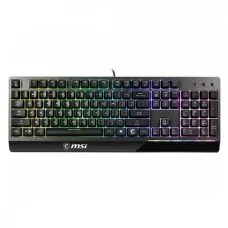
Showing 1 to 2 of 2 (1 Pages)
These are the latest in-stock MSI keyboard at Unix Network, with the current price in Bangladesh. Open a model for specifications.
| MSI keyboard List | Price in BD |
|---|---|
| MSI VIGOR GK30 RGB Backlit Gaming Keyboard | ৳3,900 |
MSI keyboards are designed for gaming, office work, programming, content creation, and everyday computer use. MSI offers keyboards in different layouts, sizes, switch technologies, connection types, and feature sets, making it possible to choose a model according to gaming performance, typing comfort, portability, and budget.
Unix Network offers MSI keyboards in Bangladesh for gamers, professionals, students, programmers, and general computer users. MSI keyboard models can include mechanical switches, membrane designs, RGB or per-key lighting, anti-ghosting, N-key rollover, dedicated media controls, programmable keys, and wired or wireless connectivity depending on the model.
An MSI keyboard is an input device designed to provide accurate and comfortable control of a desktop computer or laptop. MSI gaming keyboards are particularly focused on fast response, durable switches, customizable lighting, and gaming-oriented features.
For office and productivity users, keyboard layout, key feel, noise level, wrist comfort, connectivity, and long-term typing comfort may be more important than gaming-specific features.
MSI gaming keyboards are designed for gamers who need responsive controls, accurate key registration, and durable construction. Depending on the model, features may include mechanical switches, anti-ghosting, N-key rollover, RGB lighting, programmable keys, multimedia controls, and software customization.
MSI mechanical keyboards use individual mechanical switches beneath the keys. Mechanical switches can provide distinct tactile or linear feedback and are popular among gamers and users who spend many hours typing.
The ideal mechanical switch depends on personal preference. Linear switches generally provide smooth key travel, while tactile switches provide noticeable feedback during key presses.
MSI RGB keyboards provide customizable lighting for gaming setups and desktop environments. Depending on the model, users may be able to customize lighting effects, brightness, colors, and individual key illumination using compatible software.
Wireless MSI keyboards reduce cable clutter and can provide a cleaner desktop setup. Depending on the model, wireless connectivity may use Bluetooth or a dedicated wireless receiver.
Wireless gaming keyboards should be evaluated for connection stability, battery life, charging method, wireless latency, and compatibility with the intended device.
Wired MSI keyboards connect directly to a computer, typically through USB. Wired keyboards do not require battery charging and are often preferred by competitive gamers who want a consistent wired connection.
USB MSI keyboards are compatible with computers that provide the appropriate USB port. They are generally easy to install because modern operating systems can automatically recognize many standard USB keyboards.
Compact keyboards remove or reduce certain keys to save desk space. Compact layouts can be useful for gamers and users who prefer a minimalist setup.
Full-size keyboards include a dedicated numeric keypad in addition to the standard navigation and function keys. They can be useful for office work, accounting, data entry, and users who frequently enter numbers.
Tenkeyless keyboards remove the dedicated numeric keypad while retaining most of the standard keyboard layout. This provides more mouse space and a more compact footprint.
The switch is one of the most important components of a mechanical keyboard. Different switches provide different levels of actuation force, travel, tactile feedback, sound, and response characteristics.
Keycaps determine the physical shape and surface feel of the keys. Keycap material and profile can affect typing comfort, durability, appearance, and the overall keyboard experience.
Anti-ghosting technology helps ensure that intended key presses are accurately detected when multiple keys are pressed simultaneously. This is especially useful for gaming, where several controls may need to be activated at the same time.
N-key rollover allows the keyboard to register multiple simultaneous key presses. This can be useful for gaming and specialized applications where multiple keys need to be detected accurately.
Response time refers to how quickly the keyboard registers an input and communicates it to the computer. Low-latency keyboards can be particularly beneficial for competitive gaming, although real-world responsiveness depends on the complete system.
Polling rate indicates how frequently a keyboard reports its input state to the computer. Some gaming keyboards offer high polling rates designed to minimize input latency.
RGB lighting can enhance the appearance of a gaming setup and improve key visibility in low-light environments. Some MSI keyboards allow users to customize lighting effects and synchronize supported devices.
Compatible MSI keyboards may provide software support for configuring lighting, macros, profiles, key assignments, and other settings. Available features depend on the exact keyboard model and supported software.
Some MSI gaming keyboards provide programmable keys or macro functionality. Macros can allow users to assign predefined key sequences or commands to supported keys, depending on the software and game or application rules.
Selected MSI keyboards include dedicated media controls or shortcut keys for functions such as volume adjustment, playback, and other common commands. These controls can be useful for both gaming and productivity.
A wrist rest can provide additional support during extended typing or gaming sessions. Some MSI keyboard models include a wrist rest, while others are designed without one.
Keyboard construction can affect durability, stability, and typing feel. Gaming-oriented MSI keyboards may use reinforced frames or other construction features designed for frequent use.
For gaming, users should consider switch type, actuation characteristics, anti-ghosting, N-key rollover, polling rate, response time, layout, and software support. RGB lighting is an optional feature that mainly affects appearance.
Office users may prioritize comfortable key travel, quiet operation, a familiar layout, a numeric keypad, reliable connectivity, and long-term typing comfort. A full-size MSI keyboard can be useful for spreadsheet and data-entry work.
Programmers often spend many hours typing and may therefore benefit from a keyboard with comfortable switches, a suitable layout, reliable key registration, and convenient access to function and navigation keys.
For typing-focused users, switch feel, key spacing, actuation force, keyboard layout, and noise level can be more important than gaming features. Mechanical keyboards can provide a distinctive typing experience, while quieter designs may be better for shared workplaces.
Students can use MSI keyboards for study, programming, gaming, document preparation, research, and general computer use. Compact keyboards can save desk space, while full-size models can be useful for numerical work.
An MSI gaming keyboard can complement a gaming PC by providing responsive controls and customizable gaming features. Users should select the keyboard according to their preferred layout, switch type, connection, and gaming requirements.
Most USB keyboards are broadly compatible with modern desktop computers and laptops, but specific features may require compatible software or operating-system support. Wireless models should also be checked for their supported connection method.
Keyboard layout determines the physical arrangement of keys. Full-size, tenkeyless, and compact layouts offer different combinations of functionality and desk-space efficiency.
| Keyboard Type | Main Characteristic | Suitable For |
|---|---|---|
| Full Size | Includes numeric keypad | Office, gaming, data entry |
| Tenkeyless | No dedicated numeric keypad | Gaming, programming, compact desks |
| Compact | Reduced physical size | Minimal setups and portability |
| Mechanical | Individual mechanical switches | Gaming and typing |
| Wireless | Wireless connectivity | Clean desk setups and flexible use |
| Feature | Benefit |
|---|---|
| Mechanical Switches | Distinct key feel and responsive operation |
| RGB Lighting | Customizable gaming and desktop lighting |
| Anti-Ghosting | Improves simultaneous key recognition |
| N-Key Rollover | Registers multiple simultaneous key presses |
| Programmable Keys | Allows customized commands on supported models |
| Media Controls | Convenient control of supported media functions |
| Wireless Connectivity | Reduces cable clutter |
| USB Connection | Reliable wired connectivity |
| Feature | MSI Mechanical Keyboard | Membrane Keyboard |
|---|---|---|
| Switch Design | Individual mechanical switches | Membrane-based key mechanism |
| Typing Feel | More distinct and customizable | Generally softer and quieter |
| Gaming | Popular for responsive control | Suitable for general gaming |
| Durability | Depends on switch and construction | Depends on membrane design and build |
| Customization | Often greater on gaming models | Usually more limited |
| Price | Can be higher | Often more budget-friendly |
Gaming keyboards should provide reliable key registration during fast gameplay. Features such as anti-ghosting, N-key rollover, mechanical switches, programmable controls, and customizable profiles can be useful depending on the game.
Competitive gamers may prioritize low input latency, consistent actuation, high polling rates, reliable wired connectivity, and a compact layout that provides more room for mouse movement.
First-person shooter players often benefit from responsive movement and control keys. A keyboard with consistent switches, accurate simultaneous key registration, and a suitable compact layout can be useful for FPS gaming.
MMO players may benefit from keyboards with programmable keys or additional controls. Macro and programmable features vary between models and should be checked before purchase.
For office environments, a comfortable layout, quiet key operation, dependable USB connectivity, and a numeric keypad can be useful. Users who type extensively should consider switch feel and ergonomics.
An MSI keyboard can be used for browsing, document preparation, entertainment, study, gaming, and general home computing. The ideal model depends on the user's preferred typing experience and connectivity requirements.
MSI keyboard prices in Bangladesh vary according to switch type, layout, connectivity, RGB features, construction, programmable controls, and other specifications. Mechanical and feature-rich gaming keyboards generally occupy different price ranges from basic keyboards.
When comparing prices, customers should consider the complete feature set, switch technology, build quality, warranty, and intended use rather than choosing a keyboard based only on appearance or RGB lighting.
Customers looking to buy an MSI keyboard in Bangladesh can choose from gaming, mechanical, wired, wireless, RGB, compact, and full-size options. The right keyboard depends on gaming requirements, typing preferences, workspace, connectivity, and budget.
Unix Network provides keyboards and other computer accessories for customers building gaming PCs, upgrading desktops, setting up office computers, or creating professional workstations.
Unix Network provides MSI keyboards and computer accessories for customers in Jashore and across Bangladesh. MSI keyboards can be used with gaming PCs, office computers, home desktops, workstations, and other compatible systems.
An MSI keyboard is a computer keyboard designed by MSI for gaming, productivity, typing, and general computer use. Depending on the model, it may feature mechanical switches, RGB lighting, wireless connectivity, anti-ghosting, and programmable controls.
MSI offers gaming keyboards with features designed for responsive gaming, including mechanical switches, anti-ghosting, N-key rollover, RGB lighting, and programmable functions on selected models.
Some MSI keyboards are mechanical, while others use different key technologies. Customers should check the exact model specification before purchasing.
Selected MSI keyboards feature RGB lighting. The type and customization options vary by model.
Selected MSI keyboard models support wireless connectivity. Depending on the model, wireless communication may use Bluetooth or a dedicated wireless receiver.
MSI keyboards can be suitable for programming. Programmers should prioritize a comfortable layout, preferred switch type, reliable key registration, and suitable noise level for their working environment.
The best MSI gaming keyboard depends on your preferred switch type, layout, connectivity, RGB requirements, programmable controls, gaming style, and budget. Competitive gamers may prioritize low latency and responsive switches, while other users may prefer additional customization features.
A mechanical MSI keyboard can provide a more distinct and customizable typing experience, but whether it is better depends on personal preference. Switch type, actuation force, sound, and key feel all influence typing comfort.
Unix Network provides keyboards and computer accessories for gaming, office work, programming, education, and general computing. Customers can compare MSI keyboard models according to switch type, layout, connectivity, RGB features, gaming functions, build quality, warranty, price, and intended use.
Before purchasing an MSI keyboard, verify the exact model, switch type, layout, connection method, software compatibility, lighting features, programmable controls, warranty, price, and stock availability. Product specifications and market availability may change without prior notice.