
Buy Premium Bixolon POS Printer in Jessore, Bangladesh | Unix Network
Showing 1 to 2 of 2 (1 Pages)
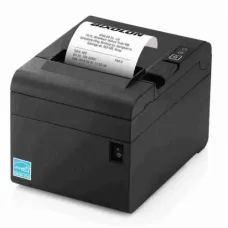

Bixolon POS Printer
Bixolon POS Printer Price in Bangladesh
A Bixolon POS printer is a professional receipt and transaction printer designed for retail shops, restaurants, supermarkets, pharmacies, cafés, and other businesses that require fast and reliable receipt printing. Bixolon offers different types of POS printers, including thermal receipt printers, mobile printers, label printers, and other specialized printing solutions.
The Bixolon POS printer price in Bangladesh depends on the printer type, printing speed, print resolution, connectivity options, paper size, interface, durability, and included features. Before buying, it is important to choose a model that matches your POS software, operating system, paper roll size, and daily printing requirements.
Buy Bixolon POS Printer in Bangladesh
If you are planning to buy a Bixolon POS printer in Bangladesh, first determine the type of documents you need to print. A thermal receipt printer can be suitable for sales receipts and invoices, while a label printer is designed for barcode and product-label applications.
Check printing speed, paper width, USB or network connectivity, Ethernet support, compatibility with your POS system, operating system support, auto-cutter, cash drawer connectivity, and warranty before making a purchase.
What is a Bixolon POS Printer?
Bixolon POS printers are point-of-sale printing devices designed to produce receipts, transaction records, order slips, invoices, labels, and other business documents. Many Bixolon thermal printers use direct thermal printing, which does not require conventional ink cartridges or toner.
These printers are commonly used with POS software and can help businesses print transaction information quickly during checkout.
Types of Bixolon POS Printer
Bixolon Thermal Receipt Printer
Bixolon thermal receipt printers are designed for fast receipt printing in retail stores, restaurants, cafés, supermarkets, pharmacies, and other businesses. They typically use thermal paper rolls and are suitable for frequent transaction printing.
Bixolon POS Receipt Printer
A Bixolon POS receipt printer is designed to print sales receipts and transaction records from a point-of-sale system. Depending on the model, connectivity may include USB, Ethernet, serial, or other interfaces.
Bixolon USB POS Printer
A USB Bixolon POS printer connects directly to a compatible computer or POS terminal through USB. It can be a practical choice for businesses where the printer is installed close to the primary POS computer.
Bixolon Ethernet POS Printer
An Ethernet-enabled Bixolon POS printer can connect to a local network, allowing POS systems and computers on the network to communicate with the printer. This can be particularly useful in restaurants, supermarkets, and multi-terminal retail environments.
Bixolon Mobile Printer
Bixolon mobile printers are compact printing devices designed for portable receipt, ticket, or label printing. They can be useful for delivery services, mobile sales, field operations, warehouses, and businesses that need printing away from a fixed checkout counter.
Bixolon Label Printer
Bixolon label printers are designed for printing product labels, barcodes, shipping labels, inventory labels, and other adhesive media. Select a label printer according to label dimensions, print volume, resolution, and required connectivity.
Bixolon POS Printer for Shop
Retail shops can use Bixolon POS printers to print customer receipts, transaction records, invoices, and other checkout documents. A reliable thermal printer can help reduce waiting time at busy checkout counters.
When choosing a printer for a shop, consider daily transaction volume, printing speed, paper size, connectivity, auto-cutter functionality, and compatibility with the existing POS software.
Bixolon POS Printer for Restaurant
Restaurants can use Bixolon POS printers for customer receipts, kitchen orders, bills, and other transaction documents. Network-connected printers can be useful when different terminals need to send print jobs to specific locations.
For kitchen environments, consider the printer's operating environment and choose a suitable model designed for the intended installation location.
Bixolon POS Printer for Supermarket
Supermarkets typically require fast and reliable receipt printing because of their high transaction volume. A suitable Bixolon POS printer can provide consistent thermal printing for customer receipts throughout the business day.
Businesses should also maintain an adequate supply of compatible thermal paper rolls to prevent interruptions during busy periods.
Bixolon POS Printer for Pharmacy
Pharmacies can use POS receipt printers to print bills, transaction details, and customer receipts. A compact thermal printer can help save counter space while providing fast receipt printing.
Bixolon POS Printer for Café
Cafés can use POS printers for customer receipts, order tickets, and transaction records. Depending on the POS setup, USB or network connectivity can be selected according to the installation requirements.
Bixolon POS Printer Printing Speed
Printing speed is an important consideration for businesses that process many transactions. A faster printer can reduce the time required to produce receipts and help improve checkout efficiency.
However, printing speed should be considered alongside print quality, reliability, paper handling, connectivity, and daily workload.
Bixolon POS Printer Paper Size
Bixolon POS printers can support different paper widths depending on the model. Thermal receipt printers are commonly designed for specific roll sizes, so users should verify the exact supported paper width before purchasing replacement paper.
Check paper width, maximum roll diameter, core size, and paper type to ensure proper compatibility.
Bixolon Thermal Paper
Bixolon thermal POS printers require compatible thermal paper to produce receipts. Thermal paper uses a heat-sensitive coating that reacts to the printer's thermal printhead.
Good-quality thermal paper can provide clear text and graphics while helping maintain smooth paper feeding. Businesses should select paper according to the printer manufacturer's recommended specifications.
Bixolon POS Printer Connectivity
USB Connectivity
USB connectivity provides a direct connection between the POS printer and a compatible computer or POS terminal. It is suitable for many single-terminal installations.
Ethernet Connectivity
Ethernet allows the printer to connect to a wired local network. It can be useful when several computers or POS terminals need to access the same printer.
Serial Connectivity
Some POS environments use serial interfaces to connect printers with compatible POS terminals or equipment. Compatibility should be confirmed before purchasing.
Wireless Connectivity
Selected models may support wireless communication, depending on their configuration. Wireless connectivity can provide additional flexibility where cable installation is inconvenient.
Bixolon POS Printer Auto Cutter
An automatic paper cutter can automatically separate printed receipts after printing. This feature can improve convenience and speed up checkout operations, especially in busy retail environments.
Bixolon POS Printer Cash Drawer Connection
Some POS receipt printers provide a cash drawer interface that allows a compatible cash drawer to be connected to the POS system. This can help coordinate receipt printing and cash drawer operations.
Check the printer and cash drawer specifications to ensure compatibility.
Bixolon POS Printer Compatibility
Compatibility is one of the most important factors when selecting a POS printer. Make sure the printer supports your POS software, operating system, connection interface, and printing requirements.
For businesses using specialized billing or inventory software, verify printer support with the software provider before purchasing.
Bixolon POS Printer for Windows
Many Bixolon POS printers can be used with Windows-based POS systems when the appropriate driver and software support are available. Always check the exact printer model and supported operating system before installation.
Bixolon POS Printer Driver
A printer driver allows the operating system and POS software to communicate correctly with the printer. Use the appropriate driver for the exact Bixolon model and operating system.
Using an incorrect or outdated driver can cause printing, connectivity, or configuration problems.
Bixolon POS Printer Installation
Installing a Bixolon POS printer generally involves connecting the printer, installing the appropriate driver where required, configuring the paper size, selecting the correct interface, and testing a receipt.
For network printers, additional configuration such as IP address and network settings may be required.
Bixolon POS Printer Maintenance
Regular maintenance can help keep a POS printer operating reliably. Keep the printer free from excessive dust and paper debris, clean the thermal printhead according to the manufacturer's instructions, and use suitable paper.
Businesses with high printing volumes should periodically inspect the paper path, cutter, printhead, cables, and power connection.
Bixolon POS Printer Print Quality
Print quality depends on the printer's resolution, thermal printhead condition, paper quality, printing settings, and content being printed. Clear receipts are important for customers and businesses because transaction information needs to remain readable.
Bixolon POS Printer Durability
Durability is particularly important for businesses that operate POS systems throughout the day. When selecting a printer, consider its recommended workload, construction, printhead life, cutter life where applicable, and operating environment.
A printer designed for the expected workload can provide better reliability than a model intended for occasional use.
How to Choose the Best Bixolon POS Printer
Identify Your Printing Requirements
Determine whether you need the printer for receipts, invoices, kitchen orders, tickets, labels, or other business documents.
Check Printing Speed
Choose an appropriate printing speed based on your average transaction volume and expected peak workload.
Check Paper Width
Verify the supported thermal paper width and roll diameter before purchasing the printer.
Check Connectivity
Choose USB, Ethernet, serial, wireless, or another supported interface according to your POS setup.
Check POS Software Compatibility
Confirm that the exact printer model works with your POS software and operating system.
Check Auto Cutter
If your business prints a large number of receipts, an automatic cutter can improve workflow and convenience.
Check Cash Drawer Support
If you use a cash drawer, verify whether the printer supports the required cash drawer connection.
Check Daily Workload
Choose a printer designed for the expected number of receipts and operating hours of your business.
Check Warranty and Support
Review warranty coverage, service availability, replacement parts, and technical support before purchasing.
Bixolon POS Printer Price in BD
The Bixolon POS printer price in BD varies depending on the model, printing technology, speed, resolution, paper width, connectivity, auto-cutter, cash drawer support, durability, and other features.
Basic receipt printers can be suitable for smaller businesses, while higher-performance models may be more appropriate for busy retail stores, restaurants, supermarkets, and other high-volume environments.
Bixolon POS Printer Price in Jessore
If you are searching for Bixolon POS printer price in Jessore, compare models according to printing speed, paper size, connectivity, POS software compatibility, auto-cutter functionality, expected workload, warranty, and budget.
Before purchasing, also consider the ongoing cost of thermal paper rolls and replacement components.
Buy Bixolon POS Printer from Unix Network
If you are planning to buy a Bixolon POS printer in Bangladesh, Unix Network can help customers compare available POS printing solutions according to their business requirements and budget.
Before purchasing, check the exact Bixolon model, printing technology, speed, resolution, paper width, connectivity, POS software compatibility, auto-cutter, cash drawer support, warranty, and availability.
Frequently Asked Questions About Bixolon POS Printer
What is a Bixolon POS printer?
A Bixolon POS printer is a point-of-sale printing device used for receipts, transaction records, order slips, invoices, labels, and other business documents.
Does a Bixolon POS printer use ink?
Many Bixolon receipt printers use direct thermal printing, which does not require traditional ink cartridges or toner. The exact printing technology depends on the model.
Which paper does a Bixolon POS printer use?
Thermal receipt models use compatible thermal paper rolls. The required width and roll dimensions depend on the specific printer model.
Can a Bixolon POS printer connect through USB?
Many models offer USB connectivity, although available interfaces vary by model. Check the exact product specifications before purchasing.
Can Bixolon POS printers work with POS software?
Yes, compatible Bixolon models can be used with supported POS systems when the appropriate drivers and software configurations are available.
Is Bixolon POS printer suitable for restaurants?
Yes. Suitable Bixolon POS printers can be used for restaurant receipts, bills, kitchen orders, and transaction records, depending on the model and installation environment.
What should I check before buying a Bixolon POS printer?
Check the printer type, printing speed, paper width, resolution, connectivity, POS software compatibility, auto-cutter, cash drawer support, expected workload, warranty, and availability of replacement supplies.
Final Buying Guide
The right Bixolon POS printer depends on your business type, transaction volume, printing requirements, POS software, paper size, connectivity, and budget. A compact receipt printer can be suitable for a small shop or café, while a network-connected and higher-performance model can be more appropriate for busy retail and restaurant environments.
Before buying, compare printing speed, paper compatibility, connectivity, auto-cutter, cash drawer support, software compatibility, durability, maintenance requirements, warranty, and total operating cost. Choosing a printer designed for your expected workload can help provide reliable receipt printing and smoother daily POS operations.
If you are searching for Bixolon POS printer price in Bangladesh, Bixolon POS printer price in BD, or Bixolon POS printer price in Jessore, compare the available options at Unix Network and choose a Bixolon POS printer that matches your business requirements and budget.
Hourly Deals