
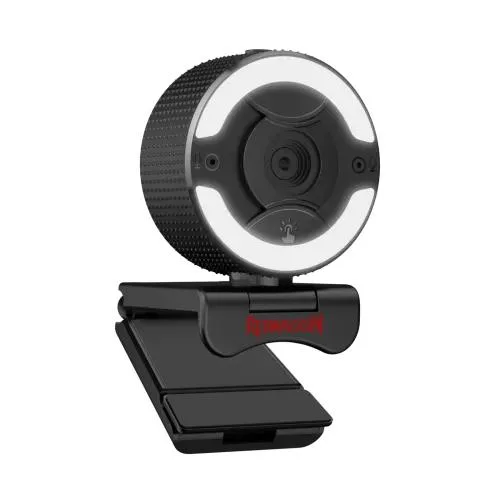
Redragon GW910 ONESHOT 1080P PC Webcam
- Brand:Redragon
- Product Code: Redragon GW910 ONESHOT 1080P PC Webcam
- Availability:In Stock
- Updated:
Specification
| BASIC INFORMATION | |
| Others | Lens Size: 1/2.7” Max Resolution: 1080p/30 fps Focus Type: Fixed Focus Built-in Mic: Stereo Digital Zoom: 5x digital magnification |
|---|---|
| Video Resolution | 1920 x 1080 @30Fps |
| Main Features | |
| autofocus | Yes |
| Physical Specification | |
| Color | Black |
| PHYSICAL SPECIFICATION | |
| Weight | 8.11 oz (230 g) |
Description
The Redragon GW910 ONESHOT 1080P PC Webcam is a Full HD USB webcam designed for video conferencing, online classes, live streaming, gaming, content creation and everyday communication. It combines 1920 x 1080 video at 30 frames per second with a 1/2.7-inch lens, built-in stereo microphones, an adjustable ring fill light, 5-level digital zoom and a magnetic privacy shutter. Its plug-and-play USB connection makes it a practical upgrade for desktop PCs and laptops that do not have a suitable built-in camera.
Redragon GW910 ONESHOT 1080P Webcam in Bangladesh
For users looking for a 1080p webcam in Bangladesh, the Redragon GW910 ONESHOT offers a useful combination of video quality, integrated lighting and built-in audio. Instead of requiring a separate webcam light for basic video calls or streaming, the GW910 incorporates a ring light around the lens with three colour-temperature levels and adjustable brightness.
The webcam is particularly useful when the available room lighting is inconsistent. A dedicated fill light can brighten the face and make the camera image easier to use during evening meetings, online classes or streaming sessions. The amount of improvement will naturally depend on the surrounding light, camera settings and environment.
Full HD 1080p Video at 30FPS
The GW910 captures video at up to 1920 x 1080 resolution and 30 frames per second. Full HD provides considerably more image detail than basic 720p webcams, making it suitable for modern video conferencing, online teaching, streaming and recording.
The 30FPS frame rate is appropriate for normal webcam applications. It provides smooth enough motion for talking-head videos, meetings, presentations and casual streaming without requiring the bandwidth or processing typically associated with higher frame rates.
The webcam uses a 1/2.7-inch optical lens system and a fixed-focus design. The fixed-focus arrangement is designed to keep the intended webcam viewing area usable without requiring continuous mechanical focus adjustment.
Built-In Adjustable Ring Fill Light
One of the most distinctive features of the Redragon GW910 is its integrated ring light. The light provides three colour-temperature levels and adjustable brightness, allowing users to compensate for dim or uneven lighting around the webcam.
This is particularly useful for users who position their webcam in a bedroom, home office, gaming room or other environment where the main room light may not illuminate the face evenly. The built-in light can also reduce the need for a separate small desk light when a simple webcam setup is required.
The ring light should be treated as a fill light rather than a replacement for professional studio lighting. For content creators who require precise lighting control, dedicated key and fill lights can still provide greater flexibility.
5-Level Digital Zoom
The GW910 provides up to 5x digital magnification. Digital zoom enlarges the image electronically rather than physically moving the lens closer to the subject.
This can be useful when you want to adjust the framing of your webcam image or make a particular area more prominent. Because it is digital magnification, increasing the zoom level can reduce the effective detail compared with using the camera at its native framing, so it is best used when additional framing flexibility is more important than maximum image detail.
Dual Stereo Microphones
The Redragon GW910 features built-in dual stereo microphones designed to provide clear voice capture for everyday communication. Having two microphones built into the webcam keeps the setup simple because users do not necessarily need a separate microphone for ordinary video calls.
The integrated microphones are suitable for online meetings, classes, Discord conversations, casual streaming and other applications where convenient voice communication is more important than studio-grade audio. Users creating professional podcasts or highly controlled voice recordings may still prefer a dedicated USB or XLR microphone.
Privacy Shutter for Camera Protection
The GW910 includes a magnetic privacy shutter that can cover the camera lens when the webcam is not being used. This provides a simple physical way to block the camera rather than relying entirely on software settings.
A physical shutter is particularly useful for users who keep the webcam permanently connected to a desktop PC or laptop. When the camera is not required, closing the shutter prevents the lens from capturing an image through the physical camera opening.
USB 2.0 Plug-and-Play Connection
The webcam connects through USB 2.0 and is designed for plug-and-play operation. This allows users to connect it to a compatible computer and select the GW910 as the camera and microphone device within supported applications.
It is suitable for common video software and communication platforms such as OBS, Discord, Skype, Zoom and other applications that support standard USB webcams. Application compatibility can vary according to the operating system and software version, so the camera should be selected from the application's video and audio device settings after connection.
Flexible Webcam Mounting
The GW910 is designed for flexible placement on common computer setups. Its mounting design can be used with compatible laptop screens and desktop monitors, while the tripod-ready base provides another mounting option for users who want to position the webcam away from the monitor.
This flexibility is useful for streaming and content creation because camera height and viewing angle can significantly affect the appearance of a video. Positioning the webcam approximately at eye level generally produces a more natural perspective for meetings and talking-head recordings.
Webcam for Online Meetings and Remote Work
The Redragon GW910 is well suited to home-office and remote-work setups. Its Full HD resolution can provide a clearer image than basic integrated laptop webcams, while the built-in microphones and ring light reduce the number of additional accessories needed for a basic meeting station.
For business meetings, interviews and presentations, the camera can be positioned on top of a monitor or laptop screen. The integrated privacy shutter is also convenient for users who leave the webcam connected between meetings.
Redragon GW910 for Online Classes
Students and teachers can use the GW910 for online classes, tutoring sessions, presentations and virtual group discussions. The 1080p resolution helps keep the speaker's face and presentation area visible, while the built-in stereo microphones simplify audio communication.
The ring light can be particularly useful during evening classes or in rooms where the user's face appears too dark because the primary light source is behind them.
Redragon GW910 for Gaming and Live Streaming
For gaming streamers, the GW910 can provide a dedicated camera feed for face-cam overlays in OBS and other supported streaming software. The 1080p 30FPS output is appropriate for a standard streamer camera view, while the ring light helps maintain more consistent illumination during long gaming sessions.
The 5x digital zoom also gives streamers additional control over framing. Depending on the streaming layout, the camera can be positioned farther away and digitally adjusted to achieve a suitable composition.
Serious content creators should remember that webcam image quality depends on more than resolution alone. Room lighting, background contrast, camera positioning, exposure and software processing can all influence the final stream.
Redragon GW910 for Content Creation
The webcam can be used for YouTube videos, tutorials, product demonstrations, live broadcasts, social-media content and other talking-head applications. Its compact design makes it easier to add a camera to an existing desktop setup without installing a dedicated camera system.
For professional video production, a dedicated mirrorless camera or higher-end webcam may provide more advanced image controls. However, for straightforward PC-based content creation, the GW910 provides a convenient all-in-one camera, microphone and basic lighting solution.
Redragon GW910 Technical Specifications
| Specification | Details |
|---|---|
| Brand | Redragon |
| Model | GW910 ONESHOT |
| Video Resolution | 1920 x 1080 Full HD |
| Maximum Frame Rate | 30FPS |
| Lens Size | 1/2.7-inch |
| Focus Type | Fixed Focus |
| Digital Zoom | 5x Digital Magnification |
| Microphone | Built-in Stereo Dual Microphone |
| Ring Light | Adjustable, 3 Colour-Temperature Levels |
| Privacy Shutter | Magnetic Privacy Shutter |
| Interface | USB 2.0 |
| Connection | Plug and Play |
| Mounting | Monitor/Laptop Mounting and Tripod-Ready Base |
| Colour | Black |
| Weight | Approximately 230g |
Why 1080p Matters for a Webcam
A webcam's resolution determines how much image information can be captured. At 1920 x 1080, the GW910 produces a Full HD image with more detail than a typical 720p webcam.
This difference can be noticeable during video calls where the camera is positioned relatively close to the user's face. Text, facial details and objects in the background can appear more defined when lighting and internet bandwidth are sufficient.
However, a 1080p webcam does not guarantee perfect image quality in every environment. Low light, strong backlighting, poor network bandwidth and aggressive video compression can all reduce the quality seen by other participants or viewers.
Fixed Focus Design
The GW910 uses a fixed-focus lens configuration. This means the camera is designed around a predetermined focus range rather than continuously adjusting the lens mechanically.
For normal desktop webcam use, fixed focus can be practical because the user typically remains within a relatively consistent distance from the camera. It also avoids unnecessary focus hunting during conversations or presentations.
Users who frequently move very close to the camera or need to focus on small objects at different distances should consider whether a fixed-focus webcam suits their particular workflow.
Simple Setup for Desktop PCs
One of the advantages of a USB webcam is the straightforward installation process. Connect the GW910 to a compatible USB port, allow the operating system to recognise the device and then select it within your preferred video application.
For streaming software such as OBS, the webcam can be added as a video capture source. For communication applications, it can normally be selected as the camera and microphone device from the application's settings.
Good Choice for a Home Office Setup
The GW910 can simplify a home-office setup by combining several useful functions into one device. Instead of purchasing a webcam, basic fill light and separate microphone individually, users can start with a single webcam that provides Full HD video, integrated lighting and stereo microphone functionality.
This makes it a practical choice for employees working remotely, freelancers, online tutors, students and small-business users who need dependable video communication without building a complicated studio setup.
Advantages of the Redragon GW910
- Full HD 1920 x 1080 video resolution.
- 30FPS video suitable for meetings, streaming and online classes.
- Built-in dual stereo microphones for convenient voice communication.
- Integrated ring fill light with three colour-temperature levels.
- Adjustable lighting brightness for different room conditions.
- 5x digital zoom for flexible framing.
- Magnetic privacy shutter for physical camera coverage.
- USB 2.0 plug-and-play connectivity.
- Compatible with common video conferencing and streaming applications.
- Tripod-ready mounting design.
Things to Consider Before Buying
- The camera records at a maximum of 30FPS, so it is not intended as a high-frame-rate webcam.
- The focus system is fixed focus, so users who require continuous autofocus should choose a different model.
- The 5x zoom is digital rather than optical, so high magnification can reduce effective image detail.
- The integrated ring light is designed for basic illumination and does not replace professional studio lighting.
- Built-in microphones are convenient for everyday communication, while professional creators may prefer a dedicated microphone.
- Actual video quality depends on room lighting, computer software, internet bandwidth and video compression.
- Always check the operating system and application requirements of your particular setup.
Who Should Buy the Redragon GW910?
- Gamers who want a webcam for live streaming and face-cam overlays.
- Remote workers attending regular online meetings.
- Students participating in online classes.
- Teachers and tutors conducting virtual lessons.
- YouTubers and beginner content creators.
- Users who want a webcam with integrated lighting.
- Desktop PC users without a suitable built-in camera.
- Laptop users looking for a dedicated external Full HD webcam.
- Users who value a physical privacy shutter.
Who May Need a More Advanced Webcam?
The GW910 is designed for practical Full HD webcam use. Users producing professional studio content, requiring 60FPS or higher frame rates, advanced manual exposure controls, optical zoom or interchangeable camera systems may benefit from a more specialised camera solution.
For everyday meetings, classes, gaming streams and general content creation, however, its 1080p output, integrated lighting and dual microphones provide a useful feature set without requiring a complicated setup.
Redragon GW910 for a Gaming PC Setup
A webcam can complement a gaming PC by adding face-cam video to live streams, Discord calls, gaming recordings and online events. The GW910's black design works naturally with most gaming desks and PC configurations, while the integrated ring light can provide additional illumination around the camera position.
For a complete streaming setup, the webcam can be paired with a gaming headset or dedicated microphone, mechanical keyboard, gaming mouse and suitable monitor. The choice of accessories should depend on whether the PC is primarily being used for gaming, streaming, work or a combination of these activities.
Why Buy the Redragon GW910 from Unix Network?
Unix Network is a computer and technology retailer serving customers in Jessore and across Bangladesh. The Redragon GW910 can be a useful choice for customers looking to add Full HD video capability to a desktop PC, gaming setup, home office or online-learning station.
Customers visiting a Computer Shop in Jessore can receive guidance on selecting a webcam according to their intended use, monitor arrangement, lighting conditions and computer setup. For streaming customers, it is also useful to consider the webcam together with the microphone, lighting and PC hardware being used for broadcasting.
Customers outside Jessore can also purchase computer accessories for delivery across Bangladesh. Before ordering, it is recommended to confirm the required connection and application compatibility for your particular computer.
Warranty Information
Warranty terms can vary by seller and distribution channel. Bangladesh listings for the Redragon GW910 commonly advertise a one-year warranty, although some retailers may provide different terms. Buyers should confirm the warranty period and conditions applicable to their purchase at the time of ordering.
Frequently Asked Questions About Redragon GW910
What resolution does the Redragon GW910 support?
The GW910 supports Full HD 1920 x 1080 video at up to 30 frames per second.
Does the GW910 have a microphone?
Yes. It has built-in dual stereo microphones designed for convenient voice communication during meetings, classes, calls and streaming.
Does the Redragon GW910 have a ring light?
Yes. It features an integrated adjustable ring fill light with three colour-temperature levels and adjustable brightness.
Does the GW910 have autofocus?
The product specifications describe the lens as fixed focus. Some retailer databases label the product's autofocus field inconsistently, so buyers requiring continuous autofocus should not assume that this model provides mechanical autofocus.
How much zoom does the GW910 have?
The webcam provides up to 5x digital magnification. Because it is digital zoom, higher magnification can reduce effective image detail.
Does the Redragon GW910 have a privacy shutter?
Yes. It includes a magnetic privacy shutter that can physically cover the camera lens when the webcam is not being used.
Is the GW910 suitable for Zoom meetings?
Yes. It is designed for common video communication applications and can be selected as a USB camera and microphone on compatible systems.
Can I use the GW910 for OBS?
Yes. The webcam is designed to work with common streaming software including OBS on supported operating systems.
Is the Redragon GW910 good for online classes?
Yes. Its 1080p video, built-in stereo microphones and integrated ring light make it suitable for online classes, tutoring and virtual presentations.
Can I use the GW910 for live streaming?
Yes. The 1080p 30FPS output is suitable for standard face-cam streaming and can be used with supported streaming applications.
Does the GW910 connect through USB?
Yes. It uses a USB 2.0 connection and is designed for plug-and-play operation on compatible computers.
Can the GW910 be mounted on a tripod?
Yes. The webcam has a tripod-ready base, providing an alternative to mounting it directly on a monitor or laptop.
Is the Redragon GW910 compatible with laptops?
It can be used with laptops that have a compatible USB connection and operating system support. It is particularly useful when the built-in laptop webcam does not provide the desired image quality or features.
Does the GW910 record at 60FPS?
No. Its specified maximum video output is 1920 x 1080 at 30FPS.
Is the ring light suitable for professional photography?
The integrated ring light is intended as a convenient webcam fill light. Professional photography or video production may require dedicated lighting equipment with greater output and control.
Final Verdict
The Redragon GW910 ONESHOT 1080P PC Webcam is a feature-rich Full HD webcam aimed at users who want more than basic camera functionality. Its 1920 x 1080 resolution, 30FPS video, dual stereo microphones, integrated adjustable ring light, 5x digital zoom and magnetic privacy shutter make it well suited to online meetings, classes, gaming streams and everyday content creation.
Its biggest strengths are convenience and versatility. The integrated light reduces the need for a separate basic fill light, while the built-in microphones keep the setup simple. The physical privacy shutter is another useful feature for users who leave their webcam connected regularly.
For customers in Jessore and across Bangladesh looking for a Full HD webcam for a PC, laptop, gaming setup, home office or online learning environment, the Redragon GW910 ONESHOT provides a practical combination of image quality, lighting, audio and privacy features in a single USB webcam.