
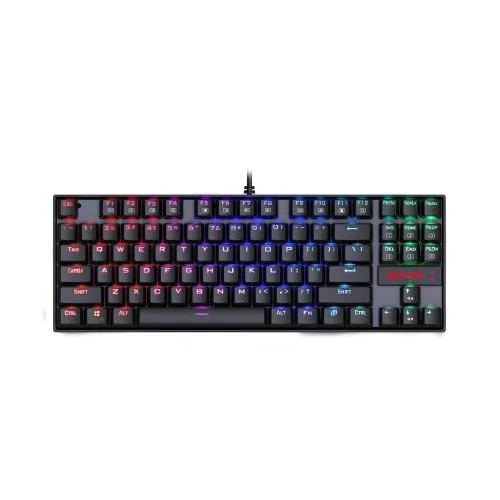
Redragon K552RGB KUMARA RGB Backlit Mechanical Gaming Keyboard
- Brand:Redragon
- Product Code: Redragon K552RGB KUMARA RGB Backlit Mechanical Gaming Keyboard
- Availability:In Stock
- Updated:
Earn ৳100 cashback in your wallet on orders of ৳3,000 or more. Credited 7 days after the order is completed, if it is not cancelled or returned. Logged-in customers only; coupon, wallet and shipping are not counted.
Specification
| BASIC INFORMATION | |
| Dimensions | 13.9 x 4.9 x 1.5 inches |
|---|---|
| Interface | Gold-plated corrosion free USB connector |
| System Requirements | Windows 10, Windows 8, Windows 7, Windows Vista, or Windows XP, Limited Mac OS keyboard support |
| Gaming Features | |
| Switch Lifecycle | Ultra-durable keys tested to 50 million keystrokes |
| Main Features | |
| Keys | 87 keys RGB full color LED backlit keys |
| Switch Color | Blue |
| Wired/Wireless | Wired |
| Memory Specifications | |
| Type | Mechanical Keyboard |
| Physical Specification | |
| Color | Black |
Description
The Redragon K552RGB KUMARA RGB Backlit Mechanical Gaming Keyboard is a compact tenkeyless mechanical keyboard built for gamers, fast typists and PC users who want a durable keyboard without taking up the desk space of a full-size model. Its 87-key TKL layout removes the dedicated number pad while retaining the main navigation, function and arrow keys, giving gamers more room for mouse movement. The K552RGB combines mechanical switches, RGB backlighting, full-key anti-ghosting, a reinforced metal and ABS construction, double-shot keycaps and a wired USB connection.
Redragon K552RGB KUMARA RGB Mechanical Gaming Keyboard in Bangladesh
For customers searching for a mechanical gaming keyboard in Bangladesh, the Redragon K552RGB KUMARA remains a practical choice for users who want the feel of mechanical switches and the compact footprint of a TKL keyboard. It is especially suitable for gaming PC setups where additional desk space around the mouse is valuable.
The K552RGB is commonly supplied with Outemu Blue mechanical switches in the Bangladesh market. These switches provide tactile feedback and a distinct audible click, making each keystroke feel more pronounced than a typical membrane keyboard. Because the sound is part of the Blue-switch experience, the keyboard is better suited to users who enjoy audible feedback rather than those who need an especially quiet workstation.
87-Key Tenkeyless Layout
The Redragon K552RGB uses an 87-key tenkeyless, or TKL, layout. Unlike a conventional full-size keyboard, it does not include a separate numeric keypad. This reduces the overall width while retaining the essential keys needed for gaming, typing, programming and everyday computer work.
The smaller footprint gives the mouse more usable space on the right side of the desk. This can be particularly useful for FPS gamers who use lower mouse sensitivity and need to make wider mouse movements.
For office work, study and programming, the TKL layout still retains the arrow keys, navigation controls and function-row functionality expected from a traditional keyboard. The main compromise is the absence of a dedicated number pad, which may matter to users who frequently enter numerical data.
Outemu Blue Mechanical Switches
The commonly documented K552RGB configuration uses Outemu Blue mechanical switches. These switches are designed to provide a tactile bump and a clearly audible click during operation. The combination gives the keyboard a more pronounced mechanical typing experience than a standard rubber-dome or membrane keyboard.
For gaming, the tactile feedback can make individual key presses feel distinct and deliberate. For typing, the click and tactile response can also make keystrokes easier to perceive without needing to bottom out every key.
Blue switches are not universally ideal, however. Their audible click can be noticeable in shared bedrooms, offices, classrooms or other quiet environments. If silent operation is important, a Red or Brown switch keyboard may be more appropriate.
Mechanical Keyboard for Gaming and Typing
The K552RGB is not limited to gaming. Its mechanical switches make it suitable for users who spend considerable time typing documents, writing, programming or communicating online.
The tactile feedback can provide a more deliberate typing experience, while the compact TKL format keeps the keyboard relatively easy to position on a desk. Users who prefer a traditional full-size keyboard should remember that the K552RGB does not provide a dedicated numeric keypad.
RGB Backlighting
RGB lighting is one of the defining features of the K552RGB. The keyboard provides illuminated keys that can add both visual appeal and practical visibility to a gaming desk.
Documented versions of the K552RGB provide multiple lighting effects and brightness controls, with some versions offering around 18 RGB lighting modes and additional colour customisation. Lighting functions can vary between revisions, so the exact available effects should be checked for the particular K552RGB version supplied.
RGB backlighting is especially useful in darker gaming environments because the illuminated legends make the keyboard easier to see. It also allows the keyboard to visually match other RGB components such as gaming mice, mouse pads, headsets and PC cases.
Full-Key Anti-Ghosting and N-Key Rollover
The Redragon K552RGB is designed with full-key anti-ghosting and N-key rollover. This allows multiple keys to be registered simultaneously rather than limiting the keyboard to a small number of concurrent inputs.
This feature is useful in gaming because players may need to hold movement keys while simultaneously pressing actions such as crouch, sprint, reload or abilities. Full-key rollover is also helpful for users who frequently use keyboard shortcuts involving several keys.
Anti-ghosting does not make a keyboard faster by itself. Its main benefit is ensuring that intended simultaneous key combinations are recognised reliably by the computer.
Double-shot Injection Keycaps
The K552RGB uses double-shot injection-moulded keycaps on documented configurations. Double-shot keycaps are produced using two layers of plastic so that the legends are formed as part of the keycap rather than simply being printed onto its surface.
This construction can help the legends remain clear through prolonged use. It is particularly relevant on gaming keyboards because frequently used keys such as W, A, S, D, Shift and Space can receive significantly more use than other keys.
The illuminated legends also work well with the RGB backlighting, helping the characters remain visible when the keyboard is being used in a darker room.
Durable Metal and ABS Construction
The K552RGB combines a metal plate or metal-alloy construction with ABS components to provide a solid foundation for the mechanical switches. This gives the keyboard a more substantial feel than many lightweight membrane keyboards.
A reinforced internal structure is useful for gaming because keyboards can experience repeated key presses, desk movement and frequent repositioning. The K552's compact form also makes it relatively easy to move between a gaming desk and another workstation.
Spill-resistant Design
Documented K552 configurations include a spill-resistant design intended to provide additional protection against accidental liquid exposure. This should be considered a practical protective feature rather than waterproofing.
Liquids should still be kept away from the keyboard. If a spill occurs, disconnecting the keyboard promptly and following appropriate drying and cleaning procedures is safer than assuming the keyboard is completely liquid-proof.
Wired USB Connection
The Redragon K552RGB uses a wired USB connection. A wired keyboard does not require Bluetooth pairing, wireless receivers or battery charging, making it straightforward for a desktop gaming PC.
The high-speed USB connection is designed for reliable communication between the keyboard and computer. Some documented K552 versions use a gold-plated USB connector intended to resist corrosion and maintain a dependable connection over time.
The wired design is also convenient for competitive gaming because there is no wireless battery to monitor during a gaming session.
Compact Design for FPS Gaming
The TKL layout is particularly useful for FPS gamers. Removing the number pad reduces the keyboard's width, leaving additional space for the mouse.
Players who use low mouse sensitivity often need substantial horizontal mouse movement. A large full-size keyboard can limit that movement, especially on smaller desks. The K552RGB's compact layout helps create a more open area around the mouse.
This is one reason TKL keyboards have become popular among gaming PC users. The trade-off is simple: you gain desk space but lose the dedicated numeric keypad.
Multimedia and Function Controls
The K552RGB provides access to multimedia and secondary functions through the keyboard's function-key combinations. Depending on the specific revision, multimedia controls can be accessed using the Fn key rather than through a separate row of dedicated media buttons.
This approach keeps the keyboard compact while still providing convenient control over common media functions. It is useful for users who listen to music or watch videos while working or gaming.
Windows Key Lock
Gaming-oriented versions of the K552 include a Windows-key lock function. This can help prevent accidental presses of the Windows key from interrupting a full-screen game.
For competitive or fast-paced gaming, accidentally opening the Windows interface can be distracting. The ability to disable the key when gaming and restore it for normal desktop use provides a useful balance between gaming and everyday productivity.
Redragon K552RGB KUMARA Specifications
| Specification | Details |
|---|---|
| Model | Redragon K552RGB KUMARA |
| Keyboard Type | Mechanical Gaming Keyboard |
| Layout | Tenkeyless (TKL) |
| Number of Keys | 87 keys |
| Switch Type | Outemu Blue mechanical switches on the commonly listed configuration |
| Switch Feel | Tactile with audible click |
| Backlighting | RGB LED |
| Anti-Ghosting | Full-key anti-ghosting / N-key rollover |
| Connectivity | Wired USB |
| USB Connector | Gold-plated connector on documented versions |
| Keycaps | Double-shot injection moulded on documented versions |
| Construction | Metal/metal-alloy and ABS construction |
| Windows Key Lock | Yes |
| Multimedia Controls | Available through function-key combinations on documented versions |
| Cable | Approximately 1.8m / 6ft depending on version |
| Dimensions | Approximately 354–355 x 124–135 x 35–38mm depending on revision |
| Weight | Approximately 0.8–0.9kg depending on version |
| Software | Varies by K552RGB revision |
| Colour | Black; white versions are also available in some markets |
Redragon K552RGB for FPS Games
The K552RGB is well suited to FPS gaming because of its mechanical switches, compact TKL layout and full-key anti-ghosting. The smaller keyboard leaves more room for mouse movement, while the mechanical switches provide clear physical feedback during repeated key presses.
The familiar WASD layout can be used for movement while the surrounding keys remain accessible for crouching, sprinting, reloading, weapon switching and other commands. RGB lighting can also make important keys easier to locate in a darker room.
For MOBA and Strategy Games
MOBA and strategy games often involve combinations of movement, abilities, shortcuts and commands. The K552RGB's mechanical key switches and full-key rollover make it suitable for these demanding keyboard-based controls.
The TKL format also leaves enough space around the keyboard for a larger mouse pad, which can be useful for users who alternate between keyboard and mouse controls.
For Programming and Office Work
A mechanical keyboard can be useful for people who spend many hours typing code, documents or messages. The tactile response of the Blue switches provides noticeable feedback with each keystroke.
The K552RGB can therefore serve as a combined gaming and productivity keyboard. Its main limitation for office-focused users is the audible click of Blue switches and the absence of a dedicated number pad.
For Students and Home Users
The compact layout makes the K552RGB suitable for study desks where space is limited. It can be used for assignments, browsing, programming, online learning and gaming without requiring a large full-size keyboard footprint.
Students sharing a room should consider the audible Blue-switch sound, particularly during late-night typing. If noise is a concern, a quieter switch configuration may be preferable.
Mechanical vs Membrane Keyboard
| Feature | Redragon K552RGB | Typical Membrane Keyboard |
|---|---|---|
| Switch Technology | Mechanical | Membrane/rubber dome |
| Key Feedback | Tactile and clicky with Blue switches | Usually softer |
| Anti-Ghosting | Full-key N-key rollover on documented versions | Varies by model |
| Layout | 87-key TKL | Often full-size |
| RGB Lighting | Yes | Depends on model |
| Gaming Focus | Strong | Varies |
| Typing Feel | Distinct mechanical feedback | Generally softer |
Advantages of the Redragon K552RGB
- Compact 87-key TKL design saves valuable desk space.
- Mechanical switches provide tactile and audible feedback.
- Full-key anti-ghosting and N-key rollover support simultaneous inputs.
- RGB backlighting gives the keyboard a customisable gaming appearance.
- Double-shot keycaps help maintain durable legends on documented versions.
- Metal and ABS construction provides a solid keyboard platform.
- Wired USB connectivity avoids battery charging.
- Windows-key lock helps prevent accidental interruptions during gaming.
- Multimedia functions are available without requiring a full-size keyboard.
- Suitable for gaming, typing, programming, study and general computer use.
Things to Consider Before Buying
- The K552RGB is a TKL keyboard and does not include a dedicated numeric keypad.
- Outemu Blue switches are clicky and relatively loud, so they may not suit quiet environments.
- K552RGB specifications can vary between revisions and regional versions.
- Software support and RGB customisation options may differ between specific K552RGB versions.
- Some newer K552 variants may use different switches or updated hot-swappable hardware, so verify the exact switch type before purchase.
- The keyboard is wired rather than wireless.
- Spill-resistant does not mean waterproof; liquids should still be kept away from the keyboard.
Who Should Buy the Redragon K552RGB KUMARA?
- Gamers looking for a compact mechanical gaming keyboard.
- FPS players who need additional space for mouse movement.
- Users who enjoy tactile and audible Blue mechanical switches.
- Students building a compact gaming and study desk.
- PC users who want RGB lighting without a full-size keyboard.
- Programmers and fast typists who prefer mechanical key feedback.
- Users who want a durable wired gaming keyboard for a desktop PC.
Who May Prefer a Different Keyboard?
The K552RGB may not be ideal for users who regularly enter large amounts of numerical data. A full-size keyboard with a dedicated number pad would be more convenient for accounting, spreadsheet-heavy work and data entry.
It may also be unsuitable for users who require a quiet keyboard. The commonly supplied Outemu Blue switches produce a noticeable click, which can be distracting to people nearby. A Red or silent-oriented switch would be better for a quiet office, shared room or recording environment.
TKL Layout and Desk Space
One of the strongest reasons to choose the K552RGB is its compact footprint. By removing the number pad, the keyboard occupies less horizontal desk space than a standard full-size keyboard.
This leaves more room for a mouse and mouse pad while keeping the main keys needed for gaming and typing. For smaller computer desks in bedrooms, study rooms and gaming stations, the difference can be noticeable.
Pairing the K552RGB with a Gaming Setup
The keyboard can form the foundation of a complete gaming peripheral setup. A suitable gaming mouse can take advantage of the additional desk space created by the TKL layout, while a large mouse pad can provide a consistent surface for low-sensitivity mouse movement.
RGB lighting can also be matched with a gaming mouse, headset and PC case to create a more coordinated appearance. The K552RGB is therefore suitable for both first-time gaming PC builds and users upgrading from a basic office keyboard.
Why Buy the Redragon K552RGB from Unix Network?
Unix Network is a computer and technology retailer serving customers in Jessore (Jashore), Khulna, Bangladesh. For customers searching for a mechanical keyboard in Jessore or a gaming keyboard in Jessore, the Redragon K552RGB is a practical option when compact design, mechanical switches and RGB lighting are important considerations.
Unix Network also supplies gaming mice, mouse pads, headsets, monitors, PC components and complete gaming PC solutions. This makes it possible to build a compatible gaming setup around the K552RGB rather than selecting each peripheral in isolation.
Customers outside Jessore can also purchase computer accessories for delivery across Bangladesh, subject to the applicable delivery arrangements and product availability.
Warranty and After-sales Support
Local Bangladesh listings commonly specify a one-year warranty for the Redragon K552RGB. Warranty terms can vary according to the exact revision, importer and seller, so the warranty provided with the purchased unit should be treated as the final reference.
Keep the keyboard, cable and purchase documentation available during the warranty period. If a key, USB connection, backlight or other hardware function develops an issue, having the complete product information can make troubleshooting and after-sales service easier.
Frequently Asked Questions
Is the Redragon K552RGB a mechanical keyboard?
Yes. The K552RGB is a mechanical gaming keyboard and commonly uses Outemu Blue mechanical switches.
How many keys does the Redragon K552RGB have?
The standard K552RGB KUMARA layout has 87 keys and uses a tenkeyless design without a dedicated number pad.
Does the Redragon K552RGB have RGB lighting?
Yes. The K552RGB features RGB backlighting with multiple lighting effects. The exact lighting controls can vary between revisions.
Does the K552RGB have anti-ghosting?
Yes. Documented K552RGB versions provide full-key anti-ghosting with N-key rollover, allowing multiple keys to be registered simultaneously.
What switches does the Redragon K552RGB use?
The commonly listed K552RGB configuration uses Outemu Blue switches, which provide tactile feedback and an audible click. Other K552 revisions can use different switch types, so the exact version should be checked before purchase.
Is the Redragon K552RGB wireless?
No. The K552RGB is a wired USB mechanical keyboard.
Does the K552RGB have a number pad?
No. It uses an 87-key TKL layout and therefore does not include a dedicated numeric keypad.
Is the Redragon K552RGB good for FPS gaming?
Yes. Its compact TKL layout provides additional mouse space, while mechanical switches and full-key rollover make it suitable for fast-paced games.
Is the K552RGB good for typing?
Yes. The tactile feedback from the commonly supplied Blue switches can make typing feel responsive and deliberate. However, the audible click may not be suitable for quiet environments.
Does the K552RGB support multimedia controls?
Yes. Documented versions provide multimedia functions through function-key combinations, allowing common media controls without requiring dedicated media keys.
Does the K552RGB have a Windows-key lock?
Yes. Gaming-oriented K552 versions provide a Windows-key lock function that can help prevent accidental interruptions during gameplay.
Are the K552RGB keycaps double-shot?
Documented K552RGB configurations use double-shot injection-moulded keycaps, which help provide durable legends and clear backlighting.
Is the Redragon K552RGB suitable for programming?
Yes. Its mechanical switches and compact layout make it suitable for programming and general typing. Users who frequently work with numerical data may prefer a keyboard with a dedicated number pad.
Is the K552RGB suitable for a small desk?
Yes. The TKL layout is specifically useful when desk space is limited because it removes the numeric keypad and reduces the keyboard's overall width.
Is the Redragon K552RGB loud?
The commonly supplied Outemu Blue switches produce a distinct audible click. If you need a quiet keyboard, consider a Red, Brown or silent-switch alternative depending on the required typing feel.
What operating systems does the K552RGB support?
The keyboard is primarily designed for Windows PCs. Some documented versions also work with macOS or Linux for basic keyboard input, although advanced functions and software support can vary.
Final Verdict
The Redragon K552RGB KUMARA RGB Backlit Mechanical Gaming Keyboard is a strong practical choice for users who want a compact mechanical keyboard with gaming-focused features. Its 87-key TKL layout saves desk space, while mechanical switches, full-key anti-ghosting, RGB lighting, durable construction and double-shot keycaps provide a feature set suitable for both gaming and everyday typing.
The biggest consideration is the switch type. The commonly supplied Outemu Blue switches deliver a satisfying tactile and clicky experience, but they are noticeably louder than quieter mechanical alternatives. If you enjoy audible mechanical feedback, this is part of the keyboard's appeal; if you share a quiet workspace, another switch type may be preferable.
For customers looking for a Redragon mechanical gaming keyboard in Bangladesh, particularly a compact TKL model for a gaming PC, the K552RGB KUMARA offers a practical balance of gaming functionality, mechanical typing feel, RGB aesthetics and efficient desk usage.