
Unix Tech Fest: offers end in
.png)

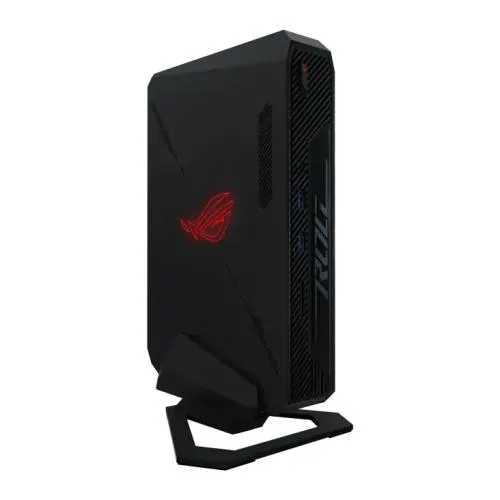
ASUS ROG NUC Core Ultra 7 155H RTX 4060 8GB Graphics Mini Gaming PC
- Brand:Asus
- Product Code: ASUS ROG NUC Core Ultra 7 155H RTX 4060 8GB Graphics Mini Gaming
- Unix CoinsEarn 2021 coins, redeemable next order
- Availability:In Stock
- Updated:
ক্যাম্পেইনের পণ্যে অন্য কোন অফার থাকলে সম্মানিত ক্রেতারা যেকোন একটি অফার উপভোগ করতে পারবেন।
Earn ৳500 (1%) cashback in your wallet on orders of ৳5,000 or more. Credited 7 days after the order is completed, if it is not cancelled or returned. Logged-in customers only; coupon, wallet and shipping are not counted.
Specification
| BASIC INFORMATION | |
| Graphics card | NVIDIA GeForce RTX 4060 Laptop GPU 110W+25W Dynamic Boost 8GB GDDR6 Intel Arc GPU2 |
|---|---|
| Operating System | Windows 11 Home 64-bit preinstalled |
| Power Supply | 330W Power Adapter |
| Processor | Intel Core Ultra 7 Processor 155H, cTDP 40W |
| Motherboard | Integrated |
| RAM | DRAM MODULE(DDR5)/5600/8G x 2 |
| Storage | SSD PCIEG4/512G M.2/PERFORMANCE |
| Casing | 2.5-liter chassis design makes integration and cleaning a breeze |
| Audio | Realtek/ALC256 |
| INPUT DEVICES | |
| External I/O Ports | 10/100/1000/2500 Mbps, 2.5G Intel LAN Front(Side) I/O Ports 1x card reader (SD) (UHS-I) 2 x USB 3.2 Gen2 Type-A 1x 3.5mm Headset Jack Back I/O Ports 1 x Thunderbolt 4 Type-C w/ DisplayPort 2.1 2 x USB 3.2 Gen 2 Type-A 2 x USB 2.0 Type-A 1 x HDMI 2.1 FRL 2 x DP 1.4a 1 x RJ45 LAN 1 x DC-in 1 x Kensington Lock |
| Physical Specification | |
| Color | Black |
| PHYSICAL SPECIFICATION | |
| Weight | 2.6 kg (5.73 lbs) |
| Warranty Information | |
| Warranty | 3 years |
Description
ASUS ROG NUC Core Ultra 7 155H RTX 4060 8GB Mini Gaming PC
Powerful gaming hardware no longer needs a full-sized desktop tower. The ASUS ROG NUC Core Ultra 7 155H RTX 4060 8GB Mini Gaming PC brings dedicated NVIDIA graphics, Intel Core Ultra processing and modern connectivity into a remarkably compact gaming system. Built for gamers, creators and professionals who want capable hardware without sacrificing valuable desk space, this ROG NUC combines performance-focused components with the distinctive design of ASUS Republic of Gamers.
At the heart of the system are an Intel Core Ultra 7 155H processor and NVIDIA GeForce RTX 4060 8GB laptop-class graphics. Together, they provide a capable platform for modern PC games, video editing, 3D design and demanding multitasking. With support for DDR5 memory, PCIe 4.0 NVMe storage and multiple high-resolution displays, the ROG NUC is designed to serve as a compact alternative to a conventional gaming desktop.
Intel Core Ultra 7 155H with 16 Cores and 22 Threads
The ASUS ROG NUC is powered by the Intel Core Ultra 7 155H processor, based on Intel's Meteor Lake architecture. It features 16 cores and 22 threads, combining six Performance-cores, eight Efficient-cores and two Low Power Efficient-cores. With a maximum turbo frequency of up to 4.8GHz, the processor is built to balance responsive performance with efficient operation.
This hybrid design helps the system handle demanding applications alongside everyday background tasks. Whether you are editing photographs, compiling software, running multiple browser tabs or playing games while communicating with teammates, the processor provides the resources needed for a responsive computing experience. Actual performance depends on cooling, system power limits and workload.
Intel AI Boost NPU for AI-Accelerated Applications
The Core Ultra 7 155H includes Intel AI Boost, a dedicated Neural Processing Unit designed to accelerate supported artificial intelligence workloads. Unlike traditional CPU-only processing, an NPU can handle certain AI operations with improved power efficiency.
Compatible applications may use the NPU for features such as background effects, image processing and selected productivity tasks. The ROG NUC also benefits from CPU and GPU acceleration, allowing software developers to use different processors according to the workload.
Not every AI application uses the NPU, and performance depends on software support. The system's dedicated RTX graphics can be particularly useful for GPU-accelerated creative and AI applications that support NVIDIA hardware.
NVIDIA GeForce RTX 4060 8GB Dedicated Graphics
Graphics performance is one of the defining features of the ASUS ROG NUC. Its NVIDIA GeForce RTX 4060 Laptop GPU with 8GB of GDDR6 video memory brings dedicated graphics processing to a compact gaming platform.
Built on NVIDIA's Ada Lovelace architecture, the RTX 4060 supports modern graphics technologies and hardware acceleration for compatible games and creative software. It is particularly well suited to 1080p gaming and can handle many titles at 1440p with appropriate graphics settings.
Actual frame rates vary according to the game, resolution, graphics quality, cooling and GPU power configuration. The mobile-class RTX 4060 used in the ROG NUC should not be assumed to deliver identical performance to a full-sized desktop RTX 4060 graphics card.
Ray Tracing for More Realistic Gaming Visuals
The GeForce RTX 4060 includes dedicated ray tracing hardware that allows compatible games to render more realistic lighting, reflections and shadows. Ray tracing can improve visual depth and atmosphere, particularly in games that make extensive use of modern rendering techniques.
Because ray tracing increases graphics processing requirements, users may need to adjust resolution and quality settings to achieve their preferred balance between image quality and frame rate. NVIDIA's supported upscaling technologies can help improve performance in compatible games.
NVIDIA DLSS 3 and AI Frame Generation
The ASUS ROG NUC benefits from NVIDIA DLSS technologies supported by its RTX 4060 GPU. In compatible games, DLSS Super Resolution uses AI-based image reconstruction to improve performance while maintaining useful visual quality. The RTX 40 Series also supports DLSS Frame Generation in games that implement the feature.
These technologies can be particularly valuable when playing demanding titles at higher resolutions or with advanced graphics effects enabled. However, DLSS availability varies by game, and generated frames do not eliminate input latency. For competitive gaming, users should select settings based on responsiveness as well as displayed frame rates.
Compact 2.5-Litre Design for Space-Saving Gaming Setups
The ASUS ROG NUC delivers its gaming hardware in a chassis of approximately 2.5 litres, making it significantly smaller than a conventional desktop tower. This compact footprint is useful for minimalist gaming desks, shared workspaces, small apartments and professional environments where available space is limited.
The ROG-inspired exterior gives the system a distinctive gaming appearance without requiring a large enclosure. Its small size also makes it easier to relocate between suitable workstations compared with a traditional desktop PC. However, the system still requires adequate ventilation and access to its external power supply.
Purpose-Built Cooling for Compact Gaming Hardware
High-performance processors and graphics hardware generate heat, making cooling especially important in a small computer. The ASUS ROG NUC uses a cooling system designed around its compact internal layout to manage processor and GPU temperatures during demanding workloads.
Effective thermal management helps the system maintain performance while operating within its intended temperature and power limits. Fan speeds and noise levels can increase during intensive gaming or rendering, so completely silent operation should not be expected. Users should keep ventilation openings clear and avoid installing the unit inside tightly enclosed spaces.
DDR5-5600 Memory for Gaming and Multitasking
The ROG NUC supports DDR5 SO-DIMM memory, providing a modern memory platform for gaming, content creation and professional applications. DDR5-5600 support offers high memory bandwidth, which can help when working with demanding applications and multiple programs simultaneously.
Dual-channel memory configurations can improve available memory bandwidth when supported modules are installed correctly. The exact amount of pre-installed RAM depends on the product configuration, as ROG NUC systems may be supplied with different memory and storage options. Buyers should confirm installed capacity and maximum supported memory before ordering.
PCIe 4.0 NVMe SSD Storage for Fast Application Loading
The ASUS ROG NUC supports high-speed M.2 NVMe solid-state storage using a PCIe 4.0 interface. A compatible NVMe SSD can improve operating system startup, game loading, application responsiveness and large file transfers compared with conventional hard disk storage.
This is particularly useful for modern games, video editing projects and creative applications that frequently access large files. Actual storage speed depends on the installed SSD model, capacity and operating conditions. The number of available storage slots and pre-installed SSD capacity should be verified for the specific ROG NUC configuration.
Thunderbolt 4 for High-Speed Connectivity
Thunderbolt 4 connectivity adds flexibility to the ASUS ROG NUC, allowing compatible devices to use high-speed data connections of up to 40Gbps. This is useful for external SSDs, docking stations, selected professional accessories and compatible display equipment.
Thunderbolt 4 can simplify a workstation by supporting multiple functions through a single compatible connection. However, available display configurations, accessory compatibility and power delivery capabilities depend on the connected hardware and port specifications. External GPU compatibility should not be assumed without confirmation from ASUS for the exact model.
Multiple High-Resolution Display Connections
The ASUS ROG NUC is designed for multi-monitor setups, making it suitable for gaming, streaming, editing and professional productivity. Its display connectivity includes modern HDMI, DisplayPort and Thunderbolt-based output options, depending on the exact model configuration.
Connecting multiple monitors allows users to keep games, communication applications, editing timelines and reference materials visible across separate screens. Support for high-resolution displays is particularly useful for creators who work with detailed images or large digital workspaces.
The maximum number of simultaneous displays, supported resolutions and refresh rates depend on the specific output ports, cables and connected monitors. The ability to output a 4K or 8K desktop signal does not mean the system can run demanding games at that resolution with high frame rates.
Wi-Fi 6E for Modern Wireless Networking
The ASUS ROG NUC includes Wi-Fi 6E connectivity, providing access to compatible 2.4GHz, 5GHz and 6GHz wireless networks. The additional 6GHz band can offer access to less congested wireless spectrum where supported by the router and local regulations.
Wi-Fi 6E is useful for fast downloads, cloud applications, video conferencing and wireless gaming in suitable network environments. To use the 6GHz band, a compatible Wi-Fi 6E router or access point is required. Actual speeds depend on signal conditions, channel availability and internet service performance.
2.5 Gigabit Ethernet for Fast Wired Networking
For users who prefer a wired connection, the ROG NUC features 2.5 Gigabit Ethernet connectivity. This provides a nominal wired link rate of up to 2.5Gbps when connected to compatible networking equipment.
A wired network can be particularly beneficial for online gaming, transferring large files to network storage and working with shared creative projects. To achieve speeds above 1Gbps, the connected router or switch and the rest of the network must also support multi-gigabit Ethernet.
Bluetooth Connectivity for Wireless Accessories
Bluetooth support makes it convenient to connect compatible wireless headphones, keyboards, mice, game controllers and other accessories. This helps reduce cable clutter around a compact gaming or office setup.
The ASUS ROG NUC is described with Bluetooth 5.3 connectivity, although the exact wireless module specification should be confirmed for the supplied model. Device compatibility and available Bluetooth features depend on the connected accessory, drivers and operating system.
ROG Styling and Customisable Lighting
The ASUS Republic of Gamers design gives the ROG NUC a distinctive appearance that fits modern gaming setups. Supported lighting and personalisation features allow users to coordinate the system's appearance with compatible ROG accessories.
Where Aura Sync functionality is provided, compatible lighting devices may be managed through supported ASUS software. Lighting features and customisation options depend on the hardware version and installed applications, so buyers should verify the exact capabilities of their chosen configuration.
Accessible Memory and Storage Upgrades
The ROG NUC is designed with serviceable internal components, allowing compatible memory and storage upgrades according to the model's specifications. This is useful for users who may need additional RAM for creative applications or more SSD capacity for a growing game library.
Before upgrading, users should check the supported memory type, maximum capacity, SSD dimensions and installation instructions. The exact access procedure and whether tools are required may vary. Always disconnect power and follow appropriate anti-static precautions when handling internal components.
ASUS ROG NUC for Modern PC Gaming
The combination of Intel Core Ultra 7 processing and GeForce RTX 4060 graphics makes the ROG NUC a capable compact gaming platform. It can run a wide range of modern PC titles, including competitive multiplayer games and graphically demanding single-player releases, with settings adjusted to suit the desired resolution and frame rate.
For many users, 1080p gaming provides a useful balance between visual quality and performance. Selected titles may also run well at 1440p, particularly when supported upscaling features are enabled. Demanding 4K gaming may require significant reductions in graphics settings, so the ROG NUC should not be treated as a guaranteed high-frame-rate 4K gaming system.
Compact Workstation for Video Editing and Content Creation
The ASUS ROG NUC is not limited to gaming. Its multi-core Intelprocessor, dedicated NVIDIA graphics and fast storage support make it suitable for a range of creative applications, including video editing, photography, graphic design and digital content production.
Compatible software can use GPU acceleration for effects, rendering and media processing. NVIDIA's hardware video encoding capabilities may also be useful for streaming and supported video production workflows. Actual application performance depends on project complexity, installed RAM, storage capacity and software optimisation.
3D Rendering, Design and AI Development
Creators working with 3D modelling, visualisation and selected AI applications can benefit from the ROG NUC's dedicated RTX graphics and Intel Core Ultra processor. Applications that support NVIDIA GPU acceleration may use the RTX 4060 for rendering and other compute-intensive tasks.
The GPU's 8GB of video memory provides a useful resource for many projects, although larger 3D scenes and AI models may require additional VRAM. The system's NPU can also accelerate supported lightweight AI workloads. Users working with particularly demanding professional projects should compare application requirements before choosing a compact gaming PC.
ASUS ROG NUC vs Traditional GamingDesktop PC
The main advantage of the ASUS ROG NUC is its ability to combine dedicated gaming graphics and modern processing hardware in a much smaller enclosure than a typical gaming tower. It is attractive for users who value desk space, portability between workstations and a streamlined setup.
A conventional gaming desktop, however, generally offers greater flexibility for replacing graphics cards, expanding cooling and upgrading other components. The ROG NUC is better suited to users who prefer a compact, integrated system and are comfortable with its more limited hardware upgrade options.
Who Should Choose the ASUS ROG NUC Core Ultra 7 RTX 4060?
The ASUS ROG NUC is an appealing option for gamers who want a compact PC without relying on integrated graphics, creators who need dedicated GPU acceleration and professionals building a multi-monitor workstation in a limited space.
It is also worth considering for users who frequently move between work areas or want a cleaner desk arrangement. Before purchasing, buyers should confirm the installed RAM, SSD capacity, operating system, included accessories and external power adapter specifications, as configurations may differ between sellers.
ASUS ROG NUC Core Ultra 7 RTX 4060 Price in Bangladesh
Looking for the ASUS ROG NUC Core Ultra 7 155H RTX 4060 8GB Mini Gaming PC price in Bangladesh? This compact gaming computer combines Intel Core Ultra processing, NVIDIA RTX graphics, DDR5 memory support and modern connectivity in a premium small-form-factor design.
For the latest ASUS ROG NUC price in Bangladesh, contact Unix Network or visit unixnetworkbd.com. Confirm the exact product model, installed memory and storage, operating system, package contents and applicable warranty before placing an order. Prices may vary depending on the supplied configuration and market availability.
Buy ASUS ROG NUC Core Ultra 7 RTX 4060 from Unix Network in Jashore
Bring gaming and creative performance to a smaller workspace with the ASUS ROG NUC Core Ultra 7 155H RTX 4060 8GB Mini Gaming PC. At Unix Network in Jashore, customers can enquire about ASUS mini PCs, gaming accessories, monitors and compatible storage or memory upgrades.
Visit the Unix Network computer shop in Jashore or browse unixnetworkbd.com for current prices, product availability and ordering information. Customers in Khulna, Jhenaidah, Magura, Narail, Satkhira and other parts of Bangladesh can also contact Unix Network to enquire about delivery options and applicable warranty coverage.