
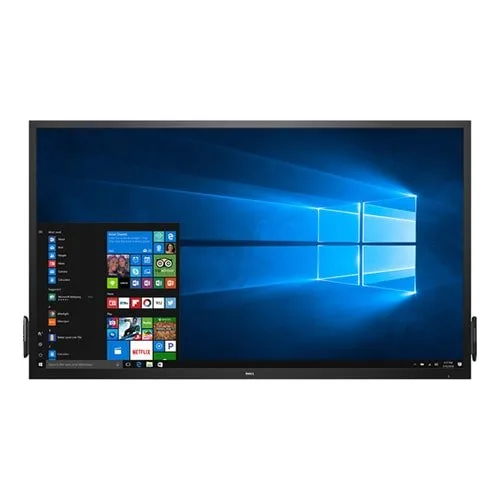
Dell C7017T 70 Inch Interactive Touch Monitor
- Brand: Dell
- Product Code: C7017T
- Availability: Out of Stock
- Updated:
Description
Dell C7017T 70 Inch Interactive Touch Monitor
The Dell C7017T 70 Inch Interactive Touch Monitor is a large-format display designed for environments where clear visual presentation and direct on-screen interaction are important. With a spacious 70-inch display area and touch functionality, it can suit classrooms, meeting rooms, training centres, corporate spaces, collaborative work areas and presentation-focused environments.
A large interactive display can change how people communicate with digital content. Instead of relying entirely on a conventional monitor, projector and separate pointing device, users can interact directly with compatible on-screen content. The generous screen size also makes presentations, diagrams, documents and other visual material easier for groups to view from a distance.
Dell C7017T 70 Inch Interactive Touch Monitor Price in Bangladesh
Customers searching for a Dell large display, interactive touch monitor or 70-inch professional screen in Bangladesh should consider more than the display size alone. Touch capability, connectivity, installation requirements, intended viewing distance and compatibility with the existing computer or presentation system can all affect whether a particular model fits the application.
Unix Network serves customers looking for professional display solutions in Jessore and throughout Bangladesh. Current availability and pricing for the Dell C7017T should be confirmed before ordering because this is a specialised large-format display rather than a conventional desktop monitor.
Product Overview
The Dell C7017T is built around a large 70-inch touch-enabled display intended for interactive visual communication. Its size makes it particularly relevant when several people need to view the same content simultaneously.
For a conference room, an interactive display can support presentations and collaborative discussion. In education, a large touch screen can make lessons more engaging by allowing instructors to interact directly with digital material. Training centres can similarly use the display for demonstrations, diagrams and instructional content.
The product is also relevant to organisations looking for a professional display rather than a consumer television. When selecting a large-format monitor, however, buyers should consider the physical environment, mounting arrangement, available space, viewing distance and connectivity requirements before purchase.
Key Features
70-inch large-format display: The expansive screen provides substantial viewing space for presentations, educational material, documents, diagrams and collaborative content.
Interactive touch capability: Touch interaction allows users to work directly with compatible on-screen content instead of relying solely on a mouse or other pointing device.
Professional presentation use: The large display format is suited to conference rooms, classrooms, training environments and other shared spaces.
Collaborative viewing: A large screen can make shared content easier for groups to see during meetings, discussions and demonstrations.
Dell professional display design: The monitor is designed around professional visual communication requirements rather than ordinary individual desktop usage.
Why a 70 Inch Interactive Display Matters
Screen size becomes particularly important when content needs to be viewed by several people at once. A conventional desktop monitor can be excellent for individual work, but it may become impractical when an entire classroom or meeting group needs to follow the same presentation.
A 70-inch display provides considerably more physical viewing area, allowing documents, charts, presentation slides and other visual material to remain visible to people positioned farther away from the screen. The interactive touch function adds another dimension by allowing direct interaction with compatible applications and content.
Interactive Touch for Education
Educational institutions can use a large interactive display for lessons, presentations, diagrams and demonstrations. An instructor can interact with digital content at the front of a classroom while students observe the same material on the large screen.
The touch interface can also be useful when teaching subjects that involve diagrams, annotations or visual explanations. Instead of moving repeatedly between a computer and projected image, the presenter can interact with the displayed material more directly.
Schools, colleges, universities and training centres should nevertheless evaluate room dimensions, viewing distance, installation requirements and software compatibility before selecting a large interactive display.
Interactive Touch for Business Meetings
Corporate meeting rooms can benefit from a large interactive screen when presentations involve multiple participants. Sales teams, project groups and management staff can use a shared display to review documents, explain concepts and discuss visual information.
The direct interaction offered by a touch display can make collaborative sessions more flexible. Users can work with supported presentation or productivity applications while other participants view the same content from their seats.
Real-World Usage
The Dell C7017T can be considered for environments where one large display serves multiple viewers. Typical applications may include classrooms, boardrooms, training rooms, presentation areas, collaborative workspaces and institutional meeting facilities.
It can also be useful in demonstration environments where the presenter needs to show detailed information to an audience while maintaining direct interaction with the displayed material.
Display Size and Viewing Experience
A 70-inch screen is substantially larger than typical desktop monitors, making it more suitable for shared environments than individual desk-based computing. The increased physical area can help presentations remain readable when participants are seated farther from the display.
Large-format displays should be selected according to the room rather than screen size alone. A screen that is appropriate for a spacious meeting room may be unnecessarily large for a small office. Lighting conditions, seating arrangement and viewing distance should therefore be considered before installation.
Touch Interaction
The interactive touch functionality is one of the defining characteristics of the C7017T. Instead of treating the display purely as an output device, users can interact directly with supported content on the screen.
This can be particularly useful for presentations, teaching, demonstrations and collaborative activities. The practical experience will depend on the connected computer, operating system, applications and touch support used by the installation.
Compatibility Considerations
Before purchasing, buyers should check how the display will connect to their existing computer, presentation equipment or other source devices. Large professional monitors may be integrated into more complex environments than ordinary desktop screens, so checking every connection requirement before installation is recommended.
Touch functionality may also depend on the connected hardware, operating system and supported interface. Organisations should verify the complete system configuration rather than assuming that every application will provide identical touch behaviour.
Installation and Placement
A 70-inch interactive monitor requires considerably more installation planning than a small desktop display. The wall, stand or mounting structure must be suitable for the physical size and weight of the unit.
When installing the display in a classroom or meeting room, consider the height, viewing angle, cable routing and accessibility of connected equipment. A professional installation can also help reduce accidental strain on the display and make the finished setup easier to use.
Build Quality and Professional Use
Dell's professional display range is designed for environments where reliable visual communication is important. With a large-format interactive screen, durability also involves more than the display panel itself. Installation quality, handling practices, ventilation and regular maintenance can influence long-term usability.
Because interactive screens are frequently touched, users should follow suitable cleaning and handling procedures recommended for the specific display. Avoid using inappropriate cleaning chemicals or excessive pressure on the panel.
Advantages of Dell C7017T 70 Inch Interactive Touch Monitor
Large 70-inch screen is suitable for group viewing.
Touch functionality enables direct interaction with compatible content.
Useful for presentations, education and collaborative meetings.
Large viewing area can improve visibility in spacious rooms.
Suitable for professional and institutional environments.
Can reduce dependence on separate pointing equipment during supported interactive activities.
Things to Consider Before Buying
Large interactive monitors require more planning than conventional desktop displays. Confirm the available wall or floor space, mounting solution, power arrangement and cable routing before ordering.
Buyers should also establish which computers or source devices will be connected to the display. Check the required video connections and touch interface requirements against the equipment already available in the organisation.
For educational or corporate environments, consider the number of users, daily operating hours and room layout. If the screen will be used heavily throughout the day, an appropriate installation and maintenance plan becomes particularly important.
Who Should Buy This Monitor?
Schools and educational institutions requiring a large interactive teaching display.
Universities and training centres conducting visual presentations.
Corporate offices looking for a large collaborative meeting-room screen.
Conference rooms where multiple participants need to view shared content.
Training facilities requiring direct interaction with digital presentations.
Organisations seeking a professional large-format interactive display.
Who May Prefer a Smaller Display?
Individual users working at a normal desk may not benefit from a 70-inch interactive monitor. A smaller desktop monitor can occupy considerably less space and may be more appropriate for personal computing.
Likewise, organisations with compact meeting rooms should measure the installation area and viewing distance before choosing such a large screen. Selecting the display according to the environment helps ensure that the investment is practical.
Why Buy from Unix Network?
Unix Network is a technology retailer serving customers in Jessore and across Bangladesh. As a computer store, laptop shop, gaming PC shop and professional technology supplier, Unix Network assists customers with a wide range of computing and display requirements.
Customers in Jashore can enquire about showroom availability and discuss their requirements before purchasing. Buyers from nearby districts including Jhenaidah, Magura, Narail, Satkhira, Khulna, Kushtia and Chuadanga can also enquire about delivery arrangements.
For customers elsewhere in Bangladesh, nationwide delivery provides access to technology products without requiring a showroom visit. Unix Network also offers expert technical guidance and after-sales support for applicable products.
Buying Guide
Begin by identifying the environment where the monitor will be installed. A classroom, conference room or training centre may have very different requirements from a standard office.
Measure the proposed installation area and determine the best viewing position. Next, check the computer and source devices that will connect to the display. Make sure the required video, audio and touch interfaces are supported by the complete setup.
Finally, plan installation carefully. A large interactive display should be positioned securely and at a practical height for both viewing and touch interaction. For institutional installations, professional mounting and cable management can provide a cleaner and safer setup.
Warranty Information
Warranty coverage for a professional display depends on the specific product condition, supplier terms and applicable warranty policy. Customers should confirm the available warranty before purchase and retain the invoice and relevant documentation.
Large displays can require specialised handling during transportation and installation, so buyers should also follow the applicable delivery and installation instructions. Any warranty claim should be handled according to the supplier's stated procedures.
Delivery Across Bangladesh
Unix Network serves customers throughout Bangladesh, including local buyers in Jessore. Customers outside Jashore can enquire about nationwide delivery for large-format display products.
Because a 70-inch monitor is significantly larger and heavier than a conventional desktop display, customers should confirm the available delivery arrangements before placing an order. Proper packaging, transportation and careful handling are important considerations for large screens.
After-Sales Technical Support
Professional displays can involve installation, connectivity and configuration considerations that are less common with ordinary monitors. Unix Network provides customer assistance for applicable product-related questions, helping buyers understand installation and compatibility considerations.
For support, customers should retain their purchase invoice, product information and details of the connected computer or presentation system. This can make technical troubleshooting more efficient.
Frequently Asked Questions
What is the screen size of the Dell C7017T?
The Dell C7017T is a 70-inch large-format interactive touch monitor. Its size makes it suitable for shared viewing in classrooms, meeting rooms and other professional environments.
Is the Dell C7017T suitable for classrooms?
Its large interactive format can be useful in classrooms, training centres and educational environments where instructors need to present and interact with digital content while students view the same screen.
Can the Dell C7017T be used in a conference room?
Yes, a large interactive display can be appropriate for conference rooms where multiple participants need to view presentations, documents and other shared content. Room size and installation requirements should be considered before purchase.
Can I use the touch function with every application?
Touch behaviour depends on the connected computer, operating system and application. Buyers should verify compatibility with the software they intend to use rather than assuming that every programme will offer identical touch functionality.
Is this monitor suitable for normal desktop use?
It can display computer content, but its 70-inch format is primarily suited to large shared environments. For individual desk-based computing, a smaller monitor is generally more practical in terms of physical space and viewing distance.
What should I check before installing this monitor?
Check the available space, mounting arrangement, power requirements, cable routing, source-device connections and touch-interface compatibility. Because this is a large-format display, secure installation and appropriate handling are particularly important.
Can customers in Jessore buy the Dell C7017T from Unix Network?
Customers in Jessore can contact Unix Network to check current availability and showroom options. Buyers elsewhere in Bangladesh can also enquire about nationwide delivery.
Conclusion
The Dell C7017T 70 Inch Interactive Touch Monitor is designed for situations where a large shared display and direct interaction are valuable. Its expansive format can support classroom teaching, business presentations, training sessions and collaborative meetings where ordinary desktop monitors may not provide sufficient viewing area.
Before purchasing, consider room dimensions, viewing distance, installation requirements, connected devices, touch compatibility and warranty terms. Customers in Jessore can visit or contact Unix Network for product guidance, while nationwide delivery provides an option for buyers across Bangladesh. With competitive pricing, technical advice, customer support and a local showroom, Unix Network can help organisations select a display solution suited to their practical requirements.