
Unix Tech Fest: offers end in
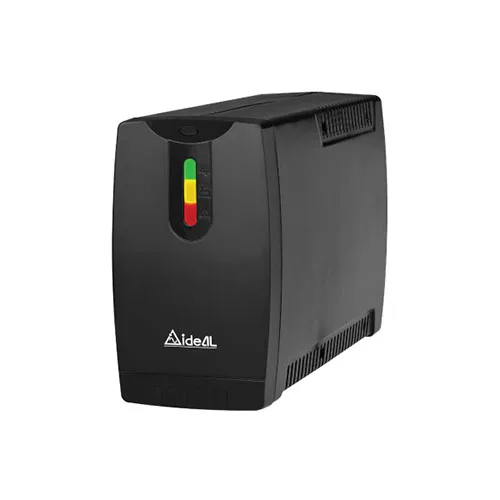
Buy IDEAL-5112CW 1250VA/720W Line Interactive UPS in Jashore
- Brand: IDEAL
- Product Code: 5112CW
- Availability: In Stock
Specification
| Case Type | |
| Front Panel | LED Indicator |
| BASIC INFORMATION | |
| Battery | 12V/7.5A x 2 Batteries |
| Main Features | |
| Input Voltage | Range: 140VAC~300VAC |
Description
The IDEAL-5112CW 1250VA/720W Line Interactive UPS is designed for computer users who need dependable short-term backup power and practical protection against common mains power interruptions. It is positioned for home users, office workstations, small businesses, retail counters and other compatible electronic setups where an unexpected shutdown can interrupt work, close applications or leave important files unsaved.
Choosing a UPS should involve more than looking at its VA number. The IDEAL-5112CW has a stated capacity of 1250VA with a 720W power rating, so the equipment connected to it should be assessed according to its actual power requirement. This is particularly important for desktop computers, gaming PCs, multiple-monitor workstations and setups containing several peripherals. A correctly sized UPS can provide a more useful and dependable backup experience than an undersized unit operating close to its limit.
The line-interactive design makes this UPS relevant to users who want both battery backup and a practical approach to managing certain variations in incoming mains electricity. It can be a sensible choice where computers and other IT equipment need continuity during short power interruptions, while users who require extended backup or support for very high-power systems should consider whether a larger or different power solution would be more appropriate.
Unix Network serves customers in Jessore, also commonly written as Jashore, and supplies computer hardware, UPS systems, networking equipment, laptops, gaming products, printers and IT accessories. Customers can enquire about the current IDEAL-5112CW price, stock status, applicable warranty and delivery options before purchasing.
IDEAL-5112CW 1250VA/720W UPS Price in Bangladesh
The IDEAL-5112CW 1250VA/720W Line Interactive UPS occupies a practical position in the UPS market for customers who need more capacity than a basic low-power computer backup unit but do not necessarily require a large commercial UPS system. Its 1250VA rating and 720W power capacity make it relevant to a range of appropriately sized desktop and office equipment.
The current IDEAL-5112CW price in Bangladesh can change depending on stock availability, import and distribution costs, supplier pricing and general market conditions. Customers should therefore confirm the latest price before placing an order rather than relying on an older advertised figure.
When comparing the price of this UPS with other models, buyers should look beyond the initial purchase cost. A UPS is an electrical backup device containing a rechargeable battery and electronic power-management components. Long-term value therefore depends on the intended workload, battery maintenance, operating environment, warranty support and suitability for the connected equipment.
The 720W power rating is particularly important when comparing products. A UPS advertised with a 1250VA capacity should not be interpreted as providing 1250W of usable power. VA and watts represent different electrical characteristics. For everyday buying decisions, the stated watt capacity should be compared with the combined real power demand of the equipment being connected.
For customers in Jessore or nearby districts, purchasing from a local computer shop can also provide practical value. Buyers can discuss their computer configuration, intended devices and backup requirements before choosing a model. Customers elsewhere in Bangladesh can enquire about nationwide delivery and support arrangements.
Product Overview
The IDEAL-5112CW is a line-interactive Uninterruptible Power Supply intended to provide backup power for compatible electronic equipment. A UPS sits between the mains supply and connected devices, monitoring the incoming electrical supply and switching to stored battery power when an interruption requires it.
The main purpose is continuity. If electricity suddenly disappears while a computer is running, an unprotected system can switch off immediately. With an appropriately sized UPS, the computer can continue operating temporarily from battery power, giving the user an opportunity to save work and perform a controlled shutdown.
For office environments, this short period can be valuable. An employee working on accounting records, spreadsheets, documents or business applications may be able to save current work rather than losing unsaved changes. In a retail environment, a UPS can also provide useful time to complete an immediate transaction or shut down a system properly.
The IDEAL-5112CW should nevertheless be treated as a short-duration backup solution rather than an unlimited power source. Runtime depends on the connected load and the condition of the battery. The heavier the load, the more quickly stored battery energy is consumed.
Key Features
- 1250VA rated UPS capacity.
- 720W stated power capacity.
- Line-interactive UPS technology.
- Designed to provide short-term backup power during mains interruptions.
- Suitable for appropriately sized computer and office equipment.
- Useful for reducing disruption caused by unexpected power loss.
- Can give users time to save important work and shut down equipment safely.
- Relevant to home computing, office workstations, retail systems and selected professional setups.
- Available through Unix Network subject to current stock.
Understanding the 1250VA/720W Rating
One of the most important things to understand before buying the IDEAL-5112CW is the difference between VA and watts. UPS manufacturers commonly use both measurements because electronic equipment has characteristics that cannot be described accurately using watts alone.
The IDEAL-5112CW is rated at 1250VA and 720W. The 1250VA figure describes its apparent power capacity, while 720W represents the stated real power capacity available for connected equipment. When deciding whether the UPS is appropriate for a particular computer, the watt figure should be carefully considered alongside the equipment's expected power consumption.
For example, a desktop computer may have a power supply with a high maximum rating but may consume considerably less during normal office work. On the other hand, a gaming PC can draw much more power when its processor and graphics card are operating under heavy load. This is why the model should be selected based on the actual system rather than simply the wattage printed on the PC's power supply.
Adding a monitor, router, speakers or other peripherals also increases the total load. If several devices are connected, their combined requirements need to remain appropriate for the UPS. Leaving sensible spare capacity is preferable to continuously running a UPS close to its maximum rating.
How Line Interactive UPS Technology Helps
Line-interactive UPS technology is designed to do more than simply wait for a complete power failure. The UPS monitors the incoming electrical supply and can manage certain voltage variations while supplying connected equipment. Depending on the design, this can reduce unnecessary battery use when the mains supply experiences fluctuations that do not require full battery operation.
This feature can be useful in areas where the mains supply is not perfectly consistent. A computer may continue operating even when the incoming voltage varies within the operating range handled by the UPS. The exact regulation behaviour, response characteristics and protection capabilities depend on the particular design of the UPS.
Line-interactive technology therefore represents a useful middle ground for many computer users. It provides more functionality than a simple standby arrangement while generally being intended for less demanding applications than specialised online UPS systems used for highly sensitive or mission-critical installations.
Customers with medical, industrial, server-room or exceptionally sensitive equipment should not assume that any line-interactive UPS is automatically suitable. Such applications may require a more specialised power-protection architecture and should be assessed according to the equipment manufacturer's requirements.
Benefits for Desktop Computers
A desktop computer can be particularly vulnerable to sudden power loss because most conventional desktops do not contain their own battery backup. When mains electricity disappears, the computer normally shuts down immediately unless another power source is available.
The IDEAL-5112CW can provide temporary battery power to an appropriately sized computer setup. This does not necessarily mean the user should continue working until the battery is exhausted. The more useful approach is to treat the available backup time as an opportunity to save documents, close applications and shut the computer down properly.
This can be valuable for students working on assignments, professionals preparing documents, accountants handling financial records and home users who simply want to reduce the inconvenience of sudden power cuts.
For computers that are regularly used during unstable electrical conditions, a UPS can also make the overall computing experience less disruptive. Rather than experiencing an abrupt shutdown every time electricity is interrupted, the user has a controlled backup period in which to respond.
IDEAL-5112CW for Office Workstations
Office computers often handle information that should not be interrupted unexpectedly. Word-processing documents, spreadsheets, accounting applications, inventory systems, browser sessions and customer records can all be affected when a computer loses power without warning.
An appropriately sized IDEAL-5112CW can be considered for individual office workstations where short-term backup is useful. The employee can continue temporarily after a power interruption and then shut the system down safely if the outage continues.
For a small business, it can be useful to prioritise critical computers rather than connecting every electrical device to one UPS. An accounting workstation, billing computer or administrative PC may be more important to keep operational than a non-essential peripheral.
Businesses should also consider whether networking equipment needs backup. If the internet connection is important for cloud software, online billing or communication, keeping compatible networking equipment powered can sometimes make the UPS more useful. The combined load must still remain within the appropriate capacity.
Using the UPS with a Gaming PC
Gaming PC owners should assess UPS capacity carefully before purchasing. A gaming computer can consume substantially more electricity during demanding workloads than a basic office PC. The processor, graphics card, cooling system, storage devices, displays and other accessories all contribute to total consumption.
The IDEAL-5112CW has a stated 720W power capacity, so gaming users should compare this figure against the actual expected load of the complete setup. A high-end gaming computer combined with one or more large monitors may require more capacity than this model can comfortably provide.
A PC power supply rated at a particular wattage does not necessarily mean that the computer constantly consumes that amount. Actual consumption varies according to workload. Gaming, video rendering, 3D applications and other demanding tasks can increase power use substantially compared with browsing or office work.
If a gaming system is comfortably below the UPS's power limit, the model may be worth considering. If the system is close to the 720W limit, a higher-capacity UPS should be evaluated instead. Avoid selecting a UPS based solely on the computer's PSU label.
Support for Networking Equipment
Modern homes and businesses often rely on routers, network switches, optical network terminals and other communication equipment. A short electricity interruption can cause these devices to restart even when the main computer itself is protected.
Where appropriate, networking equipment can be included in a UPS strategy. Keeping a router or other essential network device operating during a short outage can be useful for users working remotely or relying on internet-based services.
However, each connected device contributes to the total electrical load. Users should therefore determine which networking components genuinely require battery backup. A small amount of additional equipment may have little impact, but a larger collection of devices can reduce available runtime.
Real-World Applications
The IDEAL-5112CW can be considered for home offices where a desktop computer is used for professional or educational work. A short backup period can help users save documents and avoid abrupt shutdowns during unexpected interruptions.
It can also be relevant to small business environments. Computers used for accounting, billing, stock management, office administration and customer records can benefit from controlled shutdown opportunities.
Retail counters are another practical use case. If a computer is involved in sales processing, an unexpected shutdown can interrupt the operator's workflow. A UPS can provide temporary continuity so staff can respond to the interruption in a controlled manner.
Students can also benefit when using desktop computers for coursework. Losing unsaved work because of a brief power interruption can be frustrating, especially when working on long assignments or projects.
For remote workers, a UPS can be particularly useful because electricity interruptions can affect online meetings and cloud-based work. The backup period can provide time to save work or complete an immediate shutdown rather than losing an active session without warning.
Performance and Backup Runtime
UPS runtime is not a fixed value that applies equally to every customer. It depends on the electrical load and the condition of the battery. A lightly loaded system generally places less demand on the battery than a heavily loaded system.
For this reason, customers should be cautious when comparing UPS models using advertised runtime figures alone. Runtime can change as equipment is added or removed. A computer that consumes relatively little power during ordinary office work may have a different backup duration when performing a demanding task.
Battery condition is another major factor. Rechargeable batteries gradually lose capacity as they age. The frequency of power interruptions, depth of discharge, charging conditions and operating temperature can all influence battery performance over time.
A sensible UPS installation therefore involves both appropriate capacity selection and reasonable expectations about runtime. The primary objective should be to provide useful continuity and controlled shutdown time rather than attempting to run equipment indefinitely.
Power Efficiency and Load Management
Efficient UPS use begins with sensible load management. Not every device connected to a computer system necessarily needs emergency power. Identifying critical equipment can help reserve the UPS's available capacity for the devices that matter most.
For example, a user may prioritise a desktop computer and monitor while leaving decorative lighting, speakers or other non-essential equipment outside the battery-backed connection. This can make better use of available capacity during an outage.
Load management also helps reduce unnecessary battery consumption. A UPS supporting fewer devices may have more useful backup time available for the equipment that is genuinely important.
Build Quality and Installation Environment
A UPS is electronic equipment that should be installed in a suitable location. Adequate ventilation is important because both the electronics and battery can be affected by excessive heat. Ventilation openings should not be blocked by walls, furniture, cables or other objects.
The UPS should be kept away from water, excessive humidity and locations where physical damage is likely. Dust should also be managed because accumulated dust can interfere with ventilation and contribute to heat buildup.
Customers should avoid placing heavy objects on the UPS or using it in ways outside the manufacturer's intended operating conditions. Correct installation and sensible usage are important parts of long-term reliability.
Compatibility with Different Equipment
The IDEAL-5112CW is intended for compatible electronic loads within its stated power capacity. Desktop computers, monitors, networking devices and office electronics may be suitable depending on their individual electrical requirements.
Compatibility should always be assessed at system level. A desktop computer might be suitable on its own, but adding multiple monitors, networking equipment and other accessories changes the total load.
Special attention should be given to equipment with high startup or operating demands. Printers and certain office appliances may behave differently from computers and should not automatically be connected to a UPS without considering their electrical requirements.
Laser printers in particular can have high power demands during operation because of their printing mechanism. Customers should check the printer's electrical requirements before deciding to place it on the same UPS as a computer.
Advantages of the IDEAL-5112CW
- 1250VA capacity provides a useful level of UPS capacity for appropriately sized computer setups.
- 720W real power rating makes system-load assessment straightforward.
- Line-interactive technology provides practical management of certain mains variations.
- Temporary battery backup can reduce disruption caused by unexpected power failures.
- Can provide valuable time for saving work and performing a controlled shutdown.
- Suitable for a variety of home and office computing applications when correctly sized.
- Can be considered for selected gaming PC configurations after checking actual power consumption.
- Can form part of a broader backup strategy for critical IT equipment.
Things to Consider Before Buying
The first consideration should be the total power requirement of the equipment you plan to connect. Make a list of every device that needs backup and estimate its actual consumption. The computer tower alone is not necessarily the complete load.
Second, compare that total with the IDEAL-5112CW's stated 720W power capacity. Do not assume that a 1250VA rating means the UPS can supply 1250 watts.
Third, consider future upgrades. If you are planning to install a more powerful graphics card, add another monitor or upgrade other hardware, the current load may increase later. Buying a UPS with insufficient spare capacity can make future upgrades inconvenient.
Fourth, think about your backup objective. If you only need enough time to save documents and shut down a computer, your requirements may be modest. If you need to continue operating during long electricity outages, a conventional UPS may not be the ideal solution.
Finally, consider after-sales support. A UPS contains a battery and electronic components, so warranty handling and technical assistance can be important over its useful life.
Who Should Buy the IDEAL-5112CW?
The IDEAL-5112CW is worth considering for home users who rely on a desktop computer and want temporary backup during unexpected electricity interruptions. It can be particularly useful for users who frequently work with documents, accounting software, study materials or other tasks where sudden shutdowns are inconvenient.
Small businesses can also consider this model for appropriately sized workstations. Computers used for billing, inventory, accounting and office administration can benefit from a controlled response to power loss.
Remote professionals may find a UPS useful for reducing disruption to online work. A short backup period can allow a user to save files and close applications rather than losing work unexpectedly.
Gaming PC users should consider the model only after checking their system's real power requirements. Moderate systems may be appropriate, while high-performance gaming machines may require a UPS with greater capacity.
Who Should Consider a Larger UPS?
Users operating high-power gaming PCs, professional workstations or multiple demanding devices should evaluate whether 720W provides sufficient capacity. If the expected load is close to the UPS limit, selecting a larger model can provide a more appropriate operating margin.
Businesses with several critical computers may also need multiple UPS units or a larger centralised power-backup system rather than attempting to connect every workstation to one 1250VA device.
Customers who require prolonged operation during extended outages should also investigate other power solutions. A conventional UPS is primarily designed to bridge interruptions and provide controlled shutdown time. Extended backup may require a larger battery bank, inverter system, generator or another appropriately engineered solution.
IDEAL-5112CW for Home Users in Bangladesh
Power interruptions can be particularly inconvenient when a household depends on a desktop computer for work, education or online services. A UPS provides a useful layer of continuity between the mains supply and the computer.
For a home user, the practical benefit is often simple: when electricity fails, there is an opportunity to save open work instead of watching the computer switch off immediately. The user can then shut the system down safely and wait for power to return.
Users should not, however, expect a UPS to keep every household electronic device running. The available capacity should be reserved for equipment that genuinely needs backup, and devices with unsuitable electrical characteristics should not be connected simply because a spare socket is available.
IDEAL-5112CW for Small Offices
Small offices often depend on computers throughout the working day. An unexpected shutdown can interrupt customer service, accounting work, document preparation and internal operations.
The IDEAL-5112CW can be considered for individual workstations that fall within the 720W power capacity. Businesses can prioritise critical systems and use separate UPS units where multiple workstations require independent protection.
For office managers, the best UPS strategy is usually based on the importance and power requirement of each workstation. A critical accounting computer may deserve priority over equipment that can safely remain offline during a short outage.
IDEAL-5112CW for Retail and Billing Systems
Retail businesses can use computers for billing, inventory management, customer records and payment-related workflows. An unexpected shutdown during an active operation can create unnecessary disruption.
A properly sized UPS can provide temporary power continuity for an appropriate workstation. Staff can use that time to finish a necessary action, save information or shut down the computer properly.
Where a retail system relies on networking equipment, the network components should also be considered as part of the total power requirement. The goal is to protect the critical parts of the system without exceeding the UPS capacity.
Battery Care and Long-Term Use
Battery health is one of the most important factors in UPS performance. Rechargeable batteries naturally degrade over time, so customers should expect battery performance to change during the product's service life.
Frequent outages can place additional cycling demands on the battery. Repeatedly allowing the battery to discharge deeply can also affect its usable lifespan. Where possible, users should shut down connected computers when an outage is expected to continue rather than intentionally running the UPS until it completely depletes.
Temperature is another consideration. A UPS should be operated in a reasonably cool and ventilated environment. Excessive heat is undesirable for electronic components and batteries.
If a UPS begins showing unusual behaviour, significantly reduced backup time or battery-related warnings, users should seek appropriate technical assistance rather than continuing to operate the equipment without investigation.
Technical Buying Advice
When purchasing an IDEAL-5112CW, provide the retailer with information about your computer and connected equipment whenever possible. Details such as desktop configuration, monitor count and intended usage can help determine whether the UPS is appropriately sized.
If you use a gaming PC, mention the processor, graphics card and number of monitors. If you are buying for an office, identify the computer, monitor and networking devices that need backup. This gives a more meaningful basis for selecting a UPS than simply saying that you need one for a computer.
For a business installation, also explain whether the objective is safe shutdown, short-term continuity or longer operation. The appropriate UPS solution can differ significantly depending on that requirement.
Why Buy from Unix Network?
Unix Network is a Jessore-based computer and technology retailer serving customers looking for UPS products, desktop computers, laptops, gaming PCs, printers, networking equipment and IT accessories. For customers purchasing a UPS, access to product guidance can be useful because the correct model depends heavily on the connected equipment.
Customers can enquire about the IDEAL-5112CW's current availability and pricing before purchase. Technical advice can help buyers understand the difference between VA and watt capacity and assess whether their computer configuration is appropriate for the model.
Local showroom availability in Jessore can also be useful for customers who prefer purchasing from a nearby retailer. Customers from surrounding districts can enquire about delivery, while online buyers across Bangladesh can ask about nationwide delivery options.
When purchasing an authentic IDEAL-5112CW, customers should confirm the product condition, invoice, applicable warranty and support terms. Unix Network can provide purchasing guidance and after-sales support according to the applicable product and distributor arrangements.
Buying the IDEAL-5112CW in Jessore
Customers searching for the IDEAL-5112CW in Jessore or Jashore can contact Unix Network to check current stock and pricing. Because UPS availability can change, confirming the product before visiting the showroom can save time.
Customers in Jhenaidah, Magura, Narail, Satkhira, Khulna, Kushtia, Chuadanga and surrounding areas can also enquire about available delivery options. Buyers elsewhere in Bangladesh can contact Unix Network for nationwide purchasing and delivery information.
When comparing a local computer shop in Jessore with online sellers, customers should consider more than price. Warranty handling, technical assistance, authenticity, invoice documentation and after-sales service can all contribute to the overall value of the purchase.
Warranty Information
Warranty terms should be confirmed at the time of purchase because coverage can vary according to the current manufacturer, distributor and retailer arrangements. Customers should ask about the applicable warranty for the IDEAL-5112CW before completing an order.
Buyers should retain their purchase invoice and any warranty documentation supplied with the product. These documents may be needed when requesting warranty service.
Battery coverage can differ from coverage for the UPS electronics, depending on the applicable warranty policy. Customers who want detailed information about battery coverage should confirm the terms directly at the time of purchase.
An official warranty, where applicable, provides an important additional consideration when comparing genuine products. Customers should not assume that every seller offers identical warranty support simply because the product model is the same.
Delivery Across Bangladesh
Unix Network serves customers beyond its Jessore showroom and can provide information about nationwide delivery arrangements for buyers across Bangladesh. Customers should confirm stock, delivery charges, payment options and warranty documentation before ordering.
For customers located close to Jessore, showroom purchasing can provide the convenience of discussing their requirements directly. Customers from other districts can communicate their equipment details before ordering so that the suitability of the UPS can be considered.
UPS products should be handled and transported appropriately because they contain electronic components and a battery. Buyers receiving a delivered unit should inspect the package and product condition according to the applicable delivery and warranty procedures.
After-Sales Technical Support
After-sales service can be particularly valuable with UPS equipment because customers may have questions about connected loads, installation, battery behaviour and operating practices after purchase.
Unix Network provides professional customer support for its technology products, helping customers address product-related questions according to the applicable service arrangements. When requesting technical assistance, customers should describe the connected equipment and the symptoms or issue clearly.
For battery-related concerns, information about the UPS age, usage pattern and frequency of power interruptions can also be useful. This helps distinguish between normal battery ageing, an installation issue and a possible product fault.
Frequently Asked Questions
What is the IDEAL-5112CW 1250VA/720W Line Interactive UPS?
The IDEAL-5112CW is a line-interactive UPS designed to provide temporary backup power for compatible electronic equipment. It has a stated 1250VA capacity and 720W power rating, making it suitable for appropriately sized computer and office setups.
Does 1250VA mean the UPS can support 1250W?
No. The IDEAL-5112CW is rated at 1250VA and 720W. VA and watts are different electrical measurements, and the stated 720W figure should be considered when assessing the real power consumption of connected equipment.
Can I use this UPS for my desktop computer?
It can be suitable for an appropriately sized desktop computer provided the total connected load remains within the UPS's stated capacity. The monitor and other connected equipment should also be included when calculating the total load.
Is the IDEAL-5112CW suitable for a gaming PC?
It may be suitable for a gaming PC whose actual power consumption remains comfortably within the 720W capacity. High-performance gaming systems can consume significant power, so users should check their complete system load before purchasing.
What is the benefit of line-interactive technology?
Line-interactive UPS technology can manage certain variations in incoming mains electricity while supplying connected equipment. This can help reduce unnecessary battery operation during some voltage fluctuations, although the exact performance depends on the UPS design and electrical environment.
How long will the IDEAL-5112CW keep my computer running?
Backup runtime depends on the connected electrical load and battery condition. A lighter load generally requires less battery power than a heavier load. Runtime can also reduce as the battery ages.
Can I connect my monitor to the UPS?
Yes, a compatible monitor can be included if the total connected load remains within the appropriate capacity. The monitor's power consumption should be added to the computer and any other devices connected to the UPS.
Can I connect a printer to this UPS?
It depends on the printer's electrical characteristics and power requirements. Printers with high operating or startup power demands should be assessed carefully before being connected to the same UPS as a computer.
Is this UPS suitable for an office?
It can be considered for appropriately sized office workstations. It is especially useful where short-term backup is needed to reduce disruption and provide time for saving work and shutting down equipment safely.
Where can I buy the IDEAL-5112CW in Jessore?
Customers can enquire with Unix Network, a computer and technology retailer in Jessore, about current product availability, pricing, warranty arrangements and delivery options.
Can customers outside Jessore order this UPS?
Customers throughout Bangladesh can enquire about nationwide delivery. Buyers should confirm current stock, delivery arrangements, warranty information and payment requirements before ordering.
What should I check before buying this UPS?
Check the total power requirement of the devices you want to connect, compare it with the 720W rating, consider future upgrades and determine whether you need short-term shutdown protection or longer-duration backup.
How to Get Better Results from Your UPS
The best way to use the IDEAL-5112CW is to connect only equipment that genuinely requires backup. Prioritise your computer, monitor and essential networking equipment rather than filling every available connection with non-critical devices.
Keep the UPS in a ventilated location and avoid excessive heat, moisture and dust. Good installation conditions can contribute to more reliable operation and help protect the battery and electronic components.
When a power failure occurs, use the backup period responsibly. Save important documents, close applications and shut down the computer if the outage is expected to continue. This approach makes the UPS more effective as a continuity and protection device.
Choosing Between UPS Capacity Options
Customers sometimes choose a UPS based only on the price difference between models. A better method is to start with the equipment requirements. If the connected load is comfortably within 720W and the required application is compatible with a line-interactive UPS, the IDEAL-5112CW may be a practical option.
If the load is close to 720W, a larger UPS deserves consideration. If the load is significantly higher, choosing the IDEAL-5112CW simply because it is available can create an unsuitable setup. The objective should always be an appropriate match between the UPS and the equipment.
For a simple office computer, an unnecessarily large UPS may not provide meaningful additional value. Conversely, for a powerful gaming PC or professional workstation, insufficient capacity can be a much more important problem. Matching the product to the application is therefore more useful than choosing purely by price or brand.
Reliability and Responsible Usage
UPS reliability is influenced by product quality, electrical conditions, battery health, connected load and operating environment. No UPS should be treated as completely immune to every electrical problem, and customers should follow the manufacturer's operating instructions.
Overloading is one of the easiest ways to create an unsuitable UPS installation. Users should remain aware of the total connected load, particularly after upgrading a computer or adding another display or peripheral.
Regularly checking the general condition of the UPS can also be useful. Unusual sounds, abnormal battery behaviour, overheating or substantially reduced backup performance should not be ignored.
Professional Buying Advice for Bangladesh Customers
Customers buying a UPS in Bangladesh should consider local power conditions, computer usage patterns and after-sales support. A UPS that works well for one user may not be appropriate for another because computer configurations and electricity requirements vary.
For customers in Jessore and Jashore, a local technology retailer can make the selection process easier by discussing the intended setup before purchase. Buyers from Khulna Division and other parts of Bangladesh can also enquire remotely and provide their equipment details for practical guidance.
Authenticity should also be considered. Customers should ask for proper purchase documentation and confirm applicable warranty terms when buying a genuine IDEAL-5112CW. Competitive pricing is valuable, but a very low price should not automatically outweigh concerns about product condition, warranty or after-sales support.
IDEAL-5112CW for Different Types of Users
For students, the main benefit may be avoiding the sudden loss of coursework or assignments. For office workers, it can mean additional time to save documents and shut down a workstation. For business owners, it can reduce disruption to billing and administrative systems.
For home users, a UPS can provide a convenient bridge during short power cuts. For remote professionals, it can help maintain temporary computer operation during an interruption to electricity. For gaming users, its suitability depends much more strongly on the actual system power requirement.
This range of applications demonstrates why the IDEAL-5112CW should be selected according to the individual setup rather than simply described as a universal UPS for every computer.
Is the IDEAL-5112CW the Best UPS for You?
The best UPS depends on what you need it to do. If your computer system is within the 720W power capacity and you want practical short-term backup with line-interactive operation, the IDEAL-5112CW can be a sensible model to consider.
If you operate a high-power gaming PC, several workstations or equipment requiring long backup duration, you should compare the IDEAL-5112CW with higher-capacity or specialised UPS solutions. Selecting a larger model when necessary can be more appropriate than trying to make an undersized UPS handle a demanding load.
Customers who are uncertain about capacity should provide their complete equipment list before purchasing. A technical discussion can help identify whether the 1250VA/720W class is suitable or whether another capacity would better match the system.
Final Buying Recommendation
The IDEAL-5112CW 1250VA/720W Line Interactive UPS is a practical UPS option for customers who need temporary backup power for appropriately sized computers and electronic equipment. Its combination of 1250VA apparent power capacity, 720W stated real power capacity and line-interactive technology gives it a useful position for home, office, retail and selected professional computing environments.
The most important purchasing decision is matching the UPS to the actual load. Customers should calculate the combined power requirements of the computer, monitor and other equipment they intend to protect. Gaming PC owners and users with multiple peripherals should be especially careful because demanding hardware can consume considerably more power than a basic office computer.
For customers searching for the IDEAL-5112CW in Bangladesh, Unix Network offers a local purchasing option in Jessore, also known as Jashore, with customer assistance for UPS and computer-related requirements. Buyers can enquire about competitive pricing, authentic products, applicable official warranty arrangements, expert advice, local showroom availability, nationwide delivery and professional after-sales support.
Whether you are buying for a home computer, office workstation, retail system or appropriately sized gaming setup, choosing the right UPS capacity and using it responsibly are the foundations of reliable backup power. The IDEAL-5112CW is best considered when its 720W power capacity matches the equipment you need to keep protected and your primary requirement is practical short-term continuity during mains power interruptions.
