
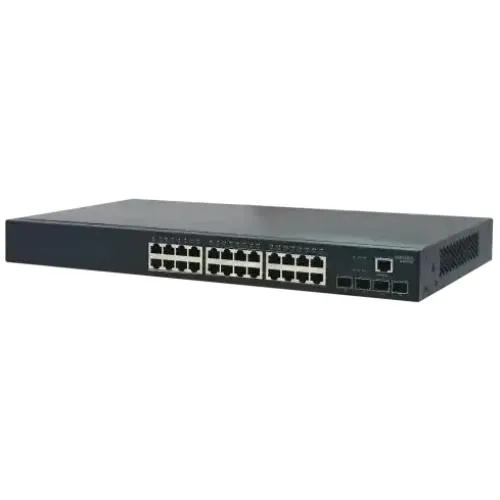
Edgecore ECS4120-28T 28-Port Ethernet Access Switch
- Brand: Edgecore
- Product Code: Edgecore ECS4120-28T 28-Port Ethernet Access Switch
- Availability: Out of Stock
- Updated:

Specification
| BASIC INFORMATION | |
| Power Supply | 110-240V AC |
|---|---|
| Environment | Operating temperature: 0°C - 50°C Operating humidity: 10% - 90% |
| MAC Address Table | 16K |
| Main Features | |
| Port | 24x GE + 4x 10G SFP+ ports |
| Memory Specifications | |
| Type | Managed |
Description
The Edgecore ECS4120-28T 28-Port Ethernet Access Switch is a high-performance managed Gigabit Ethernet switch designed for business networks, ISP access environments, enterprise infrastructure, campus networks and other installations where dependable wired connectivity, advanced traffic management and high-speed uplinks are important. It combines 24 Gigabit Ethernet RJ45 access ports with four 10G SFP+ uplink ports, providing a practical balance between high-density user connections and high-bandwidth network aggregation.
With a 128Gbps switching capacity, 95Mpps forwarding rate, 16K MAC address table and Layer 2+ management capabilities, the ECS4120-28T is considerably more capable than a basic unmanaged switch. Its fanless design also allows quiet operation, making it suitable for offices, network rooms, server environments and other locations where unnecessary fan noise is undesirable.
Edgecore ECS4120-28T 28-Port Gigabit Managed Switch in Bangladesh
For organisations looking for a professional Ethernet switch in Bangladesh, the Edgecore ECS4120-28T offers a combination of Gigabit access connectivity and 10 Gigabit uplink capability that can support a growing network without requiring every connected device to use 10Gbps hardware. The 24 RJ45 ports can connect computers, servers, access points, printers, IP devices and other Ethernet equipment at Gigabit speeds, while the four SFP+ ports can be used for high-speed connections towards a core switch, server, aggregation layer or service-provider network.
The switch is particularly relevant for businesses that need more control over their network than an unmanaged switch can provide. VLANs, Quality of Service, multicast control, port security, spanning-tree functions, IPv6 features and management interfaces allow administrators to build a more organised and controlled network.
24 Gigabit Ethernet Ports for High-Density Connectivity
The ECS4120-28T provides 24 Gigabit Ethernet RJ45 ports for connecting standard Ethernet devices. Gigabit Ethernet supports significantly higher throughput than traditional 10/100Mbps Fast Ethernet, making these ports suitable for modern office computers, network storage, wireless access points, servers and other bandwidth-intensive endpoints.
Auto-negotiation allows compatible devices to establish an appropriate connection speed and duplex mode, while Auto MDI/MDIX simplifies cable installation by reducing the need to worry about traditional straight-through or crossover cable requirements.
For an office or commercial environment, 24 Gigabit access ports can provide a useful central connection point for workstations, printers, IP phones, access points, CCTV equipment and other network devices. The exact performance available to each device still depends on the connected hardware, cabling, network architecture and traffic conditions.
Four 10G SFP+ Uplink Ports
One of the major advantages of the Edgecore ECS4120-28T is its four integrated 10G SFP+ uplink ports. These ports provide a high-speed pathway between the access switch and the rest of the network, helping reduce uplink bottlenecks when many Gigabit devices are active simultaneously.
SFP+ technology also provides installation flexibility because the appropriate compatible transceiver, DAC or AOC can be selected according to the required connection type and distance. Depending on the network design, the uplinks can be used for connections to another switch, a server, a core network, an aggregation switch or an ISP infrastructure.
Supported optical and network options can include compatible 10G SFP+ transceivers as well as appropriate Gigabit optical modules where supported. The exact transceiver should always be selected according to the required speed, fibre type, wavelength, distance and compatibility requirements.
128Gbps Switching Capacity
The ECS4120-28T has a 128Gbps switching capacity, providing the internal switching bandwidth required for a high-density Gigabit access environment with high-speed uplinks. This is particularly useful when multiple connected devices are transferring data at the same time.
A high switching capacity does not mean that every connected device will automatically receive 128Gbps of Internet speed. Instead, it represents the switch's internal ability to handle network traffic across its interfaces. Actual throughput depends on the connected devices, uplinks, server performance, Internet connection, transceivers, cabling and overall network architecture.
95Mpps Forwarding Performance
The ECS4120-28T provides a forwarding rate of up to 95 million packets per second. Packet forwarding performance is particularly relevant in networks where many devices generate simultaneous traffic, including business networks, service-provider environments, campus installations and infrastructure with multiple network services.
For normal office traffic, file sharing, Internet access, VoIP and general network communication, this level of switching performance provides substantial capacity. It also gives network administrators room to design a more demanding access network without relying on a basic desktop-class switch.
Layer 2+ Managed Network Control
The Edgecore ECS4120-28T is a managed Layer 2+ Ethernet switch rather than a simple plug-and-play unmanaged model. This distinction is important for businesses and network administrators because a managed switch can provide much greater control over how traffic moves through the network.
Network administrators can use management features to create logical network segments, prioritise important traffic, control access to ports, manage multicast traffic and implement network redundancy. These capabilities are useful when a network has multiple departments, services, device types or security requirements.
VLAN Support for Network Segmentation
VLAN functionality allows a physical switch infrastructure to be divided into logical networks. For example, an organisation could separate office computers, guest Wi-Fi, IP phones, surveillance equipment and management devices into different VLANs.
Network segmentation can make a large network easier to manage and can help reduce unnecessary broadcast traffic between different groups. It can also provide a foundation for applying different security and Quality of Service policies to different types of devices.
For an ISP, enterprise or campus network, VLAN capability can be especially valuable because different customers, departments or services can be logically separated while sharing the same physical switching infrastructure.
Advanced Quality of Service
Quality of Service, commonly known as QoS, helps network administrators classify and prioritise traffic. This can be important when voice, video and ordinary data traffic share the same network.
For example, a business may want VoIP traffic to receive appropriate priority so that voice communication remains usable when large file transfers are taking place. Similarly, video or other latency-sensitive applications can benefit from properly configured traffic policies.
QoS does not create additional Internet bandwidth, but it can help the available bandwidth be used more effectively when different traffic types compete for network resources.
Voice VLAN for IP Telephony
The ECS4120 series includes Voice VLAN functionality designed to help organisations manage IP telephone traffic. Voice devices can be placed into an appropriate logical network while ordinary computer traffic remains separated.
This can simplify network administration in offices where computers and IP phones share physical Ethernet infrastructure. Proper VLAN and QoS configuration can also help maintain more consistent voice performance.
IGMP Snooping and Multicast Management
The Edgecore ECS4120-28T supports IGMP snooping for multicast traffic management. Multicast applications can generate unnecessary traffic if multicast packets are simply flooded across every switch port.
IGMP snooping allows the switch to learn which ports are associated with multicast receivers and forward multicast traffic more selectively. This can be useful for IPTV, multicast video, certain surveillance applications and other network services that rely on multicast communication.
Network Redundancy with Spanning Tree
Network loops can cause serious connectivity problems in Ethernet networks. The ECS4120-28T supports spanning-tree technologies designed to help create loop-free network topologies and provide redundancy.
Rapid Spanning Tree Protocol can help networks recover more quickly when a link or path changes. This is useful in business and enterprise networks where redundant connections are intentionally deployed to improve availability.
Redundancy should always be designed and configured correctly. Simply connecting multiple network paths without appropriate loop-prevention mechanisms can create broadcast storms or other network failures.
Port Security
Port security features can help administrators control which devices are permitted to use particular switch ports. This is useful in environments where unrestricted connection of unknown devices is undesirable.
Port security can also help protect against certain types of MAC flooding behaviour and provide an additional layer of network access control. It should be considered part of a broader network security strategy rather than a replacement for firewall, authentication and endpoint security systems.
IPv6 Support
The ECS4120-28T includes IPv6 management and security capabilities, making it suitable for networks that need to accommodate IPv6 alongside traditional IPv4 infrastructure.
IPv6 support is increasingly relevant for service providers, enterprises, educational institutions and larger networks that need long-term addressing flexibility. The switch family also provides features related to IPv6 traffic control and management.
SNMP and Professional Network Management
For managed network environments, the ECS4120-28T supports SNMP versions including SNMPv1, SNMPv2c and SNMPv3. SNMP can be used with compatible network management platforms to monitor and manage network equipment.
The switch also provides an industry-standard command-line interface, allowing experienced network administrators to configure and troubleshoot the device using CLI commands. Web-based management can make everyday configuration more accessible, while CLI access provides greater control for technical users.
Fanless Design for Quiet Operation
A notable physical feature of the ECS4120-28T is its fanless design. Instead of relying on an internal cooling fan, the switch is designed to operate without active fan noise.
This can be beneficial in offices, classrooms, network cabinets and other environments where continuous fan noise is undesirable. A fanless design also removes the mechanical fan as a potential point of failure, although proper ventilation and installation are still important for reliable long-term operation.
Rack-Mountable 1U Form Factor
The ECS4120-28T uses a standard 19-inch rack-oriented chassis with a height of approximately 1U. Its approximate dimensions are 440mm wide, 220mm deep and 44mm high.
This makes it suitable for professional network racks and structured cabling installations. Rack mounting also helps keep network hardware organised when several switches, patch panels, routers, firewalls and other infrastructure components are installed together.
Technical Specifications of Edgecore ECS4120-28T
| Specification | Details |
|---|---|
| Model | ECS4120-28T |
| Brand | Edgecore |
| Switch Type | Managed Gigabit Ethernet Access / Aggregation Switch |
| Management Layer | Layer 2+ / Lite Layer 3 feature set |
| RJ45 Ports | 24 x 10/100/1000Mbps Gigabit Ethernet |
| Uplink Ports | 4 x 10G SFP+ |
| Switching Capacity | 128Gbps |
| Forwarding Rate | Up to 95Mpps |
| MAC Address Table | 16K entries |
| Jumbo Frames | Up to 9KB |
| Flash Memory | 256MB |
| DRAM | 512MB |
| Management | Web management, CLI and SNMP |
| SNMP | SNMPv1, SNMPv2c and SNMPv3 |
| Rack Size | 19-inch |
| Form Factor | 1U |
| Dimensions | Approximately 440 x 220 x 44mm |
| Weight | Approximately 2.47kg according to later hardware documentation |
| Cooling | Fanless |
| Power Input | 100–240V AC, 50/60Hz |
| Maximum Power Consumption | Approximately 20W |
| Operating Temperature | 0°C to 50°C |
| Operating Humidity | Up to 95% non-condensing in later documentation |
Edgecore ECS4120-28T for Business Networks
For a growing business, the ECS4120-28T can serve as a central access switch for employee computers, printers, wireless access points, IP phones and other network equipment. Gigabit Ethernet provides a strong wired foundation for office applications, file sharing and network services, while the 10G SFP+ ports provide high-bandwidth connections to the network core.
VLANs can be used to separate departments or device categories, while QoS can help prioritise voice and other important traffic. Port security and management features provide administrators with greater visibility and control than an unmanaged switch.
Edgecore ECS4120-28T for ISP and Network Infrastructure
The ECS4120 series was designed with access and aggregation applications in mind, making the ECS4120-28T relevant to ISP and service-provider infrastructure. Its combination of Gigabit access ports and 10G uplinks allows multiple downstream connections to be aggregated into a high-speed network path.
The switch family also includes features for multicast control, IPv6 deployment, network redundancy, Layer 2 VPN-related functions and operations and management requirements. These capabilities make the platform considerably more suitable for structured network infrastructure than a basic consumer switch.
Edgecore ECS4120-28T for Campus Networks
Educational institutions, training centres and larger organisations can use managed Gigabit switches to connect classrooms, offices, wireless access points, servers and other infrastructure. VLANs can help separate administrative, student, guest and infrastructure traffic according to the network design.
The four 10G SFP+ ports can also be used to connect the access layer to higher-capacity aggregation or core equipment, reducing the likelihood of an overloaded single Gigabit uplink when many access ports are active.
Edgecore ECS4120-28T for Server and Storage Networks
The 10G SFP+ interfaces make the ECS4120-28T useful for connecting compatible servers and network infrastructure that require more than ordinary Gigabit uplink capacity. This can be helpful for file servers, storage systems, virtualisation environments and other applications where several Gigabit clients may access central resources simultaneously.
For maximum performance, the server NIC, SFP+ module or DAC, switch configuration and storage system must all support the required speed. A 10G switch port cannot make a Gigabit-only network adapter operate at 10Gbps.
Large File Transfers and Network Storage
Gigabit Ethernet can provide substantially faster wired transfers than 100Mbps Fast Ethernet, making the ECS4120-28T appropriate for networks where users regularly access shared files, servers or network storage.
When a high-performance storage server is connected through a 10G SFP+ uplink and multiple users access it through Gigabit ports, the higher-speed uplink can provide additional aggregate bandwidth between the access layer and the server or core network.
Jumbo Frame Support
The switch supports jumbo frames up to approximately 9KB. Jumbo frames can be useful in specific controlled network environments where compatible switches, network adapters and applications are configured consistently.
Jumbo frames should not be enabled simply because the feature exists. The entire relevant network path needs to support the selected frame size, otherwise configuration mismatches can cause connectivity or performance problems.
Network Security and Traffic Control
Managed switching is valuable because network administrators can implement policies rather than simply connect devices. Depending on the deployment and configuration, the ECS4120-28T can support access control, port security, VLAN segmentation, traffic classification and other controls.
These features can be especially useful in a business environment where guest devices, employee systems, IP phones, wireless infrastructure and sensitive servers should not all operate in the same unrestricted broadcast domain.
Things to Consider Before Buying
- The ECS4120-28T has 24 Gigabit RJ45 access ports and four 10G SFP+ ports; it does not provide 28 RJ45 Gigabit ports.
- The four SFP+ interfaces require compatible transceivers, DACs or AOCs when optical or direct-attach connections are needed.
- This is a managed network switch, so advanced features require proper configuration and network knowledge.
- It does not provide PoE on the ECS4120-28T model. PoE requirements should be matched to a suitable PoE switch model instead.
- 10Gbps uplink capability does not automatically provide 10Gbps connectivity to devices connected to the 1Gbps RJ45 ports.
- Actual network performance depends on cabling, connected devices, transceivers, configuration and upstream network equipment.
- The ECS4120-28T is an older Edgecore platform, and some retail channels list it as discontinued. Buyers should therefore confirm product condition, hardware revision, firmware status, warranty and after-sales support before purchasing.
- For a new deployment, it is worth comparing the ECS4120-28T with current-generation Edgecore models if long-term product availability is a priority.
Who Should Buy the Edgecore ECS4120-28T?
The Edgecore ECS4120-28T is best suited to customers who need more than basic Ethernet connectivity and understand the benefits of managed switching.
- Internet service providers and network operators
- Small and medium-sized businesses
- Enterprise network installations
- Campus and educational networks
- Office networks with multiple VLANs
- Professional IT infrastructure
- Network administrators requiring SNMP and CLI management
- Networks requiring 10G uplinks
- Server and storage environments using Gigabit access and 10G aggregation
- Installations requiring a quiet fanless switch
Who May Not Need This Switch?
A small home user with only a few computers and no requirement for VLANs, SNMP, QoS or high-speed uplinks may not need the management capabilities of the ECS4120-28T. A simple unmanaged Gigabit switch can be easier to configure for basic connectivity.
Likewise, customers who specifically need PoE should choose a switch designed for the required PoE standard and power budget. The ECS4120-28T should not be purchased as a PoE solution.
Why Buy Networking Equipment from Unix Network?
Unix Network is a computer and networking equipment retailer serving customers in Jessore, Jashore and throughout Bangladesh. For professional networking products such as managed switches, choosing the correct model is often more important than simply selecting the highest port count.
Our approach is to help customers match the switch to their actual network requirements, including the number of users, Gigabit access requirements, uplink speed, VLAN requirements, PoE requirements, optical connectivity, rack installation and future expansion.
Customers in Jessore can also benefit from local access to computer networking products and technical guidance, while customers outside Jashore can order networking equipment for delivery across Bangladesh according to available delivery arrangements.
Installation and Configuration Considerations
Before installation, determine which ports will be used for access devices and which will serve as uplinks. For a professional installation, document the port assignments and VLAN structure before connecting production equipment.
Use appropriate Category Ethernet cabling for the required Gigabit connections and select compatible SFP+ modules or direct-attach cables for 10G links. Optical modules should match the fibre type, wavelength and transmission distance.
After installation, verify link speed, duplex status, VLAN membership, trunk configuration, STP status and uplink operation. For managed networks, keeping configuration backups and documenting changes can significantly simplify future troubleshooting.
Warranty and Product Verification
Warranty coverage for the Edgecore ECS4120-28T depends on the seller, product condition and supply channel. Because this model is an older platform and some Bangladesh retailers list it as discontinued, customers should confirm the exact warranty terms, hardware condition and support arrangement before purchase.
For used, refurbished or previously deployed networking equipment, it is particularly important to verify the physical condition of the chassis, power supply, Ethernet ports, SFP+ ports, management access and firmware status.
Frequently Asked Questions
How many ports does the Edgecore ECS4120-28T have?
The ECS4120-28T has 28 network ports in total: 24 Gigabit Ethernet RJ45 ports and four 10G SFP+ uplink ports.
Is the Edgecore ECS4120-28T a managed switch?
Yes. The ECS4120-28T is a professionally managed Gigabit Ethernet switch with Layer 2+ features, web management, CLI and SNMP support.
Does the ECS4120-28T support 10Gbps?
Yes. It has four 10G SFP+ ports designed for high-speed uplinks. The 24 RJ45 access ports are Gigabit Ethernet ports.
Does the ECS4120-28T have 10G RJ45 ports?
No. Its four 10G uplink interfaces are SFP+ ports. Compatible SFP+ transceivers or appropriate direct-attach or active optical cables can be used depending on the required connection.
Does the Edgecore ECS4120-28T support VLAN?
Yes. VLAN functionality is part of its managed networking feature set and can be used to logically separate different types of network traffic.
Does the ECS4120-28T support QoS?
Yes. The ECS4120 series supports advanced Quality of Service functions for traffic classification, marking and scheduling. Proper configuration can help prioritise important traffic such as voice or video.
Does the ECS4120-28T support PoE?
No. The ECS4120-28T is not a PoE switch. Devices such as PoE access points, IP cameras or IP phones require a separate PoE switch, injector or appropriate power arrangement.
Is the ECS4120-28T suitable for an office?
Yes. Its 24 Gigabit access ports, VLAN functionality, QoS, security features and 10G uplinks make it suitable for many business and office network environments, particularly where professional network management is required.
Is the Edgecore ECS4120-28T fanless?
Yes. The ECS4120-28T uses a fanless design, allowing it to operate without the continuous noise associated with conventional active cooling fans.
What is the switching capacity of the ECS4120-28T?
The documented switching capacity of the ECS4120-28T is 128Gbps, with a forwarding rate of up to 95Mpps.
How large is the MAC address table?
The ECS4120-28T supports a 16K MAC address table, providing substantial capacity for a managed access switch in business and infrastructure deployments.
Does the ECS4120-28T support IPv6?
Yes. The ECS4120 series provides IPv6 management, security and multicast-related functionality, making it suitable for networks that are deploying or planning for IPv6.
Can the ECS4120-28T be installed in a rack?
Yes. The switch is designed for professional rack environments and uses a 19-inch, approximately 1U form factor.
Is the ECS4120-28T suitable for a home network?
Technically it can be used in a home lab or advanced home network, but its management capabilities are generally more useful in business, ISP, enterprise, campus and professional network environments.
Is the ECS4120-28T a current-generation switch?
The ECS4120 series is an older Edgecore platform, and some retailers list the ECS4120-28T as discontinued. However, Edgecore continues to provide documentation and firmware resources for the ECS4120 series. Buyers considering this model should verify the exact hardware revision, firmware, condition, warranty and long-term support expectations before purchase.
Final Verdict
The Edgecore ECS4120-28T 28-Port Ethernet Access Switch is a capable professional networking platform for installations that require 24 Gigabit Ethernet access connections alongside four high-speed 10G SFP+ uplinks. Its 128Gbps switching capacity, 95Mpps forwarding performance, 16K MAC table, Layer 2+ management, VLAN, QoS, multicast, IPv6, security and redundancy features make it substantially more advanced than a conventional unmanaged Gigabit switch.
The fanless 1U design is another practical advantage for professional environments where quiet and organised network infrastructure is desirable. For SMBs, enterprise networks, campus installations, service providers and experienced network administrators, the ECS4120-28T can provide a strong combination of access connectivity and uplink flexibility.
Because the ECS4120-28T is an older platform and may be sold as discontinued depending on the market, purchasing decisions should also consider hardware revision, condition, firmware, warranty and future support. When those factors are acceptable, it remains a useful option for a managed Gigabit access network that benefits from 10G uplinks and professional network-management features.