
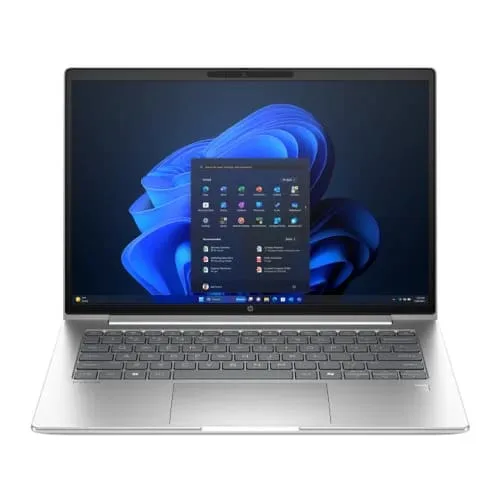

HP ProBook 4 G1i Business Laptop – Intel Core Ultra 5 225U / Core Ultra 7 255U, 14" / 16" WUXGA IPS
- Brand: HP
- Product Code: ProBook 4 G1i
- Unix CoinsEarn 1325 coins, redeemable next order
- Availability: In Stock
- Updated:
Available Options
Desktop and Laptop Processors – Intel Core and AMD Ryzen Series
Choosing the right processor is essential when building a desktop PC, upgrading a compatible computer or selecting a laptop for work, study, gaming or professional applications. Unix Network offers a range of Intel Core i3, i5, i7 and i9 processors alongside AMD Ryzen 3, 5, 7 and 9 series options. From everyday office computing to demanding gaming, content creation and workstation workloads, you can explore different processor models to find the right balance of performance and budget.
Processor specifications vary by generation and model. Core count, thread count, clock speed, cache, power requirements, integrated graphics and platform compatibility should all be considered before purchasing.
Intel Core Processor Series – i3, i5, i7 and i9
Intel Core i3: A practical option for everyday computing, office applications, web browsing, online classes and general home use. Suitable models can provide responsive performance for common productivity tasks.
Intel Core i5: A versatile choice for multitasking, business applications, programming, photo editing and gaming. Core i5 processors are available across different performance levels, making it important to compare the exact generation and model.
Intel Core i7: Designed for users who need higher processing performance for demanding applications, software development, content creation, video editing and gaming. The actual performance depends on the processor generation, core configuration and power limits.
Intel Core i9: A high-performance option for enthusiast PCs and demanding professional workloads, including intensive content production, rendering and complex multitasking. Selected models support unlocked overclocking, but this feature is not available on every Core i9 processor.
AMD Ryzen Processor Series – Ryzen 3, 5, 7 and 9
AMD Ryzen 3: An accessible processor option for everyday desktop computing, study, office applications and general productivity. Performance and integrated graphics availability depend on the specific model.
AMD Ryzen 5: A popular choice for balanced gaming and productivity systems. Depending on the model, Ryzen 5 processors offer multi-core performance for multitasking, gaming, programming and everyday content creation.
AMD Ryzen 7: Suitable for more demanding gaming, streaming, software development and content creation. Selected Ryzen 7 models feature AMD 3D V-Cache technology, while others focus on different combinations of cores, clock speeds and cache.
AMD Ryzen 9: Designed for high-performance desktop systems and demanding workloads such as 3D rendering, video production, software compilation and professional multitasking. Available specifications vary across Ryzen 9 generations and platforms.
Desktop and Laptop Processor Options
Intel and AMD offer processors for both desktop computers and laptops, but desktop and mobile CPUs are not interchangeable. Desktop processors are designed for compatible desktop motherboards and cooling systems, while laptop processors are selected and integrated by laptop manufacturers. When choosing a processor, confirm whether it is intended for a desktop or laptop and check the exact model specifications.
How to Choose the Right Processor
For office work and study: An appropriate Intel Core i3 or AMD Ryzen 3 processor can handle everyday applications, browsing, documents and online learning.
For multitasking and general productivity: Intel Core i5 and AMD Ryzen 5 processors offer a useful balance for business software, programming, everyday editing and multitasking.
For gaming and content creation: Consider suitable Intel Core i5 or i7 and AMD Ryzen 5 or Ryzen 7 models, depending on the games, graphics card and applications you use.
For demanding professional workloads: Higher-tier Intel Core i7 and i9 or AMD Ryzen 7 and Ryzen 9 models may provide additional processing capacity for rendering, video editing and complex projects.
Processor Compatibility and Important Buying Considerations
Before buying a desktop processor, check its socket type, motherboard chipset, BIOS support, memory compatibility and cooling requirements. Also confirm whether the CPU includes integrated graphics if you plan to use the computer without a dedicated graphics card. DDR4 and DDR5 support depends on the processor and motherboard platform; these memory types are not universally interchangeable.
For laptop processors, compatibility is determined by the laptop's design and manufacturer configuration. A desktop CPU cannot normally be used as a replacement for a laptop processor. Always compare the exact processor model rather than relying only on its Core or Ryzen series name.
Why Buy Intel and AMD Processors from Unix Network?
Unix Network offers processor options for desktop PC builds, gaming computers, office systems and compatible laptop configurations. You can compare Intel Core and AMD Ryzen models according to your performance requirements, budget and intended use. Ask about the exact model, platform compatibility, stock availability and applicable warranty before purchasing.
Intel Core and AMD Ryzen Processor Price in Bangladesh
Looking for Intel Core i3, i5, i7, i9 or AMD Ryzen 3, 5, 7, 9 processor prices in Bangladesh? Explore available processor models at Unix Network in Jashore. Prices vary according to generation, model, specifications and availability. Contact the shop to check the latest price and warranty details for your preferred CPU.
Buy Desktop Processors from Unix Network, Jashore
Visit Unix Network at Jessore Computer City, Jashore, to explore Intel and AMD processor options for your next desktop PC or custom computer build. You can also order online from anywhere in Bangladesh. Choose a processor that matches your applications, motherboard platform and budget, and confirm the applicable official brand warranty and compatibility before purchase.
Option info
Processor
Desktop and Laptop Processors – Intel Core and AMD Ryzen Series
Choosing the right processor is essential when building a desktop PC, upgrading a compatible computer or selecting a laptop for work, study, gaming or professional applications. Unix Network offers a range of Intel Core i3, i5, i7 and i9 processors alongside AMD Ryzen 3, 5, 7 and 9 series options. From everyday office computing to demanding gaming, content creation and workstation workloads, you can explore different processor models to find the right balance of performance and budget.
Processor specifications vary by generation and model. Core count, thread count, clock speed, cache, power requirements, integrated graphics and platform compatibility should all be considered before purchasing.
Intel Core Processor Series – i3, i5, i7 and i9
Intel Core i3: A practical option for everyday computing, office applications, web browsing, online classes and general home use. Suitable models can provide responsive performance for common productivity tasks.
Intel Core i5: A versatile choice for multitasking, business applications, programming, photo editing and gaming. Core i5 processors are available across different performance levels, making it important to compare the exact generation and model.
Intel Core i7: Designed for users who need higher processing performance for demanding applications, software development, content creation, video editing and gaming. The actual performance depends on the processor generation, core configuration and power limits.
Intel Core i9: A high-performance option for enthusiast PCs and demanding professional workloads, including intensive content production, rendering and complex multitasking. Selected models support unlocked overclocking, but this feature is not available on every Core i9 processor.
AMD Ryzen Processor Series – Ryzen 3, 5, 7 and 9
AMD Ryzen 3: An accessible processor option for everyday desktop computing, study, office applications and general productivity. Performance and integrated graphics availability depend on the specific model.
AMD Ryzen 5: A popular choice for balanced gaming and productivity systems. Depending on the model, Ryzen 5 processors offer multi-core performance for multitasking, gaming, programming and everyday content creation.
AMD Ryzen 7: Suitable for more demanding gaming, streaming, software development and content creation. Selected Ryzen 7 models feature AMD 3D V-Cache technology, while others focus on different combinations of cores, clock speeds and cache.
AMD Ryzen 9: Designed for high-performance desktop systems and demanding workloads such as 3D rendering, video production, software compilation and professional multitasking. Available specifications vary across Ryzen 9 generations and platforms.
Desktop and Laptop Processor Options
Intel and AMD offer processors for both desktop computers and laptops, but desktop and mobile CPUs are not interchangeable. Desktop processors are designed for compatible desktop motherboards and cooling systems, while laptop processors are selected and integrated by laptop manufacturers. When choosing a processor, confirm whether it is intended for a desktop or laptop and check the exact model specifications.
How to Choose the Right Processor
For office work and study: An appropriate Intel Core i3 or AMD Ryzen 3 processor can handle everyday applications, browsing, documents and online learning.
For multitasking and general productivity: Intel Core i5 and AMD Ryzen 5 processors offer a useful balance for business software, programming, everyday editing and multitasking.
For gaming and content creation: Consider suitable Intel Core i5 or i7 and AMD Ryzen 5 or Ryzen 7 models, depending on the games, graphics card and applications you use.
For demanding professional workloads: Higher-tier Intel Core i7 and i9 or AMD Ryzen 7 and Ryzen 9 models may provide additional processing capacity for rendering, video editing and complex projects.
Processor Compatibility and Important Buying Considerations
Before buying a desktop processor, check its socket type, motherboard chipset, BIOS support, memory compatibility and cooling requirements. Also confirm whether the CPU includes integrated graphics if you plan to use the computer without a dedicated graphics card. DDR4 and DDR5 support depends on the processor and motherboard platform; these memory types are not universally interchangeable.
For laptop processors, compatibility is determined by the laptop's design and manufacturer configuration. A desktop CPU cannot normally be used as a replacement for a laptop processor. Always compare the exact processor model rather than relying only on its Core or Ryzen series name.
Why Buy Intel and AMD Processors from Unix Network?
Unix Network offers processor options for desktop PC builds, gaming computers, office systems and compatible laptop configurations. You can compare Intel Core and AMD Ryzen models according to your performance requirements, budget and intended use. Ask about the exact model, platform compatibility, stock availability and applicable warranty before purchasing.
Intel Core and AMD Ryzen Processor Price in Bangladesh
Looking for Intel Core i3, i5, i7, i9 or AMD Ryzen 3, 5, 7, 9 processor prices in Bangladesh? Explore available processor models at Unix Network in Jashore. Prices vary according to generation, model, specifications and availability. Contact the shop to check the latest price and warranty details for your preferred CPU.
Buy Desktop Processors from Unix Network, Jashore
Visit Unix Network at Jessore Computer City, Jashore, to explore Intel and AMD processor options for your next desktop PC or custom computer build. You can also order online from anywhere in Bangladesh. Choose a processor that matches your applications, motherboard platform and budget, and confirm the applicable official brand warranty and compatibility before purchase.
Laptop and Monitor Display Options in Bangladesh
Choose the right screen for your laptop or desktop setup with Laptop and Monitor Display Options at Unix Network. This collection covers display sizes from 13.3 inches to 27 inches, with different resolutions, aspect ratios and panel technologies for everyday computing, office work, programming, graphic design, video editing and gaming. Available options may include Full HD (FHD), WUXGA, QHD and 4K UHD resolutions, alongside IPS and OLED panels on selected models.
Whether you need a compact laptop display for travel, a larger screen for a productive workstation or a high-refresh-rate monitor for gaming, compare the available specifications to find a display that suits your requirements and budget.
Display Sizes and Resolution Options
13.3-inch and 14-inch displays: Compact screen options commonly found in portable and business laptops. Suitable for students, professionals and users who prioritise portability.
15.3-inch, 15.6-inch and 16-inch laptop displays: Larger laptop screens offer more comfortable viewing space for documents, spreadsheets, coding, browsing and multimedia. Depending on the model, resolutions may include FHD (1920 x 1080) and WUXGA (1920 x 1200). WUXGA uses a 16:10 aspect ratio, providing additional vertical workspace compared with a standard 16:9 FHD screen.
21.45-inch to 27-inch desktop monitors: Monitor options may include FHD, QHD (2560 x 1440) and 4K UHD (3840 x 2160) resolutions. Choose according to your desk space, viewing distance, application requirements and preferred image detail.
IPS, OLED and Other Display Technologies
IPS panels: In-Plane Switching technology generally provides wide viewing angles and consistent colour reproduction. IPS displays are useful for office work, content consumption and colour-related tasks. Actual colour coverage and accuracy depend on the individual model.
OLED panels: Selected OLED displays offer individually controlled pixels, deep blacks and high contrast. They can provide an excellent viewing experience for entertainment and supported creative applications.
Mini-LED panels: Available on selected display models, Mini-LED backlighting can provide more precise local dimming and improved contrast compared with conventional LED-backlit LCD screens.
Anti-glare displays: Matte or anti-glare surfaces help reduce reflections from surrounding light, making screens more comfortable to view in many office and classroom environments.
Refresh Rate and Eye-Care Features
Display refresh rates vary by model. Standard 60Hz screens are suitable for general productivity, browsing and everyday use, while 120Hz, 144Hz, 165Hz and higher refresh-rate monitors can deliver smoother motion for compatible games and applications. To benefit from a higher refresh rate, your computer, graphics hardware, connection and display settings must support the selected mode.
Some displays also include TÜV-certified Low Blue Light, Flicker-Free or other eye-care features. These technologies may improve viewing comfort during extended use, although comfort varies between users and screen settings.
How to Choose the Right Laptop or Monitor Display
Before choosing a laptop screen, check the exact laptop model, display part number, screen size, resolution, aspect ratio, connector, mounting position and panel compatibility. Laptop displays with the same diagonal size are not necessarily interchangeable.
For a desktop monitor, consider screen size, resolution, refresh rate, panel technology, available video ports and your graphics card's output capabilities. A 27-inch QHD or 4K monitor may suit users who need more workspace and detail, while an FHD monitor can be a practical choice for everyday computing and many gaming setups.
For graphic design and professional content creation, check the panel's colour gamut, colour accuracy and calibration specifications rather than relying on the IPS or OLED label alone.
Buy Laptop and Monitor Displays from Unix Network
Unix Network offers laptop and monitor display options in Jashore, Bangladesh, for users looking for FHD, WUXGA, QHD, 4K UHD, IPS and selected OLED display configurations. Whether you are replacing a laptop screen or choosing a desktop monitor, compare the available specifications to find a suitable option.
Visit Unix Network at Jessore Computer City, Jashore, or order online from anywhere in Bangladesh. Check the exact model, compatibility, availability and applicable brand warranty before purchasing. Explore the latest laptop and monitor display prices in Bangladesh at Unix Network.
Option info
Display
Laptop and Monitor Display Options in Bangladesh
Choose the right screen for your laptop or desktop setup with Laptop and Monitor Display Options at Unix Network. This collection covers display sizes from 13.3 inches to 27 inches, with different resolutions, aspect ratios and panel technologies for everyday computing, office work, programming, graphic design, video editing and gaming. Available options may include Full HD (FHD), WUXGA, QHD and 4K UHD resolutions, alongside IPS and OLED panels on selected models.
Whether you need a compact laptop display for travel, a larger screen for a productive workstation or a high-refresh-rate monitor for gaming, compare the available specifications to find a display that suits your requirements and budget.
Display Sizes and Resolution Options
13.3-inch and 14-inch displays: Compact screen options commonly found in portable and business laptops. Suitable for students, professionals and users who prioritise portability.
15.3-inch, 15.6-inch and 16-inch laptop displays: Larger laptop screens offer more comfortable viewing space for documents, spreadsheets, coding, browsing and multimedia. Depending on the model, resolutions may include FHD (1920 x 1080) and WUXGA (1920 x 1200). WUXGA uses a 16:10 aspect ratio, providing additional vertical workspace compared with a standard 16:9 FHD screen.
21.45-inch to 27-inch desktop monitors: Monitor options may include FHD, QHD (2560 x 1440) and 4K UHD (3840 x 2160) resolutions. Choose according to your desk space, viewing distance, application requirements and preferred image detail.
IPS, OLED and Other Display Technologies
IPS panels: In-Plane Switching technology generally provides wide viewing angles and consistent colour reproduction. IPS displays are useful for office work, content consumption and colour-related tasks. Actual colour coverage and accuracy depend on the individual model.
OLED panels: Selected OLED displays offer individually controlled pixels, deep blacks and high contrast. They can provide an excellent viewing experience for entertainment and supported creative applications.
Mini-LED panels: Available on selected display models, Mini-LED backlighting can provide more precise local dimming and improved contrast compared with conventional LED-backlit LCD screens.
Anti-glare displays: Matte or anti-glare surfaces help reduce reflections from surrounding light, making screens more comfortable to view in many office and classroom environments.
Refresh Rate and Eye-Care Features
Display refresh rates vary by model. Standard 60Hz screens are suitable for general productivity, browsing and everyday use, while 120Hz, 144Hz, 165Hz and higher refresh-rate monitors can deliver smoother motion for compatible games and applications. To benefit from a higher refresh rate, your computer, graphics hardware, connection and display settings must support the selected mode.
Some displays also include TÜV-certified Low Blue Light, Flicker-Free or other eye-care features. These technologies may improve viewing comfort during extended use, although comfort varies between users and screen settings.
How to Choose the Right Laptop or Monitor Display
Before choosing a laptop screen, check the exact laptop model, display part number, screen size, resolution, aspect ratio, connector, mounting position and panel compatibility. Laptop displays with the same diagonal size are not necessarily interchangeable.
For a desktop monitor, consider screen size, resolution, refresh rate, panel technology, available video ports and your graphics card's output capabilities. A 27-inch QHD or 4K monitor may suit users who need more workspace and detail, while an FHD monitor can be a practical choice for everyday computing and many gaming setups.
For graphic design and professional content creation, check the panel's colour gamut, colour accuracy and calibration specifications rather than relying on the IPS or OLED label alone.
Buy Laptop and Monitor Displays from Unix Network
Unix Network offers laptop and monitor display options in Jashore, Bangladesh, for users looking for FHD, WUXGA, QHD, 4K UHD, IPS and selected OLED display configurations. Whether you are replacing a laptop screen or choosing a desktop monitor, compare the available specifications to find a suitable option.
Visit Unix Network at Jessore Computer City, Jashore, or order online from anywhere in Bangladesh. Check the exact model, compatibility, availability and applicable brand warranty before purchasing. Explore the latest laptop and monitor display prices in Bangladesh at Unix Network.
Specification
| Display Features | |
| Display Resolution | WUXGA (1920 x 1200) |
|---|---|
| Display size | 14 / 16 Inch |
| BASIC INFORMATION | |
| Adapter Type | HP Smart 65 W External AC Power Adapter |
| Audio Features | Poly Studio |
| Battery Capacity | 56 Wh |
| Battery type | HP Long Life 3-cell Li-ion |
| Bus Speed | 5600MHz |
| Dimensions | 31.86 x 22.43 x 1.09 cm |
| Display Features | anti-glare, 300 nits, low power, 62.5% sRGB |
| Fingerprint Sensor | Yes |
| Graphics Memory | Shared |
| Graphics Model | Intel Graphics |
| Graphics Type | Integrated |
| Keyboard Features | Spill-resistant, Backlit keyboard |
| Keyboard Type | HP Premium Keyboard |
| Operating System | FreeDOS |
| Processor Brand | Intel |
| Processor Frequency | up to 4.8 GHz |
| Processor Model | Core Ultra 5 -225U / Core Ultra 7 -225U |
| RAM Type | DDR5 |
| Security Locker Slot | Yes |
| Speakers | Dual stereo speakers |
| Storage Capacity | 512GB |
| Total RAM Slot | 2 SODIMM |
| TouchPad | Yes |
| RAM | 8GB |
| Display Type | IPS |
| Storage type | PCIe NVMe SSD |
| INPUT DEVICES | |
| WebCam | 1080p FHD camera |
| Interface | |
| WIFi | Intel Wi-Fi 6E AX211 (2x2) |
| Main Features | |
| Microphone | Dual-array microphones |
| NETWORK & WIRELESS CONNECTIVITY | |
| Bluetooth | Bluetooth 5.3 Wireless Card |
| LAN | 1x RJ45 |
| Physical Specification | |
| Color | Pike silver aluminum |
| PHYSICAL SPECIFICATION | |
| Body material | aluminum |
| Weight | 1.39 kg |
| PORTS, CONNECTORS & SLOTS | |
| HDMI Port | 1 x HDMI 2.1 |
| Headphone & Microphone Port | 1x headphone/microphone combo |
| USB 3 Port | 2 x USB Type-A 5Gbps signaling rate (1 charging, 1 power) |
| USB Type-C / Thunderbolt Port | 2 x USB Type-C 20Gbps signaling rate (USB Power Delivery 3.0, DisplayPort 1.4, HP Sleep and Charge) |
| WARRANTY | |
| Manufacturing Warranty | Warranty Details 3 year warranty (Terms & Conditions Apply As Per HP). |
Description
HP ProBook 4 G1i Business Laptop – Intel Core Ultra 5 and Core Ultra 7
The HP ProBook 4 G1i is a professional business laptop series designed for corporate users, office professionals, executives, developers and organisations that need dependable performance for everyday business operations. Available with Intel Core Ultra 5 225U or Core Ultra 7 255U processors and 14-inch or 16-inch WUXGA IPS display options, it offers flexibility for different working styles and requirements.
With DDR5 memory support, PCIe Gen 4 NVMe SSD storage and integrated Intel AI Boost technology, the ProBook 4 G1i is built for modern productivity, multitasking, video conferencing and compatible AI-assisted applications. Its business-focused security features and practical connectivity options make it suitable for office environments and hybrid work.
Intel Core Ultra 5 225U and Core Ultra 7 255U Processor Options
Choose the processor configuration that matches your workload. The Intel Core Ultra 5 225U is a suitable option for everyday business applications, office productivity, online meetings and multitasking. For users who need additional processing capability, the Intel Core Ultra 7 255U offers a higher-tier option for demanding professional workloads and more intensive multitasking.
Both processor options feature hybrid CPU architecture and an integrated Intel AI Boost NPU. The NPU is designed to accelerate supported AI workloads efficiently, including compatible background effects, noise reduction and selected AI-powered productivity features. Actual AI functionality depends on software support and application requirements.
DDR5 Memory and PCIe Gen 4 NVMe SSD Storage
The HP ProBook 4 G1i supports high-speed DDR5 memory for responsive business multitasking. Depending on the selected configuration, memory capacity and upgrade options may vary. Check the exact model specifications before purchasing to confirm installed RAM, available slots and maximum supported capacity.
PCIe Gen 4 NVMe SSD storage provides fast system startup, application loading and file access. It is useful for professionals who regularly work with documents, spreadsheets, business software, presentations and project files.
14-Inch and 16-Inch WUXGA IPS Display Options
The ProBook 4 G1i series is available with 14-inch and 16-inch WUXGA displays featuring a 1920 x 1200 resolution and 16:10 aspect ratio. The taller screen format provides additional vertical workspace compared with conventional 16:9 displays, making it practical for spreadsheets, document editing, web applications and multitasking.
The IPS anti-glare display is designed for comfortable everyday office use, with wide viewing angles and reduced reflections. The 14-inch model is convenient for professionals who travel frequently, while the 16-inch version provides a larger viewing area. Selected 16-inch configurations include a numeric keypad for data entry and spreadsheet work.
AI-Ready Video Conferencing and Poly Studio Audio
Designed for modern hybrid work, the HP ProBook 4 G1i includes business-focused camera and audio features, depending on configuration. Selected models offer an FHD or IR camera, privacy shutter and dual microphones for online meetings. Poly Studio-tuned stereo speakers support clearer audio for conference calls, presentations and everyday communication.
HP Wolf Security and Business-Level Protection
Security is an important part of the ProBook business experience. HP Wolf Security for Business provides hardware and software-based protection features on supported configurations. TPM 2.0 helps protect encryption keys and other security credentials, while a physical camera shutter offers additional privacy during video calls. A fingerprint reader is available on selected models, depending on the configuration.
MIL-STD-810H Tested Design and Professional Connectivity
The HP ProBook 4 G1i is designed for regular business use, with MIL-STD-810H testing referenced for durability against specified environmental conditions. This testing does not mean the laptop is damage-proof or immune to accidental drops and liquid spills.
Business connectivity options may include Wi-Fi 6E or Wi-Fi 7, an RJ-45 Gigabit Ethernet port, USB Type-C with Power Delivery and DisplayPort support, USB Type-A ports and HDMI 2.1. These connections make it practical to connect compatible external displays, wired networks, storage devices and office peripherals. Exact wireless standards and port configurations should be checked against the selected model.
HP ProBook 4 G1i Business Laptop Specifications
Series: HP ProBook 4 G1i
Processor Options: Intel Core Ultra 5 225U or Intel Core Ultra 7 255U
AI Engine: Integrated Intel AI Boost NPU
Memory: DDR5 RAM, configuration dependent
Storage: PCIe Gen 4 NVMe SSD, capacity dependent
Display Options: 14-inch or 16-inch IPS WUXGA
Display Resolution: 1920 x 1200
Aspect Ratio: 16:10
Display Surface: Anti-glare
Audio: Poly Studio-tuned stereo speakers, configuration dependent
Camera: FHD or IR camera options, depending on configuration
Security: HP Wolf Security for Business, TPM 2.0 and selected fingerprint reader options
Durability: MIL-STD-810H tested
Wireless: Wi-Fi 6E or Wi-Fi 7 and Bluetooth, depending on configuration
Connectivity: USB Type-C, USB Type-A, HDMI 2.1 and RJ-45 LAN, subject to model configuration
Warranty: 3-year official HP commercial warranty, as stated for the offered configuration
Which HP ProBook 4 G1i Configuration Should You Choose?
Core Ultra 5 with 14-inch display: A practical option for professionals who need a portable business laptop for office applications, meetings, travel and everyday multitasking.
Core Ultra 5 with 16-inch display: Suitable for users who prefer a larger workspace for documents, spreadsheets and business applications.
Core Ultra 7 with 14-inch display: A higher-performance option for professionals who need additional processing capability in a portable format.
Core Ultra 7 with 16-inch display: A suitable choice for users who prioritise a larger screen and higher-tier processor performance for demanding business workloads.
Who Should Buy the HP ProBook 4 G1i?
The HP ProBook 4 G1i is suitable for corporate professionals, business owners, executives, developers, enterprise teams and users who need a modern business laptop. Its processor choices, DDR5 memory support, fast SSD storage, AI acceleration and business security features make it a practical platform for office productivity, hybrid meetings and professional multitasking.
HP ProBook 4 G1i Price in Bangladesh
Looking for the HP ProBook 4 G1i Core Ultra 5 or Core Ultra 7 laptop price in Bangladesh? Unix Network offers HP business laptop options with different processor and display configurations. Compare the 14-inch and 16-inch models, check the installed RAM and SSD capacity, and confirm the latest price, stock availability and warranty coverage before ordering.
Buy HP ProBook 4 G1i from Unix Network
Find the HP ProBook 4 G1i Business Laptop at Unix Network, Jessore Computer City, Jashore, Bangladesh. Choose the Intel Core Ultra 5 225U or Core Ultra 7 255U configuration with a 14-inch or 16-inch WUXGA IPS display according to your professional requirements. Visit our shop or order online from anywhere in Bangladesh. The stated 3-year HP commercial warranty is subject to the applicable warranty terms for the selected model.