
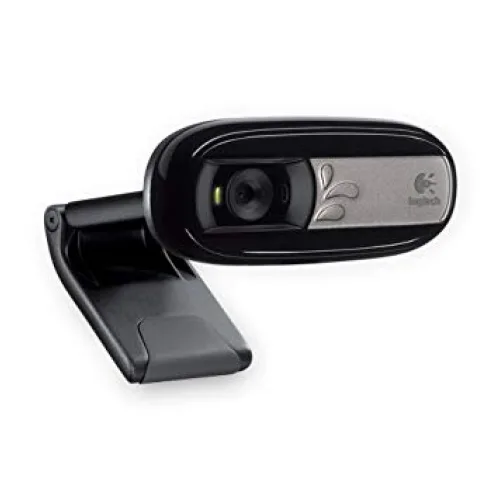
Logitech Webcam C170
- Brand: Logitech
- Product Code: Logitech Webcam C170
- Availability: In Stock
- Updated:
Description
Logitech C170 Webcam Price
The Logitech C170 Webcam is a compact and easy-to-use USB webcam designed for online classes, video calls, virtual meetings and everyday communication. Featuring VGA video calling, a built-in microphone and a universal mounting clip, this webcam provides a practical solution for desktop computers and laptops without a suitable built-in camera. The Logitech C170 supports video calling at up to 640 x 480 pixels and can capture software-enhanced photographs at resolutions of up to 5 megapixels using compatible Logitech software. Its simple USB connection and lightweight design make it suitable for students, teachers, office workers and home users looking for an affordable webcam in Bangladesh.
VGA 640 x 480 Video Calling for Everyday Communication
The Logitech C170 Webcam supports VGA video calling at a resolution of up to 640 x 480 pixels. This resolution is suitable for basic face-to-face communication, online lessons, personal video calls and routine virtual meetings. It provides a convenient alternative for desktop computers without integrated cameras and laptops with faulty webcams. While VGA resolution is lower than modern HD and Full HD webcams, it remains useful for users who prioritise simple video communication over high-resolution recording. Actual video quality depends on lighting, internet bandwidth and application settings.
Up to 5MP Software-Enhanced Photo Capture
The Logitech C170 can capture still photographs at resolutions of up to 5 megapixels through compatible Logitech software. This feature uses software enhancement rather than a native 5MP image sensor, so the resulting photographs should not be confused with images captured by a dedicated 5MP camera. It can be useful for taking quick profile photographs, casual snapshots and other simple images directly from a computer. Actual image quality depends on lighting, software support and the camera's native sensor capabilities.
Logitech Fluid Crystal Technology for Video Enhancement
The Logitech C170 features Logitech Fluid Crystal technology, designed to improve the appearance of video calls through image processing and camera optimisation. This technology helps support colour reproduction, image sharpness and smoother-looking video under suitable conditions. It can make everyday communication more comfortable when using the webcam in a properly lit room. However, image quality remains limited by the camera's VGA resolution, and performance in dim environments may be reduced. For the clearest results, position a light source in front of the user rather than behind them.
Built-in Microphone for Voice Communication
The Logitech C170 includes an integrated microphone that allows users to speak during video calls without connecting a separate microphone. This makes it convenient for online classes, family conversations, basic office meetings and other everyday communication tasks. The microphone captures voice directly from the webcam, reducing the number of accessories required for a simple video calling setup. For professional recording or use in noisy environments, a dedicated headset or external microphone may provide better sound quality.
Noise-Reducing Microphone for Clearer Conversations
The Logitech C170 is designed with microphone noise-reduction features that can help minimise certain background sounds during voice communication. This can be useful when attending online lessons or meetings from a home or shared workspace. Noise reduction may improve speech clarity in suitable environments, but it cannot completely eliminate surrounding conversations, traffic or other loud sounds. Microphone placement, room acoustics and the noise suppression settings of the video calling application also influence audio quality.
USB Plug-and-Play Connectivity for Easy Installation
The Logitech C170 connects to a compatible desktop computer or laptop through a USB interface. Its straightforward connection makes it convenient for users who want to start video calling without installing additional internal hardware. On supported operating systems, the webcam can often be recognised through standard USB video device support. Some optional camera functions may require compatible software or additional configuration. Users should verify operating system support and application permissions before installation, particularly on newer computers.
USB 2.0 Interface for Reliable Computer Connection
The Logitech C170 uses a USB 2.0 connection to transfer video and audio data to the computer. This makes it suitable for compatible desktop PCs and laptops equipped with standard USB ports. The webcam receives power through its USB connection, so a separate power adapter is not required. Users with computers that provide only USB Type-C ports may need a suitable USB adapter. Connection stability can be affected by damaged cables, incompatible adapters or insufficient power from certain USB hubs.
Universal Clip for Desktop Monitors and Laptops
The Logitech C170 features an adjustable universal clip designed to attach the webcam to many desktop monitors and laptop screens. This allows users to position the camera near eye level for more natural-looking video calls. The clip provides a convenient mounting option without requiring a dedicated camera stand. Fit and stability depend on the thickness and shape of the display, so users should check that the webcam is securely positioned before use. The compact design also makes it easy to move between compatible computers.
Compact and Lightweight Webcam Design
The Logitech C170 has a compact construction that makes it suitable for small desks, home offices and shared workstations. Its lightweight body can be positioned on a compatible monitor or laptop without occupying much additional space. This makes it convenient for students and professionals who need a basic webcam for occasional or regular communication. The simple design also makes the camera easy to store when it is not being used.
Logitech C170 for Online Classes and Distance Learning
The Logitech C170 is a practical webcam for students and teachers who need video communication for online education. Its VGA camera provides basic video calling capability, while the integrated microphone allows users to participate in discussions without requiring a separate audio input device. The USB connection and monitor clip make it convenient to install on compatible desktop computers. For online examinations, live presentations or learning platforms that require HD video, users should check the platform's minimum camera requirements before choosing this model.
Logitech C170 for Video Conferencing and Office Meetings
The Logitech C170 can be used for routine office video calls, remote discussions and basic virtual meetings. Its built-in microphone and compact design provide a simple communication solution for employees working from home or using desktop computers without webcams. The camera is suitable for situations where basic video visibility is sufficient. Businesses requiring detailed presentations, higher image resolution or advanced conferencing features may prefer an HD or Full HD webcam.
Compatibility with Zoom, Google Meet and Microsoft Teams
The Logitech C170 can work with popular video calling services such as Zoom, Google Meet and Microsoft Teams when the operating system and application recognise it as a compatible USB camera. Users can select the webcam and its microphone from the audio and video settings of their chosen application. Actual compatibility depends on the operating system, browser, application version and supported device drivers. Since the C170 is an older webcam model, users should confirm compatibility with their current software environment before purchasing.
Windows Compatibility and Driver Requirements
The Logitech C170 was designed for Windows-based computers and supports standard webcam functions on compatible systems. Basic camera operation may be available through built-in USB video drivers, depending on the operating system. However, older Logitech software packages and optional features may not be supported on every current version of Windows. Users should check Logitech's available support resources and verify compatibility with their computer before installation. Support for macOS, Linux or other operating systems should also be confirmed separately.
Simple Setup for Home and Office Computers
Setting up the Logitech C170 is straightforward on a compatible computer. Attach the webcam securely to a monitor or laptop, connect its USB cable and allow the operating system to detect the device. Then open the preferred video calling application and select the Logitech webcam as the camera and microphone source. If the webcam is not detected, users should check USB connectivity, application permissions and driver compatibility. Proper lighting and camera positioning can help improve the appearance of video calls.
Logitech C170 for Family and Personal Video Calls
The Logitech C170 provides a convenient way to communicate with friends and family through supported video calling applications. Its built-in microphone and VGA camera allow users to see and speak with others using a desktop computer or laptop. This makes it useful for keeping in touch with relatives, participating in personal conversations and making occasional video calls. For users who do not require HD resolution, the C170 offers a straightforward alternative to more expensive webcam models.
Logitech C170 vs HD Webcams
The Logitech C170 is designed primarily for basic VGA video calling, while modern HD webcams typically provide 720p or 1080p resolution. Higher-resolution webcams can capture more facial detail and may be better suited to professional presentations, content creation and frequent video meetings. However, the C170 remains a practical choice for users who need a simple USB webcam with an integrated microphone. When comparing models, consider video resolution, operating system compatibility, microphone quality and intended use rather than relying only on price.
Why Choose the Logitech C170 Webcam?
The Logitech C170 combines essential video calling features in a compact and convenient design. Its VGA video capability is suitable for everyday communication, while software-enhanced photo capture provides an additional option for casual snapshots. The built-in noise-reducing microphone, USB connection and adjustable mounting clip make it easy to use with compatible computers. For students, home users and office workers who need an affordable webcam for basic online communication, the Logitech C170 is worth considering.
Logitech C170 Webcam Price in Bangladesh
Looking for the Logitech C170 Webcam price in Bangladesh? Contact Unix Network to check the latest price, stock availability and product specifications. Before ordering, confirm compatibility with your operating system, preferred video calling applications and any required software. As the Logitech C170 is an older webcam model, availability and warranty coverage may vary depending on the supplied stock. Comparing it with newer Logitech HD webcams can help you select a suitable camera for your budget and communication needs.
Buy Logitech C170 Webcam from Unix Network in Jashore
Explore the Logitech C170 Webcam at Unix Network in Jashore, Bangladesh. Whether you need a webcam for online classes, home communication, video conferencing or everyday office use, Unix Network can help you enquire about Logitech webcams and compatible computer accessories. Customers in Jashore, Khulna, Jhenaidah, Magura, Narail, Satkhira and other parts of Bangladesh can contact Unix Network for ordering and delivery information. Visit our shop or browse unixnetworkbd.com to check current prices, confirm stock availability and review applicable warranty details before purchasing.