
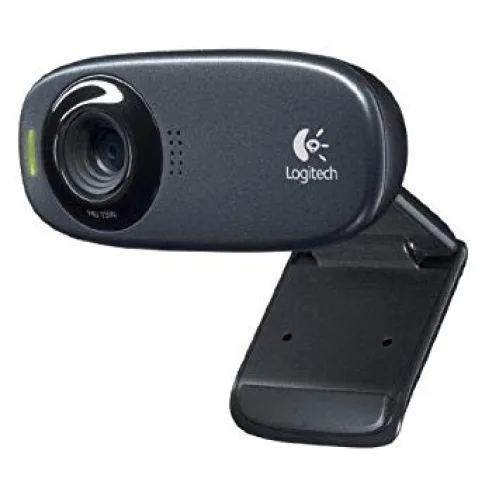
Logitech Webcam C310 High-Definition
- Brand: Logitech
- Product Code: C310
- Availability: In Stock
- Updated:
Description
Logitech C310 High-Definition HD Webcam Price in Bangladesh
The Logitech C310 High-Definition Webcam is a compact USB webcam designed for online meetings, video conferencing, remote working, virtual interviews and online classes. Featuring HD 720p video recording at up to 30 frames per second, the Logitech C310 delivers clearer widescreen video than basic VGA webcams. It also includes Logitech RightLight 2 technology for automatic lighting adjustments, a built-in noise-reducing microphone and a universal mounting clip for convenient installation. With straightforward USB connectivity and compatibility with supported video calling applications, the Logitech C310 is a practical webcam for students, teachers, office professionals and home users in Bangladesh.
HD 720p Video Calling at 30 Frames per Second
The Logitech C310 supports HD video calling at a resolution of up to 1280 x 720 pixels and 30 frames per second under suitable conditions. This provides a noticeable improvement in image detail compared with older VGA webcams, making facial expressions and other visual details easier to see during online conversations. Its HD capability is useful for virtual meetings, online classes and personal video calls. Actual resolution and frame rate depend on the selected application, computer performance, lighting conditions and available internet bandwidth.
16:9 Widescreen Video for Online Meetings
The Logitech C310 uses a 16:9 widescreen video format at its supported HD resolution. This aspect ratio is suitable for modern video conferencing applications and helps provide a natural-looking image during online meetings. Widescreen video can be useful for showing the speaker and part of their surroundings without requiring an unusually narrow camera view. The visible area depends on the webcam's fixed field of view and its placement. Users should position the camera at approximately eye level for a more comfortable video calling experience.
Logitech RightLight 2 Technology for Automatic Light Correction
The Logitech C310 features RightLight 2 technology, designed to improve video appearance by adjusting image settings according to surrounding lighting conditions. This can help balance brightness and contrast when using the webcam in a home office, classroom or indoor workspace. Automatic light correction is particularly useful when natural lighting changes during the day. However, image quality can still be affected by very dark rooms or strong light sources behind the user. For better results, place a suitable light source in front of the face.
Clearer Video in Different Indoor Lighting Conditions
The Logitech C310 is designed to provide practical video quality across common indoor environments. Its automatic image adjustments help maintain usable video when lighting is less than ideal, making it suitable for bedrooms, home offices and shared workspaces. However, RightLight 2 cannot completely eliminate image noise or compensate for every challenging lighting condition. Good room lighting remains important for achieving sharp, natural-looking video. Avoid placing the webcam directly towards bright windows or strong overhead lights whenever possible.
Up to 5MP Software-Enhanced Photo Capture
The Logitech C310 supports still image capture at resolutions of up to 5 megapixels using compatible Logitech software. These higher-resolution photographs are software-enhanced rather than captured by a native 5MP imaging sensor. The feature can be useful for casual profile photographs, quick snapshots and simple image capture from a desktop computer or laptop. Actual photograph quality depends on lighting, camera settings and software compatibility. Users requiring detailed photography or professional image capture should consider a dedicated camera.
Built-in Mono Microphone for Voice Communication
The Logitech C310 includes an integrated mono microphone for capturing speech during video calls. This allows users to participate in online meetings, classes and family conversations without connecting a separate microphone. The built-in audio capability is convenient for desktop computers that do not already have a microphone. For routine communication, it provides a straightforward solution with fewer accessories and cables. Users requiring stereo recording, studio-quality audio or advanced microphone controls may prefer a dedicated external microphone.
Noise-Reducing Microphone for Clearer Conversations
The Logitech C310 features microphone noise-reduction technology designed to reduce certain unwanted background sounds during voice communication. This can help improve speech clarity when attending meetings or classes from a typical home or office environment. The effectiveness of noise reduction depends on the type and level of surrounding noise, microphone placement and application settings. It cannot completely remove loud conversations, traffic or other disruptive sounds. A headset may still be preferable when privacy or consistent audio quality is important.
USB Plug-and-Play Connectivity for Easy Setup
The Logitech C310 connects to a compatible desktop computer or laptop through a standard USB connection. On supported operating systems, basic camera and microphone functions can generally be recognised without complicated installation procedures. Users can connect the webcam, open a compatible video calling application and select the Logitech C310 as their preferred camera. Some optional settings or older Logitech software features may require additional configuration. Users should confirm compatibility with their operating system before purchasing.
USB 2.0 Interface for Desktop PCs and Laptops
The Logitech C310 uses a USB 2.0 interface to transfer video and audio data to a connected computer. It receives power through the USB connection, eliminating the need for a separate power adapter. The webcam can be used with compatible USB ports on desktop computers and laptops. Computers equipped only with USB Type-C ports may require a suitable adapter. For stable performance, users should avoid damaged cables and ensure that the connected USB port provides adequate power.
Universal Mounting Clip for Monitors and Laptop Screens
The Logitech C310 features an adjustable mounting clip designed to attach to many laptop screens and desktop monitors. This makes it convenient to position the webcam above the display for video calls and online meetings. The clip can also provide flexible placement on suitable flat surfaces, depending on the setup. Actual fit depends on the thickness and design of the monitor or laptop screen. Users should check that the webcam is securely mounted before use, particularly when adjusting the screen angle.
Compact and Lightweight Design for Everyday Use
The Logitech C310 has a compact design that fits easily into home offices, study areas and professional workstations. Its lightweight construction makes it convenient to move between compatible computers or store when not required. The webcam does not need a separate power adapter, helping keep the workspace organised. This makes it particularly suitable for students, remote workers and office employees who want a simple video communication device without occupying much desk space.
Logitech C310 for Zoom Video Meetings
The Logitech C310 can be used with Zoom on compatible computers that recognise the webcam as a supported USB video device. Its HD 720p capability is suitable for routine virtual meetings, online interviews and team discussions. The built-in microphone provides an audio input option, while RightLight 2 helps improve video appearance in changing lighting conditions. Zoom may adjust the actual video resolution according to account settings, internet bandwidth, system performance and meeting configuration.
Logitech C310 for Google Meet and Microsoft Teams
The Logitech C310 is also suitable for video calls through Google Meet and Microsoft Teams when supported by the operating system and application. Users can select the webcam and its integrated microphone from the relevant audio and video settings. This makes it useful for remote working, educational discussions and business communication. Actual compatibility depends on the browser, operating system, application version and available drivers. Users should verify their current software requirements before purchasing.
Logitech C310 for Online Classes and Teaching
Students, teachers and tutors can use the Logitech C310 for online lessons, virtual classrooms and educational discussions. Its 720p HD video provides clearer image detail than basic VGA webcams, while the built-in microphone allows users to speak without additional audio equipment. The universal clip makes it convenient to install on a laptop or desktop monitor. For teaching environments that require detailed demonstrations of printed materials or handwritten notes, a separate document camera may be more suitable.
Logitech C310 for Remote Work and Job Interviews
The Logitech C310 is a practical option for remote workers and job applicants who need a webcam for professional video communication. Its HD resolution, automatic light correction and integrated microphone provide the essential features required for many virtual interviews and office meetings. For a professional appearance, users should position the webcam at eye level, choose a tidy background and use adequate front-facing lighting. A stable internet connection is also important for maintaining consistent video and audio quality.
Windows, macOS and ChromeOS Compatibility
The Logitech C310 is designed to work with supported computer operating systems, including compatible versions of Windows, macOS and ChromeOS. Basic webcam functionality may be available through standard USB video device support, depending on the system. However, some older Logitech software packages and optional features may not be compatible with the latest operating system releases. Users should check Logitech's current support information for their specific system before purchasing or installing the webcam.
Easy Camera and Microphone Configuration
Setting up the Logitech C310 involves connecting the webcam to a suitable USB port, allowing the operating system to recognise the device and selecting it within the preferred video calling application. Users should also check camera and microphone permissions in their operating system settings. If the webcam is not detected, checking the USB connection, restarting the application and reviewing driver compatibility may help. Proper lighting, camera positioning and microphone settings can further improve the overall video calling experience.
Logitech C310 vs Logitech C170 Webcam
The Logitech C310 offers a higher video calling resolution than the Logitech C170, making it a suitable upgrade for users who want clearer online communication. The C310 supports HD 720p video at up to 30fps, while the C170 is primarily designed for VGA 640 x 480 video calling. The C310 also includes RightLight 2 technology for automatic lighting correction. Both models provide built-in microphones, USB connectivity and convenient mounting clips. Customers should consider their video quality requirements, operating system compatibility and budget when choosing between these webcams.
Logitech C310 vs Full HD 1080p Webcams
The Logitech C310 is designed for HD 720p video communication, while Full HD webcams provide a higher resolution of 1920 x 1080 pixels. A 1080p webcam may be preferable for professional presentations, content creation or situations where additional image detail is important. However, the C310 remains a practical option for everyday online classes, office meetings and personal video calls. The best choice depends on the intended application, available internet bandwidth, lighting conditions and budget.
Why Choose the Logitech C310 HD Webcam?
The Logitech C310 combines HD 720p video calling, automatic lighting correction and convenient audio features in a compact USB webcam. Its RightLight 2 technology helps improve image appearance under common indoor lighting conditions, while the built-in noise-reducing microphone supports everyday conversations. The universal mounting clip and straightforward USB connection make installation simple on compatible computers. For students, teachers, remote workers and home users who want a practical HD webcam without paying for advanced professional camera features, the Logitech C310 is worth considering.
Logitech C310 HD Webcam Price in Bangladesh
Looking for the Logitech C310 High-Definition Webcam price in Bangladesh? Contact Unix Network to check the latest price, stock availability and product specifications. Before ordering, confirm compatibility with your operating system, preferred video conferencing applications and any required software. As the Logitech C310 is an established webcam model, stock availability and warranty terms may vary depending on the supplied product. Comparing it with other Logitech HD and Full HD webcams can help you select a suitable camera for your communication needs and budget.
Buy Logitech C310 HD Webcam from Unix Network in Jashore
Explore the Logitech C310 High-Definition Webcam at Unix Network in Jashore, Bangladesh. Whether you need an HD webcam for online classes, video conferencing, remote work or personal communication, Unix Network can help you enquire about Logitech webcams and compatible computer accessories. Customers in Jashore, Khulna, Jhenaidah, Magura, Narail, Satkhira and other parts of Bangladesh can contact Unix Network for ordering and delivery information. Visit our shop or browse unixnetworkbd.com to check current prices, confirm stock availability and review applicable warranty details before purchasing.