

Netis Access Point Price in Bangladesh
Showing 1 to 4 of 4 (1 Pages)
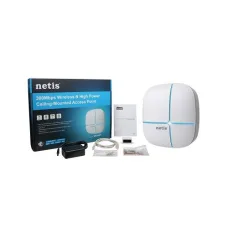
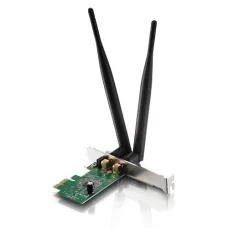
Find the Right Netis Access Point for Your Budget and Needs
These are the latest in-stock Netis Access Point at Unix Network, with the current price in Bangladesh. Open a model for specifications.
Latest Netis Access Point Price List in BD 2026
| Netis Access Point List | Price in BD |
|---|---|
| Netis E1+ 300Mbps Wireless N Range Extender | ৳1,700 |
Netis Access Point Price in Bangladesh
Netis wireless access points provide practical Wi-Fi networking solutions for offices, hotels, restaurants, educational institutions, commercial buildings and residential properties. Designed to extend wireless connectivity through an existing wired network, Netis access points offer different installation options and wireless capabilities depending on the model. From compact indoor access points to selected ceiling-mount and outdoor wireless solutions, Netis products can help businesses establish Wi-Fi coverage in areas where a single wireless router may not be sufficient.
At Unix Network, customers can explore Netis access point prices in Bangladesh and compare available models based on wireless standards, operating frequency, coverage requirements, Power over Ethernet support and network management features. Whether you need an access point for a small office, a multi-floor building or a commercial Wi-Fi installation, choosing the right Netis AP depends on the number of users, building layout, available network infrastructure and expected internet usage.
Netis WirelessAccess Point for Reliable Wi-Fi Connectivity
A Netis wireless access point connects to a compatible wired network and provides Wi-Fi connectivity for wireless devices such as laptops, smartphones, tablets and other network-enabled equipment. Access points are commonly used to expand wireless coverage in buildings where one router cannot adequately serve every room or floor.
Unlike a typical wireless range extender, an access point generally uses a wired Ethernet connection to the existing network. This can provide a more predictable connection between the wireless coverage area and the main network infrastructure.
Actual wireless performance depends on the access point model, connected devices, installation location and network conditions.
Netis Indoor WirelessAccess Point
Netis indoor access points are suitable for offices, classrooms, meeting rooms, reception areas, shops and residential spaces. They provide wireless connectivity in locations where consistent Wi-Fi access is important for everyday work and communication.
Depending on the model, indoor access points may support 2.4GHz Wi-Fi, dual-band connectivity, multiple wireless network names and different security configurations.
For the best results, position the access point where it can provide suitable coverage without excessive interference from walls, metal structures or nearby wireless equipment.
Netis Ceiling Mount Access Point
Selected Netis access points are designed for ceiling installation, making them suitable for offices, hotels, restaurants, educational institutions and other commercial environments. Ceiling-mounted access points can provide convenient wireless coverage while keeping networking equipment away from desks and working areas.
Depending on the model, these devices may support PoE connectivity, allowing power and data to be delivered through a compatible Ethernet cable.
Before installation, check the access point's mounting accessories, power requirements and recommended placement.
Netis Outdoor WirelessAccess Point
Outdoor wireless access points are designed for locations where Wi-Fi coverage is needed beyond indoor rooms. Suitable applications may include courtyards, commercial outdoor spaces, building entrances and other areas requiring network connectivity.
Selected Netis outdoor models may feature weather-resistant housings and external antenna configurations for suitable outdoor installations.
Weather protection ratings vary by product. Buyers should verify the specific IP rating, operating temperature range and installation requirements rather than assuming every outdoor model has the same level of protection.
Netis Dual Band Access Point with 2.4GHz and 5GHz Wi-Fi
Selected Netis dual-band access points operate on both 2.4GHz and 5GHz wireless frequencies, allowing compatible devices to connect using the band most suitable for their requirements.
The 2.4GHz band generally provides broader coverage under comparable conditions, while 5GHz can offer higher wireless data rates and access to additional channels.
Dual-band connectivity is useful in offices, restaurants and other environments where multiple users need wireless access for browsing, video conferencing and everyday online activities. Supported speeds and frequency bands depend on the individual model.
Netis 300Mbps WirelessAccess Point
Netis 300Mbps access point models are designed for basic wireless networking applications, commonly using 2.4GHz Wi-Fi technology. They can be suitable for small offices, homes and other environments with modest connectivity requirements.
These devices may provide a cost-effective way to extend wireless coverage where high-speed dual-band connectivity is not essential.
The advertised 300Mbps figure represents a theoretical wireless link rate rather than guaranteed internet download speed. Actual throughput depends on signal quality, connected devices and network conditions.
Netis AC1200 Dual Band WirelessAccess Point
Selected Netis AC1200 wireless access points support Wi-Fi 5 dual-band technology, typically combining theoretical wireless rates of up to 300Mbps on 2.4GHz and 867Mbps on 5GHz.
AC1200 access points can be suitable for offices, commercial premises and homes where users need faster wireless connectivity than basic single-band equipment can provide.
The combined AC1200 classification does not mean one connected device can achieve 1200Mbps of real-world throughput. Actual speeds depend on device compatibility, Ethernet uplink capacity, interference and other network factors.
Netis Wi-Fi 6 Access Point
Selected Netis wireless product ranges may include Wi-Fi 6 access points designed to support modern wireless networking requirements. Wi-Fi 6, also known as IEEE 802.11ax, introduces technologies intended to improve wireless efficiency in environments with multiple connected devices.
Depending on the model, Wi-Fi 6 access points may support OFDMA, MU-MIMO and other features that help manage wireless traffic more efficiently.
Available wireless speed classes, frequency bands and management functions vary by product. Customers should verify the specifications and availability of individual Netis Wi-Fi 6 access points before purchasing.
Netis Access Point with MU-MIMO Technology
Selected Netis access points support MU-MIMO technology, which allows compatible wireless equipment to communicate with multiple devices more efficiently under suitable conditions.
This feature can be useful in offices, classrooms and commercial spaces where several users access the wireless network at the same time.
MU-MIMO performance depends on the access point, client device capabilities and wireless environment. It does not eliminate network congestion or guarantee maximum speeds for every connected device.
Netis Access Point with Beamforming
Beamforming is a wireless technology supported by selected access points that can help improve signal delivery towards compatible connected devices.
In suitable conditions, beamforming may contribute to better wireless link quality and more efficient communication.
Its effectiveness depends on the model, device compatibility and installation environment. Walls, floors and other physical obstacles can still reduce wireless signal strength.
Netis PoE Access Point for Flexible Installation
Selected Netis wireless access points support Power over Ethernet, allowing network data and electrical power to be supplied through a single compatible Ethernet cable.
PoE connectivity is particularly useful for ceiling-mounted access points and installations where a nearby electrical socket is unavailable.
Depending on the model, power delivery may use IEEE 802.3af, IEEE 802.3at or a specified passive PoE arrangement. These methods are not automatically interchangeable, so buyers should confirm the required power standard before connecting a PoE switch or injector.
Netis Access Point with Multiple SSID Support
Selected Netis access points allow administrators to create multiple wireless network names, also known as SSIDs. This can be useful for separating different groups of wireless users, such as employees and visitors.
For example, a business may configure a staff Wi-Fi network and a separate guest network when supported by the access point and underlying network infrastructure.
Creating multiple SSIDs alone does not guarantee complete traffic isolation. Secure guest access may require additional VLAN, firewall or network isolation settings.
Netis Guest Wi-Fi for Hotels and Restaurants
Hotels, restaurants, cafés and other hospitality businesses often need to provide wireless internet access to visitors while maintaining separate connectivity for internal operations.
Selected Netis access points with guest network or multiple SSID capabilities can support this type of arrangement when configured with suitable network equipment.
For busy hospitality environments, consider the expected number of simultaneous users, internet bandwidth, coverage area and any required authentication or access controls.
Netis Access Point with Wireless Roaming Support
In buildings using multiple access points, wireless roaming allows compatible client devices to move between coverage areas while maintaining access to the same network.
Selected access points and management systems may offer roaming assistance features to improve transitions between access points.
However, roaming decisions are also influenced by client devices, signal conditions and network configuration. Seamless handover without any interruption cannot be guaranteed for every application or installation.
Netis Access Point with Centralised Management
Some business-oriented wireless access points support centralised configuration and monitoring through compatible management software or controller systems. This can simplify administration when several access points are installed across an office or commercial property.
Depending on the product series, administrators may be able to manage wireless settings, monitor connected devices and apply supported configuration changes across multiple access points.
Centralised controller compatibility and maximum supported device counts vary by model. Not every Netis access point supports hardware or software controller management.
Netis Access Point with WPA2 and WPA3 Security
Wireless network security is an important consideration for offices, businesses and residential installations. Netis access points may support security standards such as WPA2, while selected newer models may also offer WPA3.
Supported security features depend on the device's wireless standard, hardware and firmware.
For safer wireless networking, use strong passwords, keep firmware updated and configure appropriate access controls. No wireless security feature can guarantee complete protection against every threat.
Netis Access Point for Multi-Floor Buildings
Multi-storey buildings often experience uneven wireless coverage because concrete floors, walls and other structural materials weaken Wi-Fi signals. Installing multiple appropriately positioned access points can help distribute coverage across different floors.
Netis access points can be connected through compatible Ethernet cabling and network switches to provide wireless access in separate areas of a building.
For larger properties, a basic wireless site survey can help determine the number of access points, suitable placement and expected coverage requirements.
Netis Access Point for Offices and Corporate Networks
Offices require dependable wireless connectivity for laptops, smartphones, meetings and everyday business applications. Netis wireless access points can provide additional Wi-Fi coverage in workspaces, conference rooms and reception areas.
Dual-band access points may be useful where multiple users connect simultaneously, while selected business models offer additional network management and security functions.
For professional deployments, consider Ethernet uplink speed, user capacity, PoE requirements and network security configuration.
Netis Access Point for Hotels, Restaurants and Resorts
Hotels, restaurants and resorts often require Wi-Fi coverage across several rooms, floors or customer areas. Properly positioned wireless access points can help provide connectivity beyond the reach of a single router.
Selected Netis access points may support guest wireless networks, dual-band operation and centralised administration, depending on the model.
For hospitality installations, coverage planning should account for building materials, room layouts, expected user numbers and the available internet connection.
Netis Access Point for Schools and Educational Institutions
Schools, colleges and training centres may need wireless connectivity across classrooms, computer laboratories, administrative offices and shared learning spaces.
Netis wireless access points can help expand Wi-Fi access through an existing Ethernet network, allowing students and staff to connect compatible devices.
For high-density environments, institutions should consider the access point's supported wireless technologies, client capacity and management features alongside the overall network infrastructure.
Netis Access Point vs Wi-Fi Router
A Wi-Fi router typically connects a local network to an internet service and may provide functions such as routing, DHCP and network address translation. A wireless access point primarily provides Wi-Fi connectivity to an existing network.
An access point is often the better choice when an existing router already manages the internet connection but additional wireless coverage is needed elsewhere in the building.
For small homes with limited coverage requirements, a suitable wireless router may be sufficient. Larger properties may benefit from multiple wired access points.
Netis Access Point vs Wi-Fi Range Extender
A wireless range extender commonly receives and retransmits an existing Wi-Fi signal, while a conventional access point uses a wired Ethernet connection to the network.
A wired access point can provide a more stable network connection in many installations because it does not depend on a wireless backhaul link to the main router.
Range extenders may be convenient where Ethernet cabling is unavailable, but access points are often preferable for planned office and commercial wireless networks.
How to Choose the Best Netis WirelessAccess Point
When comparing Netis access points in Bangladesh, first determine whether the installation is indoors or outdoors. Indoor ceiling-mount models may suit offices and commercial interiors, while outdoor installations require suitable weather protection.
Next, compare the wireless standard and frequency bands. Basic 2.4GHz access points may be sufficient for modest requirements, while dual-band or Wi-Fi 6 models can provide additional capabilities for compatible devices.
Consider PoE support, Ethernet uplink speed, multiple SSIDs, management features and expected client capacity. For multi-floor buildings, plan the number and placement of access points rather than relying solely on advertised wireless coverage.
Finally, check the model's power requirements, installation accessories and applicable warranty information.
Netis Access Point Price in BD
The Netis access point price in Bangladesh varies according to wireless technology, supported speed, antenna configuration, PoE capability, installation design and network management features. Basic wireless access points are generally positioned for smaller installations, while dual-band, outdoor and business-oriented models may offer additional capabilities.
To find the latest Netis wireless access point price in BD, visit Unix Network or browse unixnetworkbd.com to compare available models, technical specifications and current prices. Product availability and pricing may vary according to supplier stock and market conditions.
Buy Netis WirelessAccess Point from Unix Network in Jashore
Looking for a Netis wireless access point in Jashore? Unix Network helps customers explore Wi-Fi networking solutions for offices, hotels, restaurants, educational institutions and residential properties. Whether you need an indoor access point, a ceiling-mounted PoE model or an outdoor wireless solution, you can compare available products according to your network requirements.
Visit Unix Network in Jashore or browse unixnetworkbd.com to check Netis access point models, current prices, availability and applicable warranty terms. Customers in Khulna, Jhenaidah, Magura, Narail, Satkhira and other parts of Bangladesh can also enquire about delivery, compatible PoE switches, Ethernet cables, routers and other networking accessories.