
C-Data ONU: Discover the Latest in Optical Network Units
Showing 1 to 1 of 1 (1 Pages)
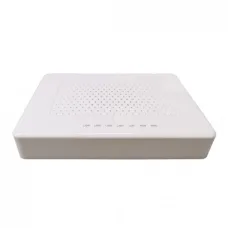
C-Data ONU is a popular fiber-optic networking solution used for FTTH broadband internet, ISP deployments, home networks, offices, and other fiber access applications. C-Data offers optical network equipment in several configurations, including GPON, EPON, XPON, and higher-speed PON solutions, with selected models providing Gigabit Ethernet, 2.5G Ethernet, Wi-Fi, VoIP, CATV, and other functions.
At Unix Network, the C-Data ONU category is designed for customers in Bangladesh who need reliable fiber networking equipment for home broadband, office internet, ISP connections, and FTTH installations. Customers can select a C-Data ONU according to their ISP's PON technology, OLT compatibility, Ethernet speed, Wi-Fi requirements, port configuration, and budget.
What Is a C-Data ONU?
A C-Data ONU is an Optical Network Unit manufactured by C-Data Technology. It is installed at the customer side of a passive optical network and provides an interface between the ISP's fiber-optic network and the customer's local network.
The ONU receives optical signals through the fiber connection and converts the network traffic into Ethernet, Wi-Fi, or other supported interfaces depending on the model.
A typical FTTH connection can be arranged as:
ISP Network → OLT → Optical Splitter → Fiber → C-Data ONU → Router → Computers and Wi-Fi Devices
Why Choose C-Data ONU?
- Designed for fiber-optic broadband networks.
- Available in different PON technologies.
- GPON, EPON, and XPON models are available in the product range.
- Gigabit Ethernet options are available.
- Selected models support 2.5G Ethernet.
- Wi-Fi-enabled ONU models are available.
- Selected models support VoIP.
- Some models provide CATV functionality.
- Suitable for home and small-office FTTH installations.
- Suitable for ISP and network deployment environments.
C-Data GPON ONU
C-Data GPON ONUs are designed for GPON-based fiber access networks. GPON is widely used by broadband providers for FTTH internet services.
A C-Data GPON ONU must be compatible with the ISP's OLT and provisioning system. Physical fiber compatibility alone does not guarantee that an ONU will work on a particular ISP network.
C-Data EPON ONU
C-Data also offers EPON ONU solutions for compatible Ethernet Passive Optical Network deployments.
EPON and GPON use different PON technologies, so customers should confirm which technology their ISP uses before purchasing an ONU.
C-Data XPON ONU
XPON ONU products are designed to provide flexibility across compatible PON environments. Depending on the exact model, an XPON device may support both GPON and EPON operation.
XPON can be useful for users or network installers who need equipment that can operate across different access-network technologies. However, ISP compatibility and provisioning should still be confirmed before purchase.
C-Data ONU with Gigabit Ethernet
Many C-Data ONU models provide Gigabit Ethernet connectivity. A Gigabit Ethernet port can support up to 1 Gbps under suitable network conditions.
For a 1 Gbps-class internet service, a Gigabit Ethernet ONU can be appropriate when supported by the ISP. Actual internet speed depends on the ISP package, optical network, router, Ethernet equipment, client device, and network conditions.
C-Data ONU with 2.5G Ethernet
Selected C-Data fiber products provide 2.5 Gigabit Ethernet connectivity for high-speed broadband and local networking.
A 2.5G ONU can be useful for internet services exceeding 1 Gbps or local networks requiring multi-gigabit connectivity. To use the full capability, the connected router, switch, computer, and Ethernet cable must also support the required speed.
C-Data Wi-Fi ONU
C-Data offers ONU models with integrated Wi-Fi. These devices can combine fiber termination, routing, and wireless networking in a single unit depending on the model.
A Wi-Fi ONU can reduce the number of networking devices required in a home or small office and simplify the FTTH installation.
C-Data XPON Wi-Fi ONU
A C-Data XPON Wi-Fi ONU can provide fiber connectivity and wireless networking while supporting compatible PON technologies on selected models.
These devices can be useful for home users who want a single device for fiber termination and Wi-Fi rather than using a separate ONU and wireless router.
C-Data ONU Router
A C-Data ONU router combines optical network termination with routing and wireless functions. Depending on the model, it can provide NAT, DHCP, firewall functions, Wi-Fi, Ethernet ports, and other network-management features.
This type of equipment is particularly convenient for residential FTTH installations.
C-Data ONU for FTTH
FTTH means Fiber to the Home. In an FTTH network, fiber is delivered directly to the customer's premises.
The C-Data ONU terminates the optical connection and provides the network interface required for the customer's router or local network.
A typical FTTH arrangement is:
Fiber Distribution Network → Drop Fiber → C-Data ONU → Router → Wi-Fi and Wired Devices
C-Data ONU for Fiber Internet
C-Data ONU products can be used for compatible fiber internet services. The most important consideration is matching the ONU with the ISP's optical access technology and configuration.
Before replacing an existing ISP ONU, confirm whether the ISP permits third-party ONUs and whether the new C-Data device can be registered on the provider's OLT.
C-Data ONU Compatibility
Compatibility is one of the most important factors when choosing a C-Data ONU. Different ISPs can use different OLT brands, PON technologies, authentication methods, VLAN configurations, and provisioning systems.
Before purchasing, check:
- GPON or EPON technology.
- XPON compatibility if required.
- OLT compatibility.
- ISP approval.
- Optical wavelength requirements.
- Optical power specifications.
- Fiber connector type.
- ONU authentication requirements.
- Serial number or registration requirements.
- VLAN configuration.
- PPPoE requirements.
- Ethernet port speed.
- Firmware requirements.
C-Data ONU and OLT
OLT stands for Optical Line Terminal and is normally located on the ISP side of a passive optical network. The ONU is installed at the customer side.
The basic relationship is:
Internet/Core Network → OLT → Passive Optical Splitter → Fiber → C-Data ONU
The OLT manages communication with multiple subscriber ONUs through the passive optical distribution network.
C-Data ONU and Fiber Splitter
A passive optical splitter divides the optical signal from the OLT so that multiple customers can share the same passive optical infrastructure.
Each customer's C-Data ONU communicates with the ISP's OLT through the fiber distribution network.
C-Data ONU Bridge Mode
On supported models, bridge mode allows the ONU to pass the ISP connection to a separate router. The downstream router can then manage PPPoE, NAT, DHCP, firewall rules, VPN, QoS, and other network functions.
This configuration is useful for customers who want to use a dedicated Mercusys, TP-Link, Netis, or other compatible router.
C-Data ONU Router Mode
In router mode, a compatible C-Data ONU gateway can manage the local network directly. Depending on the model, it can provide Wi-Fi, DHCP, NAT, firewall, and other routing functions.
This can be a convenient solution for homes and small offices that do not require a separate router.
C-Data ONU PPPoE
Many broadband providers use PPPoE authentication. Depending on the network configuration, the PPPoE username and password can be configured on the C-Data ONU router or on a separate downstream router.
Customers should obtain the correct PPPoE credentials and configuration information from their ISP.
C-Data ONU VLAN Configuration
Some ISPs require VLAN tagging for internet, IPTV, VoIP, or other services. A compatible C-Data ONU or downstream router must support the required VLAN configuration.
Never guess the VLAN ID. Obtain the correct settings from the ISP or network administrator.
C-Data ONU Authentication
An ONU usually needs to be recognized by the ISP's OLT before it can access the provider's network. Depending on the ISP and OLT, authentication can involve the ONU serial number, password, LOID, or another supported method.
For this reason, a new C-Data ONU may require ISP-side registration before it can provide internet access.
Can C-Data ONU Replace an ISP ONU?
A C-Data ONU can replace an ISP-provided ONU only when the ISP permits third-party optical equipment and the specific C-Data model is compatible with the provider's network.
Contact your ISP before purchasing or replacing the optical termination device.
C-Data ONU Installation
Fiber-optic equipment should be installed carefully because optical cables and connectors can be damaged by excessive bending, pulling, contamination, or improper handling.
- Connect the fiber cable to the optical port.
- Connect the power adapter.
- Connect Ethernet from the ONU to a router or computer.
- Wait for optical synchronization.
- Check PON and LOS indicators.
- Configure the required WAN settings.
- Test the internet connection.
C-Data ONU LED Indicators
C-Data ONU LED indicators vary by model, but common indicators can include Power, PON, LOS, LAN, Wi-Fi, and other service indicators.
| Indicator | General Meaning |
|---|---|
| Power | Indicates electrical power status |
| PON | Indicates optical network registration or link status |
| LOS | Generally indicates loss of optical signal |
| LAN | Indicates Ethernet connection or activity |
| Wi-Fi | Indicates wireless status on supported models |
The exact meaning and LED behavior should be checked in the documentation for the specific C-Data model.
C-Data ONU LOS Problem
If the LOS indicator remains active, the ONU may not be receiving an appropriate optical signal.
Possible causes include:
- Disconnected fiber cable.
- Damaged fiber cable.
- Dirty optical connector.
- Incorrect fiber connection.
- Optical signal problem.
- ISP network outage.
- Faulty ONU or optical equipment.
Do not repeatedly unplug and reconnect the fiber connector. Contact the ISP or a qualified fiber technician if the LOS problem continues.
C-Data ONU PON Light
The PON indicator generally represents the optical registration or connection status between the ONU and the provider's OLT. The exact LED behavior varies by model.
C-Data ONU LAN Light
The LAN indicator generally shows the status or activity of the Ethernet connection. If the LAN indicator is off, check the Ethernet cable and the connected router, switch, or computer.
C-Data ONU No Internet
If the C-Data ONU has optical synchronization but there is no internet access, the problem may be related to ISP authentication, VLAN configuration, PPPoE settings, router configuration, or an upstream service issue.
Check the router's WAN status and determine whether other devices connected to the same network experience the same problem.
C-Data ONU Troubleshooting
- Check the power supply.
- Check the optical fiber connection.
- Check the PON indicator.
- Check the LOS indicator.
- Check the Ethernet cable.
- Restart the ONU and router when appropriate.
- Verify PPPoE credentials.
- Verify VLAN settings if required.
- Check router WAN configuration.
- Contact the ISP if ONU registration or optical synchronization fails.
C-Data ONU for 1 Gbps Internet
For a 1 Gbps-class fiber connection, a C-Data ONU with Gigabit Ethernet can be suitable when supported by the ISP.
To achieve the best available performance, the router, Ethernet cable, switch, and client device should also support Gigabit Ethernet.
C-Data ONU for 2.5 Gbps Internet
For broadband services above 1 Gbps, consider a C-Data ONU with a 2.5 Gbps Ethernet interface where supported.
The complete network path must support multi-gigabit Ethernet. A 2.5G ONU connected to a 1 Gbps router will still be limited by the slower router interface.
C-Data ONU for Home
C-Data ONU products can provide fiber connectivity for home broadband. Users can select between basic ONU devices and integrated Wi-Fi ONU routers depending on their network requirements.
For homes using a separate wireless router, a simple Ethernet ONU may be preferable. For users who want an all-in-one device, a Wi-Fi-enabled ONU router may be more convenient.
C-Data ONU for Office
An office can use a C-Data ONU as the fiber termination device before connecting to a router, firewall, or business gateway.
The downstream network can then connect to switches, computers, printers, access points, CCTV systems, VoIP equipment, and other devices.
C-Data ONU for Small Business
Small businesses can use compatible C-Data ONU equipment with a business router or firewall to provide fiber connectivity for computers, cloud applications, CCTV, point-of-sale systems, printers, access points, and other network devices.
C-Data ONU for CCTV
A C-Data ONU can provide the fiber internet connection required by an IP CCTV network when connected to the appropriate router or network gateway.
A typical arrangement is:
Fiber → C-Data ONU → Router/Firewall → PoE Switch → IP Cameras + NVR
For larger CCTV installations, the network should be designed according to camera count, recording requirements, bandwidth, remote viewing requirements, and security needs.
C-Data ONU with Wi-Fi
A C-Data Wi-Fi ONU can combine fiber termination and wireless networking in one device. Depending on the model, it may support 2.4 GHz, 5 GHz, dual-band Wi-Fi, or newer wireless technologies.
Check the exact model specifications before purchasing because Wi-Fi capability varies significantly between C-Data ONU models.
C-Data ONU with VoIP
Some C-Data ONU models include telephone interfaces for Voice over IP services. These devices can be useful when the ISP provides internet and telephone services through the same fiber connection.
VoIP functionality depends on the ISP's service configuration and the exact ONU model.
C-Data ONU with CATV
Selected C-Data optical network devices provide CATV functionality for compatible fiber deployments. This can allow optical fiber infrastructure to carry television services alongside broadband services when supported by the ISP.
CATV availability and configuration depend on the specific model and service provider.
C-Data ONU with Multiple Ports
Some C-Data ONU models provide multiple Ethernet ports. This can allow several wired devices to connect directly to the ONU or integrated gateway.
However, port count and port speed vary by model. Check whether each port is Fast Ethernet, Gigabit Ethernet, or 2.5 Gigabit Ethernet before purchasing.
C-Data ONU for Mesh Wi-Fi
A C-Data ONU can be connected to a separate mesh Wi-Fi system. In this setup, the ONU handles the optical connection while the mesh router and satellite units provide wireless coverage.
This arrangement can be useful for larger homes, multi-story buildings, offices, and shops.
C-Data ONU and Network Switch
A compatible C-Data ONU can be connected to a network switch when additional wired Ethernet ports are required.
For example:
Fiber → C-Data ONU → Router → Gigabit Switch → Computers + Printers + CCTV + Access Points
Using a router between the ONU and the switch is generally appropriate when the router needs to perform routing, NAT, DHCP, firewall, or other gateway functions.
C-Data ONU and Wi-Fi Router
A C-Data Ethernet ONU can connect to the WAN port of a Wi-Fi router. The router then provides wireless and local network services.
This setup allows customers to upgrade the Wi-Fi router separately from the optical equipment.
C-Data ONU Bridge Mode vs Router Mode
| Mode | Typical Function |
|---|---|
| Bridge Mode | Passes the ISP connection to a separate router |
| Router Mode | ONU gateway performs routing and local network functions |
The preferred mode depends on the ISP configuration and the customer's network requirements.
C-Data ONU Firmware
Firmware controls many of the functions of an ONU. Firmware versions can affect compatibility, security, performance, and available features.
Customers should use firmware intended specifically for the exact C-Data model and hardware revision. Installing incorrect firmware can cause malfunction or make the device unusable.
C-Data ONU Management
Depending on the model and network configuration, C-Data ONU devices can provide web-based management or other configuration methods.
Management access should be protected with strong credentials, and unnecessary remote access should be disabled where possible.
C-Data ONU Security
- Change default administrative credentials when applicable.
- Use a strong management password.
- Use secure Wi-Fi settings on Wi-Fi-enabled models.
- Keep firmware updated when appropriate.
- Disable unnecessary remote administration.
- Use appropriate firewall and access-control settings.
- Separate guest or less-trusted devices where supported.
C-Data ONU vs TP-Link ONU
| Consideration | C-Data ONU | TP-Link Fiber Equipment |
|---|---|---|
| FTTH Applications | Widely used in fiber access environments | Available in selected fiber networking markets and products |
| GPON/EPON | Available on selected models | Depends on exact model |
| XPON | Available on selected models | Depends on exact model |
| Wi-Fi ONU | Available on selected models | Available on selected fiber gateway products |
| Multi-Gigabit | Available on selected newer models | Depends on exact model |
| ISP Compatibility | Must be verified with the ISP | Must be verified with the ISP |
The most important factor is not simply the brand. The ONU should match the ISP's OLT, PON technology, authentication, optical specifications, and service configuration.
C-Data ONU Price in Bangladesh
C-Data ONU prices in Bangladesh vary according to the PON technology, Ethernet port speed, number of ports, Wi-Fi capability, VoIP support, CATV support, chipset, model, and other specifications.
Basic EPON or GPON ONUs are generally positioned differently from XPON, Wi-Fi ONU, Gigabit, 2.5G, and advanced fiber gateway models.
Prices and stock can change without prior notice because of supplier availability, market conditions, exchange rates, product revisions, and other factors. Customers should check the current product listing for the latest price and availability.
Buy C-Data ONU in Bangladesh
If you are looking to buy a C-Data ONU in Bangladesh, first confirm the fiber technology used by your ISP. This is particularly important because GPON, EPON, XG-PON, and XGS-PON equipment are not automatically interchangeable.
Before purchasing, check the exact C-Data model, PON technology, OLT compatibility, ISP registration requirements, optical specifications, Ethernet speed, Wi-Fi capability, warranty, current price, and stock status.
Unix Network is a computer, networking, CCTV, and IT products and services provider in Jashore, Bangladesh. Customers can explore C-Data ONU, ONT, fiber networking equipment, routers, switches, access points, Ethernet accessories, and other networking products through the Unix Network eCommerce website.
Best C-Data ONU for GPON
The best C-Data GPON ONU is one that is compatible with your ISP's GPON OLT, authentication system, optical requirements, and service configuration.
Do not select a GPON ONU based solely on Ethernet speed. ISP compatibility is the primary consideration.
Best C-Data ONU for EPON
For an EPON network, choose a C-Data EPON ONU compatible with the ISP's OLT and provisioning system.
Confirm the network technology with your ISP before purchasing.
Best C-Data XPON ONU
A C-Data XPON ONU can be useful for compatible GPON and EPON environments where flexibility is important. However, the exact supported technologies and features vary by model.
Confirm the model's compatibility with your ISP before purchase.
Best C-Data Wi-Fi ONU
A Wi-Fi-enabled C-Data ONU can be a convenient choice for home users who want fiber termination and wireless networking in a single device.
When choosing one, consider Wi-Fi generation, dual-band capability, Ethernet port speed, coverage requirements, ISP compatibility, and the number of connected devices.
Best C-Data ONU for 1 Gbps Fiber
For a 1 Gbps-class fiber service, a C-Data ONU with Gigabit Ethernet can be suitable when supported by the ISP.
Make sure the downstream router and client devices also support Gigabit Ethernet.
Best C-Data ONU for 2.5 Gbps Fiber
For a broadband connection above 1 Gbps, consider a compatible C-Data ONU with a 2.5 Gbps Ethernet interface.
The router, switch, computer, and Ethernet cabling must also support multi-gigabit networking to take advantage of the higher speed.
Frequently Asked Questions About C-Data ONU
What is a C-Data ONU?
A C-Data ONU is an optical network unit used to terminate a compatible fiber-optic access connection and provide Ethernet, Wi-Fi, or other network interfaces depending on the model.
Is C-Data ONU compatible with all ISPs?
No. Compatibility depends on the ISP's PON technology, OLT, authentication method, optical configuration, VLAN settings, and equipment policy.
Can I use a C-Data ONU with GPON?
Yes, C-Data offers GPON ONU models. The specific model must be compatible with the ISP's GPON network and OLT.
Can I use C-Data ONU with EPON?
Yes, C-Data offers EPON-compatible models. An EPON ONU should be used with an appropriate EPON network.
What is C-Data XPON ONU?
C-Data XPON ONU refers to models designed to support compatible PON technologies such as GPON and EPON, depending on the exact model.
Can C-Data ONU provide Wi-Fi?
Yes. C-Data offers Wi-Fi-enabled ONU and fiber gateway models. Wi-Fi specifications vary by model.
Can I connect a router to C-Data ONU?
Yes. A C-Data Ethernet ONU can normally connect to the WAN port of a compatible router when configured appropriately.
Can C-Data ONU replace an ISP ONU?
It may be possible if the ISP permits third-party ONUs and the C-Data model is compatible with the ISP's OLT and provisioning system.
What does LOS mean on C-Data ONU?
LOS generally means Loss of Signal. It indicates that the ONU may not be receiving the expected optical signal. Check the fiber connection and contact the ISP or a qualified fiber technician if the problem persists.
What does PON mean on C-Data ONU?
PON means Passive Optical Network. The PON indicator generally represents the optical registration or connection status between the ONU and the provider's optical network.
Can C-Data ONU support 1 Gbps internet?
Yes, compatible C-Data ONU models with Gigabit Ethernet can support 1 Gbps-class services when the ISP, optical network, router, and client equipment also support the required performance.
Can C-Data ONU support 2.5 Gbps internet?
Selected C-Data models provide 2.5 Gbps Ethernet. The complete network path must support multi-gigabit Ethernet to use a broadband service above 1 Gbps effectively.
Does C-Data ONU need a router?
A basic Ethernet ONU can be connected to a separate router for Wi-Fi and local network management. An integrated C-Data ONU router may provide these functions without a separate router.
Does C-Data ONU need an OLT?
An ONU operates as part of a compatible PON network and communicates with an OLT on the provider side. Customers normally do not need to install an OLT in a standard FTTH connection.
Final Thoughts on C-Data ONU
C-Data ONU products provide fiber networking solutions for FTTH broadband, home internet, offices, businesses, ISP deployments, and other optical access networks. The product range includes different PON technologies and configurations, from basic Ethernet ONUs to Wi-Fi-enabled and higher-speed fiber gateways.
The most important consideration when purchasing a C-Data ONU is compatibility with your ISP. Check the PON technology, OLT compatibility, authentication method, optical specifications, VLAN requirements, Ethernet speed, and ISP equipment policy before replacing an existing ONU.
For basic fiber internet, a suitable GPON, EPON, or XPON Gigabit ONU may be sufficient. Users with modern high-speed broadband can consider models with 2.5G Ethernet or other advanced capabilities where supported by the ISP.
Why Buy C-Data ONU from Unix Network?
Unix Network is a computer, networking, CCTV, and IT solutions provider in Jashore, Bangladesh. The business offers networking equipment and accessories for home users, offices, shops, businesses, ISP-related installations, and professional network deployments.
Customers looking for C-Data ONU can explore available products through the Unix Network eCommerce website and compare models according to PON technology, Ethernet speed, Wi-Fi features, specifications, price, availability, and warranty.
Product prices and stock may change without prior notice. Customers should confirm the latest price, availability, exact model, ISP compatibility, specifications, and warranty before placing an order.