
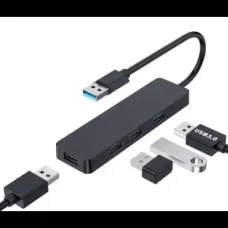
2% Cashback Havit H94 4-Port High-Speed USB Hub
Showing 1 to 4 of 4 (1 Pages)

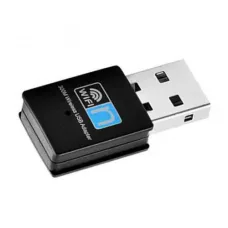

Looking for the latest Havit Wi-Fi Adapter price in Bangladesh? Unix Network offers Havit Wi-Fi adapters for customers who want to add wireless internet connectivity to desktop computers, laptops, and other compatible devices.
A Wi-Fi adapter is especially useful for desktop PCs that do not have built-in Wi-Fi. Instead of running a network cable from the router to the computer, a compatible Havit USB Wi-Fi adapter can provide a convenient wireless connection.
Havit Wi-Fi adapters are available in different designs and wireless standards. Before buying, customers should consider Wi-Fi generation, supported frequency bands, maximum theoretical speed, USB interface, antenna design, operating-system compatibility, driver support, range, and intended usage.
| Havit Wi-Fi Adapter Type | Best For | Important Features |
|---|---|---|
| Havit USB Wi-Fi Adapter | Desktop & Laptop | USB Connectivity, Wireless Internet |
| Havit 2.4GHz Wi-Fi Adapter | Basic Internet & Browsing | Good Range, Broad Compatibility |
| Havit Dual-Band Wi-Fi Adapter | Streaming & Everyday Use | 2.4GHz + 5GHz Support |
| Havit High-Speed Wi-Fi Adapter | Faster Wireless Networking | Higher Wireless Throughput |
| Havit Wi-Fi USB Adapter | Desktop PCs | Plug-and-Play Convenience |
| Havit Wireless Network Adapter | Home & Office | Wireless Network Connectivity |
Price note: Havit Wi-Fi adapter prices can change depending on the exact model, wireless standard, speed, stock availability, warranty, offers, and market conditions. Always confirm the current price and model before purchasing.
A Havit Wi-Fi Adapter is a networking device that allows a compatible computer to connect to a wireless Wi-Fi network.
USB Wi-Fi adapters are particularly useful because they can be connected directly to a USB port on a desktop or laptop.
Once the appropriate driver is installed and the adapter is configured, the computer can connect to a compatible wireless router or access point.
A USB Wi-Fi adapter is one of the easiest ways to add wireless connectivity to a computer.
For a desktop PC, simply connect the adapter to a suitable USB port, install the required driver if necessary, and connect to your wireless network.
Before purchasing, check whether the adapter requires a specific USB version and whether the operating system supports the device.
Desktop computers often do not include built-in Wi-Fi, particularly older or custom-built systems.
A Havit USB Wi-Fi adapter can provide a convenient alternative to installing an internal PCIe Wi-Fi card.
It can be useful when:
Most modern laptops already include Wi-Fi, but an external Wi-Fi adapter can still be useful if the internal wireless adapter is damaged, unavailable, or does not support the required wireless standard.
A USB adapter can also provide an alternative wireless interface for specific networking requirements.
A dual-band Wi-Fi adapter supports both 2.4GHz and 5GHz wireless networks when supported by the particular model.
2.4GHz generally offers better coverage through obstacles, while 5GHz can provide higher wireless performance over shorter distances and may experience less congestion in some environments.
The actual result depends on the router, adapter, distance, walls, interference, network configuration, and internet connection.
2.4GHz Wi-Fi is widely used and can provide useful coverage for basic browsing, email, online learning, office applications, and everyday internet access.
Because the 2.4GHz band can be crowded in apartments, offices, and densely populated areas, customers should consider their local wireless environment when choosing an adapter.
5GHz Wi-Fi can offer higher wireless performance and less congestion than 2.4GHz in some environments.
However, 5GHz signals generally have shorter effective range and can be affected more strongly by walls and other obstacles.
If your router supports 5GHz and your computer is reasonably close to the router, a compatible 5GHz adapter can be a useful choice.
High-speed Wi-Fi adapters are designed to provide higher theoretical wireless throughput than basic adapters.
Remember that the advertised wireless speed is normally a theoretical maximum under specific conditions. Actual file-transfer and internet speeds are often lower.
Real-world performance depends on the router, Wi-Fi generation, channel width, signal strength, interference, antenna configuration, computer hardware, network traffic, and internet package.
A Wi-Fi adapter can be used for PC gaming when a wired Ethernet connection is not practical.
For gaming, maximum advertised speed is not the only consideration. Latency, stability, signal strength, interference, and packet loss are often more important.
For competitive gaming, Ethernet is generally preferable when available because a wired connection can provide more consistent latency.
For online games, choose an adapter that provides a stable connection to your router.
Consider:
A suitable Wi-Fi adapter can support video streaming when the wireless connection provides sufficient throughput and stability.
For high-resolution streaming, a dual-band adapter may be preferable if your router supports the appropriate 5GHz network.
4K streaming requires a sufficiently fast and stable network connection.
The Wi-Fi adapter is only one part of the system. Your router, internet connection, streaming service, signal strength, wireless interference, and device performance also affect streaming quality.
A wireless adapter can provide network connectivity for office desktops where Ethernet cabling is inconvenient.
For office environments, prioritize connection stability, operating-system compatibility, security support, and reliable drivers.
For home users, a Wi-Fi adapter can provide an easy way to connect a desktop computer to an existing wireless router.
It is particularly convenient when the router is located in another room and running an Ethernet cable would be difficult.
A stable wireless connection is important for online classes, video conferencing, file downloads, and educational websites.
A suitable Havit Wi-Fi adapter can help a desktop computer connect wirelessly to your home router.
For remote work, connection stability is generally more important than maximum theoretical speed.
Choose an adapter with reliable driver support and a wireless standard compatible with your router.
Before purchasing a Havit Wi-Fi adapter, check the supported Windows versions for the exact model.
Some adapters may require manual driver installation, particularly on older Windows versions or after a clean operating-system installation.
Many USB Wi-Fi adapters can be used with Windows 10 when the appropriate driver is available.
Always check the manufacturer's driver requirements for your exact Havit model.
If you are using Windows 11, confirm Windows 11 driver compatibility before purchasing.
Do not assume that an adapter supporting an older Windows version will automatically have full Windows 11 support.
The driver allows the operating system to communicate correctly with the Wi-Fi adapter.
If Windows does not automatically recognize your adapter, you may need to install the appropriate driver manually.
Always use the driver intended for the exact adapter model and operating system.
The exact installation process can vary depending on the Havit adapter model and operating system.
Wireless range depends on many factors and cannot be determined only from the adapter's advertised specifications.
Important factors include:
For better reception, place the computer or adapter where it has a clearer path toward the router whenever practical.
The maximum advertised speed of a Wi-Fi adapter represents theoretical wireless throughput under specific conditions.
Your actual internet speed will normally be limited by the slowest relevant component, such as your internet package, router, wireless connection, server, or computer.
For example, purchasing a very high-speed Wi-Fi adapter will not make a 50 Mbps internet package operate at 500 Mbps.
| Feature | Wi-Fi Adapter | Ethernet |
|---|---|---|
| Installation | Easy and Flexible | Requires Cable |
| Mobility | Excellent | Limited by Cable Length |
| Latency | Can Vary | Generally More Consistent |
| Interference | Possible | Much Less Affected by Wireless Interference |
| Gaming | Good When Stable | Usually Preferred for Competitive Gaming |
| Convenience | Excellent | Depends on Cabling |
Check which Wi-Fi generation the adapter supports and make sure it is compatible with your router.
If your router supports both 2.4GHz and 5GHz, consider a dual-band adapter.
Confirm whether the adapter is designed for your available USB port and operating system.
Compare theoretical wireless speeds, but remember that real-world performance will normally be lower.
If your computer is far from the router, antenna design and placement can become important.
Make sure drivers are available for your operating system.
Basic browsing requires much less performance than large file transfers, high-resolution streaming, or gaming.
Make sure the adapter supports the wireless network technology used by your router.
Check that the adapter supports the wireless security features used by your router.
Confirm warranty and after-sales support before purchasing.
| User | Recommended Features |
|---|---|
| Basic Home User | 2.4GHz, Easy USB Installation |
| Office User | Stable Connection, Driver Support |
| Student | Affordable, Reliable Wireless Connectivity |
| Streamer | Dual-Band, Higher Wireless Throughput |
| Gamer | Stable Connection, Low Latency, Dual-Band |
| Desktop User | USB Wi-Fi Adapter |
| Long-Distance User | Good Reception & Suitable Antenna Design |
| Work From Home | Stable Connection, Reliable Drivers |
Try another USB port, restart the computer, check Device Manager, and install the correct driver for the adapter.
Confirm that the driver matches the exact model and Windows version. Remove an incompatible driver and install the correct version where necessary.
Check the Wi-Fi password, restart the router and computer, remove the saved network, and reconnect.
Check signal strength, USB power settings, driver versions, router stability, and wireless interference.
Check signal strength, router location, frequency band, network congestion, driver configuration, and the internet package.
Move the computer or adapter closer to the router, reduce obstacles, try the 2.4GHz band for longer-range coverage, or consider an adapter with a more suitable antenna design.
Update the appropriate driver, check Windows power-management settings, and make sure the USB port provides a stable connection.
Check driver compatibility, USB ports, operating-system support, security software, and network configuration on the second computer.
A built-in Wi-Fi adapter is integrated into the computer, while a USB Wi-Fi adapter is an external device.
A USB adapter can be particularly useful for desktop PCs without integrated Wi-Fi and can also provide a replacement option if the internal wireless adapter fails.
If your desktop motherboard does not have built-in Wi-Fi, a USB Havit Wi-Fi adapter can be a simple way to connect the computer to your wireless router.
This can be easier than installing an internal PCIe wireless card, particularly for users who do not want to open the computer case.
An external Wi-Fi adapter can add wireless connectivity to an older desktop or laptop, provided that the operating system and USB hardware are compatible.
Always check driver support before purchasing an adapter for an older computer.
Wireless security depends on both the Wi-Fi adapter and the router.
Use a strong Wi-Fi password and modern security settings supported by your router and client devices. Avoid using outdated wireless security protocols when better options are available.
If you are searching for Havit Wi-Fi Adapter price in Jessore, Unix Network can help you choose a suitable wireless adapter according to your desktop, laptop, router, operating system, internet package, and budget.
Before visiting the showroom, confirm the exact Havit model, current price, warranty, and stock availability.
When purchasing a Havit Wi-Fi adapter online, compare the complete specifications instead of choosing only the lowest-priced model.
Check:
Unix Network helps customers choose networking products according to their computer configuration, router, internet requirements, budget, and intended use.
The price depends on the exact Havit model, Wi-Fi standard, speed, frequency bands, antenna design, warranty, stock, and current market conditions.
It is used to provide wireless network connectivity to compatible computers and other supported devices.
Yes. A compatible USB Havit Wi-Fi adapter can add wireless connectivity to a desktop computer.
Yes, provided the adapter and its driver are compatible with your laptop's operating system and USB port.
5GHz support depends on the specific model. Check the product specifications before purchasing.
A dual-band adapter supports both 2.4GHz and 5GHz Wi-Fi networks when supported by the model.
A suitable Havit Wi-Fi adapter can be used for gaming. For online gaming, prioritize connection stability and latency rather than maximum advertised speed alone.
Yes, a suitable adapter can support streaming when the wireless connection has enough throughput and stability.
Not necessarily. An adapter can improve wireless connectivity, but your internet speed is also limited by your internet package, router, wireless conditions, and other network factors.
It can provide a convenient alternative when Ethernet cabling is impractical. However, wired Ethernet is generally preferred when maximum consistency and low latency are important.
Some models may be automatically recognized by the operating system, while others require a specific driver. Check the exact model's installation instructions.
Compatibility depends on the exact model and available drivers. Confirm Windows 11 support before purchasing.
Slow performance can be caused by weak signal, interference, router limitations, the 2.4GHz band, driver problems, USB limitations, network congestion, or a slow internet connection.
Frequent disconnections may result from weak signal, interference, outdated drivers, USB power settings, router problems, or network configuration.
Customers can check Havit Wi-Fi adapter availability from computer and networking retailers and compare the exact model, price, warranty, and compatibility before purchasing.
Customers searching for Havit Wi-Fi Adapters in Jessore can check Unix Network's current stock and confirm the exact model and price before visiting the showroom.
A Havit Wi-Fi Adapter is a practical networking accessory for adding wireless connectivity to compatible desktop computers, laptops, and other devices.
For basic browsing, an affordable adapter may be enough. For streaming and higher wireless performance, consider a suitable dual-band model. For gaming, prioritize stability and latency. For computers located far from the router, pay particular attention to signal reception and antenna design.
Before purchasing, always check the exact Havit model, Wi-Fi standard, supported bands, theoretical speed, USB interface, operating-system compatibility, driver availability, warranty, and current price.
If you are searching for Havit Wi-Fi Adapter price in Bangladesh, Havit Wi-Fi Adapter price in Jessore, Havit Wi-Fi Adapter BD, Havit Wi-Fi Adapter Bangladesh, Havit USB Wi-Fi Adapter, Havit Wireless Adapter, Havit USB Wi-Fi Dongle, Havit Dual Band Wi-Fi Adapter, Havit 5GHz Wi-Fi Adapter, Havit 2.4GHz Wi-Fi Adapter, Havit Wi-Fi Adapter for PC, Havit Wi-Fi Adapter for Desktop, Havit Wi-Fi Adapter for Laptop, Havit Wi-Fi Adapter for Windows 10, Havit Wi-Fi Adapter for Windows 11, Havit Gaming Wi-Fi Adapter, Havit High-Speed Wi-Fi Adapter, Havit Wireless Network Adapter, Havit Wi-Fi Dongle Price in Bangladesh, Havit Wi-Fi Adapter Online, or Havit Wi-Fi Adapter Shop in Jessore, Unix Network can help you choose a suitable wireless networking solution according to your requirements and budget.
Hourly Deals