
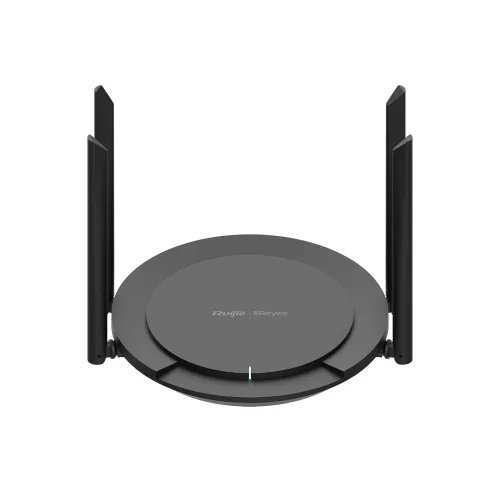
Ruijie RG-EW300 Pro 300Mbps Smart WiFi Router
- Brand: Ruijie
- Product Code: RG-EW300
- Availability: In Stock
- Updated:
Specification
| BASIC INFORMATION | |
| Data Rate | 300Mbps |
|---|---|
| Standards | Wi-Fi 4 (802.11n) |
| Wireless | Wi-Fi 4 |
| Antenna | 4 Antenna |
| Keyboard | |
| Interface | 1x 10/100 Base-T WAN Port 3x 10/100 Base-T LAN Ports |
| Main Features | |
| Frequency | 2.4 GHz |
| Paper Handling | |
| Weight | 0.26 kg |
| PHYSICAL SPECIFICATION | |
| Dimensions (W x D x H) | 210 mm × 180 mm × 33 mm |
| WARRANTY | |
| Manufacturing Warranty | 3 Years Warranty |
Description
Ruijie RG-EW300 Pro 300Mbps Smart WiFi Router Price in Bangladesh
The Ruijie RG-EW300 Pro is an affordable 300Mbps wireless router designed to provide dependable internet connectivity for homes, small offices, student accommodation and everyday networking needs. Developed under Ruijie's Reyee networking range, this single-band Wi-Fi router operates on the 2.4GHz frequency and supports IEEE 802.11n wireless technology. Its four external 5dBi antennas help distribute Wi-Fi signals across suitable indoor spaces, while smart networking features make it convenient to configure and manage. Whether you need a wireless connection for online classes, video calls, social media, smart televisions or general internet browsing, the Ruijie RG-EW300 Pro offers a practical entry-level networking solution.
300Mbps Wireless N Speed for Everyday Internet Access
The Ruijie RG-EW300 Pro delivers theoretical wireless link speeds of up to 300Mbps using Wi-Fi 4 (802.11n) technology. This provides sufficient wireless capacity for many routine activities, including browsing websites, checking email, using social media and attending online lessons. The 300Mbps rating refers to the maximum supported wireless connection speed under suitable conditions, not a guaranteed internet download speed. Actual performance depends on the broadband package, connected devices, wireless interference and router placement.
2.4GHz Wi-Fi Coverage for Homes and Small Offices
Operating on the 2.4GHz frequency band, the Ruijie RG-EW300 Pro is designed to provide wireless access across typical indoor environments. The 2.4GHz band can offer useful coverage through common household obstacles and is compatible with many smartphones, laptops, printers and smart home devices. It is particularly suitable for users who need basic wireless connectivity rather than high-bandwidth gaming or large file transfers. Because this is a single-band router, it does not provide a separate 5GHz Wi-Fi network.
Four 5dBi High-Gain Antennas for Better Signal Distribution
The Ruijie RG-EW300 Pro features four external antennas rated at 5dBi, helping distribute wireless signals to compatible devices around the home or office. The antenna arrangement is intended to improve practical coverage compared with basic compact router designs. It can be useful in apartments, small workplaces and student residences where devices are located in different rooms. Actual Wi-Fi range depends on wall thickness, building materials, neighbouring networks and the position of the router. For the best results, install the device in an open and central location.
Signal Amplification for Indoor Wireless Performance
The Ruijie RG-EW300 Pro is described with signal amplification hardware intended to support wireless transmission and reception. This can help maintain usable connectivity across suitable indoor distances, particularly when devices are separated from the router by common household obstacles. However, reinforced concrete walls, metal structures and electrical interference can still reduce wireless performance. The router cannot guarantee uninterrupted coverage in every room, and larger properties may require an additional access point or compatible range extender.
Smart Router Features for Flexible Network Setup
Beyond basic wireless access, the Ruijie RG-EW300 Pro is designed to provide configuration options for different networking environments. Depending on its firmware version, supported operating modes may allow the router to function as the primary internet gateway or assist with extending an existing network. This flexibility can be useful when changing broadband providers, relocating the router or adapting a small office network. Users should confirm the available operating modes for their exact hardware and firmware version before installation.
WISP Mode for Sharing an Existing Wireless Connection
The Ruijie RG-EW300 Pro is described with Wireless Internet Service Provider (WISP) mode, which can allow a compatible router to connect to an existing wireless network and provide internet access to local devices. This feature may be useful in selected shared accommodation or networking environments where an Ethernet internet connection is unavailable. WISP performance depends on the strength and quality of the upstream Wi-Fi signal. Users should verify WISP support and configuration requirements in the installed firmware.
Access Point and Repeater Functions
The Ruijie RG-EW300 Pro may support additional networking modes, including access point or wireless repeating functions, depending on firmware capabilities. Access point mode can be useful for providing wireless connectivity from an existing wired network, while repeater functionality can help extend the reach of an existing Wi-Fi connection. Repeating a wireless signal may reduce effective throughput because the same wireless resources can be used for both receiving and retransmitting data. For better performance, a wired access point is often preferable when Ethernet cabling is available.
Reyee Mesh Networking for Expandable Wi-Fi Coverage
The Ruijie RG-EW300 Pro is associated with Reyee's smart networking ecosystem, which includes mesh-capable products designed to simplify Wi-Fi expansion. Where supported by the specific model and firmware, Reyee Mesh can help compatible routers work together to provide broader wireless coverage using a coordinated network. This can be useful when a single router cannot adequately serve every room. Buyers should verify the RG-EW300 Pro's exact mesh compatibility and supported pairing methods before purchasing additional Reyee devices. Mesh roaming performance also depends on connected client devices and network conditions.
Ruijie Cloud App for Convenient Network Management
Ruijie's cloud management ecosystem provides tools for configuring and monitoring supported Reyee networking devices. Depending on device compatibility and firmware, users may be able to review connected devices, adjust wireless settings and manage selected network functions through a compatible mobile application. This can be useful for home users and small business owners who prefer managing network settings from a smartphone. Available remote-management functions may require an internet connection, account registration and appropriate permissions.
Easy Wi-Fi Setup for Home Users
The Ruijie RG-EW300 Pro is designed to make everyday router installation straightforward. Users can connect the router to a compatible broadband modem or optical network terminal, configure the internet connection and create a wireless network name and password. The setup process depends on the broadband provider's connection requirements, which may include DHCP, PPPoE or other settings. Users should keep their internet service credentials available during installation and choose a strong wireless password to help protect their network.
Parental Controls for Managing Internet Access
The Ruijie RG-EW300 Pro is described with parental control capabilities that may help families manage internet access for selected devices. Depending on the available firmware features, users may be able to apply access schedules or other restrictions to connected equipment. These functions can be useful for organising children's online study and recreational internet use. The availability of website filtering, content blocking and scheduling options should be confirmed for the specific router version. Router-based parental controls do not replace device-level safety settings or parental supervision.
Guest Wi-Fi for Visitors and Temporary Connections
Guest Wi-Fi functionality can provide a separate wireless network name for visitors when supported by the installed firmware. This is convenient for homes and small offices that want to share internet access without distributing the main Wi-Fi password. Guest network settings may also offer options for controlling access to local network resources. Users should check the available guest isolation features and configure appropriate security settings, as a separate wireless network name does not automatically guarantee complete device isolation.
WPA and WPA2 Wireless Security
The Ruijie RG-EW300 Pro supports wireless security options intended to help protect access to the network. WPA2 encryption is generally preferable to older WPA security modes when supported by connected devices. Users should select the strongest compatible security setting, create a unique Wi-Fi password and keep the router firmware updated. Wireless encryption helps reduce unauthorised access but does not provide complete protection against malicious websites, compromised devices or other online threats.
IPv6 Support for Compatible Broadband Networks
The Ruijie RG-EW300 Pro is described with IPv6 support, allowing compatible networks to use the newer internet addressing standard where available. IPv6 is increasingly supported by internet service providers and online services. Its practical availability depends on the router firmware, broadband provider and selected network configuration. Users should confirm whether their ISP provides IPv6 connectivity before enabling the feature. IPv6 compatibility does not automatically improve wireless speed or internet latency.
Compact Design for Flexible Router Placement
The Ruijie RG-EW300 Pro has a compact desktop router design suitable for home study areas, office desks and other indoor locations. Its external antennas can be positioned to suit the installation environment, while the enclosure is intended for routine indoor operation. For reliable performance, place the router on a stable surface with adequate ventilation. Avoid enclosing it inside cabinets or positioning it directly beside large metal objects and other equipment that may interfere with wireless signals.
Ventilation and Heat Management for Everyday Operation
Like other networking devices, the Ruijie RG-EW300 Pro generates heat during normal operation. Its enclosure is designed to support heat dissipation under suitable indoor conditions. Keeping ventilation openings unobstructed can help maintain reliable performance during extended use. Users should avoid direct sunlight, excessive humidity and high-temperature locations. If the router experiences frequent restarts or unstable connectivity, the power adapter, firmware, operating temperature and broadband connection should be checked.
Connecting Smartphones, Laptops and Smart Home Devices
The Ruijie RG-EW300 Pro can provide wireless access for compatible smartphones, laptops, tablets, smart televisions and other 2.4GHz devices. This makes it useful for households where several family members share an internet connection. The router may also be suitable for compatible Wi-Fi printers, smart plugs and other basic smart home accessories. Actual device capacity depends on how actively each device uses the network. A fixed number of connected devices should not be interpreted as a guarantee of consistent performance under every workload.
Ruijie RG-EW300 Pro for Online Classes and Video Meetings
The Ruijie RG-EW300 Pro is a practical option for students, teachers and remote workers who need internet access for online education and routine video calls. Its 2.4GHz Wi-Fi connection can support common communication applications when broadband bandwidth and signal quality are sufficient. Video quality depends on the internet connection, application settings and competing network traffic. For users who regularly transfer large files or participate in high-resolution video meetings with many active devices, a dual-band Wi-Fi router may provide greater flexibility.
Ruijie RG-EW300 Pro for CCTV and Smart Devices
The Ruijie RG-EW300 Pro can provide network connectivity for compatible wireless CCTV cameras, smart home devices and monitoring accessories. Its 2.4GHz band is widely used by many entry-level smart devices. However, continuous video streaming from several cameras can consume considerable wireless bandwidth and may affect other connected devices. For larger CCTV installations or critical recording equipment, a wired Ethernet network may provide more consistent performance. The router does not replace a dedicated CCTV recorder or power backup system.
Ruijie RG-EW300 Pro vs Dual-Band Wi-Fi Routers
The Ruijie RG-EW300 Pro is a single-band 2.4GHz router designed for everyday wireless connectivity at an affordable price. Dual-band routers provide an additional 5GHz network, which can offer higher wireless link speeds and less congestion in some environments. However, 2.4GHz remains useful for many smart devices and basic internet applications. Customers with modest broadband requirements may find the RG-EW300 Pro suitable, while households with high-speed fibre connections, frequent large downloads or demanding gaming needs may benefit from a dual-band Gigabit router.
Why Choose the Ruijie RG-EW300 Pro 300Mbps Router?
The Ruijie RG-EW300 Pro combines 300Mbps Wireless N connectivity, four external 5dBi antennas and practical smart networking features in a budget-friendly design. Its 2.4GHz wireless coverage is suitable for common home and office applications, while supported management and network expansion options can provide additional flexibility. The router is worth considering for users who need a straightforward wireless solution for browsing, online classes, video calls and compatible smart devices without investing in a higher-speed dual-band model.
Ruijie RG-EW300 Pro Router Price in Bangladesh
Looking for the Ruijie RG-EW300 Pro 300Mbps Smart WiFi Router price in Bangladesh? Contact Unix Network to check the latest price, stock availability and technical specifications. Before purchasing, confirm the router's Ethernet port speeds, supported operating modes, Reyee Mesh compatibility, cloud management features and applicable warranty terms. Prices and specifications may vary depending on the hardware revision and market conditions. Comparing the RG-EW300 Pro with other Ruijie Reyee routers can help you choose a suitable networking solution for your internet connection and budget.
Buy Ruijie RG-EW300 Pro WiFi Router from Unix Network in Jashore
Explore the Ruijie RG-EW300 Pro 300Mbps Smart WiFi Router at Unix Network in Jashore, Bangladesh. Whether you are setting up home Wi-Fi, upgrading a student residence network or connecting devices in a small office, Unix Network can help you enquire about Ruijie Reyee routers and compatible networking accessories. Customers in Jashore, Khulna, Jhenaidah, Magura, Narail, Satkhira and other parts of Bangladesh can contact Unix Network for ordering and delivery information. Visit our shop or browse unixnetworkbd.com to check current prices, confirm stock availability and review applicable warranty details before purchasing.