
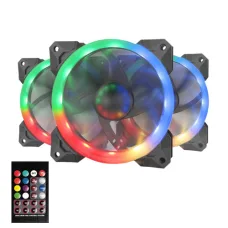
Redragon Casing Coolers
Showing 1 to 1 of 1 (1 Pages)
Find the Right Redragon Casing Coolers for Your Budget and Needs
These are the latest in-stock Redragon Casing Coolers at Unix Network, with the current price in Bangladesh. Open a model for specifications.
Latest Redragon Casing Coolers Price List in BD 2026
| Redragon Casing Coolers List | Price in BD |
|---|---|
| Redragon GC-F009 RGB Casing Cooler Fan Triple Pack with Remote | ৳2,400 |
Redragon Casing Cooler
Redragon Casing Cooler Price in Bangladesh
The Redragon Casing Cooler price in Bangladesh depends on the fan size, cooling performance, airflow, fan speed, bearing type, RGB lighting, connector type, and number of fans included in the package. Redragon offers casing cooling solutions for users who want to improve PC airflow while maintaining a stylish gaming setup.
A good casing cooler helps move fresh air into the PC case and remove warm air generated by the processor, graphics card, motherboard, SSD, and other components. Proper airflow can help maintain more consistent component temperatures, especially during gaming and other demanding workloads.
Buy Redragon Casing Cooler in Bangladesh
If you want to buy Redragon Casing Cooler in Bangladesh, choose a model according to your PC case and cooling requirements. Before purchasing, check the supported fan size, available mounting positions, fan connector, airflow, noise level, and RGB compatibility.
Redragon casing coolers can be suitable for:
Gaming PCs
Home computers
Office PCs
Performance desktops
RGB gaming setups
Custom PC builds
High-performance systems
Redragon Casing Fan
A Redragon casing fan is designed to improve airflow inside a desktop PC. Depending on the installation position, the fan can be configured as an intake or exhaust fan.
A balanced airflow setup can help bring cooler air into the case while removing heated air from around the CPU and GPU.
Redragon 120mm Casing Cooler
The Redragon 120mm casing cooler is a popular choice because 120mm fan mounts are supported by many modern PC cases.
Before purchasing a 120mm Redragon fan, make sure your casing has compatible 120mm mounting positions. Also check whether you need a single fan or a multi-fan package.
Redragon RGB Casing Cooler
A Redragon RGB casing cooler combines PC cooling with RGB lighting. It can be a good option for gaming PC users who want their computer to have a more customized appearance.
However, RGB lighting should not be the only factor when selecting a case fan. Also consider:
Airflow
Fan speed
Noise level
Bearing type
Fan size
Connector type
Case compatibility
RGB control method
Redragon Casing Cooler for Gaming PC
A Redragon Casing Cooler for gaming PC can help improve airflow around high-performance components. Gaming PCs equipped with dedicated graphics cards and powerful processors can produce considerable heat during extended gaming sessions.
A common airflow arrangement is:
Front Fans
Front-mounted fans are generally used as intake fans to bring fresh air into the case.
Rear Fan
A rear-mounted fan is commonly used as an exhaust fan to remove warm air from the case.
Top Fans
Top-mounted fans are often configured as exhaust fans, although the ideal configuration depends on the PC case and overall cooling setup.
Redragon Casing Cooler for High-Performance PC
High-performance computers can benefit from effective case airflow. Systems used for gaming, video editing, 3D rendering, software development, and other demanding workloads may generate more heat than standard office computers.
Adding suitable intake and exhaust fans can help maintain better internal airflow.
However, installing more fans does not automatically mean better cooling. Fan direction, case design, dust filters, component placement, and airflow balance are also important.
How to Choose a Redragon Casing Cooler
Check the Fan Size
Common PC case fan sizes include:
80mm
92mm
120mm
140mm
200mm
Always check your PC case specifications before purchasing.
Check Airflow
Airflow is usually measured in CFM and indicates how much air the fan can move under specified testing conditions.
Higher airflow can be useful for moving warm air out of the case, but airflow should be considered together with fan speed and noise.
Check Fan Speed
Fan speed is measured in RPM. A higher RPM can provide stronger airflow, but it may also produce more noise depending on the fan design.
Check Static Pressure
Static pressure is particularly important when the fan is installed behind restrictive dust filters, radiator fins, or other components that resist airflow.
Check the Connector
Check whether the fan uses a 3-pin or 4-pin connector and whether your motherboard or fan controller supports it.
A PWM-compatible fan can provide automatic speed control through the motherboard.
Check RGB Compatibility
If you want RGB lighting, verify the connector and control method before purchasing. Some fans use motherboard-controlled RGB or ARGB connections, while others may include a dedicated controller or remote.
Redragon Casing Cooler Price in BD
The Redragon Casing Cooler price in BD varies according to the model, specifications, number of fans, and included accessories.
Single fans are generally suitable when you only need to add one intake or exhaust fan, while multi-fan packages can be useful when building a complete airflow configuration.
Since computer hardware prices and availability can change, customers should check the latest product price and stock status before purchasing.
Redragon Casing Cooler Price in Jessore
If you are searching for the Redragon Casing Cooler price in Jessore, compare available models based on fan size, airflow, RPM, noise level, RGB features, connector type, and compatibility with your PC case.
Unix Network provides computer hardware and accessories for customers looking to build or upgrade desktop PCs in Jessore.
Redragon Casing Cooler for Better Airflow
A casing cooler works most effectively when the airflow direction is planned correctly.
Positive Airflow
Positive airflow means the case has slightly more intake airflow than exhaust airflow. This can help reduce the amount of unfiltered air entering through gaps in the case when dust filters are properly installed.
Balanced Airflow
A balanced configuration attempts to maintain a reasonable relationship between intake and exhaust fans.
Negative Airflow
Negative airflow occurs when exhaust airflow is greater than intake airflow. This can work in some builds, but it may increase air entering through unfiltered openings depending on the case design.
The best setup depends on your case, components, fan configuration, and cooling requirements.
Redragon Casing Cooler vs CPU Cooler
A casing cooler and CPU cooler perform different functions.
A CPU cooler is designed primarily to remove heat from the processor, while casing fans move air through the PC chassis.
CPU Cooler
The CPU cooler transfers heat away from the processor and releases it through a heatsink or radiator.
Casing Cooler
The casing cooler circulates air through the PC case and helps remove warm air from around internal components.
For a well-cooled gaming PC, both CPU cooling and proper case airflow are important.
Redragon Casing Cooler for RGB PC Build
Redragon RGB casing fans can be a suitable choice for users who want to create an attractive gaming PC.
RGB fans can complement:
RGB RAM
RGB CPU coolers
RGB graphics cards
RGB keyboards
RGB gaming cases
RGB accessories
For the best appearance, make sure the lighting system is compatible with your motherboard or controller.
Who Should Buy Redragon Casing Cooler?
Gamers
Gamers using dedicated graphics cards and powerful processors can benefit from improved case airflow.
PC Builders
A Redragon casing fan can be useful when a new PC build requires additional intake or exhaust fans.
RGB Enthusiasts
Users who want a gaming-style appearance can choose compatible RGB casing coolers.
Performance PC Users
Systems running demanding workloads can benefit from appropriate airflow through the chassis.
Budget-Conscious Users
Adding one or two additional case fans can sometimes be a simple way to improve airflow without replacing the entire cooling system.
Things to Check Before Buying
PC Case Compatibility
Confirm the supported fan size and mounting locations.
Number of Fans
Decide whether you need one fan or a multi-fan package.
Airflow Direction
Plan which fans will be intake and which will be exhaust.
Noise Level
Check the manufacturer's noise rating if quiet operation is important.
Fan Connector
Make sure the connector is compatible with your motherboard or fan controller.
RGB Control
Check whether the RGB lighting requires a motherboard header, controller, or remote.
Fan Speed Control
PWM support can provide more convenient automatic fan-speed management.
Buy Redragon Casing Cooler from Unix Network
Unix Network provides computer accessories and cooling solutions for customers looking to build, upgrade, or improve their desktop PC.
Before buying a Redragon Casing Cooler, compare the available models according to your PC case, fan size, airflow requirements, cooling configuration, RGB requirements, and budget.
Final Buying Guide
The right Redragon Casing Cooler depends on your PC case and cooling requirements. A 120mm fan can be a practical choice for many desktop cases, while multiple fans may be more suitable for gaming and high-performance systems.
Don't choose a casing fan based only on RGB lighting or maximum RPM. Consider fan size, airflow, static pressure, noise level, connector, PWM support, RGB compatibility, and case mounting compatibility.
If you are looking for the Redragon Casing Cooler price in Bangladesh, Redragon Casing Cooler price in BD, or Redragon Casing Cooler price in Jessore, check the latest available models at Unix Network and choose the cooling solution that best matches your PC configuration.