
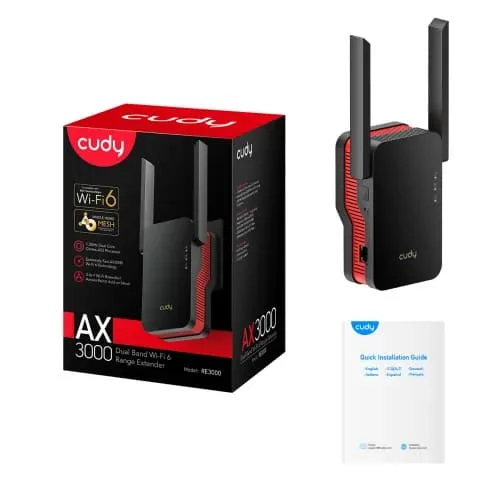
Cudy RE3000 AX3000 Dual Band Mesh WiFi 6 Range Extender
- Brand: Cudy
- Product Code: RE3000
- Availability: In Stock
- Updated:
Specification
| BASIC INFORMATION | |
| Wireless frequency | 2.4GHz & 5GHz (11ac) |
|---|---|
| Wireless Security | WPA-PSK / WPA2-PSK / WPA3 |
| CPU | MT7981BA+MT7976CN |
| Antenna | 2*External Antennas + 1*Internal Antennas |
| Button | Reset Button / WPS Button |
| Main Features | |
| Temperature | Operating Temperature: 0℃~40℃ Storage Temperature: -40℃~70℃ Operating Humidity: 10%~90% non-condensing Storage Humidity: 5%~90% non-condensing |
| Power | |
| DC jack input Voltage | Direct plug-in power supply (100V-240V) |
Description
Cudy RE3000 AX3000 Dual-Band Mesh Wi-Fi 6 Range Extender Price in Bangladesh
The Cudy RE3000 AX3000 Dual-Band Mesh Wi-Fi 6 Range Extender is a wall-plug wireless networking device designed to improve Wi-Fi coverage in homes, apartments, offices and multi-storey buildings. Built with Wi-Fi 6 (IEEE 802.11ax) technology, it supports combined theoretical wireless link speeds of approximately 3000Mbps, including up to 2402Mbps on the 5GHz band and 574Mbps on the 2.4GHz band. With 160MHz channel support, Cudy Mesh compatibility, two external antennas, a Gigabit Ethernet port and Access Point mode, the Cudy RE3000 provides flexible options for extending an existing wireless network. Its compact plug-in design makes it convenient for locations where installing a separate desktop router may be impractical.
AX3000 Wi-Fi 6 Technology for Faster Wireless Coverage
The Cudy RE3000 uses Wi-Fi 6 technology to provide improved wireless capacity and efficiency compared with many older range extenders. Its dual-band configuration supports theoretical link speeds of up to 2402Mbps on 5GHz and 574Mbps on 2.4GHz. This makes it suitable for extending connectivity to compatible laptops, smartphones, smart televisions and other wireless devices. The AX3000 rating represents the combined theoretical wireless link speeds of both frequency bands, not guaranteed internet throughput. Actual speeds through a wireless extender also depend on the connection between the extender and the main router.
160MHz Channel Bandwidth for Compatible Wi-Fi 6 Devices
One of the key features of the Cudy RE3000 is support for 160MHz channel bandwidth on the 5GHz frequency. A wider wireless channel can provide greater data capacity than narrower channel configurations when used with compatible Wi-Fi 6 equipment. This can be useful for high-resolution streaming, transferring large files and other bandwidth-intensive applications. To benefit from 160MHz operation, the connected devices and relevant network equipment must support suitable channel settings. Performance may also be affected by interference, regional regulations and the available wireless spectrum.
2402Mbps 5GHz Wi-Fi for High-Bandwidth Applications
The Cudy RE3000 supports theoretical wireless link speeds of up to 2402Mbps on the 5GHz band under compatible conditions. This provides wireless capacity for activities such as 4K video streaming, video conferencing, online gaming and large downloads. The 5GHz frequency may experience less congestion than 2.4GHz in some environments, although it can be more affected by walls and floors. When operating as a wireless range extender, actual performance depends on both the extender-to-router connection and the connection to the client device.
574Mbps 2.4GHz Wi-Fi for Everyday Connectivity
The Cudy RE3000 also provides theoretical wireless speeds of up to 574Mbps on the 2.4GHz band. This frequency is useful for everyday browsing, online classes, email and compatible smart home devices. Compared with 5GHz, the 2.4GHz band can often provide more practical coverage through common indoor obstacles, although it may experience greater interference from neighbouring wireless networks. Dual-band support helps accommodate a mixture of older and newer wireless devices.
Cudy Mesh Technology for Whole-Home Wi-Fi Expansion
The Cudy RE3000 supports Cudy Mesh technology, allowing it to work with compatible Cudy networking devices as part of a coordinated wireless network. This is useful for homes and offices where multiple coverage points are needed to reach different rooms or floors. A compatible mesh configuration can provide a common wireless network name and help devices move between coverage points. Actual roaming behaviour depends on connected devices, network configuration and signal conditions. Buyers should verify mesh compatibility between the RE3000 and their existing router, including hardware and firmware versions, before purchasing.
Extend Wi-Fi Coverage to Weak-Signal Areas
The Cudy RE3000 is designed to extend wireless coverage into areas where the main router's signal is insufficient. Common examples include bedrooms, upstairs rooms, home offices and other locations separated from the router by walls or floors. For effective operation, the extender should be installed where it can still receive a reasonably strong signal from the main router. Placing it directly inside an area with very poor reception may result in limited speed and unreliable connectivity. Thick walls, interference and building layout can affect the improvement achieved.
Two External Antennas for Wireless Reception
The Cudy RE3000 features two external antennas designed to support wireless reception and transmission. These antennas help the extender communicate with the main router and nearby connected devices. Their performance depends on the surrounding wireless environment, including router placement, distance and physical obstacles. For better results, install the extender in an open location where its antennas are not obstructed by large furniture or metal objects. External antennas can improve reception under suitable conditions but cannot overcome every source of signal loss.
Gigabit Ethernet Port for Wired Devices
The Cudy RE3000 includes a Gigabit Ethernet port that can be used to connect compatible wired equipment such as a desktop computer, gaming console or smart television. This is useful when a device does not have built-in Wi-Fi or when a wired connection to the extender is more convenient. The Ethernet interface supports a nominal link rate of up to 1Gbps, although actual throughput depends on the extender's connection to the main network. When the extender uses wireless backhaul, the wired device's internet performance remains limited by the quality and capacity of that wireless link.
Access Point Mode for Ethernet-Connected Wi-Fi Coverage
The Cudy RE3000 supports Access Point mode, allowing it to provide wireless connectivity through a wired Ethernet connection to an existing network. This can be useful in homes and offices where an Ethernet cable is available in a room with limited Wi-Fi coverage. Compared with wireless repeating, Access Point mode can avoid some of the performance limitations associated with a wireless backhaul. Actual speed depends on the Ethernet network, connected devices and wireless conditions. Users should select the appropriate operating mode during setup.
Smart Signal Indicator for Better Extender Placement
The Cudy RE3000 includes a signal indicator designed to help users identify a suitable installation location. By checking the indicator during setup, users can position the extender where it receives an adequate connection from the main router while still providing coverage towards the intended area. This can help avoid the common mistake of placing a range extender too far from the source network. The indicator is a useful placement guide, although actual performance should also be checked using connected devices in the target rooms.
One-Touch WPS Setup for Compatible Routers
The Cudy RE3000 supports WPS setup for compatible wireless routers. Where WPS is enabled and supported on both devices, users can initiate pairing without manually entering all wireless connection details. This can make initial installation more convenient for home users. The exact pairing procedure depends on the router and extender configuration. Users should follow the manufacturer's instructions and review their router's WPS security settings. Manual configuration may be required if WPS is disabled or unavailable.
WPA3 Security for Modern Wireless Networks
The Cudy RE3000 supports WPA3 wireless security for compatible network configurations. WPA3 provides improved authentication and protection against certain password-based attacks compared with older wireless security standards. Compatibility with WPA2-based networks may also be available for devices that do not support WPA3. Users should configure strong wireless passwords and keep their networking equipment updated with official firmware when available. Wireless encryption improves network security but cannot prevent every online threat.
Compatibility with Existing Wi-Fi Routers
The Cudy RE3000 is designed to extend compatible standard Wi-Fi networks, making it suitable for use with many routers supplied by broadband providers and networking brands. In conventional range extender mode, it does not necessarily require a Cudy-branded main router. However, Cudy Mesh functionality is different from ordinary wireless repeating and requires compatible mesh equipment. Users should confirm wireless standards, security settings and operating mode compatibility before installation, particularly when using older routers or specialised ISP configurations.
Compact Wall-Plug Design for Convenient Installation
The Cudy RE3000 uses a compact wall-plug design that connects directly to a suitable electrical outlet. This avoids the need for a separate desktop location and makes it convenient for bedrooms, corridors, study rooms and other indoor spaces. Its external antennas and signal indicator support practical placement and setup. For reliable operation, the extender should be installed in a ventilated location with adequate clearance. Avoid placing it behind large furniture or in areas where the wireless signal from the main router is already extremely weak.
Cudy RE3000 for Gaming, Streaming and Remote Work
The Cudy RE3000 can help improve wireless access in rooms used for online gaming, streaming, remote work and video meetings. Its Wi-Fi 6 technology and dual-band connectivity provide capacity for compatible devices, while the Gigabit Ethernet port offers an additional connection option for wired equipment. For activities that require predictable latency, Access Point mode with a wired Ethernet connection is generally preferable when available. Wireless repeating can improve coverage but may introduce additional latency and reduce effective throughput compared with a direct connection to the main router.
Cudy RE3000 Range Extender vs a Wi-Fi 6 Router
A Wi-Fi router normally manages the main internet connection and provides networking services for connected devices, while a range extender is primarily designed to expand coverage from an existing network. The Cudy RE3000 is suitable for users who already have a working router but experience weak Wi-Fi reception in certain rooms. Its Access Point mode also allows it to provide wireless coverage through Ethernet. If the main router itself is outdated or cannot handle the required broadband speed, upgrading the router may be more beneficial than adding an extender alone.
Wireless Range Extender Mode vs Access Point Mode
The Cudy RE3000 offers flexibility through its wireless range extender and Access Point operating modes. Range extender mode is convenient when Ethernet cabling is unavailable because it connects to the existing network wirelessly. Access Point mode uses a wired network connection and can provide more consistent performance where suitable cabling is installed. The better choice depends on building layout, network infrastructure and intended usage. Users prioritising stable connectivity for gaming or demanding work should consider a wired access point configuration when practical.
Why Choose the Cudy RE3000 AX3000 Wi-Fi 6 Range Extender?
The Cudy RE3000 combines AX3000 dual-band Wi-Fi 6, 160MHz channel support and flexible network expansion features in a convenient wall-plug device. Its two external antennas help support wireless reception, while the smart signal indicator assists with placement. Cudy Mesh compatibility provides options for coordinated coverage with supported equipment, and the Gigabit Ethernet port allows compatible wired devices to connect. Access Point mode, WPS setup and WPA3 security add further functionality. For users who want to improve Wi-Fi coverage without replacing their existing router, the RE3000 is a practical option to consider.
Cudy RE3000 AX3000 Wi-Fi 6 Range Extender Price in Bangladesh
Looking for the Cudy RE3000 AX3000 Dual-Band Mesh Wi-Fi 6 Range Extender price in Bangladesh? Contact Unix Network to check the latest price, stock availability and product specifications. Before ordering, confirm the hardware version, mesh compatibility, supported operating modes, Gigabit Ethernet connectivity, included accessories and applicable warranty terms. Prices and availability may change depending on market conditions. Comparing the RE3000 with other Cudy Wi-Fi extenders and mesh devices can help you choose a suitable solution for your coverage requirements and budget.
Buy Cudy RE3000 AX3000 Wi-Fi 6 Range Extender from Unix Network in Jashore
Explore the Cudy RE3000 AX3000 Dual-Band Mesh Wi-Fi 6 Range Extender at Unix Network in Jashore, Bangladesh. Whether you need to extend Wi-Fi coverage into another room, improve connectivity in a multi-storey home or add wireless access to an office, Unix Network can help you enquire about Cudy networking products and compatible accessories. Customers in Jashore, Khulna, Jhenaidah, Magura, Narail, Satkhira and other parts of Bangladesh can contact Unix Network for ordering and delivery information. Visit our shop or browse unixnetworkbd.com to check current prices, confirm stock availability and review applicable warranty details before purchasing.