
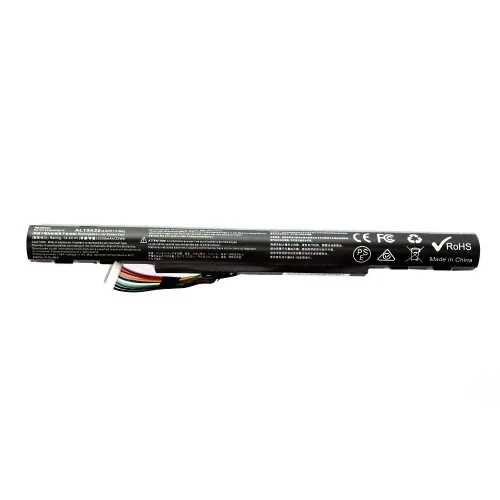
MaxGreen AL15A32 Laptop Battery for Acer Aspire E5-422 E5-573 E5-573G E5-573T E5-522 E722 E5-473G-561X Series
- Brand:MaxGreen
- Product Code: AL15A32
- Availability:In Stock
- Updated:
Earn ৳49 (1%) cashback in your wallet (up to ৳500) on orders of ৳20,000 or more. Credited 7 days after the order is completed, if it is not cancelled or returned. Logged-in customers only; coupon, wallet and shipping are not counted.
Available Options
Webcam
Short description: Upgrade your laptop for clearer and more professional video calls, online classes, meetings, interviews, and content creation.
Best for: Remote workers, students, teachers, interview candidates, and content creators.
Why add it? A dedicated webcam can provide a better video experience when the built-in laptop camera isn't enough.
External SSD
Short description: Add fast and portable storage for your important files, photos, videos, games, and work projects.
Best for: Professionals, students, creators, gamers, and anyone who needs extra storage.
Why add it? More storage means less need to delete important files, while an SSD provides convenient and fast access to your data.
Microphone
Short description: Make your voice clearer and more professional during calls, classes, recordings, gaming, streaming, and meetings.
Best for: Content creators, streamers, online teachers, remote workers, and gamers.
Why add it? Better voice quality makes communication easier and gives recordings and online meetings a more professional feel.
USB Hub
Short description: Expand your laptop's connectivity and connect multiple USB accessories from a single compact hub.
Best for: Office users, students, professionals, and customers who use several USB devices.
Why add it? Connect your mouse, keyboard, flash drive, phone, printer, and other USB devices without constantly swapping cables.
External Keyboard
Short description: Enjoy a more comfortable typing experience with a dedicated keyboard for work, study, programming, and everyday use.
Best for: Office workers, programmers, students, writers, and heavy typists.
Why add it? A dedicated keyboard can make long typing sessions more comfortable and gives you a convenient desktop-style setup.
Laptop Stand
Short description: Raise your laptop to a more comfortable viewing position while creating a cleaner and more organized workspace.
Best for: Students, office workers, remote workers, and anyone who spends long hours using a laptop.
Why add it? A better laptop position can make your workspace more comfortable and help create a more ergonomic setup.
USB Flash Drive
Short description: Keep your important documents, photos, presentations, and other files portable and easy to transfer.
Best for: Students, professionals, teachers, office users, and everyday laptop users.
Why add it? It's a simple way to carry important files and transfer data between computers and other compatible devices.
Cooling Pad
Short description: Improve airflow around your laptop during extended work, gaming, study, or other demanding sessions.
Best for: Gamers, professionals, students, and users who regularly run demanding applications.
Why add it? Additional airflow can help create a more comfortable operating environment during long laptop sessions.
Keyboard Protector
Short description: Add an extra layer of protection against everyday dust, dirt, and accidental spills around the keyboard.
Best for: Students, office users, travelers, and anyone who wants to keep their laptop cleaner.
Why add it? It's an inexpensive way to help keep the keyboard clean and protected during everyday use.
Speaker
Short description: Enjoy a more enjoyable audio experience for movies, music, presentations, online classes, and entertainment.
Best for: Entertainment users, students, office workers, and customers who want better external audio.
Why add it? External speakers can provide a more enjoyable listening experience than relying only on the laptop's built-in speakers.
Antivirus
Short description: Add an extra layer of protection for your laptop while browsing the internet, downloading files, using email, and handling important documents.
Best for: Students, professionals, families, office users, and frequent internet users.
Why add it? Protecting your laptop and important files is an important part of maintaining a reliable everyday computer.
Headphone
Short description: Enjoy private and immersive audio for music, movies, gaming, online meetings, classes, and everyday entertainment.
Best for: Gamers, students, remote workers, music lovers, and online learners.
Why add it? Get focused audio without disturbing people around you—ideal for both work and entertainment.
Screen Protector
Short description: Help keep your laptop display protected from everyday scratches, dust, fingerprints, and surface marks.
Best for: Students, travelers, office users, and customers who frequently carry their laptop.
Why add it? A screen protector provides an additional layer between your display and everyday wear.
Adjustable Stand
Short description: Create a more flexible laptop workspace by adjusting the viewing height and angle to suit your setup.
Best for: Remote workers, students, professionals, and home-office users.
Why add it? A flexible viewing position can make your desk setup more comfortable, especially during long working or studying sessions.
Wireless Mouse
Short description: Upgrade your everyday laptop navigation with a convenient wireless mouse and a cleaner, cable-free workspace.
Best for: Office workers, students, designers, professionals, and everyday laptop users.
Why add it? A mouse can make browsing, selecting, dragging, designing, and working more comfortable than using the touchpad for extended periods.
HDMI Cable
Short description: Connect your laptop to a compatible monitor, TV, projector, or external display for a larger viewing experience.
Best for: Office workers, teachers, students, gamers, and entertainment users.
Why add it? An HDMI cable makes it easy to use your laptop with a larger screen for presentations, movies, multitasking, and gaming.
Screen Cleaner
Short description: Keep your laptop display looking cleaner and clearer by removing everyday fingerprints, dust, and smudges.
Best for: All laptop users, especially students, professionals, and people who frequently use touchscreens.
Why add it? A clean display looks better and makes your laptop easier and more pleasant to use every day.
Wi-Fi Router
Short description: Build a reliable wireless connection for your laptop, smartphone, smart devices, streaming, online classes, and work.
Best for: Home users, students, remote workers, gamers, and small offices.
Why add it? A suitable Wi-Fi router can provide the connectivity needed to get the most from your laptop and other connected devices.
Option info
Laptop Option
Webcam
Short description: Upgrade your laptop for clearer and more professional video calls, online classes, meetings, interviews, and content creation.
Best for: Remote workers, students, teachers, interview candidates, and content creators.
Why add it? A dedicated webcam can provide a better video experience when the built-in laptop camera isn't enough.
External SSD
Short description: Add fast and portable storage for your important files, photos, videos, games, and work projects.
Best for: Professionals, students, creators, gamers, and anyone who needs extra storage.
Why add it? More storage means less need to delete important files, while an SSD provides convenient and fast access to your data.
Microphone
Short description: Make your voice clearer and more professional during calls, classes, recordings, gaming, streaming, and meetings.
Best for: Content creators, streamers, online teachers, remote workers, and gamers.
Why add it? Better voice quality makes communication easier and gives recordings and online meetings a more professional feel.
USB Hub
Short description: Expand your laptop's connectivity and connect multiple USB accessories from a single compact hub.
Best for: Office users, students, professionals, and customers who use several USB devices.
Why add it? Connect your mouse, keyboard, flash drive, phone, printer, and other USB devices without constantly swapping cables.
External Keyboard
Short description: Enjoy a more comfortable typing experience with a dedicated keyboard for work, study, programming, and everyday use.
Best for: Office workers, programmers, students, writers, and heavy typists.
Why add it? A dedicated keyboard can make long typing sessions more comfortable and gives you a convenient desktop-style setup.
Laptop Stand
Short description: Raise your laptop to a more comfortable viewing position while creating a cleaner and more organized workspace.
Best for: Students, office workers, remote workers, and anyone who spends long hours using a laptop.
Why add it? A better laptop position can make your workspace more comfortable and help create a more ergonomic setup.
USB Flash Drive
Short description: Keep your important documents, photos, presentations, and other files portable and easy to transfer.
Best for: Students, professionals, teachers, office users, and everyday laptop users.
Why add it? It's a simple way to carry important files and transfer data between computers and other compatible devices.
Cooling Pad
Short description: Improve airflow around your laptop during extended work, gaming, study, or other demanding sessions.
Best for: Gamers, professionals, students, and users who regularly run demanding applications.
Why add it? Additional airflow can help create a more comfortable operating environment during long laptop sessions.
Keyboard Protector
Short description: Add an extra layer of protection against everyday dust, dirt, and accidental spills around the keyboard.
Best for: Students, office users, travelers, and anyone who wants to keep their laptop cleaner.
Why add it? It's an inexpensive way to help keep the keyboard clean and protected during everyday use.
Speaker
Short description: Enjoy a more enjoyable audio experience for movies, music, presentations, online classes, and entertainment.
Best for: Entertainment users, students, office workers, and customers who want better external audio.
Why add it? External speakers can provide a more enjoyable listening experience than relying only on the laptop's built-in speakers.
Antivirus
Short description: Add an extra layer of protection for your laptop while browsing the internet, downloading files, using email, and handling important documents.
Best for: Students, professionals, families, office users, and frequent internet users.
Why add it? Protecting your laptop and important files is an important part of maintaining a reliable everyday computer.
Headphone
Short description: Enjoy private and immersive audio for music, movies, gaming, online meetings, classes, and everyday entertainment.
Best for: Gamers, students, remote workers, music lovers, and online learners.
Why add it? Get focused audio without disturbing people around you—ideal for both work and entertainment.
Screen Protector
Short description: Help keep your laptop display protected from everyday scratches, dust, fingerprints, and surface marks.
Best for: Students, travelers, office users, and customers who frequently carry their laptop.
Why add it? A screen protector provides an additional layer between your display and everyday wear.
Adjustable Stand
Short description: Create a more flexible laptop workspace by adjusting the viewing height and angle to suit your setup.
Best for: Remote workers, students, professionals, and home-office users.
Why add it? A flexible viewing position can make your desk setup more comfortable, especially during long working or studying sessions.
Wireless Mouse
Short description: Upgrade your everyday laptop navigation with a convenient wireless mouse and a cleaner, cable-free workspace.
Best for: Office workers, students, designers, professionals, and everyday laptop users.
Why add it? A mouse can make browsing, selecting, dragging, designing, and working more comfortable than using the touchpad for extended periods.
HDMI Cable
Short description: Connect your laptop to a compatible monitor, TV, projector, or external display for a larger viewing experience.
Best for: Office workers, teachers, students, gamers, and entertainment users.
Why add it? An HDMI cable makes it easy to use your laptop with a larger screen for presentations, movies, multitasking, and gaming.
Screen Cleaner
Short description: Keep your laptop display looking cleaner and clearer by removing everyday fingerprints, dust, and smudges.
Best for: All laptop users, especially students, professionals, and people who frequently use touchscreens.
Why add it? A clean display looks better and makes your laptop easier and more pleasant to use every day.
Wi-Fi Router
Short description: Build a reliable wireless connection for your laptop, smartphone, smart devices, streaming, online classes, and work.
Best for: Home users, students, remote workers, gamers, and small offices.
Why add it? A suitable Wi-Fi router can provide the connectivity needed to get the most from your laptop and other connected devices.
Specification
| BASIC INFORMATION | |
| Battery Part Number | AL15A32 AL15A32 (4ICR17/65) KT.00403.025 KT.004B3.025 |
|---|---|
| Battery type | Lithium-Ion |
| Battery Voltage | 14.4V |
| Compatible Laptop Model | Acer Aspire E5-473A E5-473G E5-474G F5-572G E5-573 E5-573G E5-573T E5-574 E5-574G E5-752G E5-772 E5-772G E5-773 E5-773G ;Travel Mate P257-M P258-M P277-M P278-M Series. |
| No. of Cell | 4 |
| Key Features | |
| Capacity | 32Wh 2000mAh |
| WARRANTY | |
| Manufacturing Warranty | 01-Year |
Description
MaxGreen AL15A32 Laptop Battery for Acer Aspire E5-422, E5-573, E5-573G, E5-573T, E5-522, E722 and E5-473G-561X Series is a replacement Lithium-Ion battery designed for compatible Acer Aspire laptops. With a 4-cell configuration and approximately 32Wh capacity, it is intended to restore portable operation when the original laptop battery has become weak, no longer holds sufficient charge or has reached the end of its useful service life.
MaxGreen AL15A32 Laptop Battery in Bangladesh
A laptop battery gradually loses its ability to store energy as it goes through charging and discharging cycles. When an older Acer Aspire notebook starts shutting down shortly after being disconnected from the charger, reports a significantly reduced battery capacity or becomes dependent on the AC adapter, replacing the battery can be a practical way to restore everyday mobility.
The MaxGreen AL15A32 is designed around the AL15A32 battery family and is listed for a range of Acer Aspire and related notebook models. It uses Lithium-Ion cells in a 4-cell configuration, with listings identifying a capacity of 32Wh and 2000mAh. The battery voltage is commonly specified at 14.4V for this MaxGreen model. :contentReference[oaicite:0]{index=0}
For customers searching for an Acer E5-573 battery, Acer E5-573G battery, AL15A32 laptop battery, MaxGreen Acer laptop battery or replacement battery for an older Acer Aspire notebook in Bangladesh, model and part-number matching should be treated as the first priority. Laptop batteries are not universal, even when two notebooks look similar or belong to the same product family.
Unix Network serves customers in Jessore (Jashore), Khulna and across Bangladesh with computer accessories, laptop parts and replacement components. Before purchasing a replacement battery, customers should compare the battery label, part number, voltage, connector arrangement and laptop model with the replacement being considered.
Product Overview
The MaxGreen AL15A32 is a replacement laptop battery intended for compatible Acer notebooks. It is not a charger, power adapter or external power bank. Its purpose is to replace a worn internal laptop battery so the notebook can once again operate away from mains power when the battery is properly installed and compatible.
The battery uses Lithium-Ion technology and four cells. Its listed capacity is 32Wh, with a 2000mAh rating in current Bangladesh retailer specifications. A battery's watt-hour rating is particularly useful when comparing battery capacity because it takes both electrical capacity and voltage into account.
For an older Acer Aspire computer, replacing the battery can be more economical than replacing the entire laptop when the computer is otherwise performing satisfactorily. If the notebook still meets the user's requirements for browsing, office applications, education, business software or general home use, a suitable replacement battery can extend its usefulness as a portable machine.
MaxGreen AL15A32 Specifications
| Specification | Details |
|---|---|
| Brand | MaxGreen |
| Model | AL15A32 |
| Battery Type | Lithium-Ion |
| Cell Configuration | 4 Cells |
| Rated Capacity | 32Wh / 2000mAh |
| Voltage | 14.4V |
| Compatible Part Numbers | AL15A32, AL15A32 (4ICR17/65), KT.00403.025, KT.004B3.025 |
| Compatible Product Family | Selected Acer Aspire and related notebook models |
What Does AL15A32 Mean?
AL15A32 is the battery model or part-number designation used to identify a particular Acer-compatible battery family. When replacing a laptop battery, the part number is one of the most useful identifiers because a laptop series can contain multiple configurations and battery types.
Compatible replacement listings also cross-reference AL15A32 with identifiers including AL15A32 (4ICR17/65), KT.00403.025 and KT.004B3.025. These references can help customers and technicians determine whether the replacement corresponds to the battery installed in a particular Acer notebook. :contentReference[oaicite:1]{index=1}
Part-number matching is more reliable than purchasing a battery simply because the laptop name appears in an online compatibility list. If the original battery label is available, comparing its part number and electrical specifications before ordering is strongly recommended.
Lithium-Ion Battery Technology
The AL15A32 uses Lithium-Ion battery technology, which is widely used in notebook computers because it offers a useful combination of energy density, weight and rechargeable performance.
A laptop battery is made up of individual cells together with electronic battery-management circuitry. The battery-management system helps monitor factors such as voltage, charging behaviour and operating conditions. This is why a laptop battery should be replaced with a properly designed compatible battery rather than attempting to assemble individual cells without the appropriate electronics and safety controls.
Like all rechargeable batteries, Lithium-Ion cells gradually age. Capacity can decrease over time, especially when a notebook is frequently operated at high temperatures or subjected to repeated charging cycles. A replacement battery provides a fresh power-storage unit for a compatible laptop.
32Wh Battery Capacity
The MaxGreen AL15A32 is listed with a 32Wh capacity. Watt-hours indicate the approximate amount of energy the battery can store when fully charged under its rated conditions.
Actual operating time cannot be calculated from the battery's Wh rating alone. A laptop's processor, display brightness, storage activity, wireless connections, software workload, battery condition and power-management settings all affect how quickly stored energy is consumed.
For example, a notebook performing light document editing may consume substantially less power than the same machine running demanding software, streaming high-resolution video or operating at high display brightness. Consequently, a replacement battery should be viewed as restoring the laptop's intended battery capacity rather than guaranteeing a particular number of hours of runtime.
2000mAh Capacity
The AL15A32 is listed with a 2000mAh capacity. Milliamp-hours are commonly printed on battery labels and describe the electrical charge capacity under specified conditions.
When comparing laptop batteries, mAh should not be considered in isolation. Voltage also matters, which is why watt-hours are often more useful for comparing the overall energy capacity of batteries with different voltage ratings.
For replacement purposes, the most important consideration is that the battery's electrical specifications match the laptop and the original battery requirements. A higher or lower mAh figure does not automatically mean that a battery is compatible.
4-Cell Configuration
The MaxGreen AL15A32 uses a four-cell configuration. The cells work together as part of the battery pack and are managed by the integrated battery electronics.
The number of cells is useful when identifying a replacement because different Acer laptop models can use batteries with different physical and electrical arrangements. The four-cell specification should therefore be checked against the original battery before installation.
Customers should avoid selecting a battery based solely on physical appearance. A battery may fit into a similar-looking laptop while still having different electrical characteristics or connector requirements.
14.4V Battery Voltage
The MaxGreen AL15A32 is listed at 14.4V. This electrical specification is important when matching the battery with the laptop's original battery system.
Some online replacement listings for AL15A32 use slightly different nominal voltage figures, such as 14.8V, depending on how the battery configuration is specified. For this reason, customers should rely on the exact label and part number of their original battery and the specifications of the particular replacement unit rather than assuming that every AL15A32 listing is electrically identical.
This is particularly important for older Acer Aspire models because a broad model family can contain different regional and hardware configurations. If there is uncertainty, checking the original battery label before ordering is the safest approach.
Compatible Acer Aspire Models
The MaxGreen AL15A32 is commonly listed for a broad selection of Acer Aspire notebooks. Compatibility listings include models from the E5 family as well as several related Aspire and TravelMate systems. :contentReference[oaicite:2]{index=2}
- Acer Aspire E5-422
- Acer Aspire E5-422G
- Acer Aspire E5-473A
- Acer Aspire E5-473
- Acer Aspire E5-473G
- Acer Aspire E5-474G
- Acer Aspire E5-522
- Acer Aspire E5-522G
- Acer Aspire E5-573
- Acer Aspire E5-573G
- Acer Aspire E5-573T
- Acer Aspire E5-573TG
- Acer Aspire E5-574
- Acer Aspire E5-574G
- Acer Aspire E5-722
- Acer Aspire E5-722G
- Acer Aspire E5-752G
- Acer Aspire E5-772
- Acer Aspire E5-772G
- Acer Aspire E5-773
- Acer Aspire E5-773G
- Acer Aspire F5-572G
- Selected Acer TravelMate P257-M models
- Selected Acer TravelMate P258-M models
- Selected Acer TravelMate P277-M models
- Selected Acer TravelMate P278-M models
Compatibility lists can vary between suppliers, so the list above should not replace a physical comparison with the original battery. A complete model number printed on the laptop's underside is more useful than a general series name when confirming a replacement.
Battery for Acer Aspire E5-422
For compatible Acer Aspire E5-422 configurations, the AL15A32 is a commonly identified replacement battery family. The E5-422 series has been listed among the supported models for AL15A32 replacement batteries. :contentReference[oaicite:3]{index=3}
If your E5-422 battery has become unable to retain a useful charge, compare the original battery's part number and voltage before ordering. This is especially important if the notebook has been repaired or its battery has previously been replaced with a different compatible pack.
Battery for Acer Aspire E5-573
The Acer Aspire E5-573 is another important model associated with AL15A32-compatible batteries. A replacement can be useful when an E5-573 remains functional on AC power but its original battery provides very limited portable runtime.
For students, office users and home users who still rely on an E5-573, replacing the battery can make the machine more practical for moving between rooms, meetings, classrooms or locations where a power outlet is not immediately available.
Battery for Acer Aspire E5-573G
The E5-573G is also included in commonly published AL15A32 compatibility references. Replacement battery listings specifically identify the E5-573G as a supported Acer Aspire model. :contentReference[oaicite:4]{index=4}
The E5-573G can be configured with hardware that consumes more power than basic office notebooks, so actual battery runtime will depend heavily on the particular configuration and workload. A battery replacement restores the battery pack but does not change the laptop's underlying power consumption.
Battery for Acer Aspire E5-573T
The E5-573T is another model appearing in AL15A32 compatibility references. Customers with this model should still verify the original battery before ordering because the presence of a model in a general compatibility list does not eliminate the possibility of configuration differences.
Checking the battery part number, voltage and connector is a simple step that can prevent an otherwise avoidable compatibility problem.
Battery for Acer Aspire E5-522
The Acer Aspire E5-522 family is also associated with AL15A32 replacement batteries. Compatible listings include E5-522 and selected E5-522G configurations. :contentReference[oaicite:5]{index=5}
For an older E5-522, a replacement battery can be a practical upgrade when the rest of the notebook remains suitable for the user's needs. It can restore the convenience of using the laptop away from a permanent desk or power socket.
Battery for Acer Aspire E5-722 and Related Models
AL15A32 compatibility references also include Acer Aspire E5-722 and E5-722G models, along with other related Aspire systems. :contentReference[oaicite:6]{index=6}
Because these notebooks can differ in exact configuration, customers should use the complete laptop model and original battery identification when ordering. This is especially important for older laptops that may have undergone previous repairs.
Battery for Acer Aspire E5-473G-561X
The Acer Aspire E5-473G family is included in AL15A32 replacement references, making this battery relevant to compatible E5-473G configurations. The specific suffix, such as E5-473G-561X, should still be checked against the battery label before purchase.
A complete model number provides better identification than simply searching for an E5-473G battery because Acer released multiple configurations within the same family.
Why Replace an Old Laptop Battery?
A battery replacement becomes worth considering when the original battery no longer provides useful portable operation. Common signs include dramatically reduced runtime, sudden shutdowns when the charger is removed, frequent low-battery warnings and a battery percentage that falls unusually quickly.
Another common situation is a laptop that works perfectly when connected to its charger but immediately powers down after the adapter is disconnected. If the battery is confirmed to be the cause, replacing it can restore portable operation without requiring a complete laptop replacement.
Users should also pay attention to physical changes. A swollen battery can create pressure inside the laptop and should not be continued in normal use. If a battery appears swollen, damaged or unusually hot, stop using the laptop battery and have the machine inspected by a qualified technician.
Benefits of a Suitable Replacement Battery
- Restores battery-powered operation on a compatible Acer notebook.
- Reduces dependence on a wall socket during normal mobile use.
- Can extend the useful life of an otherwise functional laptop.
- Provides a practical solution when the original battery has aged.
- Useful for study, office work, browsing and general portable computing.
- Maintains the convenience of using the laptop in different locations.
- Can be more economical than replacing an entire working laptop.
Battery Runtime in Real-World Use
It is important not to judge a replacement battery by a fixed promised runtime. The same battery can provide very different operating times depending on what the laptop is doing.
Light activities such as writing documents, reading webpages and working with simple office applications generally consume less power than processor-intensive workloads. Display brightness, Wi-Fi usage, connected peripherals, background programs and the condition of the laptop itself can also influence battery life.
An older notebook may have additional power consumption caused by a worn cooling system, ageing storage device, inefficient software configuration or a high-power processor. Therefore, installing a new battery does not necessarily return the laptop to the exact battery runtime it had when it was originally new.
Charging Behaviour
A compatible laptop battery is charged through the notebook's existing charging system. The laptop controls the charging process through its power-management and battery-management systems.
After installing a new battery, the battery percentage reported by the operating system may require normal charge and discharge cycles before the system's estimate becomes consistent. Users should follow the battery manufacturer's or laptop manufacturer's recommended charging procedure rather than repeatedly performing deep discharges unnecessarily.
Modern Lithium-Ion batteries generally do not require routine full discharges simply to prevent a memory effect. Keeping the battery away from excessive heat and using a compatible charging system are more important for normal long-term operation.
Important Compatibility Check Before Purchase
Battery compatibility should be verified before placing an order. The most useful information is normally printed directly on the original battery.
- Check the original battery part number.
- Compare the battery model with AL15A32.
- Check the stated voltage.
- Compare the cell configuration.
- Check the capacity and electrical ratings.
- Compare the connector position and physical design.
- Confirm the complete Acer laptop model and sub-model.
- Do not rely only on the laptop series name.
This verification is especially valuable when buying replacement batteries online. If the original battery is available, customers can provide its label information to Unix Network for assistance in identifying the appropriate replacement.
Do Not Choose Only by Laptop Model
A common mistake when purchasing a laptop battery is searching only for the laptop's commercial model name. Laptop manufacturers frequently release multiple configurations under one family name, and replacement batteries can have different electrical specifications.
For example, a search for an Acer E5-573 battery may return several battery listings. The correct choice depends on the particular battery fitted to the laptop, not simply the fact that the computer belongs to the E5-573 family.
The part number printed on the original battery is therefore one of the most useful pieces of information for a safe and accurate replacement decision.
Who Should Buy the MaxGreen AL15A32?
- Acer Aspire E5-series owners with a worn compatible battery.
- Users whose laptop shuts down soon after being disconnected from AC power.
- Students using compatible Acer notebooks for study and assignments.
- Office users who need portable operation from an older Acer laptop.
- Home users who want to extend the practical life of a functioning notebook.
- Technicians looking for a compatible AL15A32 replacement battery.
- Customers replacing an aged AL15A32, KT.00403.025 or KT.004B3.025 battery.
Who Should Not Buy Without Checking First?
Customers whose Acer laptop uses a different battery part number should not purchase the AL15A32 simply because the laptop looks similar to one of the listed compatible models. The same applies when the voltage or connector arrangement differs.
If the laptop has an unknown battery, a missing battery label or a previous non-original replacement, it is better to have the battery identification checked before ordering. This can help avoid an incompatible purchase.
Build and Replacement Considerations
A laptop battery is a precision electronic component rather than a generic collection of cells. The battery-management electronics, connector and physical enclosure all need to correspond with the intended laptop.
When replacing the battery, avoid modifying the battery connector, opening the battery pack or attempting to replace individual cells without appropriate professional equipment and knowledge. Lithium-Ion battery packs can present safety risks when incorrectly handled.
For customers who are not comfortable opening a laptop, professional installation is preferable. A technician can also inspect the laptop's battery connector, charging system and physical condition while installing the replacement.
Battery Safety
Do not use a battery that is visibly swollen, cracked, leaking or severely damaged. A damaged Lithium-Ion battery should be handled appropriately and should not be punctured, crushed or exposed to excessive heat.
Keep the battery away from water and high temperatures. Avoid placing the laptop on surfaces that completely block ventilation because excessive heat can affect both the laptop and battery.
If the replacement battery becomes unusually hot, produces an abnormal smell, swells or behaves unexpectedly, stop using it and seek professional inspection rather than continuing to charge it.
Extending Battery Life
Once a suitable replacement battery has been installed, everyday usage habits can influence its long-term condition. Excessive heat is one of the factors worth controlling, so ensure the laptop has adequate ventilation during operation.
Reducing unnecessary display brightness can lower power consumption during battery operation. Closing applications that are not being used and reducing unnecessary background activity can also help the laptop consume less energy.
Wireless connections and external USB devices can consume additional power. If they are not required, disconnecting unnecessary peripherals can help reduce battery drain.
For Study and Office Work
A working battery is particularly useful for students and office users because laptops are often moved between desks, classrooms, meetings and different rooms. A compatible replacement can make an older Acer notebook more convenient to use in these situations.
For document editing, spreadsheets, web browsing, email and similar tasks, the battery allows the laptop to continue operating when a power socket is temporarily unavailable.
This can be especially useful in environments where power interruptions occur or where the user needs to move frequently between locations.
For Home and General Computing
Home users may continue using an older Acer Aspire notebook for web browsing, online learning, document preparation, media consumption and general tasks. If the computer remains responsive enough for these activities but its battery has degraded, replacing the battery can be a sensible maintenance decision.
There is no need to replace a complete laptop simply because its battery has aged. If the processor, memory, storage and display continue to meet the user's needs, replacing the failed consumable component can extend the notebook's useful service period.
For Laptop Repair Technicians
The MaxGreen AL15A32 can also be relevant to computer repair shops and technicians servicing compatible Acer Aspire notebooks. Correct part-number identification is particularly important when handling customer repairs because an apparently similar battery may not have the same electrical specifications.
Technicians should inspect the original battery before ordering and verify the replacement after installation. Checking charging recognition, battery percentage reporting and basic discharge behaviour can help confirm that the replacement is operating correctly.
Why Buy from Unix Network?
Unix Network (ইউনিক্স নেটওয়ার্ক) is a computer and technology retailer serving customers in Jessore (Jashore), Khulna Division and across Bangladesh. Our product range includes laptops, computer components, accessories, networking equipment, printers and replacement parts.
Replacement batteries require more careful matching than many ordinary accessories. Unix Network can help customers compare the laptop model and battery identification so they can make a more informed purchasing decision.
Customers in Jessore can visit the local showroom to discuss their laptop battery requirements. Buyers from other districts in Bangladesh can use nationwide delivery arrangements, subject to the applicable delivery terms.
We focus on practical compatibility guidance rather than assuming that every battery with a similar laptop name will work. Customers can check the original battery label before ordering and ask for assistance if the identification is unclear.
Buying Guide for MaxGreen AL15A32
Start by turning the laptop over and identifying the exact Acer model. Then, if the battery is removable or accessible, check the label on the existing battery. Look for AL15A32 or one of the recognised cross-reference numbers such as KT.00403.025 or KT.004B3.025.
Next, compare the voltage and capacity information. For the MaxGreen listing covered here, the specification is 32Wh, 2000mAh and 14.4V with four Lithium-Ion cells. Some third-party AL15A32 listings may state a slightly different nominal voltage, which is another reason to compare the exact replacement unit with the original battery rather than relying on a generic search result. :contentReference[oaicite:7]{index=7}
Finally, check the physical connector and battery shape. If there is any uncertainty, provide the battery label information to a technician or seller before purchase.
Installation Guidance
Battery replacement involves opening the laptop and disconnecting the existing battery in many Acer Aspire models. If you are not experienced with laptop disassembly, professional installation is recommended.
Before installation, the laptop should be completely powered down and disconnected from the charger. The technician should use appropriate tools and avoid shorting battery contacts or damaging internal components.
After installation, the battery should be recognised by the laptop and operating system. The technician can check the reported capacity, charging status and basic operation before returning the laptop to the customer.
Checking the Battery After Installation
After a new battery is installed, the laptop should be checked while connected to AC power and while operating from battery power. The operating system should recognise the battery and report an appropriate charging status.
It is also useful to check whether the battery percentage changes normally and whether the laptop remains powered after the AC adapter is disconnected. These simple checks can help identify installation or compatibility issues early.
If the laptop does not recognise the replacement battery, do not repeatedly force the battery into operation. First verify the connector, battery part number, installation and charging system.
Warranty Information
Warranty coverage depends on the specific MaxGreen battery supplied by the seller and the applicable sales terms. Current Bangladesh retailer listings for this AL15A32 model show a one-year warranty in at least one listing, but customers should confirm the exact warranty offered by Unix Network at the time of purchase. :contentReference[oaicite:8]{index=8}
Warranty normally relates to covered product faults according to the seller's stated conditions. Physical damage, swelling caused by misuse, unauthorised modification or damage resulting from incorrect installation may be treated differently.
Customers should retain their purchase documentation and follow the applicable warranty procedure if a covered problem occurs.
Delivery Across Bangladesh
Unix Network serves customers in Jessore and provides access to computer products and accessories for buyers across Bangladesh. Customers outside Jashore can order compatible laptop batteries through nationwide delivery arrangements.
Because compatibility is critical for batteries, online buyers should verify the exact battery part number before placing an order. If you are unsure whether AL15A32 is correct for your Acer notebook, checking the original battery label first can save time and reduce the possibility of ordering the wrong component.
After-Sales Support
After-sales assistance is particularly valuable for replacement laptop batteries because installation and compatibility can sometimes be more complicated than purchasing a standard accessory.
Unix Network can provide practical guidance regarding battery identification, laptop compatibility and replacement considerations. Customers in Jessore can also discuss battery-related requirements at the local showroom.
If a battery-related issue appears after installation, customers should provide the laptop model, battery part number and details of the behaviour so the problem can be assessed more accurately.
Frequently Asked Questions
What is the MaxGreen AL15A32 battery?
The MaxGreen AL15A32 is a Lithium-Ion replacement battery designed for compatible Acer Aspire and related laptop models. It is commonly specified as a 4-cell battery with 32Wh capacity and 2000mAh rating.
Which laptops use the MaxGreen AL15A32 battery?
Compatibility references include selected Acer Aspire E5-422, E5-473, E5-473G, E5-522, E5-573, E5-573G, E5-573T, E5-574, E5-722, E5-772 and E5-773 configurations, along with selected related Acer models. Exact compatibility should be verified using the original battery part number.
What is the voltage of the MaxGreen AL15A32?
The MaxGreen AL15A32 is listed at 14.4V. Because some third-party AL15A32 listings use different nominal voltage figures, customers should compare the exact replacement specification with the original battery label before purchasing.
How many cells does the AL15A32 have?
The MaxGreen AL15A32 is specified as a 4-cell Lithium-Ion battery.
What is the capacity of the AL15A32 battery?
The MaxGreen listing specifies 32Wh and 2000mAh. Actual usable runtime depends on the laptop's hardware, software workload, display brightness and power settings.
Can I use AL15A32 for Acer Aspire E5-573G?
AL15A32-compatible battery listings include the Acer Aspire E5-573G. However, the exact battery fitted to the particular laptop should be checked before purchase to confirm part-number and electrical compatibility.
Can I use this battery for Acer Aspire E5-573?
Yes, the E5-573 appears in commonly published AL15A32 compatibility lists. Customers should still compare the original battery label and voltage before ordering.
How do I know whether my Acer laptop needs a new battery?
Common signs include very short battery runtime, sudden shutdown after disconnecting the charger, rapid battery percentage drops and dependence on the AC adapter. A swollen or physically damaged battery should be inspected promptly and should not be used normally.
Will a new battery make my Acer laptop faster?
No. A battery replacement primarily restores portable power. It does not upgrade the processor, RAM, SSD or graphics hardware. However, it can make an otherwise functional laptop more convenient to use away from a power socket.
Can I install the AL15A32 myself?
Installation depends on the particular Acer model and the user's technical experience. Because laptop disassembly involves internal connectors and battery safety considerations, professional installation is recommended for users who are not familiar with laptop repair.
How long will the replacement battery last on one charge?
There is no single runtime applicable to every compatible laptop. Battery life depends on the laptop configuration, workload, display brightness, wireless activity, software and battery condition.
Final Verdict
MaxGreen AL15A32 Laptop Battery is a practical replacement option for compatible Acer Aspire notebooks whose original batteries have reached the end of their useful service life. With a Lithium-Ion construction, four-cell configuration and listed 32Wh / 2000mAh capacity, it is designed to restore battery-powered operation on supported Acer systems.
The battery is associated with a broad range of Acer Aspire models, including E5-422, E5-473, E5-473G, E5-522, E5-573, E5-573G, E5-573T, E5-722, E5-772 and E5-773 variants. However, compatibility should always be confirmed using the original battery's part number, voltage, connector and physical design rather than relying exclusively on the laptop's series name.
For customers in Jessore, Jashore and across Bangladesh, Unix Network provides access to laptop batteries and computer accessories with expert product guidance, local showroom availability, nationwide delivery and after-sales support. If your Acer notebook is otherwise working well but its battery no longer provides practical portable runtime, a correctly matched MaxGreen AL15A32 replacement can be a sensible way to extend the useful life of the machine.