
Unix Tech Fest: offers end in
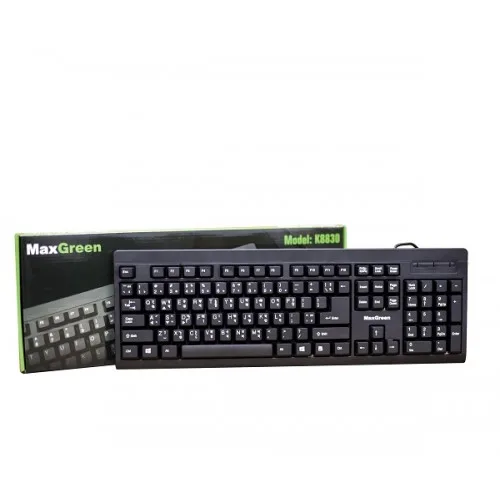
MaxGreen K8830 USB Keyboard - Enhance Your Typing Experience
- Brand: MaxGreen
- Product Code: MaxGreen K8830
- Availability: In Stock

Specification
| BASIC INFORMATION | |
| System Requirements | Win xp , Win vista , Win7 32 , Win7 64 , Win8 32 , Win8 64 , Win10 32 ,Win10 64 |
| Wireless | Wired |
| External Features | |
| Dimensions | 460 X 175 X 30 mm |
| Main Features | |
| Keys | 101-106 |
| Cable Length | 1.5M |
| Physical Specification | |
| Color | Black |
| WARRANTY | |
| Manufacturing Warranty | 606-gram |
Description
The MaxGreen K8830 USB Keyboard is a straightforward full-size wired keyboard designed for desktop computers, office work, study, browsing and everyday typing. Its standard layout, large high-profile keycaps, USB 2.0 interface and approximately 1.5-metre cable make it a practical choice for users who want a simple, dependable keyboard without the added complexity of wireless connectivity or gaming-focused features.
MaxGreen K8830 USB Keyboard in Bangladesh
For customers looking for an affordable USB keyboard in Bangladesh, the MaxGreen K8830 is designed around the essentials. It uses a conventional full-size keyboard layout with approximately 101–106 keys, providing the familiar arrangement expected from a desktop keyboard. The wired USB connection also means there is no battery to charge and no wireless receiver to manage.
The K8830 is particularly suitable for basic desktop setups, office computers, home PCs, school and study systems, internet browsing and general typing. Its standard design makes it easy to use for customers who prefer a traditional keyboard layout rather than a compact or specialised gaming keyboard.
Full-Size Standard Keyboard Layout
The MaxGreen K8830 uses a standard full-size keyboard design with approximately 101–106 keys, depending on how the regional specification counts the layout. Unlike a compact keyboard, it provides the familiar desktop arrangement with the main typing area, function keys and navigation controls.
The standard layout is useful for everyday computer users because there is little need to adapt to an unusual key arrangement. This makes the K8830 suitable for office employees, students, home users and anyone replacing an older desktop keyboard.
For users who frequently work with spreadsheets or numerical data, the full-size format is generally more convenient than a compact keyboard because it provides the traditional desktop arrangement. Buyers who specifically require dedicated multimedia buttons or advanced programmable keys should instead consider a keyboard designed around those features.
Large High-Profile Keycaps
One of the distinguishing characteristics of the K8830 is its large, high-profile keycap design. The taller key shape provides a conventional typing feel and makes the individual keys easy to identify by touch.
This type of layout can be comfortable for users who are accustomed to traditional desktop keyboards. The larger keycaps can also make the keyboard approachable for general-purpose typing, particularly for users who do not want to transition to a low-profile laptop-style keyboard.
As with any keyboard, typing comfort depends on personal preference. Users accustomed to slim laptop keyboards may prefer a lower-profile design, while those who regularly use conventional desktop keyboards may find the K8830's key shape familiar.
Wired USB 2.0 Connection
The MaxGreen K8830 uses a wired USB 2.0 interface. This provides a simple connection to a compatible desktop or laptop computer without Bluetooth pairing or a separate wireless dongle.
A wired keyboard is particularly practical for desktop computers that remain in one location. There is no internal battery to recharge, and the keyboard receives its operating power directly through the USB connection.
The approximately 1.5-metre cable provides useful reach for typical desktop arrangements. It gives enough flexibility for a computer placed underneath, beside or near the desk without requiring an unnecessarily long cable.
Simple Plug-and-Use Design
The K8830 is designed as a straightforward computer peripheral. Connect the USB plug to a compatible computer and the keyboard can be used for normal keyboard input without the need for a complicated setup process.
This simplicity makes it suitable for replacing an old or damaged keyboard in an office, home, school or shop computer. It is also useful for technicians and businesses that need inexpensive standard keyboards for multiple desktop systems.
Suitable for Office Work
The MaxGreen K8830 is well suited to everyday office tasks such as document preparation, email, web browsing, data entry and general computer operation. Its standard layout allows users to move between different applications without learning a compact or unconventional arrangement.
For workplaces where computers are used primarily for productivity rather than gaming, a basic wired keyboard can be a sensible choice. There is little need to manage batteries, wireless receivers or additional configuration.
Useful for Students and Home Computers
Students can use the K8830 for assignments, online learning, research, document preparation and general browsing. Its standard layout is suitable for long periods of normal typing and does not require specialised gaming software.
It is also a practical option for a family computer. When the same desktop is used by different people, a conventional full-size keyboard is generally easy for everyone to understand and use.
MaxGreen K8830 for General Desktop Use
The K8830 is best understood as a general-purpose desktop keyboard rather than a mechanical gaming keyboard. It focuses on straightforward typing, USB connectivity and a conventional layout instead of RGB lighting, mechanical switches, programmable macros or wireless operation.
This makes it particularly appropriate when the main requirement is a replacement keyboard that performs the basic job reliably without adding unnecessary features.
MaxGreen K8830 Specifications
| Specification | Details |
|---|---|
| Brand | MaxGreen |
| Model | MaxGreen K8830 |
| Keyboard Type | Standard wired USB keyboard |
| Layout | Full-size standard layout |
| Number of Keys | 101–106 keys |
| Interface | USB 2.0 |
| Connection | Wired |
| Cable Length | Approximately 1.5m |
| Design Style | Standard |
| Keycap Style | Large high-profile keycaps |
| Dimensions | Approximately 460 x 175 x 30mm |
| Weight | Approximately 606g |
| Colour | Black |
| Supported Windows Versions | Windows XP, Vista, Windows 7, Windows 8 and Windows 10 |
MaxGreen K8830 for Typing
The standard full-size arrangement makes the K8830 suitable for everyday typing. Users who work with documents, emails, forms and web applications can use the familiar key arrangement without having to adapt to a compact keyboard.
The large keycaps also provide a traditional desktop typing experience. This can be useful for users who prefer clearly separated, higher-profile keys rather than the flatter keycaps commonly found on laptops.
For Data Entry and Office Applications
Full-size keyboards are often preferred in office environments because they provide a familiar layout and efficient access to the complete set of standard keys. The K8830 can be used for spreadsheets, accounting software, inventory applications, billing systems and other desktop programs that rely heavily on keyboard input.
For intensive numeric data entry, buyers should verify the exact physical layout of the supplied version and ensure that it meets their requirements for dedicated numeric-keypad functionality.
For Internet Browsing and Multimedia
The K8830 can handle everyday web browsing, email, social media, online learning and video playback through standard keyboard input. It does not need a separate driver for basic keyboard operation on a compatible system.
Users who require dedicated media keys, volume wheels or programmable shortcuts may prefer a multimedia keyboard with those controls built into the design.
For Shop and Business Computers
A simple wired keyboard can be useful for business environments where computers are used throughout the day for billing, inventory, browsing, documentation and administrative work. The K8830's conventional design makes it easy to deploy across standard desktop workstations.
Its wired connection also eliminates concerns about replacing batteries or locating wireless receivers, which can be useful when multiple computers are operated in the same workplace.
For Computer Repair and Replacement
The K8830 can also be considered as a replacement keyboard for an existing desktop system. If the original keyboard has developed faulty keys, cable damage or general wear, a standard USB keyboard can restore basic computer operation without requiring changes to the computer itself.
Before purchasing, check that the computer has an available USB port and that the physical keyboard layout meets the user's requirements.
Advantages of the MaxGreen K8830
- Full-size standard keyboard layout.
- Approximately 101–106 keys.
- Wired USB 2.0 connectivity.
- No battery or wireless receiver required.
- Approximately 1.5-metre cable for desktop use.
- Large high-profile keycaps provide a traditional typing feel.
- Standard black design works well with most desktop setups.
- Suitable for office, home, study and general computer use.
- Approximately 606g construction provides a substantial desktop feel.
- Simple design is suitable for replacing a conventional desktop keyboard.
Things to Consider Before Buying
- The K8830 is a standard wired keyboard, not a wireless or Bluetooth model.
- It is not a mechanical gaming keyboard.
- It does not focus on RGB lighting or programmable gaming functions.
- Older published specifications primarily list Windows XP through Windows 10, so advanced compatibility should be checked if using a newer or non-Windows operating system.
- Key-count descriptions vary between 101 and 106 keys across listings, so the physical layout should be confirmed if a particular key arrangement is important.
- The keyboard is approximately 460mm wide, so users with very limited desk space may prefer a compact model.
Who Should Buy the MaxGreen K8830?
- Home desktop users who need a basic USB keyboard.
- Students looking for a straightforward keyboard for study and browsing.
- Office users who prefer a traditional full-size layout.
- Businesses requiring standard keyboards for desktop workstations.
- Users replacing an old wired keyboard.
- Computer shops and technicians looking for a simple replacement keyboard.
- Users who prefer large traditional keycaps over slim laptop-style keys.
Who May Prefer a Different Keyboard?
If gaming performance is the main priority, a mechanical gaming keyboard with anti-ghosting, dedicated gaming functions and backlighting would be a better match. The K8830 is designed primarily for standard desktop computing rather than competitive gaming.
Similarly, users who need wireless connectivity should consider a wireless or Bluetooth keyboard. Those who frequently travel with a laptop may also find a compact keyboard easier to carry than the full-size K8830.
MaxGreen K8830 vs Gaming Keyboard
| Feature | MaxGreen K8830 | Typical Gaming Keyboard |
|---|---|---|
| Connection | Wired USB | Wired or wireless, depending on model |
| Keyboard Type | Standard | Usually mechanical or gaming-focused membrane |
| Layout | Full-size standard | Full-size, TKL or compact |
| RGB Lighting | No documented RGB feature | Common on gaming models |
| Programmable Controls | Not a primary feature | Available on many models |
| Gaming Focus | Basic/general use | Gaming focused |
| Battery | Not required | Depends on connectivity |
Why Buy the MaxGreen K8830 from Unix Network?
Unix Network is a computer and technology retailer serving customers in Jessore (Jashore), Khulna, Bangladesh. For customers searching for a USB keyboard in Jessore or a basic computer keyboard in Jessore, the MaxGreen K8830 is a practical option when a traditional full-size wired design is more important than advanced gaming features.
Unix Network also supplies computer accessories, keyboards, mice, mouse pads, headsets, monitors, printers and other IT products, making it possible to select compatible peripherals for home, office, education and gaming setups.
Customers outside Jessore can also order computer accessories for delivery across Bangladesh, subject to applicable delivery arrangements and product availability.
Warranty and After-sales Support
Published Bangladesh listings for the MaxGreen K8830 show a two-year warranty on some listings, while warranty information can vary according to seller and product batch. The warranty supplied with the specific unit should therefore be confirmed at the time of purchase.
Keep the keyboard and purchase documentation during the warranty period. If keys stop responding or the USB connection develops a problem, having the complete product information available can make after-sales troubleshooting easier.
Frequently Asked Questions
What is the MaxGreen K8830?
The MaxGreen K8830 is a standard full-size wired USB keyboard designed for desktop computers and general typing.
Is the MaxGreen K8830 a mechanical keyboard?
No. The K8830 is a standard desktop keyboard rather than a mechanical gaming keyboard.
How many keys does the MaxGreen K8830 have?
Published specifications describe approximately 101–106 keys. The exact count can depend on how the particular layout is specified.
Is the MaxGreen K8830 wireless?
No. It is a wired keyboard that connects through USB.
What type of USB connection does the K8830 use?
The documented interface is USB 2.0.
How long is the K8830 keyboard cable?
The cable is approximately 1.5 metres long, which is suitable for most desktop computer arrangements.
What colour is the MaxGreen K8830?
The documented K8830 is black.
What are the dimensions of the MaxGreen K8830?
The published dimensions are approximately 460 x 175 x 30mm.
How much does the K8830 weigh?
The published product weight is approximately 606 grams.
Is the K8830 suitable for office work?
Yes. Its standard layout and wired USB connection make it suitable for documents, email, browsing, spreadsheets and other everyday office tasks.
Can the MaxGreen K8830 be used for gaming?
Yes, it can be used for basic PC gaming, but it is designed as a standard keyboard rather than a dedicated gaming keyboard. Users looking for mechanical switches, RGB lighting or advanced gaming controls should consider a gaming model.
Does the K8830 require batteries?
No. The wired USB connection supplies the required power, so there is no battery to replace or recharge.
Is the MaxGreen K8830 good for students?
Yes. It is suitable for typing assignments, online learning, browsing, research and general desktop use.
Is the K8830 suitable for a desktop PC?
Yes. It is primarily designed as a desktop USB keyboard and is suitable for compatible computers with an available USB port.
Does the K8830 have RGB lighting?
No RGB lighting feature is documented for the standard MaxGreen K8830. It is designed as a simple standard keyboard.
Does the MaxGreen K8830 support Windows?
Published specifications list Windows XP, Vista, Windows 7, Windows 8 and Windows 10. Basic USB keyboard functionality may work on other compatible operating systems, but the documented compatibility should be used as the primary reference.
Final Verdict
The MaxGreen K8830 USB Keyboard is a practical choice for users who simply need a conventional full-size keyboard for everyday computer work. Its wired USB 2.0 connection, approximately 1.5-metre cable, large high-profile keycaps and standard layout make it suitable for home computers, offices, educational setups, businesses and general desktop use.
It is not intended to compete with mechanical gaming keyboards or feature-rich wireless keyboards. Instead, its appeal lies in its straightforward design and familiar typing arrangement. For users who value simplicity over RGB lighting, programmable controls and wireless connectivity, the K8830 provides the essential functions expected from a standard desktop keyboard.
For customers looking for an affordable MaxGreen keyboard in Bangladesh, particularly a standard USB keyboard for a desktop computer, the K8830 is worth considering when a full-size traditional layout is the priority.