
Unix Tech Fest: offers end in
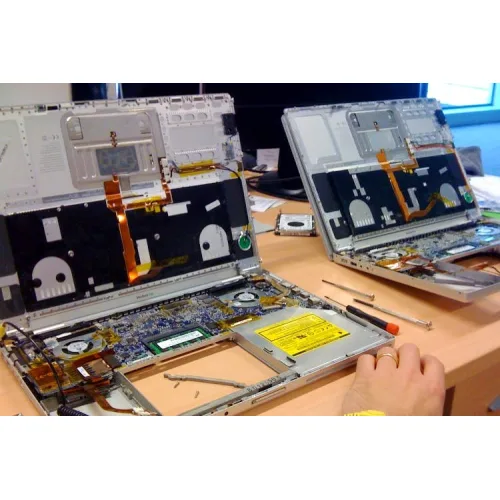
Laptop Repair Service
- Brand: Unisoft
- Product Code: Laptop Repair Service
- Availability: In Stock

Description
Professional laptop servicing is important when a device becomes slow, overheats, stops charging, develops display problems, fails to start, loses connectivity or behaves differently from normal. Modern laptops combine many compact electronic and mechanical components, so identifying the actual cause of a problem is often more important than simply replacing a part. Top Laptop Repair or Service center in Jashore for All Brands provides a practical approach to laptop diagnosis, repair, maintenance, troubleshooting and upgrade-related support for customers who want dependable technical assistance.
A laptop may appear to have one simple problem while the underlying cause is somewhere else. A charging issue can involve the battery, adapter, charging connector or power circuitry. Slow performance can result from storage limitations, insufficient memory, excessive background software or thermal problems. A blank screen can be related to the display assembly, cable, graphics system or motherboard. Professional diagnosis helps separate these possibilities before customers spend money on unnecessary parts.
Unix Network serves customers in Jessore and Jashore with computer hardware, laptops, gaming PCs, printers, networking equipment and IT accessories, alongside technical support. Customers can discuss their laptop symptoms and receive practical guidance about whether repair, maintenance, component replacement, upgrading or purchasing another device is the most sensible solution. The emphasis is on useful technical advice, suitable products and professional after-sales service rather than unrealistic promises.
Laptop Repair Price in Bangladesh
The Laptop Repair Price in Bangladesh depends on the type of problem, laptop model, required labour, availability of suitable components and complexity of the repair. A routine cleaning or software troubleshooting service is naturally different from motherboard diagnosis, display replacement, charging-circuit work or replacement of a major internal component. For this reason, a single fixed price cannot accurately represent every laptop repair requirement.
Customers comparing laptop repair prices should consider the complete value of the service rather than selecting a provider solely on the lowest initial quotation. Proper diagnosis, suitable components, careful installation and post-repair testing all contribute to the quality of the result. A cheap repair that uses an unsuitable component or fails to address the original cause may become more expensive if the same problem returns.
Laptop model and component availability can also influence repair costs in Bangladesh. Common models may have easier access to compatible batteries, displays, keyboards, cooling parts and storage devices. Older, less common or specialised laptops may require more time to source appropriate components. Premium and compact machines can also require additional care because of their internal construction.
Before approving a repair, customers should ask what is included in the quotation. It is useful to understand whether diagnosis, labour and replacement components are charged separately and whether a replacement part carries applicable warranty coverage. This makes price comparisons more meaningful and helps customers make an informed decision.
Unix Network takes a practical approach to service requirements. Instead of assuming that every laptop needs a complete repair or replacement, the device can be assessed according to its symptoms and condition. Where appropriate, the customer can then consider repair, upgrade or replacement based on expected usefulness and overall cost.
Product Overview
Top Laptop Repair or Service center in Jashore for All Brands is a service-focused solution for customers experiencing laptop hardware faults, software errors, performance problems, power issues, charging difficulties, cooling problems, display faults, storage concerns, memory limitations and connectivity issues. The service is designed around diagnosis and practical troubleshooting rather than treating every symptom as the same type of fault.
Laptops are compact systems in which the processor, memory, storage, display, battery, cooling assembly, motherboard, wireless hardware and operating system work together. A fault in one area can affect another. A professional assessment therefore considers the complete system and the circumstances in which the problem occurs.
The service can be relevant to everyday notebooks, business laptops, student computers, performance laptops and gaming systems. Different manufacturers use different internal designs and components, so repair procedures must be appropriate for the particular laptop rather than based only on the brand.
Customers searching for a Laptop Shop in Jessore may also require more than repair. A laptop owner might need an SSD upgrade, additional memory, a replacement charger, networking accessories or advice about purchasing a new computer. As a broader Tech Store Bangladesh, Unix Network can help customers consider these related requirements alongside the immediate service issue.
Key Features
- Laptop fault diagnosis before major repair decisions
- Hardware troubleshooting for common laptop components
- Software and operating system troubleshooting
- Performance diagnosis and maintenance
- Overheating and cooling-system assessment
- Battery and charging problem diagnosis
- Display and screen troubleshooting
- Keyboard and touchpad troubleshooting
- Storage and SSD upgrade guidance
- RAM and memory compatibility checking
- Wi-Fi and Bluetooth troubleshooting
- Power and startup fault diagnosis
- Port and connectivity troubleshooting
- Motherboard-level assessment where applicable
- Compatibility checking before component replacement
- Post-service functional testing
- Repair, upgrade and replacement guidance
Feature Benefits
The most important benefit of professional laptop servicing is that it can identify the likely source of a fault before unnecessary components are replaced. This is particularly valuable when symptoms overlap. For example, a slow laptop does not automatically need more RAM, and a laptop that does not charge does not automatically need a new battery.
Hardware diagnosis examines physical components and their behaviour. Depending on the laptop and symptoms, this may include storage, memory, battery, cooling hardware, display components, keyboard assemblies, ports, wireless components and motherboard-related functions.
Software troubleshooting addresses problems that originate from the operating system, drivers, applications, configuration or unwanted software. A laptop experiencing startup errors or instability may sometimes be restored through appropriate software maintenance rather than hardware replacement.
Cooling maintenance is useful for laptops that have accumulated dust or developed abnormal fan behaviour. Restricted airflow can contribute to increased temperatures and reduced sustained performance. A suitable cleaning and inspection process can help determine whether cooling maintenance is enough or whether another component requires attention.
Compatibility checking is particularly important for laptop upgrades. Storage drives, RAM, batteries, displays, keyboards, chargers and other components can vary between models. Checking compatibility before purchase reduces the possibility of buying a component that cannot be installed or does not meet the laptop's requirements.
Technical Highlights
| Service Area | Typical Assessment |
|---|---|
| Hardware Diagnosis | Physical components, connections, symptoms and component condition |
| Software Service | Operating system, drivers, applications and configuration |
| Performance Troubleshooting | Storage, memory usage, software load and thermal behaviour |
| Power Diagnosis | Startup behaviour, battery symptoms, charging and power delivery |
| Cooling Service | Dust, airflow, fan operation and thermal behaviour |
| Storage Service | Storage health, compatibility and upgrade requirements |
| Memory Service | Memory-related faults and supported upgrade options |
| Display Troubleshooting | Screen, cable, backlight and related display symptoms |
| Connectivity | Wi-Fi, Bluetooth, ports and network-related problems |
| Final Testing | Basic functional checks after completed service work |
Common Laptop Repair Requirements
Laptop servicing covers a wide range of problems. Some faults develop gradually, while others appear suddenly after a drop, liquid exposure, electrical event or component failure. Explaining the symptoms accurately can help the technician investigate the correct area more efficiently.
- Laptop does not power on
- Laptop powers on but shows no image
- Slow startup or application loading
- Frequent freezing or unexpected restarts
- Battery drains unusually quickly
- Battery does not charge
- Laptop works only with the charger connected
- Charging connector becomes unreliable
- Laptop becomes excessively hot
- Cooling fan becomes unusually noisy
- Keyboard keys stop responding
- Touchpad stops working correctly
- Screen flickers or displays abnormal lines
- Wi-Fi repeatedly disconnects
- Bluetooth devices fail to connect
- Storage becomes unusually slow
- Operating system fails to boot normally
- Applications repeatedly crash
- USB or other ports stop responding
- Hinges or chassis become physically damaged
- Liquid exposure causes abnormal operation
Laptop Hardware Repair
Hardware repair involves examining the physical components responsible for the laptop's operation. Depending on the design, this can include storage devices, RAM, cooling fans, heat-transfer components, keyboards, touchpads, batteries, displays, speakers, wireless modules, charging assemblies and motherboard circuitry.
Not every damaged component should be repaired at component level. In some situations, replacing a module is the more practical solution. In other cases, a connector, circuit or board-level fault may be serviceable. The right decision depends on the repair complexity, component availability, laptop value and expected future use.
Physical damage deserves particular attention. A cracked display, damaged hinge or bent chassis can place additional stress on internal components. Continuing to use a physically compromised laptop may increase the damage, especially when the affected area is repeatedly opened, closed or moved.
Software Troubleshooting and Maintenance
Software problems can make a healthy laptop appear defective. Startup errors, application crashes, system freezes, slow operation, driver conflicts and network problems can all originate from software rather than physical hardware.
Software servicing may involve examining the operating system, drivers, startup applications, installed programs and system configuration. Unnecessary software can consume resources, while problematic drivers can affect hardware functions such as Wi-Fi, graphics, audio or Bluetooth.
Customers should clearly identify important files before major software work begins. Operating system reinstallation, recovery procedures or certain forms of troubleshooting can affect stored information. Independent backups remain the safest way to protect important personal and business data.
Laptop Overheating Service
Heat is a significant factor in laptop reliability and sustained performance. Dust accumulation around fans and ventilation areas can restrict airflow, while a worn cooling fan or deteriorated thermal interface can reduce cooling effectiveness.
When processor or graphics temperatures become too high, the system may reduce performance to control heat. This can appear as reduced speed during gaming, video editing, rendering, programming or other demanding workloads.
Overheating should not automatically be treated as a reason to replace the laptop. Inspection can determine whether cleaning, cooling maintenance, fan replacement or another repair is appropriate. The solution depends on the actual condition of the device.
Battery and Charging Problems
Battery degradation is normal over time, but unusual charging behaviour deserves investigation. A laptop may discharge rapidly, refuse to charge, shut down when disconnected from mains power or show inconsistent battery readings.
These symptoms can involve the battery, charger, charging connector, charging circuitry or software reporting. Replacing the battery without checking the rest of the charging system may not resolve the underlying problem.
If a battery becomes swollen, unusually hot or physically damaged, continued use should be avoided until the device can be assessed safely. A damaged battery should not be repeatedly charged in an attempt to restore normal operation.
Display and Screen Repair
Display faults can range from a damaged screen panel to a loose or defective display connection. Symptoms may include flickering, lines, abnormal brightness, intermittent image loss or a completely blank screen.
Diagnosis should determine whether the problem originates from the display panel, cable, graphics system or another component. If an external monitor works normally while the built-in display does not, this can provide useful diagnostic information.
Screen replacement also requires compatibility checking. Matching only the physical size is not sufficient for every laptop. The correct replacement may depend on the laptop model, connector arrangement, mounting design and other characteristics.
Keyboard and Touchpad Service
Keyboard faults can affect one key, several keys or the entire input assembly. Physical wear, liquid exposure, connection issues and component failure can all produce different symptoms.
Touchpad problems may originate from the touchpad hardware, internal connection, drivers or operating system settings. A technician can determine whether the issue is primarily software or hardware related before recommending replacement.
Liquid exposure deserves additional caution because damage may extend below the keyboard into the motherboard or other internal components. If liquid enters a laptop, continuing normal operation can increase the risk of further damage.
Storage and SSD Upgrade Support
Storage has a major effect on everyday system responsiveness. A laptop with an older or deteriorating storage device may experience slow startup, application delays, file-access problems or instability.
An SSD upgrade can be useful when the laptop supports a suitable drive. Faster storage can improve boot times, application loading and general responsiveness compared with slower storage technologies, although the overall improvement depends on the rest of the system.
Storage selection should consider interface, physical format, capacity, system compatibility and the customer's workload. Before replacing a system drive, important files should be backed up and any required data migration should be planned.
RAM Upgrade and Memory Diagnosis
Memory affects how comfortably a laptop handles multiple applications and active tasks. Users who regularly keep many browser tabs open, run office applications simultaneously, edit media or work with development tools may notice limitations when available memory is insufficient.
Not every laptop can be upgraded in the same way. Some models provide accessible memory slots, while others use memory integrated into the motherboard. Supported memory technology and capacity also vary.
Customers should therefore check their exact laptop model before buying RAM. Unix Network can help customers assess whether a memory upgrade is appropriate and whether the proposed component matches the system requirements.
Motherboard Troubleshooting
The motherboard connects many of a laptop's essential functions, including power delivery, processor operation, memory communication, storage interfaces, display functions and peripheral connectivity. Problems at board level can therefore produce several apparently unrelated symptoms.
Motherboard diagnosis is more complex than routine maintenance. A board-level repair should be considered only after appropriate troubleshooting identifies a credible fault. In some situations, replacing a board can be more practical than extensive component-level work.
The economics of motherboard repair should also be considered. Customers should compare the estimated repair cost with the laptop's current value, age, specifications, availability of replacement boards and expected future usage.
Real World Usage
Students often depend on laptops for assignments, research, online learning, presentations, programming and communication. If a suitable laptop develops a manageable fault, professional servicing can extend its practical usefulness without requiring an immediate replacement.
Office users depend on stable computers for documents, spreadsheets, accounting, communication, browsing and business applications. Problems involving storage, charging, connectivity or performance can interrupt daily work, making timely diagnosis valuable.
Home users may encounter laptops that have gradually become slower or hotter over several years. Cleaning, software maintenance, storage replacement or a suitable memory upgrade can sometimes restore useful performance.
Gaming laptop users place higher demands on processors, graphics hardware, cooling systems and power delivery. If a gaming system becomes unusually hot, loses performance, crashes under load or shuts down unexpectedly, diagnosis should consider thermal and electrical factors rather than assuming that the graphics hardware is automatically defective.
Performance After Servicing
A repair should restore appropriate functionality rather than promise an unrealistic transformation. The improvement a customer experiences depends on the original fault and the condition of the rest of the laptop.
A machine suffering from overheating may become more consistent after appropriate cooling maintenance. A laptop with an ageing or failing storage device may become substantially more responsive after a compatible storage upgrade. A system affected by unnecessary background software may improve after suitable software maintenance.
Repair cannot change the fundamental limitations of an older processor or graphics platform. When the hardware is no longer appropriate for the customer's workload, replacement may be a better long-term decision. Honest technical advice should account for this rather than recommending repairs simply because a repair is possible.
Build Quality and Physical Condition
Laptop construction influences both durability and serviceability. Business-oriented laptops may use different chassis designs from thin consumer notebooks, while gaming laptops can have larger cooling systems and different internal layouts.
Physical wear around hinges, ports, keyboards and chassis panels can indicate how the device has been used. A laptop with a damaged hinge may need mechanical attention even if its electronic components remain functional.
Good maintenance also involves proper everyday handling. Avoid placing a laptop on surfaces that block ventilation, forcing stiff hinges or repeatedly bending charging cables. Small habits can influence long-term reliability.
Compatibility Considerations
Compatibility is critical when selecting laptop replacement parts or upgrades. A component that appears physically similar may still have different electrical, firmware, connector or mounting requirements.
Battery, screen, keyboard, RAM, SSD, Wi-Fi module, cooling components and chargers should be selected according to the particular laptop model and configuration. Compatibility should be confirmed before purchasing a replacement component.
Customers searching for the Best {name} should therefore consider technical suitability as well as service price. A correctly selected component can provide better value than a cheaper part that is unsuitable or unreliable.
Reliability and Durability
Reliable laptop servicing means more than making the device function temporarily. The technician should consider the original cause, surrounding components and whether the repair is likely to provide sensible value for the laptop's remaining useful life.
Appropriate replacement components, careful installation and post-service testing can support reliability. However, a repair cannot prevent unrelated components from ageing in the future. Older laptops may naturally develop additional issues as batteries, storage devices, fans and other components reach the end of their service life.
Preventive maintenance can help reduce avoidable problems. Keeping cooling paths clear, using suitable chargers, protecting the laptop from liquid and maintaining backups are practical steps for everyday users.
Advantages of Professional Laptop Servicing
- Identifies likely causes before unnecessary parts are purchased
- Provides structured troubleshooting
- Helps distinguish hardware faults from software problems
- Supports sensible upgrade decisions
- Allows compatibility to be checked before component purchase
- Can extend the useful life of suitable laptops
- Helps identify overheating and cooling problems
- Provides guidance on repair versus replacement
- Supports hardware and software maintenance
- Provides professional technical assistance for complex symptoms
Things to Consider Before Choosing Laptop Repair
Start by recording the symptoms. Note when the problem occurs, whether it happens every time, whether it began after an accident or update and whether anything changed before the fault appeared.
Consider the importance of the data stored on the laptop. If it contains business documents, accounting information, photographs or other valuable files, communicate this before major repair or operating system work.
Ask for a clear explanation of the proposed repair. Customers should understand which component is suspected, what work is required and whether replacement parts are necessary.
Compare the expected repair cost with the laptop's age and capability. Repairing a relatively capable laptop with a manageable fault may be worthwhile, while extensive work on an old machine with multiple ageing components may not offer good value.
Who Should Use This Service
Laptop repair and servicing can be useful for students, office professionals, business owners, home users, freelancers, programmers, content creators and gamers. The service is particularly relevant when the laptop remains suitable for its intended work but has developed a specific fault or performance problem.
Students may benefit from servicing when their existing laptop is capable of handling academic requirements but has developed storage, battery, keyboard, software or cooling problems.
Office and business users can benefit from timely troubleshooting because computer downtime can interfere with daily operations. Charging, connectivity, storage and software problems can all affect productivity.
Gaming users may require additional attention to cooling, power delivery, storage and sustained performance. A gaming laptop should be assessed according to its workload and thermal behaviour.
Why Choose Unix Network
Unix Network is a local technology retailer serving customers in Jessore and Jashore, with a broader range of computers, laptops, gaming PCs, printers, networking equipment and IT accessories. This wider product knowledge can be useful when a repair requirement is connected with an upgrade or replacement decision.
Customers looking for a Computer Shop in Jessore or Jessore Computer Store can discuss their technology requirements with a local team rather than making a decision based only on an online product listing.
For customers who need laptop components or accessories, compatibility can be considered before purchase. This is particularly useful for batteries, storage devices, memory, chargers and other laptop-specific products.
Unix Network also serves customers beyond Jessore through nationwide delivery for eligible products. Customers in Jhenaidah, Magura, Narail, Satkhira, Khulna, Kushtia, Chuadanga and other areas can contact the business regarding product requirements and available support.
The goal is to provide competitive pricing, authentic products where applicable, expert technical guidance and professional customer support. Warranty information should always be considered according to the specific product or service supplied.
Buying Guide
Before bringing a laptop for service, identify the main symptom as clearly as possible. A simple description such as “does not charge”, “shuts down during gaming” or “screen flickers when the lid moves” can provide useful diagnostic direction.
Do not purchase a replacement part solely based on a generic laptop name. Exact model and configuration information can be important when selecting a battery, display, keyboard, RAM, SSD or charger.
If the laptop is slow, consider whether the problem appeared suddenly or developed gradually. Sudden performance changes can indicate a software or hardware fault, while gradual degradation may be related to storage, thermal maintenance, ageing components or changing workload requirements.
If the laptop is several years old, consider its overall condition before approving expensive repairs. A repair that makes financial sense should also provide enough useful life to justify the expenditure.
Original and Genuine Replacement Parts
Customers often search for Original {name} or Genuine {name} because component quality matters. However, the word “original” should not be used as a substitute for proper compatibility checking. The important question is whether the component is appropriate for the particular laptop and meets the required quality standard.
Depending on the model and availability, replacement components may come from different supply channels. Some products may have manufacturer-backed options, while compatible alternatives may be suitable in other situations. Customers should understand the available choice before approving replacement work.
Unix Network can provide guidance on suitable products and components based on availability and compatibility. Where an official manufacturer warranty applies to a supplied product, the applicable warranty terms should be checked before purchase.
Warranty Information
Warranty coverage varies according to the product, replacement component and service arrangement. A battery, storage drive, laptop accessory and repair labour may have different terms, so customers should confirm the applicable conditions before completing a purchase or service.
Warranty does not normally cover every form of physical damage, misuse or unrelated future fault. Customers should retain relevant purchase or service information where applicable so that warranty queries can be handled efficiently.
Professional repair and warranty support work together, but neither should be treated as a guarantee against normal component ageing. Appropriate use and regular maintenance remain important for long-term reliability.
Delivery Across Bangladesh
Unix Network provides nationwide delivery for eligible technology products, allowing customers outside Jessore to access computers, laptops, networking equipment, accessories and other IT products.
Customers who require a replacement component can discuss the product and compatibility requirements before ordering. This can help reduce mistakes when purchasing model-specific laptop parts.
For repair requirements outside the local area, customers should contact Unix Network first to understand the available service process. Repair logistics can vary depending on the fault, device type and location.
After Sales Support
After-sales service is an important part of purchasing technology. Customers may require assistance after buying an upgrade, replacement component or accessory, particularly when the product needs to work with an existing laptop.
If a serviced laptop develops another problem, explaining the previous symptoms and work performed can help with further assessment. Not every later fault is necessarily connected to the original repair, so technical evaluation remains important.
Unix Network aims to support customers beyond the initial transaction through product guidance, technical assistance and after-sales communication where applicable.
Preventive Laptop Maintenance
Regular maintenance can help keep a laptop operating reliably. Cooling vents should remain unobstructed, and the device should not routinely be used on soft surfaces that restrict airflow.
Important files should be backed up independently. A laptop can experience storage failure or other hardware problems without warning, and servicing should not be considered a replacement for a proper backup strategy.
Users should also monitor unusual symptoms such as increasing fan noise, excessive heat, repeated crashes, charging irregularities or sudden performance changes. Early assessment may prevent a manageable issue from becoming more complicated.
Laptop Repair for Students
Students often need a dependable computer for assignments, online learning, research, programming, presentations and communication. When an existing laptop is still adequate for these tasks, repairing a specific fault can be more practical than purchasing a replacement immediately.
Common student requirements include operating system troubleshooting, storage upgrades, battery assessment, cooling maintenance, keyboard repair and general performance diagnosis.
Laptop Repair for Office Users
Office laptops are frequently used for documents, spreadsheets, accounting, email, web applications, video meetings and business communication. Stability and reliability are often more important than maximum performance.
When an office laptop develops a charging problem, storage fault, network issue or software instability, timely service can help reduce disruption. Data protection should remain a priority throughout the repair process.
Laptop Repair for Gaming Users
Gaming laptops can experience greater thermal and power demands than many everyday notebooks. Dust, restricted airflow, ageing cooling components or sustained high workloads can affect performance.
If a gaming laptop begins shutting down during games, losing frame-rate consistency or producing unusually high fan noise, professional diagnosis can determine whether the issue is thermal, software-related or connected with another component.
Laptop Repair for Professional Work
Programmers, designers, engineers, editors and other professionals may rely heavily on their laptops. Storage capacity, memory, cooling, display quality and system stability can have a direct effect on productivity.
For these users, repair and upgrade decisions should be based on workload rather than specifications alone. A targeted upgrade may be sufficient when the existing platform remains capable, while a replacement may be appropriate when the laptop no longer meets the required performance level.
Frequently Asked Questions
How much does laptop repair cost in Bangladesh?
Laptop repair pricing depends on the fault, laptop model, labour involved and whether replacement components are required. A diagnosis is normally necessary before a meaningful repair estimate can be provided.
Does Unix Network provide laptop repair in Jessore?
Unix Network serves customers in Jessore and Jashore with computer technology products and technical support. Customers can contact the business to discuss their laptop symptoms and determine the appropriate service process.
Can all laptop brands be serviced?
Serviceability depends on the particular model, fault and availability of suitable components. Different manufacturers use different designs, so each laptop should be assessed individually before repair.
Should I repair my old laptop?
Repair can be worthwhile when the laptop remains capable of handling the customer's workload and the fault is economically sensible to fix. If the machine has multiple major faults or no longer meets the required performance level, replacement may offer better long-term value.
Can a slow laptop be repaired?
Many causes of slow performance can be addressed through servicing or upgrading. Storage condition, available memory, software load, operating system issues and overheating should all be considered before choosing a solution.
Can overheating reduce laptop performance?
Yes. Excessive temperature can cause a system to reduce processor or graphics performance to control heat. Cooling maintenance may help when dust, restricted airflow or cooling-component problems are responsible.
Does every charging problem mean the battery needs replacement?
No. Charging problems can also involve the charger, charging connector, power circuitry or software. Diagnosis is useful before purchasing a replacement battery.
Can I upgrade my laptop with an SSD?
Many laptops support storage upgrades, but the correct SSD depends on the laptop's supported interface, physical format and configuration. Compatibility should be confirmed before purchase.
Can laptop RAM be upgraded?
Some laptops support RAM upgrades, while others use integrated memory. The exact model must be checked to determine whether an upgrade is possible and which memory configuration is supported.
Can liquid-damaged laptops be repaired?
Some liquid-damaged laptops can be recovered, but the outcome depends on how much liquid entered the device and which components were affected. Continued operation after liquid exposure can increase damage, so professional assessment is advisable.
What should I do if my laptop does not turn on?
Avoid repeatedly forcing the power or charging connection if there are signs of electrical or physical damage. If the laptop has experienced liquid exposure, unusual heat, burning odour or physical damage, stop using it and seek professional assessment.
Is laptop servicing useful when the laptop still works?
Preventive maintenance can be useful when a laptop has accumulated dust, developed increasing heat, become noticeably slower or started showing unusual behaviour. Early attention can help identify developing issues.
Does Unix Network deliver products outside Jessore?
Unix Network supports customers across Bangladesh through nationwide delivery for eligible products. Customers outside Jashore can contact the business regarding product availability, compatibility and relevant support options.
How do I choose the best laptop repair service?
Consider diagnostic quality, technical experience, component suitability, transparent service information, warranty terms where applicable and after-sales support. A good repair decision should focus on solving the actual fault while keeping the total cost and expected laptop lifespan in perspective.
Conclusion
A dependable laptop repair service should focus on accurate diagnosis, suitable solutions and sensible value. Whether the problem involves charging, battery health, overheating, display, keyboard, storage, RAM, connectivity, software or motherboard-level symptoms, the correct repair depends on the laptop's individual condition.
Top Laptop Repair or Service center in Jashore for All Brands is intended to help customers make better decisions about servicing, repairing, upgrading or replacing their laptops. Professional assessment can prevent unnecessary part purchases and provide a clearer understanding of the options available.
For customers in Jessore and surrounding areas, Unix Network combines local showroom availability with broader technology expertise across computers, laptops, gaming PCs, printers, networking equipment and IT accessories. Customers can seek expert technical support, competitive pricing, authentic products where applicable and professional after-sales service.
Whether you are looking for a Computer Shop in Jessore, Laptop Shop in Jessore, Gaming PC Shop in Jessore or a reliable Tech Store Bangladesh for your next technology requirement, Unix Network provides a practical local option. Customers throughout Bangladesh can also access eligible products through nationwide delivery, with product selection and compatibility guidance available when required.