
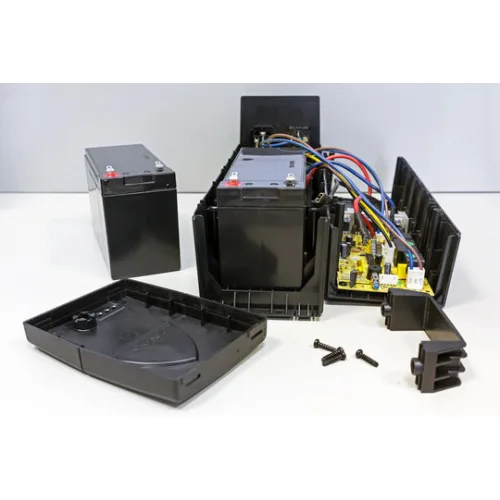
Description
UPS Repair is an important service for keeping an Uninterruptible Power Supply dependable when its battery no longer provides adequate backup, the unit fails to switch to battery mode, produces unusual alarms, shuts down unexpectedly, shows unstable output or develops another operating problem. A UPS is often connected to equipment that people depend on every day, including desktop computers, gaming PCs, routers, networking equipment, CCTV systems, billing computers and office workstations. When the UPS itself becomes unreliable, repairing the underlying problem can be more practical than immediately replacing the entire unit.
UPS repair is not limited to changing a battery. A technician may need to investigate the charging circuit, inverter section, input and output stages, protection components, cooling system, wiring, connectors, control electronics and other parts depending on the symptoms. A proper diagnosis is therefore important before deciding whether a UPS needs a simple battery replacement, electronic repair, preventive servicing or complete replacement.
This guide explains the practical aspects of UPS Repair, including common faults, diagnosis, battery problems, charging issues, overload conditions, no-output situations, unusual sounds, maintenance, repair-versus-replacement decisions and buying considerations. It is intended to help customers understand what can go wrong with a UPS and what information is useful when seeking professional technical support in Jessore, Jashore or elsewhere in Bangladesh.
UPS Repair Price in Bangladesh
The price of UPS repair in Bangladesh depends on the nature of the fault, the UPS design, required replacement parts, battery condition and the amount of diagnostic work involved. A battery replacement is generally a different service from repairing an inverter circuit, charging section or damaged electronic component.
A responsible repair assessment should identify the cause of the problem before quoting a final repair cost. Simply replacing a battery without checking the charging system may not solve the problem if the UPS has an internal electronic fault.
The total cost may be influenced by several factors:
- UPS capacity and design
- Type of fault
- Battery condition
- Number and type of batteries required
- Charging circuit condition
- Inverter or power-conversion fault
- Input or output circuit problems
- Cooling and fan condition
- Availability of compatible replacement components
- Labour and diagnostic requirements
- Age and overall condition of the UPS
- Warranty or service coverage
For this reason, customers should be cautious about choosing a repair provider solely because the initial quoted price is low. A proper diagnosis can help determine whether the repair is economically sensible and whether the UPS is likely to remain suitable for the intended workload.
What Is UPS Repair?
UPS repair is the process of diagnosing and correcting faults in an Uninterruptible Power Supply so that the equipment can perform its intended functions safely and reliably. Depending on the problem, repair may involve inspection, electrical testing, battery replacement, component replacement, connection repair, cleaning, configuration checks or other technical work.
A UPS normally performs several jobs. It accepts incoming mains power, charges its battery, supplies power to connected equipment and changes to battery-powered output when the normal supply is unavailable, depending on its topology. Some models also regulate voltage or provide additional monitoring and protection features.
Because several sections work together, a fault in one area can produce symptoms that appear to originate elsewhere. For example, a UPS that shuts down quickly during an outage may have a weak battery, but excessive load or a charging problem could also contribute to the symptom.
Common Reasons a UPS Needs Repair
UPS problems can develop gradually or appear suddenly. Some are caused by normal battery ageing, while others result from electrical stress, environmental conditions, overloaded operation, poor connections or component failure.
- Battery no longer holding sufficient charge
- UPS shutting down shortly after a power failure
- Failure to charge the battery properly
- No output power
- Repeated overload warnings
- Unexpected shutdown during normal operation
- Unusual alarm behaviour
- Excessive heat
- Cooling fan problems
- Input power faults
- Output instability
- Damaged connectors or cables
- Internal electronic component failure
- Physical damage
- Age-related deterioration
UPS Battery Problems
The battery is one of the most common service items in a UPS. Rechargeable batteries gradually lose capacity as they age. Eventually, a UPS may appear to operate normally while mains electricity is available but provide very little backup time when the power fails.
A weak battery can cause symptoms such as immediate shutdown, low-battery warnings, short runtime or repeated switching behaviour. However, battery failure should be confirmed rather than assumed.
If a replacement battery is installed in a UPS with a faulty charging circuit, the new battery may also fail to charge correctly. This is why battery replacement and UPS diagnosis should be considered together when symptoms are unclear.
When Should a UPS Battery Be Replaced?
A battery may need replacement when its available capacity has deteriorated significantly, the UPS reports a battery fault, backup time has become unusually short or testing indicates that the battery is no longer suitable for service.
Battery lifespan varies according to operating temperature, charging conditions, usage patterns, battery quality and UPS design. There is no single replacement interval that applies equally to every installation.
Customers should also inspect the battery for physical damage. A swollen, leaking or otherwise visibly damaged battery requires appropriate handling and should not simply be placed back into service.
UPS Not Turning On
A UPS that does not turn on can have several possible causes. The problem may be related to the mains input, internal fuse or protection circuitry, battery condition, power switch, control electronics or another internal component.
Before arranging repair, users can perform basic external checks such as confirming that the mains connection is present and checking whether the power switch is in the correct position. Internal electrical components should not be opened or tested by someone without appropriate technical knowledge.
If external checks do not resolve the problem, professional diagnosis is preferable. Repeatedly switching a faulty UPS on and off can be unhelpful when the underlying problem has not been identified.
UPS Has No Output Power
A UPS may have mains input but fail to provide usable output. Possible causes include an internal output fault, protection state, overload, switching problem, damaged connection or other electronic failure.
Check whether the UPS indicates an overload or fault condition. If the equipment is overloaded, disconnecting non-essential loads may help identify whether the problem is load-related. If the UPS still fails to provide output, technical inspection may be required.
UPS Shuts Down During a Power Cut
If the UPS switches to battery power but shuts down almost immediately, battery condition is one of the first areas to investigate. However, excessive load, battery connection problems and internal faults can create similar symptoms.
For example, a UPS that previously operated a desktop computer for a useful period but now shuts down almost immediately may have a deteriorated battery. A recently upgraded gaming PC could also increase the load enough to exceed what the UPS can comfortably support.
UPS Battery Not Charging
A battery that does not charge can result from a failed battery, damaged connection, charging circuit problem, control-board issue or other fault. Simply replacing the battery is not always the correct solution.
A technician can assess whether charging voltage and other relevant electrical behaviour are consistent with the UPS design. This type of diagnosis helps distinguish a battery problem from a charging-system problem.
UPS Beeping Frequently
Beeping does not automatically mean that the UPS is defective. Many UPS systems use audible alerts to indicate battery operation, low battery, overload or another status condition.
The meaning of an alarm pattern depends on the specific model. Customers should check the manufacturer's documentation or have the unit inspected if the alarm is persistent or accompanied by abnormal behaviour.
UPS Overload Problems
An overloaded UPS may produce warning sounds, show an overload indicator, reduce output or shut down depending on its design. Overload can occur when too many devices are connected or when a high-demand device is added.
Gaming PCs, high-performance workstations and laser printers can have considerably different power requirements from basic office computers. A UPS should therefore be selected and operated according to the actual load.
Removing unnecessary devices from the backup output can help reduce the load. If the UPS remains overloaded with the essential equipment connected, a higher-capacity solution may be required.
UPS Inverter Problems
The inverter is a critical part of a UPS because it converts stored battery energy into the form of electrical output required by connected equipment during battery operation.
An inverter-related fault can cause symptoms such as failure to provide output during an outage, unusual sounds, abnormal alarms or immediate shutdown. Diagnosing this section requires appropriate electrical testing and technical knowledge.
Because the internal circuitry can contain hazardous electrical energy even after the unit is disconnected from mains power, inverter repair should be handled by an appropriately qualified technician.
UPS Charging Circuit Repair
The charging circuit maintains the battery after the UPS has been connected to mains power. If this section develops a fault, the UPS may appear functional but fail to restore adequate battery charge.
Charging problems can be confused with battery problems. If a replacement battery repeatedly becomes discharged or the UPS reports charging errors, the charging system should be investigated.
UPS Input Problems
Input faults can prevent a UPS from receiving or correctly processing mains electricity. Symptoms may include failure to charge, repeated switching, abnormal indicators or complete shutdown.
Input-related issues can originate from the external electrical supply, connection, internal protection circuitry or other components. A technician should distinguish between an installation problem and a UPS hardware problem before repair is attempted.
UPS Output Problems
Output problems may appear as unstable operation, shutdown of connected devices, alarms or failure to provide power. The connected load should be considered as part of the diagnosis because incompatible or excessive loads can influence UPS behaviour.
If only one connected device experiences a problem while other devices operate normally, the device's power requirements and connection should also be investigated.
UPS Fan and Cooling Problems
Some UPS models use fans to control internal temperature. A failed or obstructed fan can contribute to overheating, reduced performance or protective shutdowns.
Dust can also restrict airflow around the UPS. Keeping ventilation openings clear and maintaining an appropriate operating environment can reduce unnecessary thermal stress.
Do not obstruct a UPS fan simply to reduce noise. Cooling is part of the equipment's normal operating requirements.
UPS Overheating
Excessive temperature can affect both electronic components and batteries. A UPS installed inside a confined cabinet without adequate ventilation may experience higher operating temperatures than intended.
Overheating can be associated with heavy load, blocked ventilation, fan failure, environmental heat or an internal electronic problem.
If the UPS becomes unusually hot, repeatedly shuts down or produces an abnormal smell, stop relying on it until the cause has been properly assessed.
UPS Short-Circuit and Protection Conditions
UPS systems contain protection mechanisms intended to respond to conditions such as overload or short circuit. If a protection feature repeatedly activates, it should not simply be bypassed.
Repeated protection events may indicate a faulty connected device, damaged cable, excessive load or internal UPS problem. Finding the source is more important than repeatedly resetting the protection mechanism.
Technical Highlights of UPS Repair
| Repair Area | Typical Purpose |
|---|---|
| Battery assessment | Checks whether the battery can provide appropriate backup performance. |
| Charging system | Determines whether the UPS is charging its battery correctly. |
| Input section | Investigates problems related to incoming electrical power and internal input circuitry. |
| Output section | Investigates failure or instability at the UPS output. |
| Inverter section | Checks the power-conversion stage used during battery operation. |
| Cooling system | Checks fans, ventilation and thermal conditions. |
| Connections | Identifies loose, damaged or corroded connections where applicable. |
| Load assessment | Determines whether connected equipment is appropriate for the UPS capacity. |
| Protection system | Investigates repeated overload or protection activation. |
How Professional UPS Diagnosis Works
A useful repair process starts with the customer's description of the problem. Information such as when the fault occurs, whether the UPS works on mains power, how long it operates on battery and what equipment is connected can help narrow the possibilities.
The technician can then inspect the unit externally and perform appropriate diagnostic checks. Depending on the symptoms, the battery, input, output, charging system, inverter, connections and other relevant sections may be evaluated.
The objective is to identify the actual cause rather than replacing parts unnecessarily. This approach can save money when a relatively simple repair is sufficient and can also prevent repeated failures caused by treating only the visible symptom.
UPS Repair vs Battery Replacement
Battery replacement and UPS repair are related but not identical. A battery is a serviceable consumable component, while the UPS itself contains electronic circuits that can also develop faults.
If the UPS operates correctly on mains power but provides inadequate runtime during an outage, the battery may be the primary problem. If the unit cannot charge a known-good battery, the charging section may need attention.
If the UPS has no output, repeatedly trips protection or shows other electronic symptoms, a broader diagnosis may be necessary.
When UPS Repair Is Worthwhile
Repair can be a sensible option when the UPS is otherwise in good physical condition, the fault is identifiable and suitable replacement components are available.
Repair may be particularly practical when the UPS has an appropriate capacity for the customer's current equipment and replacing it would provide no meaningful functional advantage.
However, repair should be evaluated based on the total condition of the unit. Replacing one failed component in a heavily aged UPS does not necessarily restore the reliability of every other ageing component.
When UPS Replacement Makes More Sense
Replacement may be preferable when the UPS has extensive damage, repeated failures, obsolete components, poor battery availability or insufficient capacity for the customer's current equipment.
A change in workload can also make replacement more sensible. For example, upgrading from a basic office PC to a substantially more powerful gaming computer can increase the required UPS capacity.
The decision should consider repair cost, remaining service life, reliability, warranty, replacement availability and the importance of the connected equipment.
UPS Build Quality and Reliability
UPS reliability depends on the quality and condition of its electrical components, battery system, cooling arrangement and physical installation. Good build quality can support long-term operation, but no electronic device is immune to ageing or electrical stress.
A UPS installed in a cool, clean and properly ventilated environment generally operates under more favourable conditions than one exposed to excessive heat, dust or moisture.
Physical connections also matter. Loose plugs, damaged cables and poor battery connections can cause intermittent faults that may appear to be more serious electronic failures.
UPS Compatibility with Computers
Before repairing or replacing a UPS for a computer, consider the computer's actual power requirements. Desktop PCs with higher-performance processors and graphics cards can place significantly greater demands on the UPS than ordinary office computers.
The power supply installed in the computer can also be relevant to UPS selection. Where compatibility with a particular UPS output waveform or operating mode is a concern, the computer power supply and UPS specifications should be checked.
UPS Compatibility with Gaming PCs
Gaming PCs require careful UPS planning because their power consumption can vary substantially depending on the processor, graphics card and workload.
A UPS that was suitable for an entry-level office computer may not be appropriate after a major gaming PC upgrade. If the UPS regularly reaches its limit, it can produce overload warnings or provide shorter battery runtime.
For a gaming system, the UPS should be selected according to the actual power requirement and the intended purpose of the backup. In many cases, the goal is to allow controlled shutdown rather than extended gaming during a prolonged outage.
UPS Compatibility with Networking Equipment
Routers, switches, modems and optical network equipment generally have different power requirements from desktop computers. A UPS can be useful for keeping these devices running during short interruptions.
When diagnosing a networking UPS setup, check the power adapter, output connection and total load. A small networking device can still stop working if the UPS output or connection is unsuitable.
UPS Compatibility with CCTV Equipment
CCTV systems may rely on a DVR or NVR, cameras, PoE equipment, network switches and other components. If only the recorder is connected to backup power while the cameras lose power, recording may still be interrupted.
A UPS repair assessment for CCTV should therefore consider the complete protected load. The system should be designed so that critical components receive power from the backup arrangement where required.
UPS Compatibility with Printers
Printer compatibility deserves particular attention. Laser printers can have high power demand during certain operating cycles, which may exceed the comfortable capacity of a UPS intended for a computer workstation.
If a UPS repeatedly enters overload when a printer operates, the printer's power characteristics and the UPS capacity should be reviewed. It may be better to keep the printer outside the UPS-backed load depending on the business requirement.
Advantages of Professional UPS Repair
- Identifies the likely cause of failure before unnecessary parts are replaced
- Can restore useful service when the underlying UPS remains suitable
- May be more economical than complete replacement
- Can identify battery and charging problems separately
- Can assess overload-related issues
- Can help identify cooling and connection problems
- Can provide practical advice about future UPS use
- Can determine whether replacement is more sensible than repair
Things to Consider Before Repairing a UPS
- Age of the UPS
- Overall physical condition
- Current battery condition
- Original UPS capacity
- Current equipment load
- Availability of compatible replacement components
- Repair cost
- Expected remaining service life
- Warranty status
- Importance of the equipment connected to the UPS
- History of previous repairs
- Availability of professional after-sales support
Safety Considerations During UPS Repair
UPS repair is not a suitable DIY project for users without appropriate electrical knowledge. Internal UPS circuits can contain hazardous voltages and stored electrical energy even when the unit has been disconnected from mains power.
Opening the enclosure, testing internal components or replacing electrical parts should therefore be left to an appropriately qualified technician.
Users can safely provide useful information by describing the symptoms, checking external connections and identifying the equipment connected to the UPS. Internal diagnosis should be handled professionally.
UPS Repair and Power Efficiency
A properly functioning UPS should operate according to its intended design. Faulty batteries, cooling problems or overloaded operation can affect how efficiently the system performs.
When servicing a UPS, consider whether the current load is still appropriate. Removing unnecessary equipment from the backup output can reduce battery demand and improve practical runtime.
Efficiency should not be considered separately from reliability. A UPS that uses slightly less energy but cannot provide suitable protection for the connected equipment may not be the right choice.
Preventive UPS Maintenance
Regular inspection can help identify problems before a UPS is needed during an actual outage. Preventive maintenance is especially useful for businesses that depend on computers, networking equipment or CCTV systems.
- Keep ventilation areas clear.
- Inspect the UPS for unusual heat or noise.
- Check warning indicators.
- Monitor battery performance.
- Inspect external cables and plugs.
- Review the connected load after equipment upgrades.
- Confirm that backup operation still works as expected.
- Keep the UPS away from excessive heat and moisture.
- Replace deteriorated batteries appropriately.
How to Extend UPS Battery Life
Battery life cannot be extended indefinitely, but suitable operating conditions can reduce unnecessary stress. Excessive heat is particularly undesirable for many rechargeable battery systems.
Keep the UPS in a reasonably cool and ventilated environment. Avoid placing it directly beside a heat-generating device or in a sealed cabinet with poor airflow.
Do not overload the UPS. A consistently heavy load can result in shorter runtime and greater stress on the battery and power-conversion system.
UPS Repair for Home Users
For a home user, UPS repair may involve a desktop computer backup unit that no longer provides useful runtime. Before replacing it, check whether the battery is the primary problem and whether the UPS capacity remains suitable for the computer.
If the computer has been upgraded since the UPS was purchased, reassess the load before repairing the existing unit. Repairing an under-capacity UPS may not solve the underlying requirement.
UPS Repair for Offices
Offices often rely on multiple computers, networking devices and printers. A UPS repair decision should therefore consider which equipment the UPS protects and how important that equipment is to daily operations.
A repaired UPS may be suitable for a non-critical workstation, while a business-critical system may justify a newer or more capable UPS with appropriate warranty and service support.
UPS Repair for Computer Shops
A computer shop can depend on UPS-backed billing computers, routers, networking equipment, CCTV systems and other infrastructure. Downtime can affect sales operations and customer service.
For this reason, UPS maintenance should be treated as part of the shop's technology infrastructure. A faulty unit should be diagnosed promptly, especially if it is responsible for protecting business-critical equipment.
UPS Repair for a Laptop Shop
A Laptop Shop in Jessore may use desktop billing systems, internet equipment, printers and CCTV alongside laptop sales and service operations. A UPS may protect some of these devices even though the laptops themselves contain internal batteries.
When deciding whether to repair or replace the UPS, consider the actual equipment connected to it rather than the shop's total electrical consumption.
UPS Repair for a Gaming PC Shop
A Gaming PC Shop can have high-power demonstration systems, testing machines and other equipment. If an existing UPS was selected for a lighter workload, it may not remain suitable after system upgrades.
Before investing in repair, calculate the current load. If the UPS is consistently overloaded, replacing it with an appropriately sized model may provide better long-term value.
UPS Repair and Data Protection
A UPS can help reduce the impact of sudden power loss, but it is not a replacement for regular data backups. Important documents, customer records, accounting information and business files should have an independent backup strategy.
For computers used for important work, combine UPS protection with appropriate backups. The UPS provides power continuity, while backups provide protection against data loss from hardware, software or other failures.
How to Choose a UPS Repair Provider
When selecting a UPS repair service, look for a provider that begins with diagnosis rather than immediately replacing components. Ask what symptoms have been identified, what parts may require replacement and whether repair is economically sensible.
It is also useful to ask whether replacement batteries or components are compatible with the specific UPS model. Generic parts are not automatically suitable simply because their physical dimensions appear similar.
Clear communication about repair scope, warranty on applicable service or parts and expected testing can help customers make a more informed decision.
Why Choose Unix Network for UPS Support
Unix Network (ইউনিক্স নেটওয়ার্ক) is a technology-focused retailer in Jessore, Jashore, Bangladesh, serving customers across computers, laptops, gaming PCs, printers, networking equipment and IT accessories. This broader technical background is relevant when assessing UPS requirements because a UPS rarely operates as an isolated product.
The correct UPS solution depends on the computer, networking equipment, CCTV system, printer or other electronics being protected. Customers can therefore benefit from discussing the complete setup rather than treating the UPS capacity as a standalone specification.
Unix Network has local showroom availability in Jessore for customers who prefer face-to-face technical discussions. Customers from nearby districts including Jhenaidah, Magura, Narail, Satkhira, Khulna, Kushtia and Chuadanga can also seek suitable technology solutions, while nationwide delivery can support customers throughout Bangladesh.
When considering an Original UPS, Genuine UPS replacement battery or related service, customers should check compatibility, warranty terms, expected service life and technical support. Competitive pricing is valuable, but dependable advice and after-sales service can be equally important for equipment intended to operate continuously.
UPS Repair Buying Guide
Before bringing a UPS for service, record the symptoms as accurately as possible. Note whether the UPS turns on normally, whether it charges, whether it provides output, how it behaves during a power interruption and what equipment is connected.
Also mention any recent changes. A new computer, graphics card, printer or networking device can alter the UPS load and create problems that were not present previously.
If the UPS has already been repaired, provide information about the previous service where available. Repeated failure of the same section can indicate an unresolved underlying problem rather than a series of unrelated faults.
After diagnosis, compare the estimated repair cost with the cost and benefits of a replacement. A repair may be sensible when the UPS is otherwise suitable, while replacement can be preferable when the unit is old, under-capacity or repeatedly unreliable.
Original and Genuine Replacement Components
Replacement components should be appropriate for the specific UPS. This is especially important for batteries, fuses, cooling components and electronic parts.
A physically compatible battery is not automatically electrically or operationally suitable. Voltage, capacity, chemistry, connector arrangement and the UPS charging design can all matter.
Customers should therefore avoid selecting replacement components based solely on appearance or price. Compatibility and quality should be confirmed before installation.
UPS Repair Warranty Information
Warranty coverage depends on the specific service, replacement component and provider. Customers should ask what is covered before authorising repair.
A replacement battery may have different warranty conditions from an electronic repair. Similarly, a manufacturer warranty on a new UPS is different from a service warranty on a repaired unit.
Keep invoices, service documentation and warranty information so that future troubleshooting can be handled more efficiently.
Delivery and UPS Products Across Bangladesh
Customers throughout Bangladesh can purchase UPS products through suitable retail and delivery channels, subject to product availability. Before ordering online, confirm the expected equipment load and UPS requirements.
For customers outside Jessore, technical guidance can be particularly useful when selecting a UPS because the correct model depends on the devices being protected rather than simply the number of available power outlets.
After-Sales UPS Support
After-sales support matters because UPS systems require battery maintenance and may eventually need troubleshooting or replacement components. A supplier that understands computers, networking equipment and related technology can help customers consider the UPS as part of the complete setup.
Professional support can also help determine whether a reported UPS problem is actually caused by the connected equipment, power supply or network infrastructure. This can prevent unnecessary UPS replacement.
UPS Troubleshooting Checklist
- Check whether mains power is reaching the UPS.
- Check external power connections.
- Check whether the UPS reports overload.
- Note any warning lights or alarm patterns.
- Check what equipment is connected.
- Consider whether the load has recently increased.
- Observe whether the UPS charges normally.
- Note how long the UPS operates during an outage.
- Check for unusual heat, smell or noise.
- Arrange professional inspection for persistent faults.
Signs You Should Stop Using a Faulty UPS
Some symptoms should not be ignored. If a UPS becomes unusually hot, produces a burning smell, shows physical battery damage, repeatedly sparks, emits abnormal sounds or behaves unpredictably, it should not continue to be relied upon for important equipment.
Disconnecting the load and seeking appropriate technical assistance can be safer than repeatedly attempting to operate a unit that appears electrically abnormal.
Frequently Asked Questions
How much does UPS repair cost in Bangladesh?
UPS repair cost varies according to the fault, UPS design, battery condition, replacement components and diagnostic requirements. A simple battery replacement is generally different in cost from repairing an electronic power or inverter circuit. A proper inspection is the best way to determine the actual repair requirement.
Can a UPS be repaired instead of replaced?
Yes, many UPS faults can be repaired when the unit is otherwise in suitable condition and compatible replacement components are available. However, repair is not always economical for an old or extensively damaged UPS. The repair cost should be compared with the cost and reliability of a replacement.
How do I know if my UPS battery is bad?
Common signs include very short backup time, immediate shutdown during a power cut, battery warnings and failure during an appropriate battery test. A charging problem can produce similar symptoms, so professional diagnosis may be needed before purchasing a replacement battery.
Why does my UPS turn off immediately when the power goes out?
A degraded battery is one common cause, but overload, poor battery connections, charging problems or internal faults can produce the same symptom. The UPS should be assessed together with its battery and connected load.
Why is my UPS not charging?
The battery may be defective, or the charging circuit, battery connection or control electronics may have a problem. If a known-good compatible battery also fails to charge correctly, the UPS charging system should be investigated.
Can I repair a UPS battery myself?
UPS battery replacement should be performed carefully using a compatible battery and appropriate safety procedures. Internal UPS electronic repair is more hazardous and should be handled by an appropriately qualified technician.
Why does my UPS keep beeping?
Beeping can indicate normal battery operation, low battery, overload or a fault depending on the model. The specific alarm pattern should be checked against the manufacturer's documentation or investigated by a technician if it continues unexpectedly.
Can an overloaded UPS be repaired?
If the UPS is simply overloaded, repair may not be necessary. Reduce the connected load and check whether the equipment is appropriate for the UPS capacity. If the UPS remains overloaded with a suitable load, further diagnosis may be necessary.
Should I repair an old UPS?
It depends on the condition and repair cost. If the UPS is otherwise suitable and the fault is relatively straightforward, repair can be worthwhile. If it has repeated faults, limited parts availability or insufficient capacity, replacement may provide better long-term value.
Can UPS repair improve battery backup time?
If poor backup time is caused by a faulty charging system, excessive load or another repairable issue, correcting the problem can restore expected performance. If the battery itself has deteriorated, battery replacement is normally required.
Can a UPS repair fix no-output problems?
It can, depending on the cause. No output may result from protection activation, a connection problem, inverter failure, output-stage damage or another fault. Diagnosis is required to identify the actual cause.
Can a UPS be used after battery replacement without servicing?
If the battery was the only problem and the UPS is otherwise operating correctly, battery replacement may restore normal operation. However, if there are other symptoms such as charging problems, overheating or unstable output, further inspection is advisable.
Is UPS repair safe to do at home?
Basic external checks can be performed by users, but opening and repairing a UPS can expose a person to hazardous electrical energy. Internal diagnosis and component-level repair should be left to appropriately qualified technicians.
How often should a UPS be serviced?
The appropriate maintenance interval depends on the UPS, environment, workload and manufacturer's recommendations. Regular checks of battery condition, ventilation, warning indicators and backup operation can help identify deterioration before a critical outage occurs.
Conclusion
UPS Repair can be a practical way to restore an existing backup system when the underlying unit remains suitable for the customer's needs. The key is to diagnose the actual fault rather than assuming that every UPS problem is caused by the battery.
Battery ageing, charging faults, inverter problems, overload, cooling issues, input and output faults and damaged connections can all produce different symptoms. Understanding these possibilities helps customers make better decisions about repair, maintenance or replacement.
Before choosing a repair service, consider the age of the UPS, current equipment load, repair cost, availability of compatible parts, warranty and expected remaining service life. If the UPS no longer has sufficient capacity for a new computer or gaming system, replacement may be more sensible than repairing an unsuitable unit.
For customers looking for UPS Repair, UPS products or related computer and networking solutions in Jessore and across Bangladesh, Unix Network provides a local technology retail option with showroom availability in Jessore, expert technical support, competitive pricing, authentic products, nationwide delivery and after-sales service.
Whether you need support for a home computer, office workstation, gaming PC, router, CCTV system, billing computer or other technology equipment, the best UPS solution is the one that matches the real electrical load and provides dependable support for the equipment that matters most.