
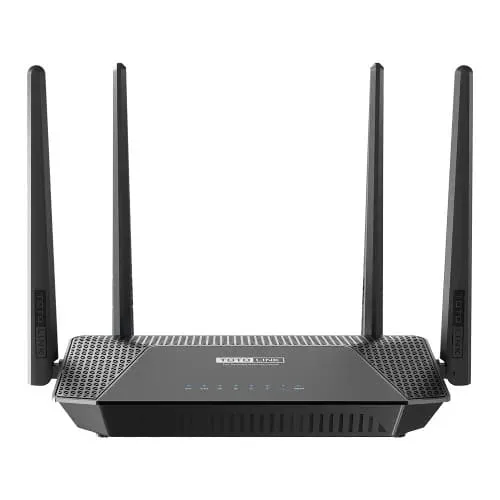
Totolink A3002R V4 AC1200 Dual Band Gigabit Router
- Brand: Totolink
- Product Code: A3002R
- Availability: In Stock
- Updated:

Specification
| BASIC INFORMATION | |
| Antenna Type | 2 * 2.4GHz fixed antennas(5dBi) 2 * 5GHz fixed antennas(5dBi) |
|---|---|
| Dimensions | 206*121*41mm |
| Frequency | 2.4GHz/5GHz |
| Interface | 3 *1000Mbps Adaptive LAN Ports 1 *1000Mbps Adaptive WAN Port |
| Others | Firewall - MAC Filtering - IP/Port Filtering - Virtual Server(Port Forwarding) - URL Filtering - DMZ System - Upgrade Firmware - Save/Reload Settings - Time Zone Settings - DDNS - Denial-of-Service - TR-069 Config - Password Settings - Reboot Schedule - System Log - Statistics - Run Command - Logout |
| Wireless | - Basic Settings - Guest network - Schedule - Access Control - Advanced |
| Button | 1 *RST/WPS Button |
| Connectivity | |
| Ports | 3 x LAN Ports 1 x WAN Port |
| Main Features | |
| Data Rate | 2.4GHz: Up to 300Mbps 5GHz: Up to 867Mbps |
| WARRANTY | |
| Manufacturing Warranty | 1 Year Warranty |
Description
Totolink A3002R V4 AC1200 Dual-Band Gigabit Router Price in Bangladesh
The Totolink A3002R V4 AC1200 Dual-Band Gigabit Router is a practical wireless networking solution for homes, apartments, student accommodation and small offices. Featuring Wi-Fi 5 (IEEE 802.11ac Wave 2) technology, this V4 hardware version offers combined theoretical wireless speeds of approximately 1200Mbps, including up to 867Mbps on the 5GHz band and 300Mbps on the 2.4GHz band. With four 5dBi external antennas, MU-MIMO, Beamforming technology and Gigabit Ethernet ports, the Totolink A3002R V4 is designed to support everyday internet activities such as HD streaming, online classes, video meetings, gaming and file downloads. It is worth considering for users upgrading from an older single-band or Fast Ethernet router.
AC1200 Wave 2 Dual-Band Wi-Fi Performance
The Totolink A3002R V4 uses 802.11ac Wave 2 wireless technology to provide simultaneous 2.4GHz and 5GHz Wi-Fi connections. The 5GHz band offers up to 867Mbps for compatible devices that benefit from higher wireless capacity, while the 2.4GHz band provides up to 300Mbps for everyday browsing and broader indoor coverage. Both frequency bands can operate simultaneously, allowing different devices to connect according to their requirements. The advertised AC1200 speed represents combined theoretical wireless link rates rather than the actual internet speed available to one device.
867Mbps 5GHz Wi-Fi for HD Streaming and Gaming
The 5GHz wireless band is suitable for activities that benefit from higher bandwidth, including HD and 4K video streaming, online gaming, video conferencing and large downloads. With a theoretical link speed of up to 867Mbps, the Totolink A3002R V4 can provide faster wireless connectivity for compatible smartphones, laptops and smart televisions. The 5GHz frequency may also experience less congestion than 2.4GHz in some environments. Actual performance depends on broadband speed, connected device capabilities, wireless interference and distance from the router.
300Mbps 2.4GHz Wi-Fi for Everyday Internet Use
The Totolink A3002R V4 also provides a 2.4GHz wireless network with theoretical speeds of up to 300Mbps. This band is useful for smartphones, wireless printers, smart home equipment and everyday activities such as browsing, email and social media. Compared with 5GHz, the 2.4GHz frequency can often provide more practical coverage through common indoor obstacles, although it may experience greater interference from neighbouring wireless networks. Having both bands available makes the router suitable for households with a mixture of older and newer devices.
Full Gigabit WAN and LAN Ports for High-Speed Wired Networking
The Totolink A3002R V4 features one Gigabit WAN port and four Gigabit LAN ports for wired broadband and local network connections. The Gigabit WAN interface allows the router to support broadband packages beyond the 100Mbps Ethernet limitation of older entry-level routers. Its four LAN ports can connect desktop computers, gaming consoles, smart televisions and other compatible networking equipment. Each Gigabit Ethernet port supports a nominal link rate of up to 1Gbps, while actual throughput depends on the internet connection, connected hardware and network configuration. Wired connections are particularly useful for stationary devices that benefit from consistent performance.
Four 5dBi External Antennas for Practical Indoor Coverage
The Totolink A3002R V4 is equipped with four external antennas rated at 5dBi, designed to distribute wireless signals across suitable indoor environments. This antenna configuration can be useful for apartments, family homes and small workplaces where devices are located in different rooms. However, actual wireless coverage depends on wall thickness, building materials, router placement and interference from nearby networks. For better results, position the router in an open, central location away from large metal objects and other sources of signal obstruction.
MU-MIMO Technology for Multiple Connected Devices
The Totolink A3002R V4 supports MU-MIMO technology, which helps the router communicate with multiple compatible wireless devices more efficiently. This is useful in households where several people browse websites, watch videos, attend online meetings and use cloud applications simultaneously. MU-MIMO can improve the use of available wireless resources under supported conditions, helping the router manage competing network demands. Its benefits depend on client compatibility and traffic patterns, and it cannot eliminate all network congestion or latency.
Beamforming Technology for Improved Signal Quality
Beamforming technology helps the Totolink A3002R V4 direct wireless transmission energy towards compatible connected devices. This can improve communication efficiency and signal quality compared with less targeted wireless transmission. Working alongside the router's four external antennas, Beamforming helps support wireless connectivity at different distances within a suitable indoor environment. However, it cannot guarantee strong reception through every wall or eliminate interference from neighbouring networks.
Router Mode for Home and Office Broadband Connections
In Router Mode, the Totolink A3002R V4 can connect to a compatible broadband modem or optical network terminal and distribute internet access to wired and wireless devices. This operating mode is suitable for homes, shared accommodation and small offices that need a central device to manage their broadband connection. The router provides local networking and wireless access for compatible computers, smartphones and other equipment. Available internet connection settings depend on the firmware and service provider requirements.
Repeater Mode for Extending Existing Wi-Fi Coverage
The Totolink A3002R V4 supports Repeater Mode, allowing it to receive a compatible existing wireless network and extend coverage into another area. This can be useful when the main router cannot provide adequate reception in a bedroom, study room or another part of the property. Repeater performance depends on the strength of the connection to the main router, wireless interference and network configuration. For demanding applications, a wired access point connection may provide more consistent performance than wireless repeating.
Access Point Mode for Wired Network Expansion
Access Point Mode allows the Totolink A3002R V4 to provide wireless connectivity through an existing wired network. In this configuration, the device connects to compatible networking equipment and functions primarily as a wireless access point rather than managing the main broadband connection. This mode is useful for offices and homes where Ethernet cabling is already available. A wired backhaul can help maintain more predictable performance compared with extending Wi-Fi through a wireless repeater.
WISP Mode for Flexible Wireless Internet Sharing
The Totolink A3002R V4 supports WISP Mode for compatible wireless internet connection arrangements. This mode allows the router to receive an upstream wireless connection and share access with devices on its local network, subject to the supported firmware and service provider configuration. WISP Mode may be useful in locations where internet access is supplied through a wireless network rather than a conventional Ethernet WAN connection. Compatibility and performance depend on the upstream network and available settings.
IPTV and VLAN Support for Compatible ISP Networks
The Totolink A3002R V4 includes IPTV and VLAN-related configuration options for supported broadband services. These features may help users configure network traffic according to the requirements of compatible internet service providers. VLAN settings can be relevant when an ISP requires specific traffic tagging for internet or television services. However, IPTV and VLAN configurations differ between providers, and support for a particular service should be confirmed before installation. Users may need configuration details from their ISP to enable these functions correctly.
Easy Setup Through a Mobile-Friendly Web Interface
The Totolink A3002R V4 provides a web-based management interface designed to make basic router configuration accessible through a compatible smartphone or computer browser. Users can configure their internet connection, change wireless network names and passwords, and manage supported networking settings. The mobile-friendly interface can be convenient when installing the router without a desktop computer. Available features and setup procedures may vary depending on the installed firmware.
WPA/WPA2 Wireless Security for Network Protection
The Totolink A3002R V4 supports WPA/WPA2 wireless security to help protect network access from unauthorised connections. WPA2 with a strong, unique password is preferable to older security settings when supported by connected devices. Users should also change default administrator credentials and follow official firmware update guidance. Wireless encryption improves local network security, although it cannot prevent every online threat or unsafe browsing activity.
Guest Wi-Fi Network for Visitors
The Totolink A3002R V4 supports guest wireless networking, allowing visitors to connect through a separate Wi-Fi network without sharing the primary wireless password. This feature is useful for homes, shared accommodation and small offices where guests occasionally need internet access. Depending on the available firmware settings, guest networking may also provide options for separating visitor traffic from the main network. Customers should check the specific configuration options available on their router version.
Parental Controls for Family Internet Management
The Totolink A3002R V4 includes parental control features designed to help households manage internet access for selected devices. Depending on the firmware, available settings may include access schedules and website restrictions. These tools can be useful for organising children's internet usage and managing shared family connections. The exact filtering and scheduling capabilities should be checked for the specific hardware and firmware version.
Bandwidth Control for Shared Internet Connections
The Totolink A3002R V4 provides bandwidth management options that can help users organise how available internet capacity is shared across connected devices. This is useful in student accommodation, shared flats and small offices where several people use the same broadband connection. Depending on the available settings, administrators may be able to apply speed limits or other traffic management rules to selected devices. Bandwidth control cannot increase the total speed supplied by the internet service provider, but appropriate configuration can help manage competing network demands.
Suitable for Homes, Apartments and Small Offices
The Totolink A3002R V4 is a practical choice for everyday networking in homes, apartments and small workplaces. Its dual-band Wi-Fi supports common activities such as online learning, video meetings, browsing and entertainment. Gigabit Ethernet ports provide wired connections for desktop computers and smart televisions, while multiple operating modes allow the router to adapt to different network layouts. Actual performance depends on the broadband package, number of active devices and wireless environment. Larger multi-storey properties may require additional access points or a suitable mesh system for consistent coverage.
Totolink A3002R V4 vs Basic Single-Band Routers
Compared with older 300Mbps single-band routers, the Totolink A3002R V4 offers several useful improvements. Its dual-band design provides a separate 5GHz network for compatible devices, while Gigabit WAN and LAN ports support faster wired connections than standard 100Mbps Ethernet interfaces. Four 5dBi external antennas, MU-MIMO and Beamforming help support wireless performance and efficiency. Repeater, Access Point and WISP modes also provide greater installation flexibility. These features make the A3002R V4 worth considering for customers upgrading an older home or office router.
Why Choose the Totolink A3002R V4 AC1200 Gigabit Router?
The Totolink A3002R V4 combines AC1200 Wave 2 dual-band Wi-Fi, Gigabit Ethernet connectivity and flexible networking features in an affordable design. Its four 5dBi external antennas and Beamforming technology support indoor wireless coverage, while MU-MIMO helps improve communication with compatible devices. Router, Repeater, Access Point and WISP modes accommodate different installation requirements. IPTV, VLAN, guest networking, parental controls and bandwidth management add practical functionality for supported configurations. For customers seeking a budget-friendly dual-band Gigabit router in Bangladesh, the A3002R V4 offers a useful balance of features and everyday performance.
Totolink A3002R V4 AC1200 Gigabit Router Price in Bangladesh
Looking for the Totolink A3002R V4 AC1200 Dual-Band Gigabit Router price in Bangladesh? Contact Unix Network to check the latest price, stock availability and technical specifications. Before ordering, confirm that the product is the V4 hardware revision, along with its supported operating modes, Gigabit Ethernet port configuration, included accessories and applicable warranty terms. Prices and availability may change depending on market conditions. Comparing the A3002R V4 with other Totolink AC1200 and Wi-Fi 6 routers can also help you choose a suitable model for your broadband connection and budget.
Buy Totolink A3002R V4 AC1200 Gigabit Router from Unix Network in Jashore
Explore the Totolink A3002R V4 AC1200 Dual-Band Gigabit Router at Unix Network in Jashore, Bangladesh. Whether you need a router for online classes, remote work, entertainment or a small office network, Unix Network can help you enquire about Totolink networking products and compatible accessories. Customers in Jashore, Khulna, Jhenaidah, Magura, Narail, Satkhira and other parts of Bangladesh can contact Unix Network for ordering and delivery information. Visit our shop or browse unixnetworkbd.com to check current prices, stock availability and applicable warranty details before purchasing.