
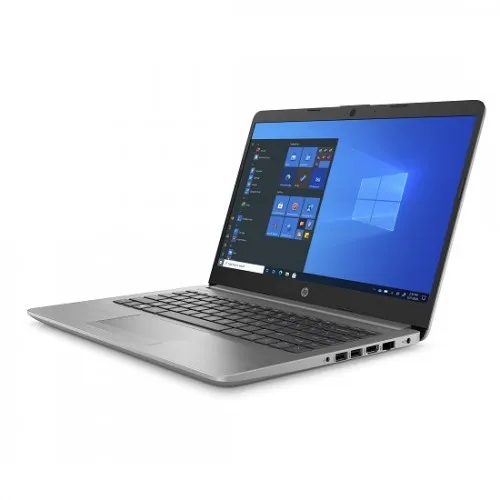
HP 240 G8 Core i3 10th Gen 14 HD 2nd hand Laptop
- Brand:HP
- Product Code: 240 G8
- Availability:Out of Stock
- Updated:
Available Options
Webcam
Short description: Upgrade your laptop for clearer and more professional video calls, online classes, meetings, interviews, and content creation.
Best for: Remote workers, students, teachers, interview candidates, and content creators.
Why add it? A dedicated webcam can provide a better video experience when the built-in laptop camera isn't enough.
External SSD
Short description: Add fast and portable storage for your important files, photos, videos, games, and work projects.
Best for: Professionals, students, creators, gamers, and anyone who needs extra storage.
Why add it? More storage means less need to delete important files, while an SSD provides convenient and fast access to your data.
Microphone
Short description: Make your voice clearer and more professional during calls, classes, recordings, gaming, streaming, and meetings.
Best for: Content creators, streamers, online teachers, remote workers, and gamers.
Why add it? Better voice quality makes communication easier and gives recordings and online meetings a more professional feel.
USB Hub
Short description: Expand your laptop's connectivity and connect multiple USB accessories from a single compact hub.
Best for: Office users, students, professionals, and customers who use several USB devices.
Why add it? Connect your mouse, keyboard, flash drive, phone, printer, and other USB devices without constantly swapping cables.
External Keyboard
Short description: Enjoy a more comfortable typing experience with a dedicated keyboard for work, study, programming, and everyday use.
Best for: Office workers, programmers, students, writers, and heavy typists.
Why add it? A dedicated keyboard can make long typing sessions more comfortable and gives you a convenient desktop-style setup.
Laptop Stand
Short description: Raise your laptop to a more comfortable viewing position while creating a cleaner and more organized workspace.
Best for: Students, office workers, remote workers, and anyone who spends long hours using a laptop.
Why add it? A better laptop position can make your workspace more comfortable and help create a more ergonomic setup.
USB Flash Drive
Short description: Keep your important documents, photos, presentations, and other files portable and easy to transfer.
Best for: Students, professionals, teachers, office users, and everyday laptop users.
Why add it? It's a simple way to carry important files and transfer data between computers and other compatible devices.
Cooling Pad
Short description: Improve airflow around your laptop during extended work, gaming, study, or other demanding sessions.
Best for: Gamers, professionals, students, and users who regularly run demanding applications.
Why add it? Additional airflow can help create a more comfortable operating environment during long laptop sessions.
Keyboard Protector
Short description: Add an extra layer of protection against everyday dust, dirt, and accidental spills around the keyboard.
Best for: Students, office users, travelers, and anyone who wants to keep their laptop cleaner.
Why add it? It's an inexpensive way to help keep the keyboard clean and protected during everyday use.
Speaker
Short description: Enjoy a more enjoyable audio experience for movies, music, presentations, online classes, and entertainment.
Best for: Entertainment users, students, office workers, and customers who want better external audio.
Why add it? External speakers can provide a more enjoyable listening experience than relying only on the laptop's built-in speakers.
Antivirus
Short description: Add an extra layer of protection for your laptop while browsing the internet, downloading files, using email, and handling important documents.
Best for: Students, professionals, families, office users, and frequent internet users.
Why add it? Protecting your laptop and important files is an important part of maintaining a reliable everyday computer.
Headphone
Short description: Enjoy private and immersive audio for music, movies, gaming, online meetings, classes, and everyday entertainment.
Best for: Gamers, students, remote workers, music lovers, and online learners.
Why add it? Get focused audio without disturbing people around you—ideal for both work and entertainment.
Screen Protector
Short description: Help keep your laptop display protected from everyday scratches, dust, fingerprints, and surface marks.
Best for: Students, travelers, office users, and customers who frequently carry their laptop.
Why add it? A screen protector provides an additional layer between your display and everyday wear.
Adjustable Stand
Short description: Create a more flexible laptop workspace by adjusting the viewing height and angle to suit your setup.
Best for: Remote workers, students, professionals, and home-office users.
Why add it? A flexible viewing position can make your desk setup more comfortable, especially during long working or studying sessions.
Wireless Mouse
Short description: Upgrade your everyday laptop navigation with a convenient wireless mouse and a cleaner, cable-free workspace.
Best for: Office workers, students, designers, professionals, and everyday laptop users.
Why add it? A mouse can make browsing, selecting, dragging, designing, and working more comfortable than using the touchpad for extended periods.
HDMI Cable
Short description: Connect your laptop to a compatible monitor, TV, projector, or external display for a larger viewing experience.
Best for: Office workers, teachers, students, gamers, and entertainment users.
Why add it? An HDMI cable makes it easy to use your laptop with a larger screen for presentations, movies, multitasking, and gaming.
Screen Cleaner
Short description: Keep your laptop display looking cleaner and clearer by removing everyday fingerprints, dust, and smudges.
Best for: All laptop users, especially students, professionals, and people who frequently use touchscreens.
Why add it? A clean display looks better and makes your laptop easier and more pleasant to use every day.
Wi-Fi Router
Short description: Build a reliable wireless connection for your laptop, smartphone, smart devices, streaming, online classes, and work.
Best for: Home users, students, remote workers, gamers, and small offices.
Why add it? A suitable Wi-Fi router can provide the connectivity needed to get the most from your laptop and other connected devices.
Option info
Laptop Option
Webcam
Short description: Upgrade your laptop for clearer and more professional video calls, online classes, meetings, interviews, and content creation.
Best for: Remote workers, students, teachers, interview candidates, and content creators.
Why add it? A dedicated webcam can provide a better video experience when the built-in laptop camera isn't enough.
External SSD
Short description: Add fast and portable storage for your important files, photos, videos, games, and work projects.
Best for: Professionals, students, creators, gamers, and anyone who needs extra storage.
Why add it? More storage means less need to delete important files, while an SSD provides convenient and fast access to your data.
Microphone
Short description: Make your voice clearer and more professional during calls, classes, recordings, gaming, streaming, and meetings.
Best for: Content creators, streamers, online teachers, remote workers, and gamers.
Why add it? Better voice quality makes communication easier and gives recordings and online meetings a more professional feel.
USB Hub
Short description: Expand your laptop's connectivity and connect multiple USB accessories from a single compact hub.
Best for: Office users, students, professionals, and customers who use several USB devices.
Why add it? Connect your mouse, keyboard, flash drive, phone, printer, and other USB devices without constantly swapping cables.
External Keyboard
Short description: Enjoy a more comfortable typing experience with a dedicated keyboard for work, study, programming, and everyday use.
Best for: Office workers, programmers, students, writers, and heavy typists.
Why add it? A dedicated keyboard can make long typing sessions more comfortable and gives you a convenient desktop-style setup.
Laptop Stand
Short description: Raise your laptop to a more comfortable viewing position while creating a cleaner and more organized workspace.
Best for: Students, office workers, remote workers, and anyone who spends long hours using a laptop.
Why add it? A better laptop position can make your workspace more comfortable and help create a more ergonomic setup.
USB Flash Drive
Short description: Keep your important documents, photos, presentations, and other files portable and easy to transfer.
Best for: Students, professionals, teachers, office users, and everyday laptop users.
Why add it? It's a simple way to carry important files and transfer data between computers and other compatible devices.
Cooling Pad
Short description: Improve airflow around your laptop during extended work, gaming, study, or other demanding sessions.
Best for: Gamers, professionals, students, and users who regularly run demanding applications.
Why add it? Additional airflow can help create a more comfortable operating environment during long laptop sessions.
Keyboard Protector
Short description: Add an extra layer of protection against everyday dust, dirt, and accidental spills around the keyboard.
Best for: Students, office users, travelers, and anyone who wants to keep their laptop cleaner.
Why add it? It's an inexpensive way to help keep the keyboard clean and protected during everyday use.
Speaker
Short description: Enjoy a more enjoyable audio experience for movies, music, presentations, online classes, and entertainment.
Best for: Entertainment users, students, office workers, and customers who want better external audio.
Why add it? External speakers can provide a more enjoyable listening experience than relying only on the laptop's built-in speakers.
Antivirus
Short description: Add an extra layer of protection for your laptop while browsing the internet, downloading files, using email, and handling important documents.
Best for: Students, professionals, families, office users, and frequent internet users.
Why add it? Protecting your laptop and important files is an important part of maintaining a reliable everyday computer.
Headphone
Short description: Enjoy private and immersive audio for music, movies, gaming, online meetings, classes, and everyday entertainment.
Best for: Gamers, students, remote workers, music lovers, and online learners.
Why add it? Get focused audio without disturbing people around you—ideal for both work and entertainment.
Screen Protector
Short description: Help keep your laptop display protected from everyday scratches, dust, fingerprints, and surface marks.
Best for: Students, travelers, office users, and customers who frequently carry their laptop.
Why add it? A screen protector provides an additional layer between your display and everyday wear.
Adjustable Stand
Short description: Create a more flexible laptop workspace by adjusting the viewing height and angle to suit your setup.
Best for: Remote workers, students, professionals, and home-office users.
Why add it? A flexible viewing position can make your desk setup more comfortable, especially during long working or studying sessions.
Wireless Mouse
Short description: Upgrade your everyday laptop navigation with a convenient wireless mouse and a cleaner, cable-free workspace.
Best for: Office workers, students, designers, professionals, and everyday laptop users.
Why add it? A mouse can make browsing, selecting, dragging, designing, and working more comfortable than using the touchpad for extended periods.
HDMI Cable
Short description: Connect your laptop to a compatible monitor, TV, projector, or external display for a larger viewing experience.
Best for: Office workers, teachers, students, gamers, and entertainment users.
Why add it? An HDMI cable makes it easy to use your laptop with a larger screen for presentations, movies, multitasking, and gaming.
Screen Cleaner
Short description: Keep your laptop display looking cleaner and clearer by removing everyday fingerprints, dust, and smudges.
Best for: All laptop users, especially students, professionals, and people who frequently use touchscreens.
Why add it? A clean display looks better and makes your laptop easier and more pleasant to use every day.
Wi-Fi Router
Short description: Build a reliable wireless connection for your laptop, smartphone, smart devices, streaming, online classes, and work.
Best for: Home users, students, remote workers, gamers, and small offices.
Why add it? A suitable Wi-Fi router can provide the connectivity needed to get the most from your laptop and other connected devices.
Specification
| BASIC INFORMATION | |
| Battery | 3 Cell, Battery Capacity 41 Wh Li-ion |
|---|---|
| Operating System | Windows 10 Home |
| Display | 14" HD (1366x768) Display |
| Memory | 4GB DDR4 3200MHz SDRAM |
| Storage | 1TB 5400 RPM SATA HDD |
| Audio | Speaker: Stereo speakers Microphone: Integrated digital microphone HD Webcam |
| Adapter | Power Adapter45 W AC power adapter |
| Graphics Specifications | |
| Graphics | Intel UHD Graphics |
| INPUT DEVICES | |
| Card Reader | 1 x SD Card Reader |
| Key Board | Full Size Textured island-style keyboard |
| Optical Drive | N/A |
| WebCam | HD Webcam |
| NETWORK & WIRELESS CONNECTIVITY | |
| Bluetooth | Bluetooth 4.2 |
| LAN | Ethernet RJ-45 |
| Wi-Fi | 802.11a, b, g, n, ac (2x2) |
| PHYSICAL SPECIFICATION | |
| Color(s) | Silver |
| Dimensions (W x D x H) | 324 x 225.9 x 19.9 mm |
| Weight | 1.47 kg |
| PORTS, CONNECTORS & SLOTS | |
| Audio Jack Combo | 1 x Headphone /Microphone port |
| Extra RAM Slot | Yes (Upgradable to 16GB) |
| HDMI | 1 x HDMI |
| Supported SSD Type | Yes |
| USB (s) | 2 x USB Type-A 1 x USB Type-C |
| WARRANTY | |
| Manufacturing Warranty | 02 years International Limited Warranty (Terms & condition Apply As Per HP) |
Description
HP 240 G8 Core i3 10th Gen 14 Inch HD 2nd Hand Laptop Price in Bangladesh
The HP 240 G8 Core i3 10th Gen 14 inch HD 2nd hand laptop is a practical option for customers looking for an affordable business-style laptop for everyday work, study and general computing. A used laptop can offer excellent value when the hardware configuration and physical condition are suitable for the buyer's needs. Instead of paying for features that may never be used, many customers choose a well-maintained second-hand laptop with a capable processor and a compact, work-friendly design.
The HP 240 G8 belongs to HP's mainstream laptop range and is designed around the requirements of regular users, students and office environments. Its 14-inch display makes it more compact than a conventional 15.6-inch laptop, which can be useful for customers who carry their computer between home, office, university or other locations.
For buyers in Bangladesh, processor generation, available RAM, storage type and overall condition are usually more important than the label of a laptop being new or used. The Intel Core i3 10th Generation platform can handle many common computing tasks efficiently when the laptop has a suitable memory and storage configuration.
The HP 240 G8 Core i3 10th Gen 2nd hand laptop is therefore worth considering for customers who need a machine for documents, spreadsheets, web browsing, online classes, communication and other regular workloads. However, because this is a used product, the exact RAM, storage capacity, battery condition, cosmetic condition and included accessories should be confirmed for the specific available unit before purchase.
HP 240 G8 Core i3 10th Gen Used Laptop Overview
The HP 240 G8 offers a compact 14-inch laptop format that can suit users who want a balance between screen space and portability. A smaller chassis can be easier to carry than many larger laptops while still providing enough workspace for common productivity applications.
The Intel Core i3 10th Generation processor platform is intended for everyday computing and moderate productivity workloads. It is not designed to compete with high-performance workstations or dedicated gaming systems, but it can be a sensible choice for users whose daily tasks involve office applications, browsers, online platforms and communication software.
Actual performance should always be judged by the complete configuration. RAM affects multitasking, while the installed storage device can influence startup and application loading times. Since used laptops may have been upgraded or configured differently, customers should verify the specifications of the exact HP 240 G8 unit available for purchase.
Key Features of the HP 240 G8 Core i3 10th Gen 2nd Hand Laptop
- Intel Core i3 10th Generation processor platform
- 14-inch HD display
- Compact laptop design for everyday portability
- Suitable for office, education and general home computing
- Practical choice for browsing, documents and online communication
- Used laptop category offering value-focused purchasing
- Suitable for students and general business users
- Compatible with common productivity workflows, subject to software requirements
Why a Core i3 10th Generation Laptop Can Still Be a Practical Choice
Many everyday computer tasks do not require a high-end processor. Writing documents, managing email, browsing websites, attending online classes and preparing presentations are workloads that can often be handled effectively by a suitable Core i3-based system.
The Intel Core i3 10th Generation platform is newer than many older used-laptop options still available in the market. This can make it an attractive category for buyers who want a balance between budget and modern everyday computing capability.
However, processor generation alone does not determine whether a laptop will feel fast. A system with limited available memory or an unsuitable storage configuration may become less comfortable during multitasking. Buyers should therefore consider the complete specification rather than purchasing solely because of the processor name.
This balanced approach is especially important when purchasing second-hand technology. The exact configuration and condition of the individual laptop should be part of the buying decision.
14 Inch HD Display for Work and Study
The 14-inch display size provides a compromise between portability and working space. It can be easier to carry than a larger 15.6-inch laptop while remaining suitable for documents, presentations, browsing and standard office applications.
Students may find this screen size convenient for carrying between classes or using in smaller study spaces. Office users who frequently move between different work locations may also appreciate a more compact laptop format.
The HD display is intended for standard computing and general multimedia use. Customers with specialised requirements involving high-resolution editing, detailed visual design or colour-critical work should carefully evaluate whether the display characteristics meet their professional needs.
As with any used laptop, the condition of the individual display should be checked before purchase. Buyers may wish to confirm screen condition and general functionality for the available unit.
Real-World Performance and Everyday Usage
The HP 240 G8 Core i3 10th Gen can be suitable for web browsing, email, document preparation and cloud-based applications. Performance during browsing depends on factors such as the number of open tabs, website complexity, installed RAM and background applications.
For students, the laptop can be considered for assignments, presentations, online learning platforms, research and communication. The actual suitability for specialist academic software should be confirmed by comparing the software requirements with the installed hardware.
Office users can consider this type of laptop for regular administrative work, spreadsheets, documents, presentations and browser-based business platforms. More demanding workloads involving large datasets, complex analysis or specialised enterprise software may require additional system resources.
For household use, the laptop can serve as a general computer for browsing, communication, online services and personal productivity. A compact 14-inch design can also make it suitable for users who do not want to carry a larger laptop.
Performance Depends on the Complete Configuration
When comparing used laptops, buyers should look beyond the processor. RAM, storage and system condition can significantly influence daily performance.
Memory is particularly important for multitasking. Users who regularly keep many browser tabs, office applications and communication software open at the same time should ensure that the installed RAM matches their working habits.
Storage also affects the user experience. The exact storage type and capacity should be confirmed for the available HP 240 G8 unit. Storage health is especially important for a used laptop because the drive is responsible for operating system files, applications and personal data.
Customers should not assume that every HP 240 G8 used laptop has the same internal configuration. Previous owners or retailers may have upgraded memory or replaced storage devices, so checking the exact unit provides a more accurate picture of value and performance.
Build Quality and Portability
The HP 240 G8 is designed as a conventional portable laptop suitable for regular use. The 14-inch form factor can be particularly useful for students, professionals and customers who frequently move their laptop between different locations.
Portability should be considered together with screen preference. A 14-inch display is generally easier to manage in a backpack or smaller workspace, while customers who spend most of their time working from a desk may prefer the additional physical screen area offered by a larger laptop.
For a second-hand laptop, physical condition should be assessed realistically. Cosmetic marks may result from normal previous use and do not necessarily indicate a functional problem. More important factors include the operation of the display, keyboard, touchpad, hinges, charging system and required connectivity.
Compatibility with Software and Accessories
The HP 240 G8 Core i3 10th Gen used laptop can be considered for commonly used productivity, education and communication software, provided the operating system and hardware configuration meet the requirements of the relevant applications.
Customers who require a laptop for specific software should check both the minimum and recommended system requirements. This is particularly important for programming environments, design software, engineering applications, professional editing tools and other specialised workloads.
External accessories may also form part of the overall setup. Depending on the ports and exact configuration of the available unit, users may wish to connect external storage, a mouse, keyboard, display or other compatible devices.
Before purchasing, it is helpful to consider how the laptop will be used as part of a complete working environment rather than evaluating the computer in isolation.
Advantages of Choosing This Used HP Laptop
- Potentially more affordable than purchasing a new laptop
- Intel Core i3 10th Generation processor platform
- Compact 14-inch format for easier portability
- Suitable for everyday productivity requirements
- Can be useful for students and office users
- Suitable for web browsing and online communication
- Practical option for a secondary or backup computer
- Potential value for budget-conscious buyers
A used laptop can make financial sense when its condition and configuration match the intended workload. Customers who primarily need a computer for standard tasks may not require a high-end system, making a properly selected second-hand laptop a practical alternative.
Things to Consider Before Buying the HP 240 G8 2nd Hand Laptop
The first step is to confirm the actual specifications of the available unit. RAM capacity and storage configuration should be checked before purchase.
Battery condition should also be discussed. Rechargeable batteries naturally experience wear over time, and the actual backup of a used laptop can vary according to battery health, brightness settings, applications and usage patterns.
Buyers should check the physical and functional condition of the laptop. Important areas include the display, keyboard, touchpad, hinges, charging functionality and ports that will be needed for daily use.
It is also sensible to consider future requirements. If you expect to begin using demanding video editing applications, 3D software, advanced engineering programmes or modern games, a more powerful system may provide better long-term value.
Who Should Buy the HP 240 G8 Core i3 10th Gen Used Laptop?
This laptop can be a suitable option for students who need a portable computer for assignments, research, online learning and presentations.
Office users can consider it for everyday administrative work, email, spreadsheets, documents and browser-based applications.
Home users may find it useful as a general-purpose computer for browsing, online services, communication and personal work.
It may also be suitable as a secondary laptop for customers who already have a primary desktop or higher-performance notebook.
Users whose main purpose is high-end gaming, advanced 3D production, intensive professional video editing or workstation-level software should compare more powerful alternatives. A dedicated gaming laptop or desktop may be more appropriate for those workloads.
Is the HP 240 G8 Suitable for Gaming?
The HP 240 G8 Core i3 10th Gen should primarily be viewed as an everyday productivity laptop rather than a dedicated gaming system. Game performance depends on the exact graphics hardware, memory configuration and requirements of the game.
Customers who mainly want to play demanding modern games should consider a purpose-built gaming laptop or gaming PC with hardware selected according to the games they intend to play.
For customers looking for a gaming PC shop in Jessore, Unix Network can help compare desktop and laptop options based on performance requirements and available budget.
Why Buy from Unix Network?
Choosing a laptop becomes easier when the seller understands the difference between everyday computing requirements and workloads that need more powerful hardware. Unix Network helps customers compare products according to practical use rather than simply focusing on processor names or promotional specifications.
As a computer shop in Jessore and a trusted local retailer for technology products, Unix Network provides customers with the opportunity to seek expert technical support and product guidance before making a purchase.
Customers searching for a laptop shop in Jessore or Jashore can enquire about local showroom availability and discuss which type of computer is suitable for their work, education or personal use.
Unix Network also serves customers outside the local area. Online buyers across Bangladesh can enquire about nationwide delivery options, allowing customers to access technology products from different districts.
Professional customer support and after-sales service are also important considerations when purchasing computer hardware. Customers should confirm the applicable support and warranty terms for the specific used laptop before completing an order.
Buying Guide for the HP 240 G8 Core i3 10th Gen
Begin by identifying the software and tasks you perform regularly. For basic browsing, office work, online classes and communication, a Core i3 10th Generation laptop may be sufficient depending on the overall configuration.
Next, check the available memory. Users who multitask frequently should pay particular attention to RAM because insufficient memory can affect the experience when several applications are open.
Confirm the storage configuration and capacity. The storage device affects application loading, system responsiveness and the amount of data you can keep on the laptop.
Evaluate battery condition based on your mobility requirements. A customer who uses the laptop mainly on a desk may have different battery expectations from someone who spends long periods away from a power source.
Finally, inspect or confirm the physical condition and applicable warranty terms. Used laptops should be evaluated as individual units rather than assuming identical condition across every available product.
Understanding the Value of a Second-Hand Laptop
A second-hand laptop can provide access to useful computing hardware at a lower cost than purchasing a comparable new device. This can be particularly beneficial for students, small businesses and customers with a fixed budget.
The value of a used laptop should be measured by its actual condition, configuration and suitability for the intended workload. A lower price is beneficial only when the computer can reliably perform the tasks required by the buyer.
Checking the individual configuration also helps customers compare multiple options fairly. A laptop with the same processor may provide a different user experience depending on memory, storage and system maintenance.
Warranty Information for Used Laptops
Warranty coverage for the HP 240 G8 2nd hand laptop should be confirmed for the specific available unit before purchase. The applicable warranty period and coverage may differ depending on the retailer's terms and the condition of the product.
Official manufacturer warranty may not be available if the original warranty period has expired. Customers should therefore avoid assuming that every used laptop includes an active official warranty.
Unix Network encourages buyers to understand the warranty and after-sales support terms applicable to the product before completing their purchase. Clear information helps customers make a more informed decision.
Local Showroom Availability in Jessore
Customers who prefer dealing with a local technology retailer can enquire about HP 240 G8 availability at the Unix Network showroom in Jessore, also known as Jashore.
Visiting or contacting a Jessore computer store can be useful when you want practical advice before choosing between different laptops. Customers can discuss whether a 14-inch laptop, larger notebook, desktop computer or higher-performance system is more suitable for their intended use.
Unix Network serves customers from Jessore and surrounding areas, including buyers from Jhenaidah, Magura, Narail, Satkhira, Khulna, Kushtia and Chuadanga, depending on product availability and purchasing arrangements.
Delivery Across Bangladesh
Customers outside Jessore can enquire about nationwide delivery for the HP 240 G8 Core i3 10th Gen 14 inch HD 2nd hand laptop. Delivery charges, service availability and estimated delivery arrangements should be confirmed before placing an order.
For used products, it is particularly important to understand the configuration of the specific unit before dispatch. Customers should confirm available RAM, storage, condition, included accessories and applicable warranty information.
This allows online buyers throughout Bangladesh to make a better-informed purchasing decision before the laptop is delivered.
After-Sales Support and Expert Technical Guidance
Technical guidance can be valuable for customers who are not sure which laptop configuration they need. A computer that is ideal for one user may be unsuitable for another, even when both customers have a similar budget.
Unix Network provides professional customer support and can help customers understand the practical differences between entry-level, mainstream and higher-performance computer options.
Customers can also seek advice when comparing a used laptop with a new model, desktop PC or gaming PC. The goal should be to select hardware that matches the intended workload and provides reasonable value for the available budget.
Frequently Asked Questions
Is the HP 240 G8 Core i3 10th Gen good for everyday use?
It can be suitable for everyday activities such as browsing, document preparation, email, online classes and general productivity. Actual performance depends on the installed RAM, storage configuration, operating system and condition of the specific used unit.
Is the HP 240 G8 suitable for students?
Yes, it can be a practical choice for students with standard requirements such as assignments, presentations, research and online learning. Students using specialised or demanding software should compare the software requirements with the actual laptop configuration.
What RAM and storage does this HP 240 G8 have?
The exact RAM and storage configuration should be confirmed for the available laptop. Used laptops can have different configurations or previous upgrades, so these details should be checked before purchase.
How is the battery backup on a second-hand HP 240 G8?
Battery performance depends on the condition of the individual unit and cannot be accurately guaranteed without specific testing information. Battery age, usage history, screen brightness and workload can all affect actual backup time.
Can I use this laptop for office applications?
Yes, a Core i3 10th Generation laptop can be suitable for common office workloads such as documents, presentations, email and standard spreadsheets, provided the overall configuration meets the software requirements.
Is the HP 240 G8 a gaming laptop?
No, it should primarily be considered an everyday productivity laptop rather than a dedicated gaming machine. Gaming performance depends on the exact graphics and hardware configuration as well as the requirements of each game.
Does the laptop come with official warranty?
Official manufacturer warranty may not apply if the original warranty period has expired. Customers should confirm the exact warranty coverage offered for the specific used unit before purchasing.
Can I buy this laptop from outside Jessore?
Yes, customers across Bangladesh can enquire about nationwide delivery through Unix Network. Delivery availability and applicable charges should be confirmed when placing the order.
Can I visit Unix Network in Jessore before buying?
Customers can enquire about local showroom availability in Jessore or Jashore and discuss their laptop requirements with the Unix Network team before making a purchasing decision.
What should I check before purchasing this 2nd hand laptop?
You should confirm the processor, installed RAM, storage capacity and type, battery condition, display condition, keyboard and touchpad functionality, charging operation, required ports, cosmetic condition, included accessories and applicable warranty terms.
Final Thoughts on the HP 240 G8 Core i3 10th Gen 2nd Hand Laptop
The HP 240 G8 Core i3 10th Gen 14 inch HD 2nd hand laptop can be a sensible choice for customers who want an affordable and portable computer for regular work, education and home use. Its compact 14-inch design can be particularly useful for users who carry their laptop frequently, while the Intel Core i3 10th Generation platform can support many common computing tasks.
The best way to evaluate a used laptop is to consider the complete package. The exact RAM, storage, battery health, physical condition and warranty arrangement should all be confirmed before purchase. This provides a clearer understanding of the laptop's real value and expected suitability.
Customers looking for a laptop shop in Jessore, a Jessore computer store or a trusted tech store in Bangladesh can contact Unix Network for product availability, expert advice, professional customer support and available after-sales service. Local showroom availability in Jashore and nationwide delivery options provide purchasing flexibility for customers in different parts of Bangladesh.
If your requirements are centred on documents, browsing, online learning, office applications and other everyday computing tasks, the HP 240 G8 Core i3 10th Gen used laptop is worth considering. Before ordering, confirm the configuration and condition of the available unit with Unix Network to ensure that it matches your budget and intended workload.