
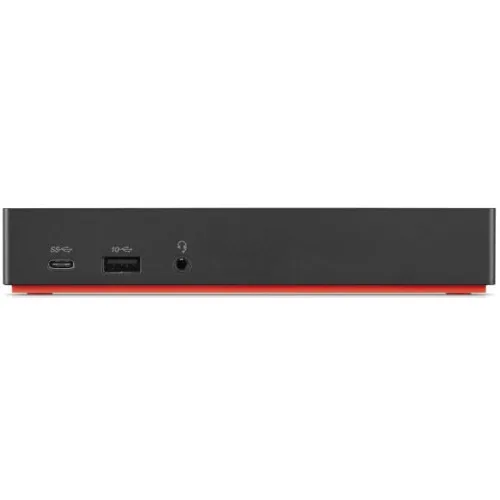
Elevate Your Workspace with Lenovo ThinkPad Type-C Dock Gen 2
- Brand: Lenovo
- Product Code: 40AS0090UK
- Availability: Out Of Stock
Available Options
Webcam
Short description: Upgrade your laptop for clearer and more professional video calls, online classes, meetings, interviews, and content creation.
Best for: Remote workers, students, teachers, interview candidates, and content creators.
Why add it? A dedicated webcam can provide a better video experience when the built-in laptop camera isn't enough.
External SSD
Short description: Add fast and portable storage for your important files, photos, videos, games, and work projects.
Best for: Professionals, students, creators, gamers, and anyone who needs extra storage.
Why add it? More storage means less need to delete important files, while an SSD provides convenient and fast access to your data.
Microphone
Short description: Make your voice clearer and more professional during calls, classes, recordings, gaming, streaming, and meetings.
Best for: Content creators, streamers, online teachers, remote workers, and gamers.
Why add it? Better voice quality makes communication easier and gives recordings and online meetings a more professional feel.
USB Hub
Short description: Expand your laptop's connectivity and connect multiple USB accessories from a single compact hub.
Best for: Office users, students, professionals, and customers who use several USB devices.
Why add it? Connect your mouse, keyboard, flash drive, phone, printer, and other USB devices without constantly swapping cables.
External Keyboard
Short description: Enjoy a more comfortable typing experience with a dedicated keyboard for work, study, programming, and everyday use.
Best for: Office workers, programmers, students, writers, and heavy typists.
Why add it? A dedicated keyboard can make long typing sessions more comfortable and gives you a convenient desktop-style setup.
Laptop Stand
Short description: Raise your laptop to a more comfortable viewing position while creating a cleaner and more organized workspace.
Best for: Students, office workers, remote workers, and anyone who spends long hours using a laptop.
Why add it? A better laptop position can make your workspace more comfortable and help create a more ergonomic setup.
USB Flash Drive
Short description: Keep your important documents, photos, presentations, and other files portable and easy to transfer.
Best for: Students, professionals, teachers, office users, and everyday laptop users.
Why add it? It's a simple way to carry important files and transfer data between computers and other compatible devices.
Cooling Pad
Short description: Improve airflow around your laptop during extended work, gaming, study, or other demanding sessions.
Best for: Gamers, professionals, students, and users who regularly run demanding applications.
Why add it? Additional airflow can help create a more comfortable operating environment during long laptop sessions.
Keyboard Protector
Short description: Add an extra layer of protection against everyday dust, dirt, and accidental spills around the keyboard.
Best for: Students, office users, travelers, and anyone who wants to keep their laptop cleaner.
Why add it? It's an inexpensive way to help keep the keyboard clean and protected during everyday use.
Speaker
Short description: Enjoy a more enjoyable audio experience for movies, music, presentations, online classes, and entertainment.
Best for: Entertainment users, students, office workers, and customers who want better external audio.
Why add it? External speakers can provide a more enjoyable listening experience than relying only on the laptop's built-in speakers.
Antivirus
Short description: Add an extra layer of protection for your laptop while browsing the internet, downloading files, using email, and handling important documents.
Best for: Students, professionals, families, office users, and frequent internet users.
Why add it? Protecting your laptop and important files is an important part of maintaining a reliable everyday computer.
Headphone
Short description: Enjoy private and immersive audio for music, movies, gaming, online meetings, classes, and everyday entertainment.
Best for: Gamers, students, remote workers, music lovers, and online learners.
Why add it? Get focused audio without disturbing people around you—ideal for both work and entertainment.
Screen Protector
Short description: Help keep your laptop display protected from everyday scratches, dust, fingerprints, and surface marks.
Best for: Students, travelers, office users, and customers who frequently carry their laptop.
Why add it? A screen protector provides an additional layer between your display and everyday wear.
Adjustable Stand
Short description: Create a more flexible laptop workspace by adjusting the viewing height and angle to suit your setup.
Best for: Remote workers, students, professionals, and home-office users.
Why add it? A flexible viewing position can make your desk setup more comfortable, especially during long working or studying sessions.
Wireless Mouse
Short description: Upgrade your everyday laptop navigation with a convenient wireless mouse and a cleaner, cable-free workspace.
Best for: Office workers, students, designers, professionals, and everyday laptop users.
Why add it? A mouse can make browsing, selecting, dragging, designing, and working more comfortable than using the touchpad for extended periods.
HDMI Cable
Short description: Connect your laptop to a compatible monitor, TV, projector, or external display for a larger viewing experience.
Best for: Office workers, teachers, students, gamers, and entertainment users.
Why add it? An HDMI cable makes it easy to use your laptop with a larger screen for presentations, movies, multitasking, and gaming.
Screen Cleaner
Short description: Keep your laptop display looking cleaner and clearer by removing everyday fingerprints, dust, and smudges.
Best for: All laptop users, especially students, professionals, and people who frequently use touchscreens.
Why add it? A clean display looks better and makes your laptop easier and more pleasant to use every day.
Wi-Fi Router
Short description: Build a reliable wireless connection for your laptop, smartphone, smart devices, streaming, online classes, and work.
Best for: Home users, students, remote workers, gamers, and small offices.
Why add it? A suitable Wi-Fi router can provide the connectivity needed to get the most from your laptop and other connected devices.
Specification
| BASIC INFORMATION | |
| color | Black |
| Dimensions (L x W x H ) | Unpacked Physical Specification: Height: 31mm (1.2 in) Width: 171mm (6.7 in) Depth: 80mm (3.1 in) Packed Carton Physical Specification Height: 75mm (2.9 in) Width: 210mm (8.3 in) Depth: 158mm (6.2 in) |
| Input Interface | Docking Interface: USB-C Cable Video Ports: 2 x DisplayPort, HDMI Port USB Ports: 2 x USB 2.0, 3 x USB 3.1 Gen 2, 1 x USB-C Audio Ports: Stereo/Microphone Combo Networking Port: Gigabit Ethernet Physical Security: Security lock slot |
| Output Interface | Maximum Number of External Monitors: 3 Maximum Resolution/ Refresh Rate: 3840x2160 @60Hz Maximum Video Output: One: 4K @ 60 Hz Two: 4K @ 60 Hz. (Source:2 Lanes HBR3* Source, MST, DSC 3:1) Three: 4K @ 60 Hz X 2, 4K @ 30 Hz X 1. (Source:2 Lanes HBR3* Source, MST, DSC 3:1) Supported Resolution Maximum Resolution/ Refresh Rate: 3840x2160 @60Hz |
| Power Supply | Input Power: 90w Maximum Power for Laptop Charging: 60W |
| Weight | Weight: 325g (0.71 lb) Weight: 960g (2.11 lb) (Packed) |
| WARRANTY | |
| Manufacturing Warranty | 1-year |
Description
Lenovo ThinkPad Type-C Dock Gen 2 Docking Station: Elevate Your Workspace
The Lenovo ThinkPad Type-C Dock Gen 2 is a versatile docking solution designed to enhance productivity for professionals and power users alike. This innovative docking station offers multiple connectivity options to streamline your workflow, making it an essential accessory for anyone using a Lenovo laptop or compatible device. With its sleek design and robust functionality, this docking station is perfect for both office environments and remote setups.
Product Overview: The ThinkPad Type-C Dock Gen 2 boasts an impressive array of ports, including USB-C, USB-A, HDMI, DisplayPort, and Ethernet, enabling you to connect multiple peripherals, monitors, and high-speed internet effortlessly. Its ability to support dual 4K displays at 60Hz means you can expand your workspace and multitask efficiently, making it ideal for video editing, graphic design, and extensive data analysis.
Benefits: One of the standout features of this docking station is its plug-and-play capability, allowing you to connect and disconnect your laptop with minimal effort. The power delivery feature charges your laptop while you work, ensuring that you never run out of battery during crucial tasks. Additionally, the dock’s compact design helps save desk space while keeping your workspace organized.
Use Cases: Whether you are a corporate professional needing to connect to multiple monitors for presentations, a creative designer requiring high-resolution outputs, or a gamer wanting to maximize visual performance, the ThinkPad Type-C Dock Gen 2 caters to diverse needs. It is also an excellent choice for educational institutions and home offices looking for a reliable docking solution.
Why Buy This Product: Investing in the Lenovo ThinkPad Type-C Dock Gen 2 means choosing a product that not only enhances your productivity but also offers longevity and reliability. With Lenovo's reputation for quality and innovation, you can trust that this docking station will meet your needs today and in the future. Its compatibility with a wide range of devices makes it a smart choice for anyone looking to upgrade their workstation.
Reviews (0)
Tags: Lenovo, ThinkPad, Type-C, docking station, USB-C, accessories, computer, electronics, productivity, multi-monitor, Jashore, Bangladesh, network, connectivity, office, peripherals