
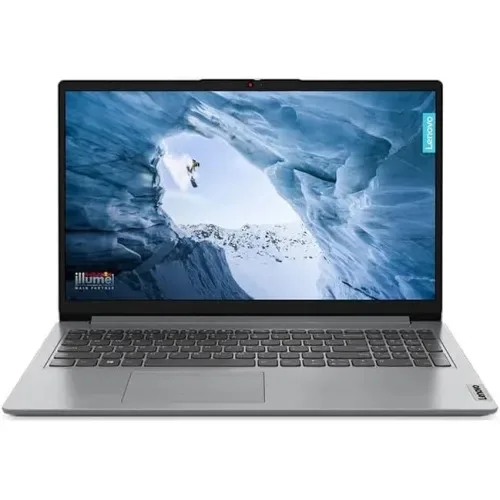
Lenovo IdeaPad Slim 1i Intel Celeron N4020 14 FHD Laptop
- Brand:Lenovo
- Product Code: IdeaPad Slim 1i 14IGL7
- Availability:Out of Stock
- Updated:
Earn ৳360 (1%) cashback in your wallet (up to ৳500) on orders of ৳20,000 or more. Credited 7 days after the order is completed, if it is not cancelled or returned. Logged-in customers only; coupon, wallet and shipping are not counted.
Available Options
Webcam
Short description: Upgrade your laptop for clearer and more professional video calls, online classes, meetings, interviews, and content creation.
Best for: Remote workers, students, teachers, interview candidates, and content creators.
Why add it? A dedicated webcam can provide a better video experience when the built-in laptop camera isn't enough.
External SSD
Short description: Add fast and portable storage for your important files, photos, videos, games, and work projects.
Best for: Professionals, students, creators, gamers, and anyone who needs extra storage.
Why add it? More storage means less need to delete important files, while an SSD provides convenient and fast access to your data.
Microphone
Short description: Make your voice clearer and more professional during calls, classes, recordings, gaming, streaming, and meetings.
Best for: Content creators, streamers, online teachers, remote workers, and gamers.
Why add it? Better voice quality makes communication easier and gives recordings and online meetings a more professional feel.
USB Hub
Short description: Expand your laptop's connectivity and connect multiple USB accessories from a single compact hub.
Best for: Office users, students, professionals, and customers who use several USB devices.
Why add it? Connect your mouse, keyboard, flash drive, phone, printer, and other USB devices without constantly swapping cables.
External Keyboard
Short description: Enjoy a more comfortable typing experience with a dedicated keyboard for work, study, programming, and everyday use.
Best for: Office workers, programmers, students, writers, and heavy typists.
Why add it? A dedicated keyboard can make long typing sessions more comfortable and gives you a convenient desktop-style setup.
Laptop Stand
Short description: Raise your laptop to a more comfortable viewing position while creating a cleaner and more organized workspace.
Best for: Students, office workers, remote workers, and anyone who spends long hours using a laptop.
Why add it? A better laptop position can make your workspace more comfortable and help create a more ergonomic setup.
USB Flash Drive
Short description: Keep your important documents, photos, presentations, and other files portable and easy to transfer.
Best for: Students, professionals, teachers, office users, and everyday laptop users.
Why add it? It's a simple way to carry important files and transfer data between computers and other compatible devices.
Cooling Pad
Short description: Improve airflow around your laptop during extended work, gaming, study, or other demanding sessions.
Best for: Gamers, professionals, students, and users who regularly run demanding applications.
Why add it? Additional airflow can help create a more comfortable operating environment during long laptop sessions.
Keyboard Protector
Short description: Add an extra layer of protection against everyday dust, dirt, and accidental spills around the keyboard.
Best for: Students, office users, travelers, and anyone who wants to keep their laptop cleaner.
Why add it? It's an inexpensive way to help keep the keyboard clean and protected during everyday use.
Speaker
Short description: Enjoy a more enjoyable audio experience for movies, music, presentations, online classes, and entertainment.
Best for: Entertainment users, students, office workers, and customers who want better external audio.
Why add it? External speakers can provide a more enjoyable listening experience than relying only on the laptop's built-in speakers.
Antivirus
Short description: Add an extra layer of protection for your laptop while browsing the internet, downloading files, using email, and handling important documents.
Best for: Students, professionals, families, office users, and frequent internet users.
Why add it? Protecting your laptop and important files is an important part of maintaining a reliable everyday computer.
Headphone
Short description: Enjoy private and immersive audio for music, movies, gaming, online meetings, classes, and everyday entertainment.
Best for: Gamers, students, remote workers, music lovers, and online learners.
Why add it? Get focused audio without disturbing people around you—ideal for both work and entertainment.
Screen Protector
Short description: Help keep your laptop display protected from everyday scratches, dust, fingerprints, and surface marks.
Best for: Students, travelers, office users, and customers who frequently carry their laptop.
Why add it? A screen protector provides an additional layer between your display and everyday wear.
Adjustable Stand
Short description: Create a more flexible laptop workspace by adjusting the viewing height and angle to suit your setup.
Best for: Remote workers, students, professionals, and home-office users.
Why add it? A flexible viewing position can make your desk setup more comfortable, especially during long working or studying sessions.
Wireless Mouse
Short description: Upgrade your everyday laptop navigation with a convenient wireless mouse and a cleaner, cable-free workspace.
Best for: Office workers, students, designers, professionals, and everyday laptop users.
Why add it? A mouse can make browsing, selecting, dragging, designing, and working more comfortable than using the touchpad for extended periods.
HDMI Cable
Short description: Connect your laptop to a compatible monitor, TV, projector, or external display for a larger viewing experience.
Best for: Office workers, teachers, students, gamers, and entertainment users.
Why add it? An HDMI cable makes it easy to use your laptop with a larger screen for presentations, movies, multitasking, and gaming.
Screen Cleaner
Short description: Keep your laptop display looking cleaner and clearer by removing everyday fingerprints, dust, and smudges.
Best for: All laptop users, especially students, professionals, and people who frequently use touchscreens.
Why add it? A clean display looks better and makes your laptop easier and more pleasant to use every day.
Wi-Fi Router
Short description: Build a reliable wireless connection for your laptop, smartphone, smart devices, streaming, online classes, and work.
Best for: Home users, students, remote workers, gamers, and small offices.
Why add it? A suitable Wi-Fi router can provide the connectivity needed to get the most from your laptop and other connected devices.
Option info
Laptop Option
Webcam
Short description: Upgrade your laptop for clearer and more professional video calls, online classes, meetings, interviews, and content creation.
Best for: Remote workers, students, teachers, interview candidates, and content creators.
Why add it? A dedicated webcam can provide a better video experience when the built-in laptop camera isn't enough.
External SSD
Short description: Add fast and portable storage for your important files, photos, videos, games, and work projects.
Best for: Professionals, students, creators, gamers, and anyone who needs extra storage.
Why add it? More storage means less need to delete important files, while an SSD provides convenient and fast access to your data.
Microphone
Short description: Make your voice clearer and more professional during calls, classes, recordings, gaming, streaming, and meetings.
Best for: Content creators, streamers, online teachers, remote workers, and gamers.
Why add it? Better voice quality makes communication easier and gives recordings and online meetings a more professional feel.
USB Hub
Short description: Expand your laptop's connectivity and connect multiple USB accessories from a single compact hub.
Best for: Office users, students, professionals, and customers who use several USB devices.
Why add it? Connect your mouse, keyboard, flash drive, phone, printer, and other USB devices without constantly swapping cables.
External Keyboard
Short description: Enjoy a more comfortable typing experience with a dedicated keyboard for work, study, programming, and everyday use.
Best for: Office workers, programmers, students, writers, and heavy typists.
Why add it? A dedicated keyboard can make long typing sessions more comfortable and gives you a convenient desktop-style setup.
Laptop Stand
Short description: Raise your laptop to a more comfortable viewing position while creating a cleaner and more organized workspace.
Best for: Students, office workers, remote workers, and anyone who spends long hours using a laptop.
Why add it? A better laptop position can make your workspace more comfortable and help create a more ergonomic setup.
USB Flash Drive
Short description: Keep your important documents, photos, presentations, and other files portable and easy to transfer.
Best for: Students, professionals, teachers, office users, and everyday laptop users.
Why add it? It's a simple way to carry important files and transfer data between computers and other compatible devices.
Cooling Pad
Short description: Improve airflow around your laptop during extended work, gaming, study, or other demanding sessions.
Best for: Gamers, professionals, students, and users who regularly run demanding applications.
Why add it? Additional airflow can help create a more comfortable operating environment during long laptop sessions.
Keyboard Protector
Short description: Add an extra layer of protection against everyday dust, dirt, and accidental spills around the keyboard.
Best for: Students, office users, travelers, and anyone who wants to keep their laptop cleaner.
Why add it? It's an inexpensive way to help keep the keyboard clean and protected during everyday use.
Speaker
Short description: Enjoy a more enjoyable audio experience for movies, music, presentations, online classes, and entertainment.
Best for: Entertainment users, students, office workers, and customers who want better external audio.
Why add it? External speakers can provide a more enjoyable listening experience than relying only on the laptop's built-in speakers.
Antivirus
Short description: Add an extra layer of protection for your laptop while browsing the internet, downloading files, using email, and handling important documents.
Best for: Students, professionals, families, office users, and frequent internet users.
Why add it? Protecting your laptop and important files is an important part of maintaining a reliable everyday computer.
Headphone
Short description: Enjoy private and immersive audio for music, movies, gaming, online meetings, classes, and everyday entertainment.
Best for: Gamers, students, remote workers, music lovers, and online learners.
Why add it? Get focused audio without disturbing people around you—ideal for both work and entertainment.
Screen Protector
Short description: Help keep your laptop display protected from everyday scratches, dust, fingerprints, and surface marks.
Best for: Students, travelers, office users, and customers who frequently carry their laptop.
Why add it? A screen protector provides an additional layer between your display and everyday wear.
Adjustable Stand
Short description: Create a more flexible laptop workspace by adjusting the viewing height and angle to suit your setup.
Best for: Remote workers, students, professionals, and home-office users.
Why add it? A flexible viewing position can make your desk setup more comfortable, especially during long working or studying sessions.
Wireless Mouse
Short description: Upgrade your everyday laptop navigation with a convenient wireless mouse and a cleaner, cable-free workspace.
Best for: Office workers, students, designers, professionals, and everyday laptop users.
Why add it? A mouse can make browsing, selecting, dragging, designing, and working more comfortable than using the touchpad for extended periods.
HDMI Cable
Short description: Connect your laptop to a compatible monitor, TV, projector, or external display for a larger viewing experience.
Best for: Office workers, teachers, students, gamers, and entertainment users.
Why add it? An HDMI cable makes it easy to use your laptop with a larger screen for presentations, movies, multitasking, and gaming.
Screen Cleaner
Short description: Keep your laptop display looking cleaner and clearer by removing everyday fingerprints, dust, and smudges.
Best for: All laptop users, especially students, professionals, and people who frequently use touchscreens.
Why add it? A clean display looks better and makes your laptop easier and more pleasant to use every day.
Wi-Fi Router
Short description: Build a reliable wireless connection for your laptop, smartphone, smart devices, streaming, online classes, and work.
Best for: Home users, students, remote workers, gamers, and small offices.
Why add it? A suitable Wi-Fi router can provide the connectivity needed to get the most from your laptop and other connected devices.
Specification
| Display Features | |
| Display Resolution | 2x 1.5W |
|---|---|
| BASIC INFORMATION | |
| Adapter Type | 45W Round Tip (3-pin) |
| Audio Features | High Definition (HD) Audio, Stereo speakers, Dolby Audio |
| Battery type | Integrated |
| Bus Speed | 3200MHZ |
| Card Reader | 1x Card reader |
| Chipset Model | Intel SoC Platform |
| CPU Cache | 4MB |
| Display Features | 220nits Anti-glare |
| Fingerprint Sensor | N/A |
| Graphics Memory | Shared |
| Graphics Model | Intel UHD Graphics 600 |
| Graphics Type | Integrated |
| Keyboard Type | Non-backlit, English (EU) |
| Max RAM Capacity | Up to 8GB (8GB SO-DIMM) DDR4-2400 offering |
| Operating System | Free DOS |
| Other Features | Green Certifications: ErP Lot 3 RoHS compliant |
| Processor Brand | Intel |
| Processor Core | 2 |
| Processor Frequency | 1.1GHz Up to 2.8GHz |
| Processor Model | Celeron N4020 |
| Processor Thread | 2 |
| RAM Type | DDR4 |
| Storage Capacity | 256GB |
| Storage Upgrade | up to 512GB M.2 2242 SSD or 512GB M.2 2280 SSD (non-eMMC models) |
| Total RAM Slot | 2 |
| Touch Screen | N/A |
| TouchPad | Buttonless Mylar surface multi-touch touchpad, supports Precision TouchPad (PTP), 69 x 104 mm (2.72 x 4.09 inches) |
| RAM | 8GB |
| Display Type | TN |
| Storage type | M.2 2242 PCIe 4.0x4 NVMe SSD |
| INPUT DEVICES | |
| WebCam | HD 720p |
| Interface | |
| WIFi | Wi-Fi 6, 11ax 2x2 |
| Main Features | |
| Microphone | 2x Array |
| NETWORK & WIRELESS CONNECTIVITY | |
| LAN | N/A |
| PHYSICAL SPECIFICATION | |
| Body material | Surface Treatment: IMR (In-Mold Decoration by Roller) Case Material: PC-ABS (Top), PC-ABS (Bottom) |
| Dimensions (W x D x H) | 325.3 x 216.5 x 17.9 mm (12.8 x 8.52 x 0.70 inches) |
| Weight | Starting at 1.3 kg (2.87 lbs) |
| Physical Specification | |
| Color | Cloud Grey |
| PORTS, CONNECTORS & SLOTS | |
| Extra M.2 Slot | Yes |
| HDMI Port | 1x HDMI 1.4b |
| Headphone & Microphone Port | 1x Headphone/microphone combo jack (3.5mm) |
| USB 2 Port | 1x USB 2.0 |
| USB 3 Port | 1x USB 3.2 Gen 1 |
| USB Type-C / Thunderbolt Port | 1x USB-C 3.2 Gen 1 (support data transfer only) |
| WARRANTY | |
| Manufacturing Warranty | 1 years Limited Warranty (Terms & Conditions Apply As Per Lenovo) |
Description
Introduction
The Lenovo IdeaPad Slim 1i is the perfect laptop for users who value simplicity, portability, and efficiency. Powered by the Intel Celeron N4020 processor, this 14-inch laptop delivers reliable performance for everyday tasks. Its Full HD display ensures sharp and clear visuals, making it ideal for work, study, or entertainment. Designed with a slim and lightweight profile, the IdeaPad Slim 1i is easy to carry wherever you go, while offering long battery life and essential connectivity options to keep you productive all day.
People Also Ask (PAA)
1. Is the Lenovo IdeaPad Slim 1i good for students?Yes, the Lenovo IdeaPad Slim 1i is an excellent choice for students. Its lightweight design, long-lasting battery, and affordable price make it a practical option for taking notes, completing assignments, and attending online classes.
2. Can the Lenovo IdeaPad Slim 1i handle multitasking?While the Intel Celeron N4020 processor is suitable for basic tasks like web browsing, document editing, and video streaming, it may not perform well under heavy multitasking or demanding applications. It’s best suited for light to moderate usage.
3. What are the standout features of the Lenovo IdeaPad Slim 1i?The IdeaPad Slim 1i stands out with its 14-inch Full HD display, sleek and portable design, and budget-friendly price. It also includes multiple connectivity options, such as USB 3.2 and HDMI ports, making it versatile for various needs.
4. Does the Lenovo IdeaPad Slim 1i come with pre-installed software?Yes, it comes with Windows 11 pre-installed, offering a modern and user-friendly interface. It also includes Lenovo’s utility software for enhanced device management.
5. Is the Lenovo IdeaPad Slim 1i durable?The laptop is built with high-quality materials, ensuring durability for everyday use. Its slim design doesn’t compromise on sturdiness, making it reliable for both students and professionals.
Use Cases and Benefits
For Students:
The Lenovo IdeaPad Slim 1i’s lightweight and slim design make it easy to carry between classes or study sessions. The Full HD display provides a great experience for watching lectures or creating presentations, while the efficient battery ensures it can last through a full day of classes.
For Professionals:
Professionals who need a compact and affordable device for basic productivity tasks will find the IdeaPad Slim 1i to be a reliable companion. Its Windows 11 operating system, combined with essential ports for external devices, makes it suitable for tasks like document editing, emailing, and video calls.
For Everyday Users:
The IdeaPad Slim 1i is perfect for casual users who need a laptop for web browsing, social media, and streaming content. The FHD display enhances the viewing experience, and its compact size makes it easy to use around the house or on the go.
Competitive Advantages
The Lenovo IdeaPad Slim 1i offers an unbeatable combination of affordability, portability, and essential features. Unlike other laptops in its price range, it boasts a 14-inch Full HD display, ensuring superior visual quality. Its lightweight design and durable build make it a better option for users seeking portability without sacrificing reliability. With Windows 11 pre-installed, it provides a seamless and modern user experience right out of the box.
The Lenovo IdeaPad Slim 1i Intel Celeron N4020 14" FHD Laptop is a sleek and powerful device designed for users in Bangladesh. This laptop features a high-resolution 14" FHD display, perfect for watching movies or working on documents. With an Intel Celeron N4020 processor, this laptop offers fast and efficient performance for all your daily tasks.
Whether you are a student, professional, or a tech enthusiast, this laptop is perfect for you. It is lightweight and portable, making it easy to carry around and work from anywhere in Bangladesh. The Lenovo IdeaPad Slim 1i also comes with a variety of connectivity options, including USB ports, HDMI, and WiFi, ensuring you can easily connect to the internet and external devices.
If you are looking for a reliable and affordable laptop in Bangladesh, the Lenovo IdeaPad Slim 1i Intel Celeron N4020 14" FHD Laptop is the perfect choice for you. Upgrade your tech game and enjoy seamless performance with this top-of-the-line device.