
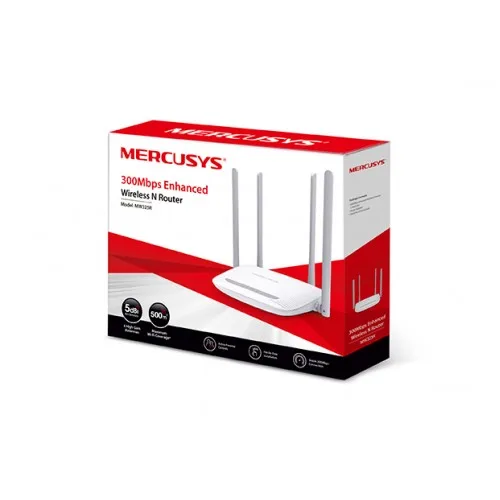
Mercusys MW325R 300Mbps Wifi Router
- Brand: Mercusys
- Product Code: MW325R
- Availability: In Stock
- Updated:
Specification
| BASIC INFORMATION | |
| External Power Supply | 9VDC/0.6A |
|---|---|
| Frequency | 2.4 - 2.4835GHz |
| Wireless Security | WPA-PSK / WPA2-PSK |
| Wireless Speed | 300Mbps |
| Wireless Standards | IEEE 802.11n, IEEE 802.11g, IEEE 802.11b |
Description
Mercusys MW325R 300Mbps Wi-Fi Router Price in Bangladesh
The Mercusys MW325R 300Mbps Wi-Fi Router is an affordable wireless networking solution for homes, small offices and students who need dependable internet access without spending too much. Equipped with four 5dBi high-gain external antennas, this router is designed to provide wider wireless coverage than basic routers with fewer antennas. It supports wireless speeds of up to 300Mbps on the 2.4GHz band, making it suitable for everyday browsing, online classes, video streaming and social media. With a simple web-based setup, parental controls and guest network functionality, the Mercusys MW325R offers a useful combination of coverage, convenience and essential networking features.
300Mbps Wireless N Speed for Everyday Internet Activities
The Mercusys MW325R uses IEEE 802.11n wireless technology to deliver a maximum theoretical wireless link speed of 300Mbps on the 2.4GHz frequency band. This provides enough wireless capability for common activities such as browsing websites, attending online meetings, watching HD videos and using messaging applications. The router is also suitable for light online gaming when the broadband connection and network conditions are stable. Actual internet speed depends on your internet service provider, connected devices, signal strength and network interference.
Four 5dBi High-Gain Antennas for Wider Wi-Fi Coverage
One of the main attractions of the Mercusys MW325R is its four external 5dBi antennas. These antennas are designed to improve wireless signal distribution across rooms and help maintain connectivity in areas where a basic router may struggle. This makes the MW325R worth considering for small houses, apartments and office spaces with several connected devices. However, coverage depends on the building layout, wall materials, router placement and nearby wireless interference. No router can guarantee a strong signal in every room or eliminate all Wi-Fi dead zones.
MIMO Technology for Improved Wireless Communication
The Mercusys MW325R incorporates MIMO technology to improve wireless communication using multiple antennas. MIMO, or Multiple-Input Multiple-Output, helps compatible wireless devices exchange data more efficiently under suitable network conditions. This can contribute to a more consistent connection when several devices are using the network. Actual performance depends on the wireless capabilities of connected devices, available bandwidth and the surrounding radio environment.
2.4GHz Single-Band Wi-Fi Connectivity
The MW325R operates on the widely supported 2.4GHz wireless band, making it compatible with many smartphones, laptops, tablets, wireless printers and smart home devices. The 2.4GHz frequency is useful for everyday home networking because it can provide practical coverage through common indoor obstacles. However, it is also more susceptible to interference from neighbouring Wi-Fi networks and other wireless equipment. The MW325R does not offer a separate 5GHz band, so users seeking higher wireless throughput may prefer a dual-band router.
Easy Router Setup Through a Web Browser
Setting up the Mercusys MW325R is straightforward for most home users. After connecting the router to your internet source, you can open its web-based management interface using a compatible smartphone, laptop or desktop computer. The setup process allows you to configure your internet connection, choose a Wi-Fi network name and create a wireless password. Some broadband providers may require additional settings, such as PPPoE account details, before the connection becomes active.
Parental Controls for Managing Children's Internet Access
The Mercusys MW325R includes parental control functionality that can help families manage how children use their home internet connection. Depending on the hardware and firmware version, parents can configure supported access restrictions or schedules for selected devices. These controls can be useful for setting household internet rules during study time or at night. They are intended as basic management tools and should be used alongside appropriate supervision and other online safety measures.
Guest Network for Visitors
The Mercusys MW325R supports guest network functionality on compatible firmware versions, allowing visitors to connect to a separate wireless network without sharing the main household Wi-Fi credentials. This is useful for homes, small offices and businesses that regularly provide temporary internet access to guests. Available guest isolation and access restrictions depend on the router's settings and firmware capabilities. Users should configure a suitable password and review the available security options before enabling guest access.
IPv6 Support for Modern Internet Connections
The Mercusys MW325R is described as supporting IPv6 networking, which may help it work with internet providers using the newer Internet Protocol standard. IPv6 offers a larger address space than IPv4 and is increasingly used across modern networks. Actual IPv6 connectivity depends on the router's hardware and firmware version, internet service provider and network configuration. Buyers who specifically require IPv6 should confirm support for their intended connection type before purchasing.
Fast Ethernet Ports for Wired Networking
The Mercusys MW325R provides Ethernet connectivity for connecting to a broadband modem or other compatible network equipment and for attaching supported wired devices. A wired connection can be useful for desktop computers, network printers and other devices located near the router. The MW325R uses 10/100Mbps Fast Ethernet ports rather than Gigabit Ethernet, which means the wired interface can limit throughput on broadband packages faster than 100Mbps. This is an important consideration when choosing a router for high-speed fibre internet.
Suitable for Online Classes, Streaming and Home Office Work
The Mercusys MW325R is a practical option for students attending online classes, families watching online videos and professionals working from home. Its 300Mbps Wireless N capability supports everyday applications such as Google Meet, Zoom, web browsing, email and social media. The four external antennas are particularly useful when the router needs to serve several nearby rooms. For households with many simultaneous high-bandwidth users, a dual-band Wi-Fi 5 or Wi-Fi 6 router may offer better overall performance.
Compact Design for Home and Small Office Installation
The Mercusys MW325R features a simple, practical design that fits naturally into a home or office networking setup. Its four external antennas give it a distinctive appearance while supporting wireless coverage. The router can be placed on a suitable flat surface with adequate ventilation and access to the required power and network connections. For better Wi-Fi performance, position it in a central, elevated location away from large metal objects and other sources of interference.
Why Choose the Mercusys MW325R 300Mbps Wi-Fi Router?
The Mercusys MW325R stands out as a budget-friendly router with four 5dBi antennas, 300Mbps Wireless N connectivity, MIMO technology and convenient network management features. It is especially appealing to users who value wireless coverage and straightforward operation more than advanced gaming or high-speed networking features. Its parental controls, guest network and simple setup make it suitable for everyday household use. The main limitations are its single-band 2.4GHz Wi-Fi and 100Mbps Ethernet connectivity, which should be considered when comparing it with newer dual-band routers.
Mercusys MW325R 300Mbps Wi-Fi Router Price in Bangladesh
Looking for the Mercusys MW325R 300Mbps Wi-Fi Router price in Bangladesh? Contact Unix Network to check the latest price, stock availability and warranty information. The MW325R is worth considering for buyers looking for an affordable four-antenna wireless router for home or small office use. Before purchasing, confirm the hardware version, supported networking features, included power adapter and compatibility with your broadband connection.
Buy Mercusys MW325R Wi-Fi Router from Unix Network in Jashore
Find the Mercusys MW325R 300Mbps Wi-Fi Router at Unix Network in Jashore, Bangladesh. Whether you need a new router for your home, a wireless connection for online learning or a budget networking solution for a small office, Unix Network can help you enquire about Mercusys routers and compatible networking accessories. Customers in Jashore, Khulna, Jhenaidah, Magura, Narail, Satkhira and other parts of Bangladesh can contact Unix Network for online ordering and delivery options. Visit our shop or explore unixnetworkbd.com to check current availability, pricing and applicable warranty terms before placing your order.