
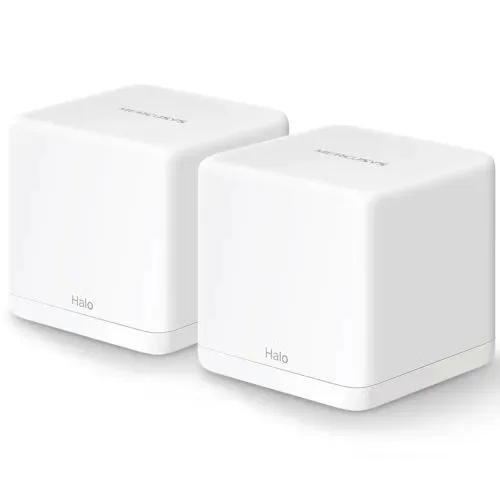
Mercusys Halo H30G AC1300 1300Mbps Dual Band Mesh Router (2 Pack)
- Brand: Mercusys
- Product Code: Halo H30G
- Availability: In Stock
- Updated:
Specification
| BASIC INFORMATION | |
| Encryption | WPA-PSK/WPA2-PSK |
|---|---|
| Frequency | 2.4 G Hz / 5 GHz |
| Interface | 2× Gigabit Ports per Halo Unit (WAN/LAN auto-sensing) |
| Network Standard | IEEE 802.11 a/n/ac 5 GHz, IEEE 802.11 b/g/n 2.4 GHz |
| Others | Operation Modes: Router, Access Point Mesh protocol: 802.11k/v/r Protocols: Supports IPv4 and IPv6 |
| Button | Reset button |
| Main Features | |
| Data Rate | 867 Mbps on 5 GHz, 400 Mbps on 2.4 GHz |
| Physical Specification | |
| Color | White |
Description
Mercusys Halo H30G AC1300 1300Mbps Dual Band Mesh Router (2 Pack)
The Mercusys Halo H30G AC1300 Dual Band Mesh Router (2 Pack) is designed for users who want wider WiFi coverage, smoother connectivity between rooms, and faster wired networking. Unlike a traditional single router, the two Halo units work together as one mesh system to help reduce weak-signal areas and create a more consistent wireless experience throughout the home or workplace.
With combined dual-band WiFi speeds of up to 1300Mbps, the Halo H30G is suitable for browsing, streaming, online classes, video calls, gaming, smart TVs, and multiple connected devices. An important advantage of the H30G version is its Gigabit Ethernet ports, making it more suitable for users who also need faster wired connectivity.
Key Features
- AC1300 dual-band Mesh WiFi system
- 2-pack whole-home WiFi solution
- Up to 1300Mbps combined WiFi speed
- 2.4GHz and 5GHz dual-band connectivity
- Two mesh units working as one network
- Seamless roaming
- Single WiFi name and password
- Gigabit Ethernet ports
- Suitable for multiple connected devices
- Guest WiFi support
- Parental control features
- Quality of Service management
- IPv4 and IPv6 support
- Router and Access Point modes
- Easy setup and network management
AC1300 Dual-Band WiFi Performance
The Halo H30G uses both the 2.4GHz and 5GHz wireless bands, allowing different devices to use the connection most suitable for their location and activity.
The 2.4GHz band is generally better for wider coverage and devices located farther away. It is suitable for browsing, social media, smart home devices, messaging, and everyday internet use.
The 5GHz band provides higher wireless performance and is better suited for activities such as streaming, video calls, online gaming, and downloading larger files.
Using two wireless bands also helps distribute connected devices more efficiently across the network.
Mesh WiFi for Better Coverage
The biggest advantage of the Halo H30G is its mesh networking technology.
Instead of depending on a single router to cover the entire home, you can place the two Halo units in different locations. They work together to create one larger WiFi network.
For example:
Internet Connection → Halo H30G #1 → Halo H30G #2
The first unit connects to your internet connection, while the second unit can be placed in another room or area where stronger WiFi coverage is needed.
This can be especially useful for:
- Large homes
- Multi-room apartments
- Two-story houses
- Shops
- Small offices
- Buildings with WiFi dead zones
Seamless Roaming
With a traditional router and WiFi extender setup, you may need to manually switch between different WiFi networks.
The Halo H30G mesh system is designed to use a unified network. As you move around your home, compatible devices can transition between the Halo units automatically.
This is useful when you are:
- Walking around while on a video call
- Watching videos on a smartphone
- Using a laptop in different rooms
- Moving between floors
- Using smart devices throughout the home
You can maintain one WiFi name and password instead of managing separate networks.
Gigabit Ethernet Ports
One of the major advantages of the Halo H30G is its Gigabit Ethernet connectivity.
This makes it suitable for connecting wired devices that can benefit from a faster and more stable network connection.
You can connect devices such as:
- Gaming PCs
- Desktop computers
- Smart TVs
- Gaming consoles
- Network switches
- NAS storage
- CCTV/NVR systems
For stationary devices, a wired connection can provide greater consistency than WiFi and can reduce the effect of wireless interference.
The Gigabit ports also make the H30G a stronger option than mesh systems limited to 10/100Mbps Ethernet ports.
Gaming Performance
The Halo H30G can be used for both wireless and wired gaming.
For devices located close to a Halo unit, the 5GHz network can provide strong wireless performance. For a gaming PC or console in a fixed location, connecting through Ethernet can provide a more stable connection.
It is suitable for:
- PC gaming
- PlayStation
- Xbox
- Mobile gaming
- Gaming laptops
- Online multiplayer games
- Downloading large games and updates
Keep in mind that router speed alone does not determine online gaming performance. Ping and latency are also affected by your internet provider, server location, routing, congestion, and overall network conditions.
Streaming and Entertainment
The dual-band mesh system is suitable for households with multiple entertainment devices.
You can connect:
- Smart TVs
- Smartphones
- Tablets
- Laptops
- Streaming devices
- Gaming consoles
The system can be used for:
- YouTube
- HD and high-quality video streaming
- Movies and TV shows
- Live streaming
- Video calls
- Online classes
- Music streaming
Multiple users can remain connected across different areas of the home without depending entirely on the coverage of a single router.
Multiple Device Connectivity
Modern homes often have many devices connected at the same time. Phones, laptops, TVs, cameras, smart devices, and other equipment can all use the network simultaneously.
The dual-band mesh design helps create a more organized and flexible wireless environment for multiple devices.
It is suitable for connecting:
- Smartphones
- Laptops
- Desktop PCs
- Smart TVs
- Tablets
- Security cameras
- Smart home devices
- Printers
- Gaming consoles
Actual performance will depend on internet bandwidth, device capability, distance, and the number of actively used devices.
Guest WiFi
The Halo H30G can provide a separate guest network for visitors.
This allows guests to access the internet without requiring access to your primary WiFi credentials.
Guest WiFi can be useful for:
- Homes
- Offices
- Shops
- Small businesses
- Guest areas
Parental Controls and Device Management
The mesh system includes features designed to help manage connected devices and internet access.
These controls can be useful for monitoring and managing network usage within a household.
Parents can use device-management features to control internet access according to their own requirements.
Quality of Service
Quality of Service, commonly known as QoS, can help manage network traffic when several devices are using the internet at the same time.
It can be useful for prioritizing important activities such as:
- Video calls
- Online classes
- Gaming
- Work devices
- Streaming
This helps users manage available bandwidth more effectively when the network is busy.
Router and Access Point Modes
The Halo H30G can be used in different networking configurations.
Router Mode
In Router Mode, the Halo system works as the main router for your internet connection and manages the home network.
Access Point Mode
In Access Point Mode, the system can work alongside an existing router to provide expanded mesh WiFi coverage.
This flexibility can be useful when upgrading an existing home or office network.
IPv4 and IPv6 Support
The Halo H30G supports both IPv4 and IPv6, allowing it to work with different types of internet services and network configurations.
This provides flexibility for modern broadband connections.
Easy Setup
The Halo H30G is designed for straightforward installation and management.
A typical setup process includes:
- Connect the first Halo unit to your internet connection.
- Power on the device.
- Complete the initial network setup.
- Place the second Halo unit in another suitable area.
- Add it to the mesh network.
- Create your WiFi name and password.
- Connect your devices.
After setup, both units work together as one unified WiFi system.
Tips for Better Mesh Performance
To get the best results from a mesh WiFi system, placement is important.
Try to:
- Place the main unit in an open location.
- Avoid putting units inside closed cabinets.
- Keep units away from large metal objects.
- Position the second unit where it can still receive a strong connection from the first unit.
- Avoid placing the second unit directly inside a complete WiFi dead zone.
- Keep the units away from major sources of wireless interference.
Proper placement can significantly improve overall coverage and connection stability.
Mercusys Halo H30G Specifications
| Specification | Details |
|---|---|
| Brand | Mercusys |
| Model | Halo H30G |
| Package | 2 Pack |
| WiFi Class | AC1300 |
| WiFi Bands | 2.4GHz + 5GHz |
| Maximum Combined Speed | Up to 1300Mbps |
| Mesh Technology | Yes |
| Seamless Roaming | Yes |
| Ethernet | Gigabit Ethernet |
| Operating Modes | Router / Access Point |
| Guest Network | Yes |
| Parental Controls | Yes |
| QoS | Yes |
| IPv4 | Yes |
| IPv6 | Yes |
| Suitable For | Home, apartment, shop and small office |
Who Should Buy the Mercusys Halo H30G?
The Halo H30G is a suitable choice for users who need:
- Better WiFi coverage
- A solution for WiFi dead zones
- A single WiFi network throughout the home
- Seamless roaming
- Dual-band WiFi
- Multiple connected devices
- Faster wired connectivity
- Gigabit Ethernet ports
- Home streaming
- Online gaming
- Small-office networking
It is especially useful for users who have a larger property where a single conventional router cannot provide reliable coverage in every room.
Final Verdict
The Mercusys Halo H30G AC1300 1300Mbps Dual Band Mesh Router (2 Pack) combines the convenience of whole-home mesh WiFi with the advantage of Gigabit wired networking.
Its two-unit design can help improve WiFi coverage across multiple rooms, while seamless roaming allows compatible devices to stay connected as you move around the property. The combination of dual-band AC1300 WiFi and Gigabit Ethernet makes it suitable for streaming, gaming, work, smart devices, and everyday internet usage.
For users who want to improve weak WiFi coverage while also keeping the option for faster wired connections, the Halo H30G 2 Pack is a practical choice for home and small-office networking.