


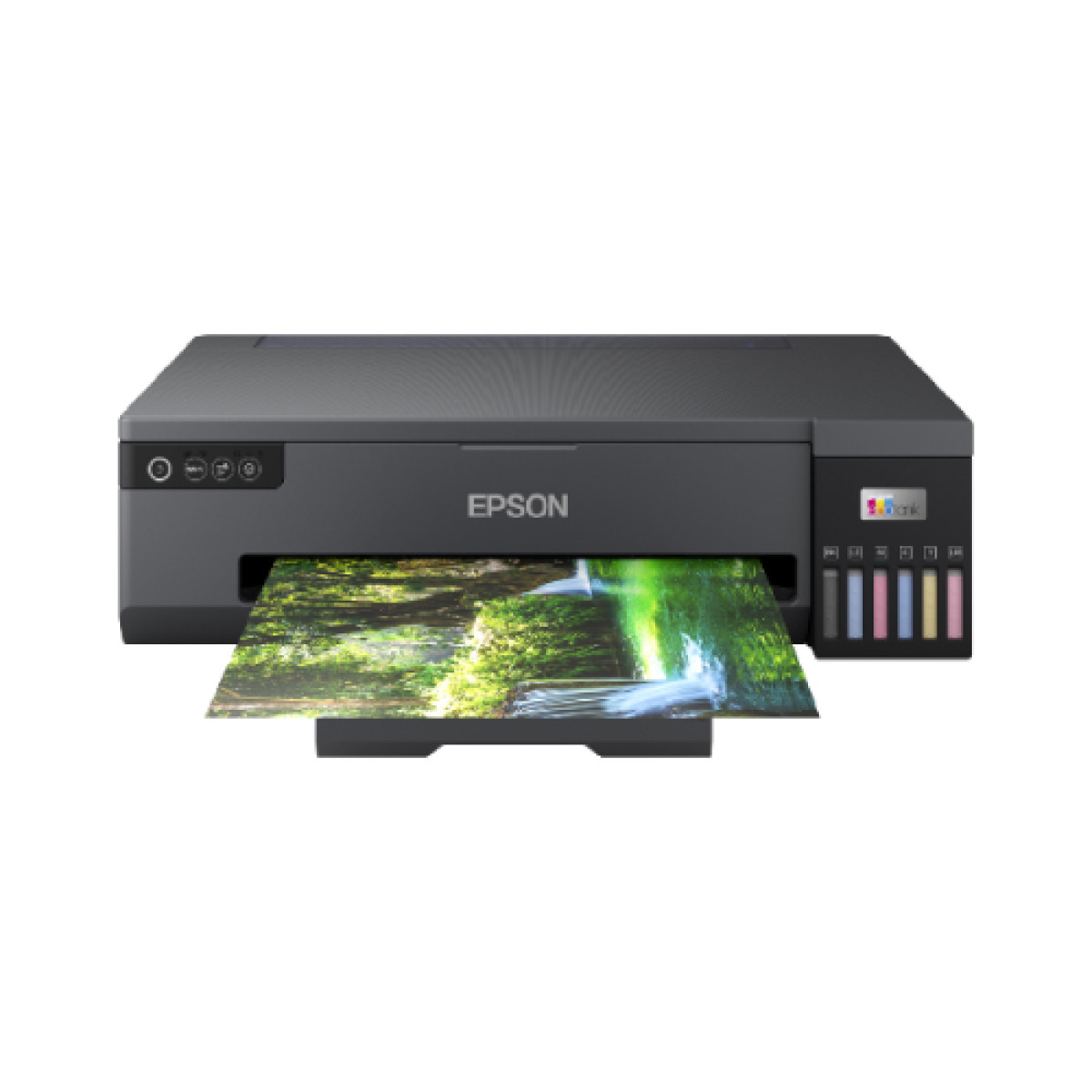
Epson EcoTank L18050 A3 Ink Tank Photo Printer
was ৳84,000
Key highlights
- Functions: Print Only
- Others: Epson Connect Features: Epson iPrint, Epson Email Print, Remote Print Driver Other Mobile Solutions: Epson Smart Panel
- Output Color: Black and White Color
- Printer Type: Print
- Software: Windows XP SP3 / XP Professional x64 SP2 / Vista / 7 / 8 / 8.1 / 10 / 11 Windows Server 2003 / 2008 / 2012 / 2016 / 2019 / 2022 Only printing and scanning functions are supported for Windows Server OS Mac OS X 10.9.5 or later
Description
High-Quality A3 Printing with Epson EcoTank L18050
Introduction
The Epson EcoTank L18050 A3 Ink Tank Photo Printer is a game-changing solution for businesses and photographers looking for an affordable, high-quality printer with low running costs. Featuring EcoTank technology, the L18050 eliminates the need for traditional ink cartridges by utilizing high-capacity ink tanks, which dramatically reduce the cost per print while providing an impressive print yield. Designed for A3-sized prints, it offers superior photo and document quality with a resolution of up to 4800 x 1200 dpi. Whether you're printing professional photos, marketing materials, or large-format graphics, the L18050 ensures precise, vibrant colors and crisp text. Additionally, the printer’s high-speed printing of up to 25 pages per minute (ppm) and easy connectivity options like Wi-Fi, USB, and Ethernet make it a versatile choice for a range of applications. The Epson EcoTank L18050 is ideal for businesses, photographers, and print shops looking to save on ink costs without compromising on quality.
People Also Ask (PAA) Section
1. What are the key features of the Epson EcoTank L18050 A3 Ink Tank Photo Printer?
The Epson EcoTank L18050 comes equipped with several features designed to enhance productivity and reduce printing costs:
High-capacity ink tanks that eliminate the need for traditional ink cartridges, offering significant cost savings on ink over time.
A3 printing capability, allowing you to print larger-sized documents and photos with ease.
Print speeds of up to 25 pages per minute (ppm), making it ideal for quick, high-volume printing tasks.
High-resolution printing up to 4800 x 1200 dpi, producing sharp, vibrant photos and detailed documents.
Multiple connectivity options, including Wi-Fi, USB 2.0, and Ethernet, for easy integration into any office or home setup.
Wireless printing via Apple AirPrint and Google Cloud Print, enabling users to print directly from smartphones and tablets.
2. What makes the Epson EcoTank L18050 different from other printers?
The Epson EcoTank L18050 stands out in the market for several reasons:
The EcoTank ink system eliminates the need for expensive ink cartridges, making it much more cost-effective in the long run compared to printers with traditional cartridges.
A3 printing capability offers more flexibility for businesses and professionals who require larger prints for marketing materials, business presentations, or photos.
The printer's high-quality prints at 4800 x 1200 dpi resolution make it perfect for printing professional-grade photos and detailed graphics.
With 25 ppm print speed, it ensures quick, efficient printing for both large and small jobs.
The large ink tank capacity ensures that you can print more pages between refills, reducing the time spent managing printer maintenance.
3. Can the Epson EcoTank L18050 print large formats?
Yes, the Epson EcoTank L18050 is capable of printing on A3-sized paper, making it perfect for those who need to print larger-format documents or photos. Its A3 printing capacity allows for printing on larger posters, presentations, marketing materials, and more, with high-quality output that maintains crisp detail and vibrant color.
4. How does the ink system in the Epson EcoTank L18050 work?
The EcoTank system in the Epson L18050 uses high-capacity ink tanks instead of traditional ink cartridges. These tanks can be easily refilled using affordable ink bottles, allowing for more pages per tank compared to traditional cartridge-based printers. This reduces printing costs by up to 90% on ink, making the printer extremely cost-effective for high-volume users. The ink tanks are transparent, so you can easily monitor ink levels to ensure you're never caught off guard by low ink.
5. What is the print quality like on the Epson EcoTank L18050?
The Epson EcoTank L18050 delivers outstanding print quality with a resolution of up to 4800 x 1200 dpi. This high resolution ensures that your prints, whether they are color photos or detailed business documents, come out looking sharp, vibrant, and professional. The claria ink technology used in the printer enhances color depth, resulting in rich, life-like colors perfect for photo prints and high-quality marketing materials.
6. Is the Epson EcoTank L18050 suitable for businesses?
Yes, the Epson EcoTank L18050 is an excellent choice for businesses, especially those with high-volume printing needs. The low running costs of the EcoTank ink system and the ability to print A3-sized documents make it ideal for businesses that require large-format prints, whether for presentations, marketing materials, or product designs. Its 25 ppm print speed, high print quality, and easy integration with office networks make it a highly efficient and cost-effective solution for business printing.
7. How do I set up the Epson EcoTank L18050?
Setting up the Epson EcoTank L18050 is a straightforward process:
Unbox the printer and fill the ink tanks with the provided ink bottles.
Follow the on-screen instructions on the printer’s LCD panel to complete the initial setup.
Connect the printer to your network via Wi-Fi, USB, or Ethernet.
You can also use the Epson iPrint app or the Epson Connect service for mobile printing and other remote print functions.
Once connected, you’re ready to start printing.
Use Cases and Benefits
The Epson EcoTank L18050 is designed to provide excellent print quality and high efficiency for both professional and personal use. Here are some practical use cases:
Small to Medium-Sized Businesses: The L18050 is perfect for businesses that need to print A3 documents, marketing materials, and professional reports. Its low operating costs and ability to print larger-sized documents at high speeds make it an excellent solution for businesses with moderate to high-volume print requirements.
Photographers and Graphic Designers: For professionals who need to print high-quality photos, the L18050 is a great choice due to its high-resolution prints and vibrant color reproduction. The ability to print on A3-sized paper provides photographers with the flexibility to create larger prints and portfolios with stunning detail and color accuracy.
Print Shops: Print shops that handle color prints and large-format graphics can benefit from the EcoTank L18050’s efficiency and affordable ink system. The high print yield of the EcoTank system allows for uninterrupted, high-volume printing, reducing the overall cost per page and improving profitability for print shops.
Educational Institutions: Schools, colleges, and universities can use the L18050 to print brochures, student projects, reports, and presentations. Its A3 printing capacity and cost-effective ink usage make it an excellent tool for educational environments.
Competitive Advantages
The Epson EcoTank L18050 offers several advantages over similar printers in its category:
EcoTank system dramatically reduces ink costs by using refillable tanks instead of expensive ink cartridges, allowing for up to 90% savings on ink.
A3 printing capability gives businesses and professionals the flexibility to print larger documents, a feature not always available in other low-cost printers.
High-quality prints with a resolution of 4800 x 1200 dpi ensure crisp, professional results for photos, documents, and graphics.
High-speed printing of up to 25 ppm ensures quick production of both color and monochrome prints.
The low maintenance of the EcoTank system, along with easy refillability, provides an excellent total cost of ownership over time.
The Epson EcoTank L18050 A3 Ink Tank Photo Printer is the perfect solution for high-quality printing needs in Bangladesh. This innovative printer features a large ink tank system that eliminates the need for cartridges, saving you time and money. With its A3 printing capability, you can easily print larger documents and photos with crisp, vibrant colours.
This printer is ideal for professionals, students, and families who require reliable and efficient printing services. The Epson EcoTank L18050 is compatible with a variety of devices, including smartphones and tablets, making it easy to print from anywhere in Bangladesh. Its user-friendly design and high-speed printing capabilities make it a top choice for those in need of fast and accurate printing results.
With its eco-friendly design and low-cost printing capabilities, the Epson EcoTank L18050 is the perfect choice for those looking to reduce their environmental impact without sacrificing quality. Upgrade to this advanced printer today and experience high-quality printing like never before in Bangladesh.
Affordable and Eco-Friendly Photo Printer for Creatives
Specification
| BASIC INFORMATION | |
|---|---|
| Functions | Print Only |
| Others | Epson Connect Features: Epson iPrint, Epson Email Print, Remote Print Driver Other Mobile Solutions: Epson Smart Panel |
| Output Color | Black and White Color |
| Printer Type | |
| Software | Windows XP SP3 / XP Professional x64 SP2 / Vista / 7 / 8 / 8.1 / 10 / 11 Windows Server 2003 / 2008 / 2012 / 2016 / 2019 / 2022 Only printing and scanning functions are supported for Windows Server OS Mac OS X 10.9.5 or later |
| Technology | Epson Micro Piezo print head |
| Paper Handling | |
| Output capacity | Up to 100 sheets of A3 Plain Paper Up to 30 sheets of Premium Glossy Photo Paper |
| PHYSICAL SPECIFICATION | |
| Dimensions (W x D x H) | 523 x 369 x 150 mm (Width x Depth x Height) |
| Weight | 8 kg |
| Physical Specification | |
| Color | Black |
| Power | |
| Power Consumption | 19 Watt |
| Printing Features | |
| Duty Cycle up to (Yield) | Standard Capacity Black: Page Yield: 3,600 pages Photo Page Yield (4R): 5,600 pages Standard Capacity Cyan: Page Yield: 7,200 (Composite Yield) Photo Page Yield (4R): 2,100 (Composite Yield) Standard Capacity Magenta: Page Yield: 7,200 (Composite Yield) Photo Page Yield (4R): 2,100 (Composite Yield) Standard Capacity Yellow: Page Yield: 7,200 (Composite Yield) Photo Page Yield (4R): 2,100 (Composite Yield) Standard Capacity Light Cyan: Page Yield: 7,200 (Composite Yield) Photo Page Yield (4R): 2,100 (Composite Yield) Standard Capacity Light Magenta: Page Yield: 7,200 (Composite Yield) Photo Page Yield (4R): 2,100 (Composite Yield) |
| Paper Sizes | A4 (21.0x29.7 cm), A5 (14.8x21.0 cm), A6 (10.5x14.8 cm), B5, C6 (Envelope), DL (Envelope), No. 10 (Envelope), Letter, Plastic cards, A3+, A3 (29.7x42.0 cm) |
| Print Speed | 8 pages/min Monochrome, 8 pages/min Colour 22 pages/min Monochrome (plain paper 75 g/m²), 22 pages/min Colour (plain paper 75 g/m²), 13 Seconds per 10 x 15 cm photo (Epson Premium Glossy Photo Paper) |
| First-Print-Out Time | Approx. 14 sec / 14 sec |
| WARRANTY | |
| Manufacturing Warranty | 1-year Limited warranty, an Adapter/Power Cable with no warranty, and also a Box Mandatory While Claiming. (1 year or 50,000 pages which comes first) |