


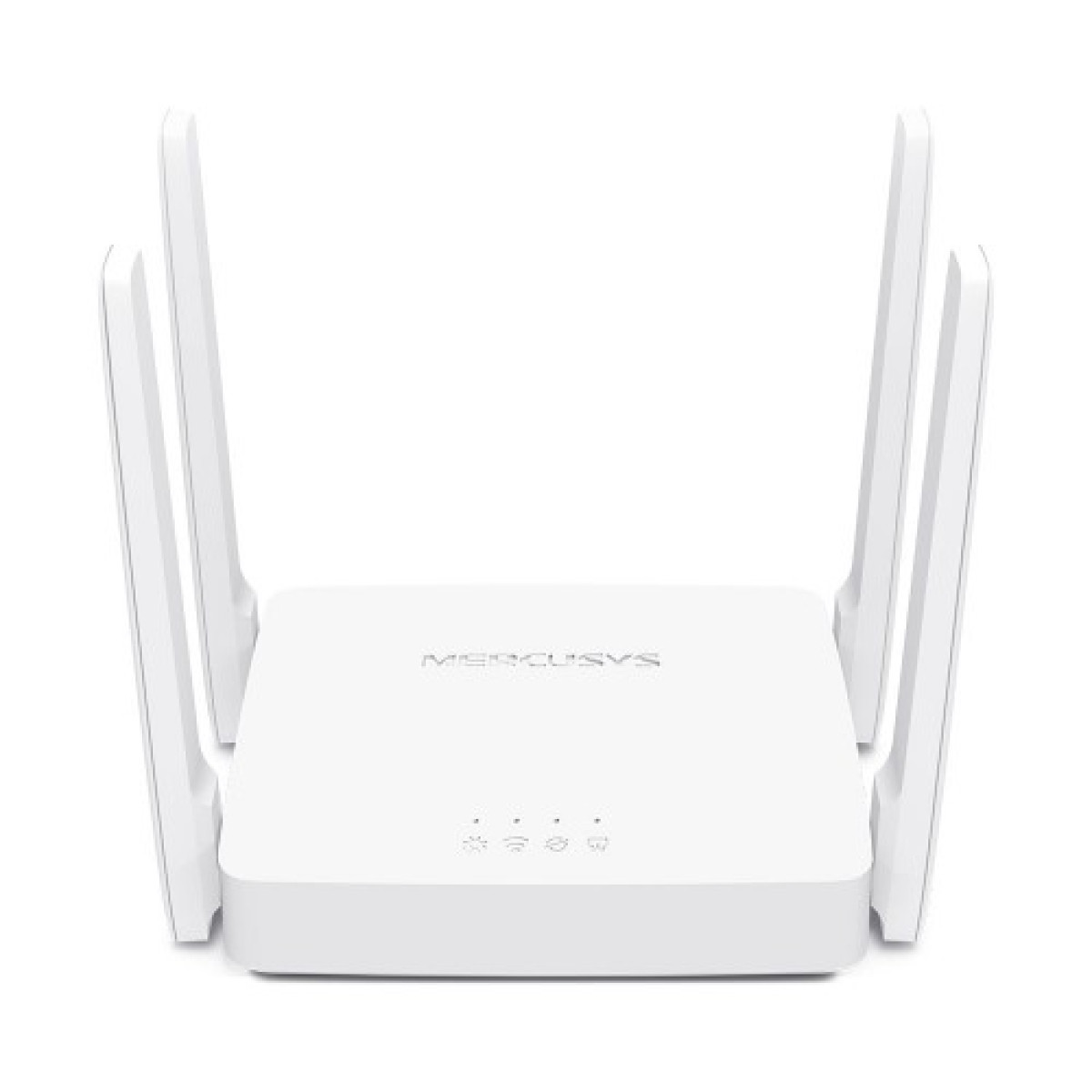
Mercusys AC10 AC1200 1200mbps 4 Antenna Dual Band Wifi Router
Now
৳1,600


Key highlights
- Interface: 1× 10/100 Mbps WAN Port 2× 10/100 Mbps LAN Ports
- Others: DHCP: Server, DHCP Client List NAT Forwarding: Port Forwarding, Port Triggering, UPnP, DMZ Firewall Security: SPI Firewall, IP and MAC Address Binding Guest Network: 2.4 GHz Guest Network, 5 GHz Guest Network
- Wireless: Enable/Disable Wireless Radio, WMM
- Antenna: 4× 5 dBi Fixed Omni-Directional Antennas
- Button: Reset/WPS Button
Description
Mercusys AC10 AC1200 1200Mbps 4 Antenna Dual Band WiFi Router
The Mercusys AC10 AC1200 Dual Band WiFi Router is an affordable and reliable networking solution for homes, apartments, small offices, shops, and everyday internet users. With support for both 2.4GHz and 5GHz WiFi, four external antennas, and a combined wireless speed of up to 1200Mbps, it is designed to provide a smoother and more flexible internet experience than traditional single-band routers.
The AC10 is suitable for everyday browsing, video streaming, online classes, social media, video calls, casual gaming, and connecting multiple smartphones, laptops, smart TVs, and other wireless devices.
Key Features
- AC1200 Dual Band WiFi
- Up to 300Mbps on 2.4GHz
- Up to 867Mbps on 5GHz
- 4 external high-gain antennas
- Beamforming technology
- Stable wireless coverage
- 2.4GHz and 5GHz networks
- Guest WiFi support
- Parental control
- Access Point functionality
- Easy installation
- IPv6 support
- IPTV support
- WPA/WPA2 wireless security
- 1 × 10/100Mbps WAN port
- 2 × 10/100Mbps LAN ports
AC1200 Dual Band WiFi Performance
The Mercusys AC10 uses two wireless bands to provide greater flexibility.
The 2.4GHz band can deliver speeds of up to 300Mbps and generally provides better coverage through walls. It is suitable for normal browsing, social media, messaging, smart devices, and general internet use.
The 5GHz band provides speeds of up to 867Mbps under suitable conditions. It is better suited to devices that require higher wireless performance, such as smartphones, laptops, smart TVs, and gaming devices.
Using the 5GHz band can also help reduce congestion when several nearby networks are competing for the same 2.4GHz wireless channels.
Actual WiFi speed depends on the internet connection, connected device, distance, walls, interference, and network conditions.
Four External Antennas
The AC10 comes with four external antennas designed to provide broad wireless coverage.
The antenna arrangement helps distribute the wireless signal throughout the coverage area, making the router suitable for typical homes and small offices.
For the best possible coverage, position the router in an open and elevated location rather than inside a cabinet or behind large objects.
Beamforming Technology
The router supports beamforming technology, which helps direct wireless transmission toward compatible connected devices.
Instead of distributing the wireless signal equally in every direction, beamforming can focus the signal toward devices that are actively connected.
This can help improve wireless stability and performance depending on the device, distance, and surrounding environment.
Gaming Performance
The Mercusys AC10 is capable of handling casual and regular online gaming.
The 5GHz band is particularly useful for gaming devices located relatively close to the router because it can provide higher wireless throughput and less congestion than the 2.4GHz band in many environments.
The router can be used with:
For competitive gaming, connection quality depends heavily on your ISP, latency, routing, WiFi interference, and the number of active devices on the network.
The AC10 is an affordable AC1200 router rather than a dedicated high-end gaming router.
Streaming Performance
The dual-band configuration makes the AC10 suitable for everyday video streaming.
The 5GHz network can be used for higher-bandwidth activities such as:
- HD video streaming
- YouTube
- Online movies
- Live streaming
- Video calls
- Smart TV streaming
The 2.4GHz band can be used for devices that are farther away from the router or do not require high wireless speeds.
Home WiFi
The AC10 is designed to provide wireless connectivity for a wide range of home devices.
You can connect:
- Smartphones
- Tablets
- Laptops
- Desktop computers
- Smart TVs
- Printers
- Streaming devices
- Smart home products
- Gaming consoles
For a typical apartment or small-to-medium home, the four-antenna design and dual-band WiFi provide a useful combination of coverage and performance.
For very large homes, multiple floors, or areas with weak wireless coverage, an additional access point, extender, or mesh WiFi system may be more appropriate.
Small Office and Shop Use
The AC10 can also be used in small offices, shops, and business environments.
It can provide WiFi connectivity for:
- Office computers
- Employee smartphones
- Laptops
- POS systems
- Printers
- Smart devices
- Guest users
The separate guest network feature can be useful when visitors need internet access without using the primary WiFi network.
Guest Network
The router supports guest WiFi, allowing you to create a separate wireless network for visitors.
This is useful for homes, offices, shops, and other environments where you want to provide internet access without giving guests the same network credentials used by your primary devices.
Parental Control
Parental-control features allow users to manage internet access for selected devices.
Parents can create access rules based on their household requirements and control when certain devices are allowed to use the internet.
This can be useful for managing children's internet usage and creating healthier internet schedules.
Access Point Mode
The AC10 can also be used as an Access Point.
This is useful when you already have a primary router but want to add wireless coverage in another area.
For example, you can connect the AC10 to an existing network using Ethernet and use it to provide WiFi to another room, floor, office, or shop area.
Wired Connectivity
The router provides:
- 1 × 10/100Mbps WAN port
- 2 × 10/100Mbps LAN ports
The WAN port is used to connect your internet source to the router.
The LAN ports can be used for wired devices such as:
One limitation is that these are 10/100Mbps Fast Ethernet ports, not Gigabit Ethernet ports. Users with very high-speed internet packages may benefit from a router equipped with Gigabit LAN and WAN ports.
Easy Setup
The AC10 is designed for straightforward installation.
A typical setup involves:
- Connect your internet line to the WAN port.
- Connect the power adapter.
- Connect your phone, laptop, or computer to the router.
- Open the router's configuration interface.
- Configure your internet connection.
- Set a WiFi name and password.
- Connect your devices.
The setup process is suitable for users with basic networking knowledge.
Security Features
The AC10 includes several features designed to help protect and manage your home or office network.
These can include:
- Wireless password protection
- WPA/WPA2 security
- Guest network
- Firewall
- Access control
- Parental control
- Port forwarding
- UPnP
- IP and MAC-related controls
Using a strong, unique WiFi password is recommended to prevent unauthorized access.
2.4GHz vs 5GHz WiFi
One of the biggest advantages of the AC10 is having two wireless bands.
| Feature | 2.4GHz | 5GHz |
|---|---|---|
| Maximum theoretical speed | Up to 300Mbps | Up to 867Mbps |
| Coverage | Generally better | Generally shorter |
| Wall penetration | Better | Lower |
| Wireless interference | Usually higher | Usually lower |
| Best for | Basic usage and distant devices | Streaming, gaming and high-speed devices |
The best band depends on your device location and network environment.
Mercusys AC10 Specifications
| Specification | Details |
|---|---|
| Model | Mercusys AC10 |
| Router Type | AC1200 Dual Band |
| Wireless Standard | 802.11ac |
| 2.4GHz Speed | Up to 300Mbps |
| 5GHz Speed | Up to 867Mbps |
| Combined Class | AC1200 |
| Antennas | 4 × External |
| Frequency | 2.4GHz + 5GHz |
| WAN Port | 1 × 10/100Mbps |
| LAN Ports | 2 × 10/100Mbps |
| Beamforming | Yes |
| Guest Network | Yes |
| Parental Control | Yes |
| IPTV | Yes |
| IPv6 | Yes |
| Access Point Mode | Yes |
| Wireless Security | WPA/WPA2 |
| WPS | Yes |
Who Should Buy Mercusys AC10?
The AC10 is suitable for:
- Home users
- Apartment users
- Students
- Small families
- Small offices
- Shops
- Online classes
- Streaming
- Casual gamers
- YouTube users
- Smart TV users
- Users upgrading from single-band routers
It is particularly suitable for someone who wants to move from an older 2.4GHz N300 router to an affordable dual-band AC1200 router.
Who Should Consider a More Powerful Router?
The AC10 may not be the best option if you require:
- Gigabit Ethernet
- WiFi 6
- Extremely high wireless speeds
- Heavy simultaneous usage
- Large multi-floor coverage
- Advanced gaming features
- High-speed NAS or local network transfers
For these requirements, a Gigabit dual-band or WiFi 6 router would be a better choice.
Final Verdict
The Mercusys AC10 AC1200 1200Mbps 4 Antenna Dual Band WiFi Router offers a practical balance of speed, coverage, and useful networking features at an affordable level.
Its 2.4GHz and 5GHz dual-band WiFi, four external antennas, beamforming, guest network, parental controls, and Access Point capability make it suitable for homes, small offices, shops, streaming, browsing, online classes, and casual gaming.
For users looking for an affordable upgrade from a basic single-band router, the AC10 is a strong entry-level choice. Its main limitation is the 10/100Mbps wired ports, so users with gigabit internet or demanding wired networking requirements should consider a Gigabit router instead.
Specification
| BASIC INFORMATION | |
|---|---|
| Interface | 1× 10/100 Mbps WAN Port 2× 10/100 Mbps LAN Ports |
| Others | DHCP: Server, DHCP Client List NAT Forwarding: Port Forwarding, Port Triggering, UPnP, DMZ Firewall Security: SPI Firewall, IP and MAC Address Binding Guest Network: 2.4 GHz Guest Network, 5 GHz Guest Network |
| Wireless | Enable/Disable Wireless Radio, WMM |
| Antenna | 4× 5 dBi Fixed Omni-Directional Antennas |
| Button | Reset/WPS Button |
| Key Features | |
| Data Rate | Up to 300 Mbps on 2.4 GHz, 867 Mbps on 5 GHz |
| Physical Specification | |
| Color | White |
| PHYSICAL SPECIFICATION | |
| Dimensions (W x D x H) | 4.5 × 3.7 × 1.0 in (114 × 94 × 26 mm) |
| POWER SOURCE | |
| Power mode | 9V/0.85A |
| WARRANTY | |
| Manufacturing Warranty | 01-year warranty |
