
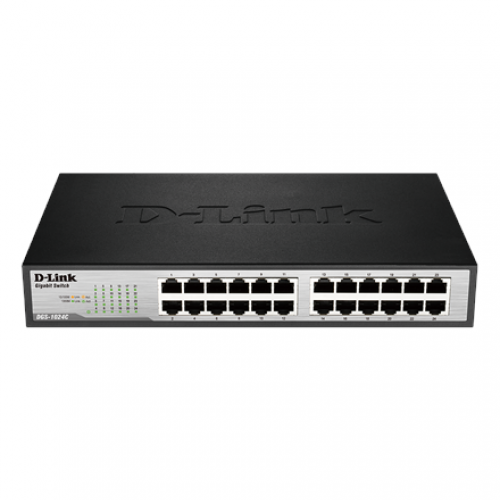
D-Link DGS-1024C 24-Port 10/100/1000Base Unmanaged Switch
- Brand: D-Link
- Product Code: M16120417
- Availability: In Stock
Description
D-Link DGS-1024C 24-Port 10/100/1000Base Unmanaged Switch
The D-Link DGS-1024C is a 24-port Gigabit unmanaged switch designed to provide a simple, reliable and efficient way to expand a wired Ethernet network. With 24 × 10/100/1000BASE-T Gigabit ports, the switch allows multiple computers, printers, servers, access points, IP cameras, NAS devices and other compatible Ethernet equipment to connect through a single network device.
Unlike a managed switch, the DGS-1024C does not require complicated configuration. It is designed around plug-and-play operation, making it suitable for homes, offices, small businesses, schools, shops, computer labs and other environments where users need additional Gigabit Ethernet ports without the administrative complexity of VLAN configuration or network management.
The switch supports automatic speed negotiation and full-duplex operation, allowing connected devices to communicate at the highest compatible Ethernet speed. Its compact desktop-friendly design, fanless operation and energy-efficient features make it a practical choice for users who want to expand a wired network while keeping installation simple.
D-Link DGS-1024C Price in Bangladesh
The D-Link DGS-1024C is positioned as an affordable 24-port Gigabit unmanaged switch for customers who need a larger number of wired network connections. When comparing the DGS-1024C price in Bangladesh, it is useful to consider its 24 Gigabit ports, plug-and-play operation, energy-saving features and compact design rather than comparing it only with smaller 5-port or 8-port switches.
Because the DGS-1024C is unmanaged, it is particularly attractive for customers who do not need advanced network configuration. Once Ethernet cables are connected, the switch can automatically negotiate the appropriate connection speed with compatible devices.
Pricing and availability can change according to distributor stock and market conditions. Customers in Jessore can contact Unix Network to check the latest D-Link DGS-1024C price, stock status, warranty and delivery options.
24-Port Gigabit Ethernet Connectivity
The main advantage of the DGS-1024C is its 24 × 10/100/1000BASE-T Ethernet ports. Each port supports Gigabit Ethernet as well as 10 Mbps and 100 Mbps connections, allowing a mixture of network devices to operate on the same switch.
Twenty-four ports provide enough capacity for many small and medium-sized wired networks. A business can connect desktop computers, printers, servers, network storage devices, wireless access points and other Ethernet equipment without immediately requiring an additional switch.
Gigabit Ethernet provides up to 1 Gbps link speed per port under suitable conditions. The actual data-transfer speed experienced by a user depends on the connected devices, Ethernet cabling, storage performance, network traffic and the capabilities of the complete network.
Plug-and-Play Unmanaged Switch
The DGS-1024C is an unmanaged switch, which means it is designed to work without requiring a web interface, VLAN setup or complicated network configuration. Connect the power adapter, connect Ethernet cables and the switch can begin forwarding compatible network traffic automatically.
This simplicity makes the DGS-1024C useful for users who want to expand their network without needing specialist networking knowledge. It can be installed as an additional Ethernet distribution point in an office, shop, home, classroom or small business.
An unmanaged switch is particularly appropriate when all connected devices can remain on the same local network and there is no requirement for advanced traffic control, network segmentation or user authentication.
10/100/1000 Mbps Auto-Negotiation
Each Ethernet port can automatically negotiate its connection speed with the connected device. This allows the switch to work with modern Gigabit Ethernet hardware while also supporting compatible 10 Mbps and 100 Mbps equipment.
For example, a newer desktop computer can establish a Gigabit connection while an older network printer may connect at 100 Mbps. The devices can coexist on the same switch without requiring the user to manually configure the speed of every port.
Auto-negotiation helps make the DGS-1024C convenient for mixed-generation networks where replacing every existing network device at the same time is not practical.
48 Gbps Switching Capacity
The DGS-1024C provides a switching capacity of up to 48 Gbps. This represents the total switching bandwidth available across its ports under the manufacturer's specified operating conditions.
A high switching capacity is useful when multiple computers and network devices communicate simultaneously. In a business environment, several users may access shared storage, servers, printers and internet resources at the same time.
It is important to distinguish switching capacity from internet bandwidth. A 48 Gbps switching capacity does not mean that an internet connection will operate at 48 Gbps. Internet speed is determined by the ISP service and the capabilities of the router, firewall, connected devices and complete network path.
Full-Duplex Communication
The DGS-1024C supports full-duplex communication on compatible Ethernet connections. Full-duplex Ethernet allows devices to transmit and receive data simultaneously, improving the efficiency of network communication compared with older half-duplex networking methods.
For everyday business networking, this helps connected Gigabit devices communicate efficiently when transferring files, accessing shared resources or communicating with network servers.
Auto MDI/MDIX for Easier Installation
The DGS-1024C supports Auto MDI/MDIX, which automatically detects the appropriate cable connection configuration. This reduces the need to manually determine whether a particular Ethernet connection requires a straight-through or crossover configuration.
For installers and everyday users, this simplifies network expansion. Standard Ethernet cables can generally be used to connect the switch to compatible computers, routers, access points and other network equipment without manually configuring port types.
Fanless Design for Quiet Operation
The DGS-1024C uses a fanless design, which helps keep operating noise low. This can be particularly useful when the switch is installed in an office, shop, classroom, reception area or home environment where fan noise may be undesirable.
A fanless design also means there are no internal cooling fans continuously spinning during normal operation. Nevertheless, the switch should still be placed in a reasonably ventilated location and should not be enclosed in a space where heat cannot dissipate properly.
Energy-Efficient Ethernet
The DGS-1024C incorporates energy-saving technology designed to reduce unnecessary power consumption. It supports IEEE 802.3az Energy Efficient Ethernet and can adjust power usage according to network activity and cable conditions.
Energy efficiency can be especially useful in offices and businesses where networking equipment remains powered for long periods. Reducing unnecessary power consumption can help lower the operating cost of a network over time.
Power Saving with Connected Cables
The switch can detect when ports are inactive or when connected Ethernet cables do not require the full available power. Depending on the operating conditions, the switch can reduce power consumption accordingly.
This approach makes the DGS-1024C a practical choice for environments where not all 24 ports are constantly carrying traffic. Users can connect additional devices when needed without having to manually manage power settings on individual Ethernet ports.
Compact Design for Flexible Placement
The DGS-1024C is designed to occupy relatively little space compared with larger enterprise switching equipment. Its compact form factor makes it suitable for desktop, shelf and small network cabinet installations.
For a small business, the switch can be placed near the main router or network equipment and connected to computers and other wired devices. For larger installations, it can serve as an access switch connected to a central router or another network switch.
D-Link DGS-1024C Technical Specifications
| Specification | Details |
|---|---|
| Brand | D-Link |
| Model | DGS-1024C |
| Product Type | 24-Port Gigabit Unmanaged Switch |
| Ethernet Ports | 24 × 10/100/1000BASE-T |
| Port Speed | 10/100/1000 Mbps |
| Switching Capacity | 48 Gbps |
| Forwarding Rate | 35.71 Mpps |
| MAC Address Table | 8K entries |
| Packet Buffer | 2 Mbits |
| Auto-Negotiation | Supported |
| Auto MDI/MDIX | Supported |
| Duplex Mode | Full/Half Duplex |
| Switching Method | Store-and-Forward |
| Energy Efficient Ethernet | IEEE 802.3az |
| Cooling | Fanless |
| Management | Unmanaged |
| VLAN Configuration | Not required; unmanaged operation |
| Rack Mounting | Not designed as a conventional rack-mount managed switch |
Ideal for Small Business Networks
Small businesses often need more Ethernet ports as additional computers, printers, POS equipment, access points and other devices are added. The DGS-1024C provides 24 Gigabit ports in a straightforward package, making it suitable for expanding a wired business network.
Because no configuration is required, a business can use the switch without employing a dedicated network administrator for basic installation. The switch can be connected to the existing router or network infrastructure and then used to provide additional wired connections.
For businesses that require VLANs, user authentication, traffic prioritisation or detailed network monitoring, a smart managed switch would be a better choice. The DGS-1024C is intended for simpler network environments.
Useful for Computer Shops and Offices
Computer shops, offices and service centres can use a 24-port Gigabit switch to connect multiple computers, printers, billing systems, servers and other network devices.
For example, a shop could connect sales computers, administrative PCs, network printers and a local server through the same Gigabit switch. A separate router or firewall can provide internet access while the DGS-1024C handles local Ethernet switching.
Its plug-and-play design is particularly useful when the network does not require separate departments or security zones.
Suitable for Network Printers and Shared Devices
Network printers, scanners, NAS systems and other shared office devices can be connected directly to the available Gigabit Ethernet ports. Once connected to the same local network, compatible computers can communicate with these devices through the normal network infrastructure.
Gigabit connectivity can also be beneficial for network storage and file-sharing workloads where both the storage device and client computers support Gigabit Ethernet.
Home and Small Office Networking
Although 24 ports may be more than a typical home user requires, the DGS-1024C can be useful for larger homes, workspaces and small offices with many wired devices.
Users with desktop PCs, smart TVs, network storage, printers, access points, security equipment and other Ethernet devices can use the switch to expand the number of available wired connections from a router.
For a small installation with only a handful of wired devices, a smaller switch may be more economical. The 24-port capacity becomes more useful when multiple wired connections are required or future expansion is expected.
Useful for IP Camera Networks
The DGS-1024C can be used as part of an IP surveillance network when the cameras receive power through separate PoE equipment or another appropriate power source.
It is important to note that the standard DGS-1024C is not a PoE switch. It does not supply power to PoE cameras, access points or other PoE devices. If direct PoE power delivery is required, a suitable PoE switch should be selected instead.
Connection to a Router
The DGS-1024C can be connected to a router to expand the number of available wired Ethernet ports. The router can continue to provide internet access, DHCP and other gateway functions while the switch provides additional local Ethernet connections.
A common setup is to connect one Ethernet port of the DGS-1024C to a LAN port on the router and then connect computers, printers and other devices to the remaining switch ports.
The exact network topology can vary depending on the router and the requirements of the installation. Users should ensure that the connected router and cabling support the desired Gigabit connection speed.
Advantages of D-Link DGS-1024C
- 24 Gigabit Ethernet ports provide extensive wired connectivity.
- Supports 10 Mbps, 100 Mbps and 1000 Mbps Ethernet devices.
- 48 Gbps switching capacity.
- 35.71 Mpps forwarding rate.
- Plug-and-play unmanaged operation.
- No complicated configuration is required for normal use.
- Auto MDI/MDIX simplifies Ethernet installation.
- Automatic speed negotiation supports mixed-speed devices.
- Full-duplex Gigabit Ethernet improves network efficiency.
- Fanless design provides quiet operation.
- IEEE 802.3az Energy Efficient Ethernet helps reduce power consumption.
- Suitable for homes, offices, shops, schools and small businesses.
- Useful for computers, printers, servers, NAS devices and access points.
- Compact design allows flexible desktop or network-equipment placement.
Things to Consider Before Buying
The DGS-1024C is an unmanaged switch, so it does not provide the advanced configuration capabilities found on smart managed or fully managed switches. If your network requires VLANs, port-based access control, QoS configuration, link aggregation, SNMP monitoring or advanced routing, you should select a managed model instead.
The DGS-1024C is also not a PoE switch. Devices such as PoE IP cameras, wireless access points and VoIP phones will require a separate PoE injector, PoE switch or appropriate power source.
Users should also select suitable Ethernet cabling. To achieve Gigabit Ethernet connectivity, the cabling and connected devices must support Gigabit Ethernet. Older or damaged cables can cause a connection to negotiate at a lower speed.
DGS-1024C vs Managed Gigabit Switch
The main difference between the DGS-1024C and a smart managed switch such as the D-Link DGS-1210 series is configuration capability. The DGS-1024C is intended to work automatically, while a managed switch gives administrators control over VLANs, security, QoS, monitoring and other network functions.
| Feature | DGS-1024C | Smart Managed Switch |
|---|---|---|
| Gigabit Ethernet | Yes | Yes |
| 24-Port Availability | Yes | Available on selected models |
| Plug-and-Play | Yes | Generally requires configuration for advanced features |
| VLAN Management | No | Yes |
| QoS Configuration | No advanced configuration | Yes |
| SNMP Management | No | Available on supported models |
| Advanced Access Control | No | Available on supported models |
| Best For | Simple wired network expansion | Networks requiring centralised management |
This comparison highlights why the DGS-1024C can be a better choice for simple networks: users are not paying for management features they do not need. Conversely, organisations with more advanced networking requirements should choose a managed model.
Who Should Buy the D-Link DGS-1024C?
The DGS-1024C is well suited to customers who need a large number of Gigabit Ethernet ports but do not require advanced network administration. It is particularly suitable for small businesses, offices, shops, classrooms, computer labs, homes with many wired devices and straightforward local networks.
It is also a practical choice when the main objective is simply to expand an existing router's LAN connectivity. The unmanaged architecture keeps installation and everyday operation straightforward.
Customers who require VLAN segmentation, network authentication, detailed monitoring or sophisticated traffic policies should instead consider a smart managed Gigabit switch.
Why Buy D-Link DGS-1024C from Unix Network?
Unix Network is a computer and networking equipment supplier serving customers in Jessore, Jashore and across Bangladesh. As a Computer Shop in Jessore and a networking equipment supplier, Unix Network can help customers select suitable networking hardware based on the number of devices, connection speed and management requirements.
For customers who simply need additional Gigabit Ethernet ports, the DGS-1024C provides a straightforward solution without unnecessary configuration. For businesses requiring VLANs, PoE, routing or network management, Unix Network can also help identify a more appropriate networking model.
Customers can check current availability, pricing, warranty information and delivery options before ordering the D-Link DGS-1024C.
Buying Guide for D-Link DGS-1024C
Start by counting the number of wired devices you currently need to connect. The DGS-1024C provides 24 Ethernet ports, giving you considerable capacity for computers, printers, access points, servers and other network devices.
Next, determine whether your network needs management features. If all devices can operate on the same local network and you simply need more Ethernet ports, an unmanaged switch can be ideal. If you need separate VLANs, access restrictions or traffic prioritisation, choose a managed switch instead.
Finally, check whether any connected devices require PoE. The DGS-1024C does not provide PoE power, so cameras, access points or VoIP equipment requiring power over Ethernet need separate PoE equipment.
Warranty Information
Warranty availability and duration can depend on the local distributor, seller and product supply channel. Customers should confirm the applicable warranty terms for the D-Link DGS-1024C with Unix Network at the time of purchase.
Keeping the purchase invoice and warranty documentation is recommended. The switch should be operated according to the manufacturer's specified electrical and environmental requirements.
Delivery Across Bangladesh
Unix Network serves customers in Jessore and provides delivery options for customers in other parts of Bangladesh, subject to current product stock and logistics availability.
Customers in Jashore, Khulna, Jhenaidah, Magura, Narail, Satkhira, Kushtia, Chuadanga and other areas can contact Unix Network to check the current D-Link DGS-1024C price, availability and delivery arrangements.
After-Sales Support
Although the DGS-1024C is designed for simple installation, basic network troubleshooting can still be useful when a connected device does not establish a Gigabit connection. Cable quality, network adapters, router ports and device settings can all affect the negotiated connection speed.
Unix Network can provide practical guidance regarding basic connectivity, suitable Ethernet cabling and choosing between unmanaged and managed networking equipment. Customers planning a larger network can also discuss their port requirements and future expansion needs before purchasing.
Frequently Asked Questions About D-Link DGS-1024C
How many ports does the D-Link DGS-1024C have?
The DGS-1024C has 24 Ethernet ports, with each port supporting 10 Mbps, 100 Mbps and 1000 Mbps Gigabit Ethernet connectivity.
Is the DGS-1024C a managed switch?
No. The D-Link DGS-1024C is an unmanaged Gigabit switch designed for simple plug-and-play network expansion.
What is the switching capacity of the DGS-1024C?
The DGS-1024C has a switching capacity of up to 48 Gbps and a forwarding rate of up to 35.71 Mpps.
Does the DGS-1024C support Gigabit Ethernet?
Yes. All 24 Ethernet ports support up to 1000 Mbps Gigabit Ethernet when connected devices and cabling support the required speed.
Does the DGS-1024C support 100 Mbps devices?
Yes. Its Ethernet ports support 10 Mbps, 100 Mbps and 1000 Mbps connections, allowing older compatible Ethernet devices to operate alongside Gigabit devices.
Is the D-Link DGS-1024C a PoE switch?
No. The standard DGS-1024C does not provide Power over Ethernet. PoE devices require a separate PoE switch, injector or other compatible power source.
Does the DGS-1024C require configuration?
No. It is designed as a plug-and-play unmanaged switch, so normal network expansion does not require a management interface or manual configuration.
Does the DGS-1024C support VLAN?
The DGS-1024C is an unmanaged switch and does not provide configurable VLAN management. Customers who need VLAN functionality should choose a suitable managed or smart managed switch.
Is the DGS-1024C suitable for an office?
Yes. It can be used to connect office computers, printers, servers, access points and other compatible Ethernet devices where advanced network management is not required.
Is the DGS-1024C fanless?
Yes. Its fanless design helps provide quiet operation, making it suitable for offices, shops, classrooms and other environments where low noise is desirable.
Can I connect the DGS-1024C to my router?
Yes. The switch can be connected to a suitable LAN port on a router to expand the number of available wired Ethernet connections.
Can the DGS-1024C be used with a NAS?
Yes. A compatible NAS can be connected to one of the Gigabit Ethernet ports. The actual file-transfer performance will depend on the NAS, client computers, storage system, cabling and other network components.
Can I use the DGS-1024C for CCTV?
Yes, it can be used as part of an IP CCTV network, but the standard DGS-1024C does not supply PoE power. PoE cameras therefore require separate compatible power equipment.
Final Verdict on D-Link DGS-1024C
The D-Link DGS-1024C 24-Port 10/100/1000Base Unmanaged Switch is a practical solution for expanding a wired network with Gigabit Ethernet connectivity. Its 24 ports, 48 Gbps switching capacity, automatic speed negotiation, Auto MDI/MDIX, full-duplex support, fanless construction and energy-efficient design provide the core features required for straightforward network expansion.
Its biggest advantage is simplicity. There is no need to configure VLANs, user authentication, routing policies or other advanced management features. For homes, offices, shops, classrooms and small businesses that simply need additional Ethernet ports, this plug-and-play approach can be more convenient than deploying a managed switch.
At the same time, buyers should understand its limitations. The DGS-1024C does not provide configurable VLANs, advanced QoS management, network monitoring or PoE power. Organisations that require these features should consider a suitable managed or PoE switch instead.
For customers searching for a D-Link DGS-1024C 24-Port Gigabit Unmanaged Switch in Bangladesh, particularly from a Computer Shop in Jessore, Unix Network offers a convenient local option for checking product availability, pricing, warranty and networking requirements. With its combination of 24 Gigabit ports and simple plug-and-play operation, the DGS-1024C is a strong choice for users who need reliable wired network expansion without unnecessary complexity.
Reviews (0)
Tags: D-Link, DGS-1024C, unmanaged switch, networking hardware, 24-port switch, Gigabit Ethernet, business solutions, energy-efficient, local market, Jashore, Bangladesh, reliable connectivity