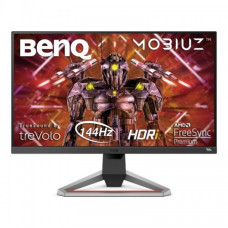
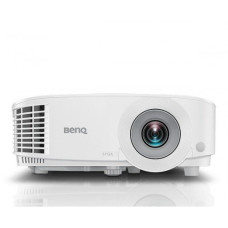
Benq showroom jashore
BenQ is a well-known technology brand focused on displays, projectors, monitors, gaming products, professional visual solutions, and related digital equipment. BenQ products are widely used by home users, students, office professionals, designers, photographers, content creators, gamers, educators, businesses, and organisations that need dependable visual performance.
In Bangladesh, BenQ is particularly relevant for customers searching for computer monitors, gaming monitors, professional colour-focused displays, projectors, and accessories. The best BenQ product depends heavily on the intended application. A student looking for an affordable monitor has very different requirements from a competitive gamer, graphic designer, photographer, video editor, or corporate presentation user.
BenQ Price in Bangladesh
BenQ product prices in Bangladesh vary according to the model, screen size, resolution, panel technology, refresh rate, colour performance, response time, connectivity, projector brightness, intended market, and availability. Basic monitors are generally more affordable, while gaming, professional, high-resolution, high-refresh-rate, and specialised displays can cost considerably more.
Projector prices also vary according to brightness, resolution, throw distance, installation requirements, connectivity, and intended application. Since technology prices and stock can change frequently, customers should confirm the latest BenQ price and availability before purchasing.
| BenQ Product Category | Best For | Important Features to Check |
|---|---|---|
| BenQ Monitor | Office, education and everyday computing | Resolution, panel type, size and connectivity |
| BenQ Gaming Monitor | PC and console gaming | Refresh rate, response time, VRR and resolution |
| BenQ Professional Monitor | Design, photography and content creation | Colour accuracy, gamut, resolution and calibration |
| BenQ 4K Monitor | Detailed visual work and entertainment | Resolution, panel quality, ports and scaling |
| BenQ Projector | Education, office, home entertainment and presentations | Brightness, resolution, throw distance and connectivity |
| BenQ Business Projector | Meetings and presentations | Brightness, portability, connectivity and reliability |
| BenQ Home Cinema Projector | Movies and home entertainment | Resolution, contrast, brightness and installation requirements |
Popular BenQ Product Categories
BenQ has products for several different visual and computing requirements. Customers should identify their primary purpose before comparing models because a monitor designed for competitive gaming may prioritise speed, while a professional display may prioritise colour accuracy and calibration.
- BenQ computer monitors
- BenQ LED monitors
- BenQ IPS monitors
- BenQ 4K monitors
- BenQ gaming monitors
- BenQ high refresh rate monitors
- BenQ professional monitors
- BenQ designer monitors
- BenQ photography monitors
- BenQ video editing monitors
- BenQ business monitors
- BenQ office monitors
- BenQ projectors
- BenQ business projectors
- BenQ education projectors
- BenQ home cinema projectors
- BenQ gaming projectors
BenQ Monitor
BenQ monitors are available for a wide range of applications, from everyday office work to professional creative work and gaming. Choosing the right monitor requires more than selecting the largest screen or highest resolution.
Screen size, resolution, panel technology, refresh rate, response time, brightness, colour reproduction, ergonomics, connectivity, and adaptive-sync support can all influence the user experience.
Who Should Buy a BenQ Monitor?
- Students who need a comfortable larger display
- Office professionals working with documents and spreadsheets
- Programmers who benefit from additional screen space
- Graphic designers and digital artists
- Photographers and video editors
- PC gamers
- Console gamers
- Content creators
- Home-office users
- Businesses building workstation setups
BenQ Gaming Monitor
BenQ gaming monitors are designed around the needs of gamers who value responsiveness, smooth motion, accurate targeting, and immersive visuals. Depending on the model, gaming-focused features can include high refresh rates, fast response times, adaptive synchronisation, gaming-oriented display modes, and features designed for competitive play.
The ideal gaming monitor depends on the type of games you play. Competitive players may prioritise refresh rate and response time, while players who enjoy visually demanding single-player games may prefer a combination of high resolution, image quality, contrast, and smooth refresh.
BenQ Monitor for Competitive Gaming
Competitive gaming places greater importance on responsiveness than many ordinary computing tasks. A high-refresh-rate display can show more frames per second when the connected computer or console can generate enough frames.
However, buying a high-refresh-rate monitor does not automatically guarantee a smoother gaming experience. The graphics card, processor, game settings, connection standard, and actual frame rate all contribute to the final result.
BenQ Monitor for Casual Gaming
Casual gamers do not necessarily need an extremely high-refresh-rate display. A balanced BenQ monitor with a suitable resolution, good image quality, adequate refresh rate, and low input latency may provide a better overall value.
Customers should spend more on features that they will actually notice during their normal gaming sessions instead of paying a premium for specifications that their computer cannot fully utilise.
BenQ 4K Monitor
A 4K monitor provides a high level of image detail and can be particularly useful for photo editing, video editing, design, productivity, and high-resolution entertainment.
Higher resolution also requires more graphics processing power in many gaming scenarios. Customers considering a 4K gaming monitor should therefore evaluate both the display and their graphics card.
BenQ IPS Monitor
IPS display technology is popular among users who value viewing angles, colour reproduction, and consistent image presentation across the screen. This makes IPS monitors attractive for office work, creative applications, entertainment, and general computing.
Panel technology should still be evaluated alongside brightness, contrast, response time, colour gamut, calibration, and resolution because the panel type alone does not determine the complete display quality.
BenQ Professional Monitor
Professional BenQ monitors can be particularly useful for photographers, graphic designers, video editors, illustrators, and other users who need greater control over colour and image presentation.
Creative professionals should look beyond resolution. Colour gamut, colour accuracy, calibration capabilities, uniformity, bit depth, connectivity, and compatibility with their workflow can be more important than simply purchasing the largest display.
BenQ Monitor for Graphic Designers
Graphic designers need a display that can present colours consistently and provide sufficient workspace for design applications. A suitable BenQ professional monitor can help designers work with graphics, layouts, illustrations, branding materials, web designs, and other visual projects.
When choosing a monitor for design, consider colour gamut, factory calibration, calibration support, resolution, panel technology, screen size, brightness, and viewing comfort.
BenQ Monitor for Photographers
Photography workflows can benefit from accurate and consistent colour reproduction. Photographers should consider a monitor's colour gamut, calibration capability, panel uniformity, resolution, and viewing environment.
A high-resolution display can make it easier to inspect photographs at greater detail, while appropriate calibration helps maintain more predictable colour during editing.
BenQ Monitor for Video Editing
Video editors often benefit from a large, high-resolution display with good colour reproduction and enough workspace for timelines, preview windows, editing tools, and media libraries.
For professional video work, customers should consider the required colour standards, resolution, connectivity, screen size, calibration support, and whether the monitor is appropriate for the type of content being produced.
BenQ Monitor for Programming
Programmers can benefit from a monitor with high resolution, comfortable text rendering, suitable screen size, and ergonomic adjustment. A larger display can make it easier to keep an editor, browser, terminal, documentation, and development tools visible simultaneously.
For long programming sessions, customers should also consider height adjustment, viewing angle, brightness control, and overall eye comfort rather than focusing only on technical specifications.
BenQ Monitor for Office Work
For office work, a balanced monitor can improve productivity by providing more screen space for documents, spreadsheets, email, browser windows, and business applications.
Office users should consider screen size, resolution, text clarity, ergonomic adjustment, connectivity, brightness, and the number of displays required for their workflow.
BenQ Monitor for Students
Students can use a BenQ monitor for online classes, programming, research, assignments, presentations, browsing, document editing, and entertainment.
A student does not necessarily need a premium professional or gaming display. A well-balanced monitor with comfortable viewing characteristics, suitable resolution, and appropriate connectivity may provide better value for everyday academic use.
BenQ Monitor Refresh Rate Guide
Refresh rate indicates how many times a display can update its image each second. Higher refresh rates can make scrolling, cursor movement, animation, and supported gaming content appear smoother.
| Refresh Rate Range | Typical Use | Customer Consideration |
|---|---|---|
| 60Hz | Office, study and general computing | Suitable for many everyday users |
| 75Hz to 100Hz | General computing and smoother everyday use | Good balance for many users |
| 120Hz to 165Hz | Gaming and smooth general use | Useful for gamers with suitable hardware |
| 180Hz and above | Competitive and high-performance gaming | Requires hardware capable of delivering high frame rates |
BenQ Response Time
Response time describes how quickly a display pixel can change between states under specified testing conditions. Lower advertised response times can be beneficial for reducing visible motion blur or ghosting, particularly in gaming.
Customers should not evaluate response time independently. Actual motion performance can depend on overdrive settings, refresh rate, panel behaviour, testing methodology, and the specific display mode.
BenQ Adaptive Sync and Gaming Features
Compatible variable-refresh technologies can help synchronise the display refresh with the graphics output of supported hardware. This can reduce tearing and improve perceived smoothness in suitable gaming scenarios.
Before purchasing, customers should confirm compatibility between the monitor, graphics card, gaming console, cable, and required refresh-rate range.
BenQ Monitor Connectivity
Modern monitors may include HDMI, DisplayPort, USB, USB-C, audio connections, and other ports depending on the model. The correct connectivity depends on the computer, graphics card, laptop, console, and peripherals being used.
USB-C monitors can be especially useful for compatible laptops because a single connection may support display output, data, and charging on suitable models. Customers should verify that both the monitor and laptop support the required functions.
BenQ USB-C Monitor
A USB-C monitor can simplify laptop-based workstations by reducing cable clutter. Depending on the model and connected laptop, USB-C may support video, data, and power delivery through one cable.
This functionality is not universal across all USB-C ports. Customers should check the exact laptop and monitor specifications before purchasing.
BenQ Projector
BenQ projectors are designed for applications including education, business presentations, home entertainment, gaming, and other visual display requirements. Projector selection should begin with the room and intended use rather than resolution alone.
Brightness, projection distance, screen size, ambient light, resolution, connectivity, installation position, and operating environment all affect projector performance.
BenQ Projector for Office Presentations
Business presentations require clear text, charts, diagrams, and images. A projector for office use should provide sufficient brightness for the meeting room and appropriate connectivity for the computers or presentation devices being used.
Portable projectors can be useful for users who frequently move between meeting rooms or locations, while larger installation-oriented projectors may be better suited to fixed conference rooms.
BenQ Projector for Education
Educational institutions can use projectors for classrooms, training centres, seminars, workshops, and lecture halls. A suitable projector should provide enough brightness for the room, readable text, appropriate resolution, reliable connectivity, and convenient maintenance.
The room's ambient lighting is particularly important. A projector that appears bright in a dark room may provide a different experience in a brightly lit classroom.
BenQ Home Cinema Projector
Home cinema projectors are designed for customers who want a larger-than-TV viewing experience. Depending on the model, they can be used for movies, streaming, sports, console gaming, and other entertainment.
Customers should consider the room size, screen or wall surface, projector placement, ambient light, viewing distance, resolution, sound system, and connectivity before purchasing.
BenQ Gaming Projector
A gaming projector can provide a large-screen gaming experience for customers who prefer projection over a conventional monitor or television. Input latency, supported refresh rate, resolution, brightness, and gaming compatibility are particularly important.
For competitive gaming, a dedicated high-refresh monitor may still be more appropriate, while a projector can be attractive for large-screen casual and entertainment-oriented gaming.
How to Choose the Right BenQ Monitor
- Decide the main purpose of the monitor.
- Choose an appropriate screen size.
- Select a suitable resolution.
- Check panel technology.
- Check refresh rate for gaming.
- Check response-time performance.
- Check colour requirements for creative work.
- Check available HDMI and DisplayPort connections.
- Check USB-C capabilities if using a laptop.
- Consider ergonomic adjustment.
- Check adaptive-sync compatibility if required.
- Confirm current price and stock before buying.
How to Choose the Right BenQ Projector
- Measure the room where the projector will be used.
- Consider ambient lighting.
- Determine the required screen size.
- Choose the required resolution.
- Check brightness requirements.
- Check throw distance and installation position.
- Check HDMI and other connectivity options.
- Consider portability if the projector will be moved frequently.
- Consider maintenance requirements.
- Confirm compatibility with the source device.
BenQ Monitor vs Television
| Feature | BenQ Monitor | Television |
|---|---|---|
| Computer Use | Usually designed specifically for close-range computing | Primarily designed for entertainment |
| Gaming Options | Many models prioritise refresh rate and responsiveness | Gaming features vary considerably |
| Desk Setup | Generally easier to position for computer work | Usually designed for larger viewing distances |
| Professional Colour Work | Specialised models available | Not generally the primary purpose |
| Built-in Smart Features | Varies by model | Common on modern TVs |
BenQ Gaming Monitor vs Professional Monitor
| Requirement | Gaming Monitor | Professional Monitor |
|---|---|---|
| Primary Priority | Speed and responsiveness | Colour and image accuracy |
| Refresh Rate | Often a major consideration | Depends on workflow |
| Colour Accuracy | Varies by model | Usually a major consideration |
| Calibration | Model dependent | Often important |
| Best For | Gaming | Design, photography and content creation |
BenQ Build Quality and Durability
The practical lifespan of a BenQ monitor or projector depends on the particular model, operating environment, usage hours, ventilation, electrical conditions, transportation, and maintenance.
Displays used for long periods every day should be installed in a location with appropriate airflow and should not be exposed to unnecessary heat or moisture. Projectors require particular attention to ventilation because heat management is important during extended operation.
How to Maintain a BenQ Monitor
- Keep ventilation openings clear.
- Use a soft, suitable cloth for cleaning the display.
- Avoid applying cleaning liquid directly to the screen.
- Do not press hard against the display panel.
- Keep the monitor away from excessive moisture.
- Use appropriate power protection where necessary.
- Keep cables organised to prevent accidental pulling.
- Adjust brightness according to the environment rather than using maximum brightness unnecessarily.
How to Maintain a BenQ Projector
- Keep ventilation areas unobstructed.
- Allow the projector to cool appropriately after use.
- Keep dust away from ventilation openings.
- Install the projector according to the manufacturer's requirements.
- Avoid moving a hot projector unnecessarily.
- Use an appropriate electrical supply.
- Keep the projection lens clean using suitable methods.
- Avoid placing the projector in excessively dusty or humid environments.
Common Mistakes When Buying a BenQ Monitor
- Choosing the monitor only by screen size.
- Choosing resolution without considering the graphics hardware.
- Buying a high-refresh monitor without a system capable of producing high frame rates.
- Ignoring colour requirements for professional work.
- Assuming every USB-C port supports video output.
- Ignoring the available ports on the computer.
- Ignoring ergonomic adjustment for long working sessions.
- Choosing a gaming monitor for professional colour work without checking its colour capabilities.
- Buying a professional monitor when gaming performance is the main priority.
- Not checking current stock and warranty information.
Common Mistakes When Buying a BenQ Projector
- Choosing only by resolution.
- Ignoring room brightness.
- Ignoring projection distance.
- Buying a projector that is not bright enough for the intended room.
- Not checking HDMI and source-device compatibility.
- Ignoring installation requirements.
- Forgetting about ventilation.
- Choosing a portable projector for a permanent high-use installation without considering the intended workload.
BenQ for Home Office
A BenQ monitor can be a useful foundation for a home-office workstation. Customers can select a display based on the number of applications they normally use, required screen space, laptop connectivity, ergonomic needs, and budget.
For users who frequently work from a laptop, a USB-C-equipped display or suitable docking solution can help reduce desk clutter when the computer supports the required functions.
BenQ for Business
Businesses can use BenQ monitors and projectors for employee workstations, conference rooms, training facilities, meeting spaces, classrooms, and presentation environments.
For business purchasing, it is useful to consider standardisation, warranty, service availability, compatibility with existing computers, connectivity, power requirements, and long-term replacement needs.
BenQ for Gaming Setup
Gamers should match the monitor to their graphics hardware and preferred game types. A high-refresh display is particularly useful when the PC or console can consistently deliver higher frame rates.
Competitive players may prioritise refresh rate, response time, motion clarity, and low input latency. Story-driven and visually focused gamers may place greater value on resolution, contrast, colour quality, and screen size.
BenQ for Content Creators
Content creators often need a combination of resolution, colour quality, screen space, connectivity, and comfortable ergonomics. A suitable BenQ professional display can provide a more controlled environment for photo editing, graphic design, video production, illustration, and other creative workflows.
Creators should select a display based on the colour standards and software workflow relevant to their projects rather than assuming the most expensive monitor will automatically be the best choice.
BenQ Price in Jessore
Customers looking for BenQ monitors or projectors in Jessore can compare models according to their budget and intended application. Gaming, professional, office, education, and home-entertainment requirements can lead to very different product choices.
For customers searching for BenQ products in Jashore, it is useful to confirm the exact model, current price, stock status, warranty information, and compatibility before purchasing or visiting a showroom.
BenQ Products Across Bangladesh
BenQ products can be purchased by customers throughout Bangladesh through technology retailers and computer stores. Monitors and projectors are available for different types of users, but availability can vary by model and market conditions.
Customers outside Jessore should confirm delivery arrangements, product condition, warranty information, current price, and stock before placing an order.
BenQ Buying Checklist
- Identify whether you need a monitor or projector.
- Define your primary use.
- Set your budget.
- Check screen size or projected image requirements.
- Check resolution.
- Check refresh rate if gaming.
- Check colour performance if doing creative work.
- Check connectivity.
- Check graphics hardware compatibility.
- Check laptop USB-C capabilities if required.
- Check ergonomic or installation requirements.
- Confirm warranty and service information.
- Confirm current Bangladesh price.
- Confirm stock availability.
BenQ Search Terms Customers May Use
- BenQ monitor price in Bangladesh
- BenQ monitor price in Jessore
- BenQ monitor price in Jashore
- BenQ gaming monitor price in Bangladesh
- BenQ 4K monitor price in Bangladesh
- BenQ IPS monitor price
- BenQ professional monitor price
- BenQ designer monitor price
- BenQ gaming monitor Bangladesh
- BenQ computer monitor Bangladesh
- BenQ projector price in Bangladesh
- BenQ projector price in Jessore
- BenQ projector price in Jashore
- BenQ business projector Bangladesh
- BenQ home cinema projector Bangladesh
- BenQ projector for office
- BenQ projector for classroom
- BenQ monitor shop in Jessore
- BenQ projector shop in Bangladesh
- BenQ products online Bangladesh
Frequently Asked Questions About BenQ
What is BenQ best known for?
BenQ is widely known for monitors, gaming displays, professional visual products, projectors, and other display-related technology solutions.
Are BenQ monitors good for gaming?
Yes, selected BenQ gaming monitors are designed specifically for gaming and can offer features such as high refresh rates, fast response, adaptive synchronisation, and gaming-focused display functions.
Is BenQ suitable for graphic design?
Selected BenQ professional monitors can be suitable for graphic design because they focus on colour reproduction, resolution, calibration, and visual consistency.
Is BenQ good for photography?
Selected professional BenQ monitors can be suitable for photography workflows. Photographers should check colour gamut, calibration capabilities, panel uniformity, resolution, and other colour-related features.
Which BenQ monitor is best for gaming?
The best model depends on your gaming hardware, preferred games, budget, resolution requirement, and desired refresh rate. Competitive gamers may prioritise speed, while other gamers may prefer higher resolution and image quality.
Which BenQ monitor is best for office work?
A suitable office monitor should provide comfortable viewing, appropriate resolution, sufficient screen space, useful connectivity, and ergonomic adjustment. The most expensive gaming monitor is not necessarily the best office monitor.
Is BenQ good for students?
BenQ monitors can be useful for students who need a larger or more comfortable display for study, programming, online classes, research, assignments, and entertainment.
What should I check before buying a BenQ monitor?
Check screen size, resolution, panel technology, refresh rate, response time, colour performance, connectivity, adaptive-sync support, ergonomic features, compatibility with your computer, warranty, price, and availability.
What should I check before buying a BenQ projector?
Check brightness, resolution, room size, ambient light, throw distance, screen size, installation position, connectivity, source-device compatibility, maintenance requirements, warranty, and current price.
Can a BenQ monitor be used with a laptop?
Yes, compatible BenQ monitors can be connected to laptops using supported HDMI, DisplayPort, USB-C, or other available interfaces. The laptop's output capabilities should be checked before purchase.
Where can I buy BenQ products in Bangladesh?
BenQ products may be available through computer retailers and technology stores in Bangladesh. Customers should confirm the exact model, price, availability, warranty, and delivery options before purchasing.
BenQ Buying Advice for Unix Network Customers
If you are purchasing a BenQ product from Unix Network, first identify what you want to accomplish. For gaming, focus on refresh rate, response time, resolution, adaptive synchronisation, and graphics hardware compatibility. For design and photography, focus on colour accuracy, gamut, resolution, calibration, and panel consistency. For office work, prioritise comfortable viewing, screen space, connectivity, and ergonomics. For projectors, focus on brightness, resolution, room conditions, throw distance, and installation requirements.
Unix Network serves customers in Jessore and Jashore and also caters to customers across Bangladesh. Before purchasing, customers should confirm the latest BenQ price, exact model, stock availability, warranty conditions, and compatibility with their existing equipment.
Final Guide to Buying BenQ in Bangladesh
BenQ offers display solutions for a wide range of users, including students, office professionals, gamers, designers, photographers, content creators, educators, businesses, and home-entertainment users. The brand's product range means that choosing the correct model is more important than simply choosing the brand.
Before buying a BenQ monitor or projector in Bangladesh, compare the features that directly affect your intended use. Check resolution, refresh rate, colour performance, brightness, connectivity, compatibility, ergonomics, installation requirements, warranty, current price, and stock. Customers in Jessore, Jashore, and other parts of Bangladesh can then select a BenQ product that provides the right balance of performance, functionality, and value for their needs.